
Bmi M-1580-SBT
Muse M-1580-SBT Soundbar User Manual
Model: M-1580-SBT
1. Introduction
Thank you for purchasing the Muse M-1580-SBT Soundbar. This manual provides important information regarding the setup, operation, and maintenance of your new soundbar. Please read this manual thoroughly before using the product and keep it for future reference.
The Muse M-1580-SBT is a powerful 80W soundbar designed to enhance your audio experience, featuring Bluetooth connectivity, HDMI ARC, USB playback, and versatile mounting options.
2. Safety Instructions
To ensure safe operation and prevent damage, please observe the following safety precautions:
- Do not expose the unit to rain, moisture, or extreme temperatures.
- Do not block any ventilation openings.
- Ensure the power adapter is compatible with your local power supply (AC 100-240V, 50/60Hz).
- Do not open the casing. Refer all servicing to qualified personnel.
- Keep the soundbar away from direct sunlight, heat sources, and strong magnetic fields.
- Clean only with a dry cloth.
3. Package Contents
Please check that all items are present and in good condition:
- Muse M-1580-SBT Soundbar
- Remote Control
- Auxiliary Cable (3.5 mm)
- AC Power Adapter
- User Manual
- USB Key (32GB)
4. Product Overview

Figure 4.1: Front view of the Muse M-1580-SBT Soundbar with a USB stick inserted into the front USB port. The soundbar features a sleek black design with a perforated grille and control buttons on the right side.

Figure 4.2: Front view of the Muse M-1580-SBT Soundbar, showcasing its minimalist design and full-length speaker grille. The Muse logo is subtly visible on the top right.
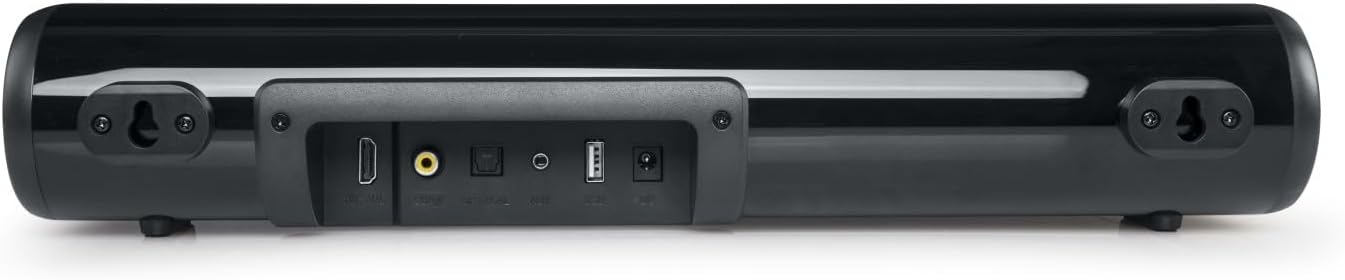
Figure 4.3: Rear view of the Muse M-1580-SBT Soundbar, displaying the various input ports including HDMI ARC, Optical, Auxiliary (3.5mm), USB, and Coaxial. Wall mounting brackets are also visible.
5. Setup
5.1 Placement
Place the soundbar on a stable, flat surface in front of your TV, ensuring it does not block the TV's remote sensor. Alternatively, you can wall-mount the soundbar (see Section 5.3).
5.2 Power Connection
- Connect the AC power adapter to the DC IN port on the back of the soundbar.
- Plug the other end of the power adapter into a wall outlet.
- The LED indicator on the soundbar will light up, indicating it is in standby mode.
5.3 Wall Mounting
The soundbar is designed for wall mounting. Use appropriate screws and wall plugs (not supplied) suitable for your wall type. Ensure the soundbar is securely mounted to prevent accidental falls.
- Measure the distance between the two keyhole slots on the back of the soundbar.
- Mark two corresponding points on the wall.
- Drill holes at the marked points and insert wall plugs if necessary.
- Insert screws into the wall, leaving a small gap (approx. 5mm) between the screw head and the wall.
- Align the keyhole slots on the soundbar with the screws and carefully hang the soundbar. Ensure it is level and secure.
6. Connections
The Muse M-1580-SBT Soundbar offers multiple connectivity options:
- HDMI ARC: Connect to your TV's HDMI ARC port for high-quality audio and control via your TV remote.
- Optical: Connect to your TV or other audio source using an optical cable (not supplied).
- Auxiliary (3.5 mm): Connect to devices with a 3.5mm audio output using the supplied auxiliary cable.
- Coaxial: Connect to your TV or other audio source using a coaxial cable (not supplied).
- USB: For playing audio files from a USB flash drive.
- Bluetooth: For wireless audio streaming from compatible devices.
6.1 Connecting to TV via HDMI ARC
- Ensure your TV has an HDMI port labeled "ARC" (Audio Return Channel).
- Connect an HDMI cable (not supplied) from the HDMI ARC port on the soundbar to the HDMI ARC port on your TV.
- Turn on both the soundbar and the TV.
- Select the HDMI ARC input on the soundbar using the remote control or the soundbar's control buttons.
- Adjust your TV's audio settings to output sound through HDMI ARC.
6.2 Connecting via Optical/Coaxial
- Connect an optical or coaxial cable (not supplied) from your TV's corresponding output port to the soundbar's Optical or Coaxial input port.
- Turn on both the soundbar and the TV.
- Select the Optical or Coaxial input on the soundbar.
- Adjust your TV's audio settings to output sound through the selected digital output.
6.3 Connecting via Auxiliary (3.5 mm)
- Connect the supplied 3.5mm auxiliary cable from the AUX IN port on the soundbar to the headphone jack or audio output port of your device (e.g., smartphone, tablet, TV).
- Select the AUX input on the soundbar.
7. Operating Instructions
7.1 Basic Operation
- Power On/Off: Press the Power button on the remote control or the soundbar.
- Volume Control: Use the Volume Up (+) and Volume Down (-) buttons on the remote or soundbar.
- Input Selection: Press the Input/Mode button on the remote or soundbar to cycle through available inputs (HDMI ARC, Optical, AUX, Coaxial, Bluetooth, USB).
- Mute: Press the Mute button on the remote to mute/unmute the sound.
7.2 Bluetooth Pairing
- Turn on the soundbar and select Bluetooth mode. The LED indicator will flash, indicating pairing mode.
- Enable Bluetooth on your mobile device (smartphone, tablet, etc.).
- Search for "M-1580-SBT" in the list of available devices and select it to pair.
- Once paired, the LED indicator will stop flashing and remain solid. You can now play audio from your device through the soundbar.
7.3 USB Playback
- Insert a USB flash drive (FAT32 format) containing audio files into the USB port on the soundbar.
- Select USB mode. The soundbar will automatically begin playing audio files from the USB drive.
- Use the remote control to navigate tracks (Previous/Next) and control playback (Play/Pause).
8. Maintenance
- Cleaning: Use a soft, dry cloth to clean the surface of the soundbar. Do not use liquid cleaners or aerosols.
- Storage: If storing the soundbar for an extended period, disconnect it from the power outlet and store it in a cool, dry place.
9. Troubleshooting
| Problem | Possible Cause | Solution |
|---|---|---|
| No power | Power adapter not connected or outlet not working. | Ensure the power adapter is securely connected to the soundbar and a working power outlet. |
| No sound | Incorrect input selected; volume too low; cables not connected properly. | Select the correct input source. Increase the volume. Check all audio cables are securely connected. Ensure TV audio output is correctly configured. |
| Bluetooth pairing fails | Soundbar not in pairing mode; device too far; interference. | Ensure the soundbar is in Bluetooth pairing mode (flashing LED). Move your device closer to the soundbar. Turn off other Bluetooth devices nearby. |
| USB playback issues | Unsupported file format; USB drive not formatted correctly; corrupted files. | Ensure audio files are in a supported format (e.g., MP3). Format the USB drive to FAT32. Try a different USB drive or files. |
10. Specifications
- Model: M-1580-SBT
- Output Power: 80W
- Connectivity: Bluetooth, HDMI ARC, USB, Auxiliary (3.5 mm), Optical, Coaxial
- Power Supply: AC 100-240V ~ 50/60Hz
- Dimensions (H x D x L): 73 mm x 95 mm x 410 mm
- Net Weight: 1 kg
- Special Features: LED Indicator, Wall Mount Support
11. Warranty and Support
This product comes with a standard manufacturer's warranty. For detailed warranty information and support, please refer to the warranty card included in your package or contact your retailer.
For technical assistance or service inquiries, please contact the customer support of your point of purchase.
Related documentsM-1580-SBT


Ask a question about this manual
Ask about setup, troubleshooting, compatibility, parts, safety, or missing instructions. Manuals+ will review the question and use this page’s manual context to help answer it.