
Introduction
Thank you for choosing the SENSE7 NOJO Electric Standing Desk. This manual provides essential information for the safe and efficient assembly, operation, and maintenance of your new desk. Please read it thoroughly before use and retain it for future reference.
The SENSE7 NOJO desk is designed to enhance your workspace with its adjustable height feature, allowing seamless transitions between sitting and standing positions. This promotes better posture, reduces muscle tension, and can improve overall well-being and productivity.

Image: A user demonstrating the standing position at the SENSE7 NOJO desk, highlighting its ergonomic benefits.
Safety Information
- Ensure all components are present and undamaged before assembly. Do not use if any parts are missing or faulty.
- Keep children and pets away from the desk during operation to prevent injury.
- Do not overload the desk. Refer to the specifications for maximum weight capacity.
- Ensure there are no obstructions above or below the desk when adjusting its height. The anti-collision system will stop movement if an obstacle is detected, but caution is still advised.
- Only use the provided power adapter.
- Do not disassemble or modify the desk's electrical components. Contact qualified personnel for repairs.
- Keep liquids away from electrical components.
Package Contents
Please verify that all the following components are included in your package:
- Desk tabletop (120x60cm, Black-Pine)
- Desk legs and frame components
- Control panel with LED display
- Power adapter and cable
- Cable management tray
- Accessory hooks (2 units)
- Assembly hardware (screws, bolts, tools)
- User Manual
Setup and Assembly
Follow these steps to assemble your SENSE7 NOJO Electric Standing Desk. It is recommended to have two people for assembly.
- Unpack Components: Carefully remove all parts from the packaging and lay them out on a clean, soft surface to prevent scratches.
- Assemble Desk Legs: Attach the foot supports to the bottom of the desk legs using the provided screws. Ensure they are securely fastened.
- Attach Legs to Frame: Connect the desk legs to the main frame crossbar. This forms the base structure of the desk.
- Mount Frame to Tabletop: Carefully place the tabletop upside down on your soft surface. Align the assembled frame with the pre-drilled holes on the underside of the tabletop. Secure the frame to the tabletop using the appropriate screws.
- Install Control Panel: Attach the control panel to the underside of the tabletop, typically on the front edge, using the designated screws.
- Install Cable Management: Secure the cable management tray and any cable grommets or hooks to the underside of the desk as desired.
- Connect Wiring: Connect the motor cables from the legs to the control box, and then connect the control panel cable to the control box. Finally, connect the power adapter to the control box.
- Position the Desk: With assistance, carefully flip the desk upright and place it in its desired location. Ensure it is stable and level.
- Plug In: Connect the power adapter to a wall outlet.

Image: Overview of desk dimensions and integrated features including two accessory hooks, a cable slot, a cable tray, and protective pads for stability.

Image: Detailed dimensions of the SENSE7 NOJO desk, illustrating the adjustable height range from 72 cm (minimum) to 118 cm (maximum), and the tabletop dimensions of 120 cm in length and 60 cm in width.
Operating Instructions
Control Panel Overview
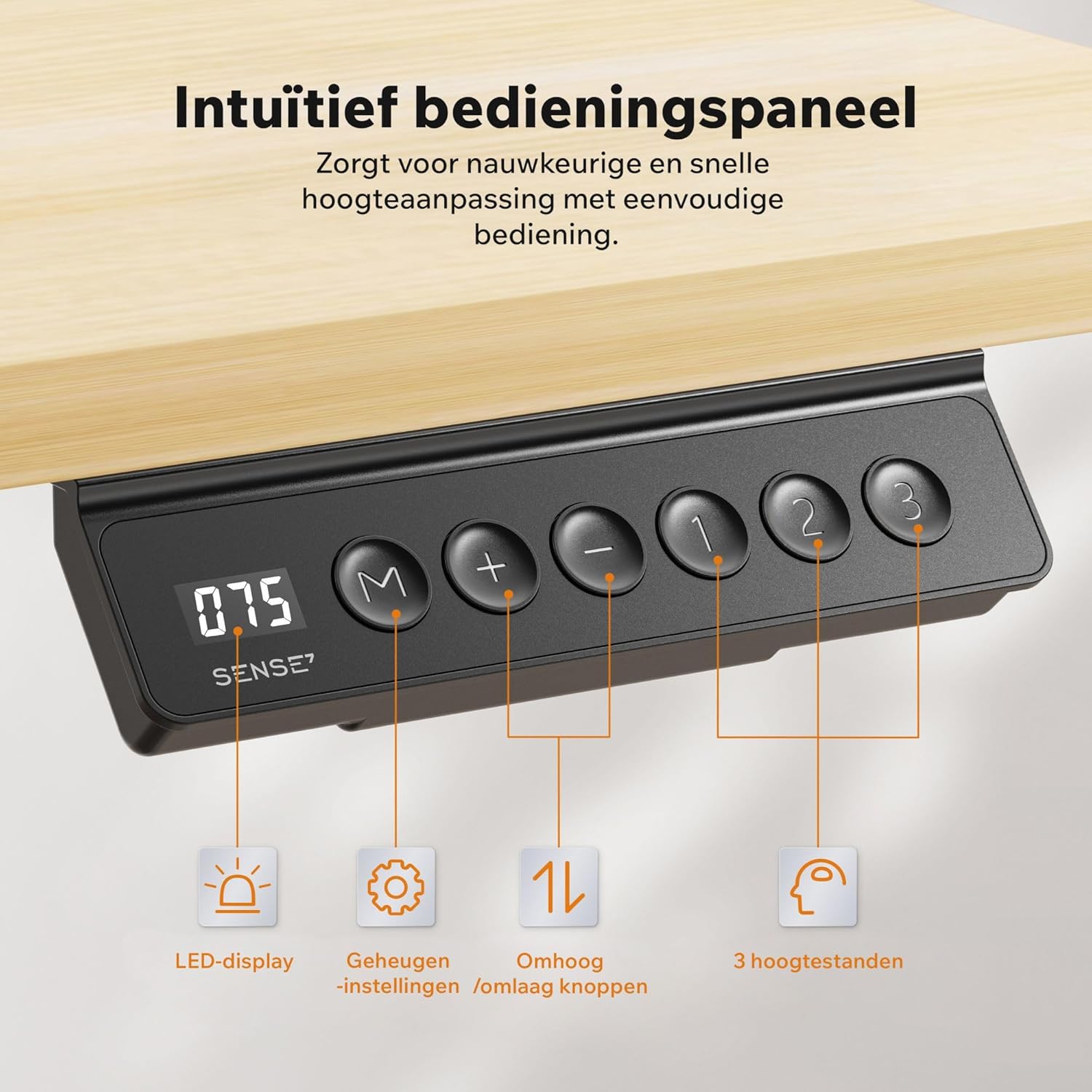
Image: The intuitive control panel featuring an LED display, memory setting button (M), up and down adjustment buttons, and three programmable height presets (1, 2, 3).
- LED Display: Shows the current desk height in centimeters.
- Up/Down Buttons (+ / -): Press and hold to adjust the desk height manually. Release to stop.
- Memory Button (M): Used to save current height settings.
- Preset Buttons (1, 2, or 3): Recall saved height positions.
Adjusting Height
To adjust the desk height:
- Press and hold the + button to raise the desk.
- Press and hold the - button to lower the desk.
- Release the button when the desired height is reached.

Image: The SENSE7 NOJO desk's wide height adjustment range, from a minimum of 72 cm suitable for sitting to a maximum of 118 cm for comfortable standing work.
Setting Memory Presets
The desk allows you to save up to three preferred height settings:
- Adjust the desk to your desired height using the + or - buttons.
- Press the M button. The LED display will show "S-".
- Within 3 seconds, press one of the preset buttons (1, 2, or 3). The display will show "S-1", "S-2", or "S-3" to confirm the setting is saved.
Recalling Memory Presets
To move the desk to a saved height:
- Simply press the corresponding preset button (1, 2, or 3). The desk will automatically move to the saved height.
Anti-Collision System
The SENSE7 NOJO desk is equipped with an anti-collision system. If the desk encounters an obstacle during height adjustment, it will automatically stop and reverse slightly to prevent damage. Always ensure the path is clear for optimal safety.

Image: Demonstrating the desk's stable, smooth, and quiet operation. Features include a noise level below 55dB, an adjustment speed of 22mm/s, a maximum load capacity of 70kg, and overall stability.
Maintenance
- Cleaning: Wipe the desk surface with a soft, damp cloth. Avoid abrasive cleaners or harsh chemicals.
- Inspection: Periodically check all screws and bolts to ensure they are tight. Retighten if necessary.
- Cable Management: Regularly organize cables in the cable tray to prevent tangles and ensure smooth operation.
- Motor Care: The electric motor is maintenance-free. Do not attempt to lubricate or open it.
Troubleshooting
| Problem | Possible Cause | Solution |
|---|---|---|
| Desk does not move. | Power cable disconnected, motor cable loose, overload. | Check power and motor connections. Reduce weight on the desk. |
| Desk moves unevenly or makes unusual noise. | Loose screws, uneven load. | Check and tighten all assembly screws. Distribute weight evenly. |
| Anti-collision system frequently activates. | Obstruction in path, sensitive setting. | Ensure clear path during adjustment. (Consult support if sensitivity adjustment is needed and not in manual). |
| Memory presets not working. | Presets not saved correctly. | Re-save the desired height settings following the "Setting Memory Presets" instructions. |
If the problem persists after attempting these solutions, please contact customer support.
Specifications
| Feature | Detail |
|---|---|
| Brand | SENSE7 |
| Model Number | 13147780 |
| Color | Black-Pine |
| Product Dimensions (L x W x H) | 120 x 60 x 118 cm |
| Item Weight | 21.7 kg |
| Material | Engineered Wood, Alloy Steel |
| Base Material | Alloy Steel |
| Top Material Type | Veneer |
| Finish Type | Laminated |
| Shape | Rectangular |
| Desk Design | Standing Desk, Writing Desk |
| Special Feature | Adjustable Height |
| Height Adjustment Range | 72 cm - 118 cm |
| Max Load Capacity | 70 kg |
| Noise Level | < 55 dB |
| Adjustment Speed | 22 mm/s |
| Country of Origin | China |
Warranty and Support
SENSE7 products are manufactured to high-quality standards. For warranty information, please refer to the documentation included with your purchase or contact your retailer. If you encounter any issues or require technical assistance, please contact SENSE7 customer support through their official website or the contact information provided with your product.
Please have your model number (NOJO 13147780) and purchase date ready when contacting support.