
Introduction
This manual provides detailed instructions for the installation and operation of the Mingrui Test Auto Start Stop Eliminator, designed for Ford F-150 models from 2021 to 2024. This device permanently disables the engine's automatic start/stop function, allowing for consistent engine operation without manual intervention.
Compatibility
- Compatible Vehicles: 2021, 2022, 2023, 2024 Ford F-150
- Important Note: Not compatible with PowerBoost Hybrid models.
Ensure your vehicle matches the specified models and is not a PowerBoost Hybrid before proceeding with installation.
Package Contents
Upon opening the package, verify that all the following items are present:
- 1 x Mingrui Test Auto Start Stop Eliminator Module
- 1 x Installation Pry Tool

Image: The Auto Start Stop Eliminator module and the included orange pry tool.
Setup and Installation
The installation process is designed to be straightforward. Follow these steps carefully:
- Prepare the Vehicle: Ensure the vehicle is turned off and the parking brake is engaged.
- Remove Upper Instrument Tray Liner: Use the provided pry tool to carefully remove the upper instrument tray liner. This is typically located above the infotainment screen or near the headlight switch, depending on your F-150 trim and year.
- Remove Bolts: Locate and remove the two bolts securing the top of the tray.
- Lift Tray and Release Clips: Gently lift the tray and release any remaining clips to gain access to the wiring harness.
- Locate and Disconnect A.S.S. Harness: Identify the vehicle's Auto Start/Stop (A.S.S.) wiring harness. Carefully disconnect it from the button or module.
- Plug in Eliminator Harness: Connect the Mingrui Test Auto Start Stop Eliminator harness inline. One end plugs into the vehicle's disconnected A.S.S. harness, and the other end plugs into the A.S.S. button/module. Ensure connections are secure.
- Reassemble: Carefully re-position the tray, secure the clips, and re-install the two bolts. Finally, replace the upper instrument tray liner.

Image: Visual guide for the installation steps, from removing the trim to connecting the module.

Image: Illustration of the module's connection point and key functional benefits.
Operating Instructions
Once installed, the Mingrui Test Auto Start Stop Eliminator operates automatically. It remembers the last state of the auto start/stop function, effectively disabling it by default without requiring manual deactivation each time the vehicle is started.
- Automatic Disablement: The device will automatically keep the auto start/stop system in the "off" position upon vehicle startup.
- Manual Override: The original auto start/stop button retains full functionality. You can still manually activate or deactivate the system at any time if desired. The device will remember this new setting until it is changed again.
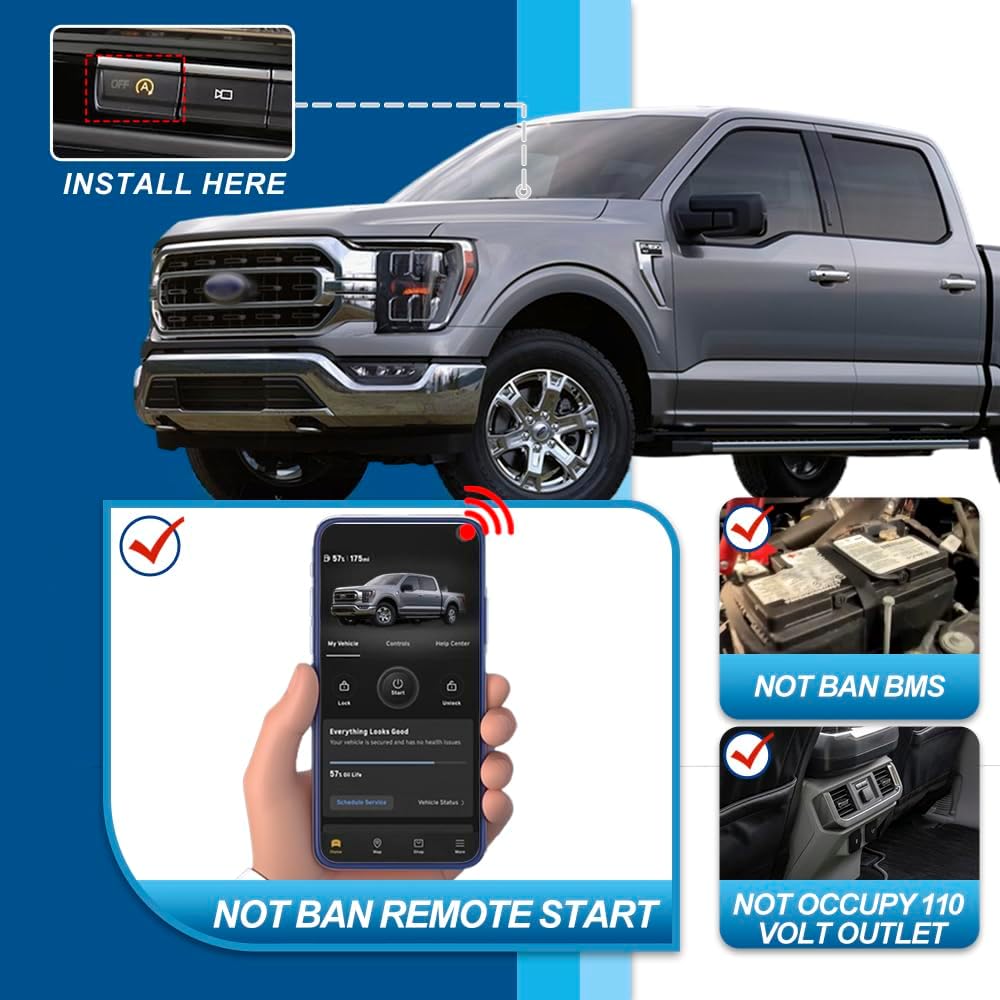
Image: Dashboard view highlighting the auto start/stop button and confirming no interference with other vehicle systems.
Features and Benefits
- Consistent Engine Performance: Eliminates the frequent engine shutdowns at stops, providing a smoother driving experience.
- No Error Codes: Designed to integrate seamlessly without triggering vehicle error codes.
- BMS Compatibility: Does not affect the Battery Management System (BMS).
- Remote Start Functionality: Remote start features remain fully operational.
- Engine Longevity: Reduces wear and tear on engine components associated with frequent start/stop cycles.
- Durable Construction: Made from high-quality, heat-resistant, flame-retardant, and abrasion-resistant materials.
Troubleshooting
If you encounter any issues after installation, please review the following common scenarios:
- Device Not Functioning:
- Ensure all connections are secure and fully seated.
- Verify compatibility with your specific Ford F-150 model year and trim (e.g., not a PowerBoost Hybrid).
- Some users have reported minor fitment issues with the connector on certain 2024-2025 models, requiring slight modification to the device's socket end (e.g., trimming a ridge). If you experience this, proceed with caution or contact support.
- Error Codes Appearing:
- The device is designed to be error-free. Double-check installation steps. If errors persist, disconnect the device and test the vehicle's original system. Contact support if the issue is isolated to the device.
- Remote Start Not Working:
- The device should not interfere with remote start. Re-verify connections. If remote start issues began immediately after installation, temporarily remove the device to confirm it is the cause.
For further assistance, refer to the Support section.
Specifications
| Attribute | Detail |
|---|---|
| Brand | Mingrui test |
| Model | F150 Engine Start Stop Disable Stop Start Jumper |
| Compatibility | 2021-2024 Ford F-150 (Excluding PowerBoost Hybrid) |
| Item Weight | 1.9 ounces |
| Package Dimensions | 7.09 x 3.54 x 1.18 inches |
| Manufacturer Part Number | MR-FOQTQ-01-21F150 |
Support
Mingrui test is committed to customer satisfaction. If you have any questions, require assistance with installation, or encounter any issues with your Auto Start Stop Eliminator, please contact our support team.
For support inquiries, please refer to the contact information provided with your purchase or visit the official Mingrui test store on Amazon: