
1. Product Overview
The Nityers Automatic Cat Feeder F11BL00 is designed to provide timed and quantitative feeding for your pets, ensuring they receive meals on schedule. It features a dual power supply system, a large capacity food tank, and a washable rotor for easy cleaning.
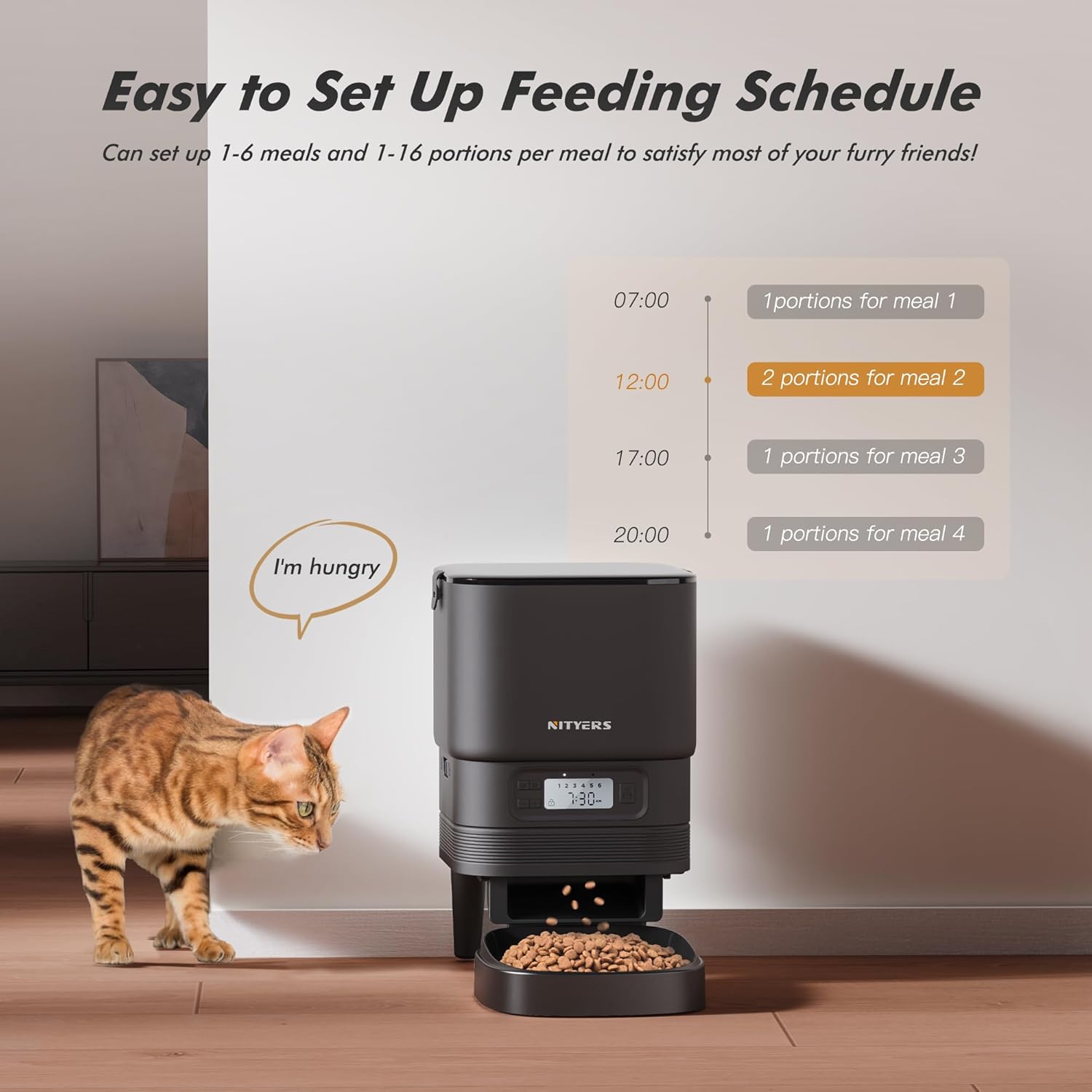
Figure 1.1: Nityers Automatic Cat Feeder F11BL00.
Key Features:
- Timed & Quantitative Feeding: Program up to 6 meals per day, with 1-16 servings per meal.
- Dual Power Supply: Operates with both an AC adapter and 4 AA batteries (not included) for uninterrupted feeding.
- Washable Rotor: The internal food dispensing rotor is detachable and washable for thorough cleaning.
- 4.2L Large Capacity: Sufficient for extended feeding periods, suitable for multi-cat households.
- Visible Top Lid: Allows easy monitoring of food levels.
- Secure Lid with Lock: Prevents pets from accessing food outside of scheduled times.
- Wide Kibble Compatibility: Supports dry pet food with grain sizes ranging from 3-20mm.

Figure 1.2: Feeder capacity and estimated feeding duration for different pet sizes.

Figure 1.3: The secure lid lock mechanism to prevent unauthorized access to food.

Figure 1.4: Dual power supply system, showing AC adapter and battery compartment.

Figure 1.5: Detachable rotor and food tank components for easy cleaning.
2. Package Contents
Please check the package for the following items:
- Nityers Automatic Cat Feeder Main Unit
- Food Tank Lid
- Food Bowl
- Power Adapter
- Instruction Manual
3. Setup
3.1 Assembly
- Place the detachable rotor onto the motor shaft at the base of the food tank.
- Insert the feeder legs into the designated holes on the bottom of the main unit. Ensure they are firmly pushed in for stability.
- Attach the food bowl to the base of the feeder. It should click securely into place.
- Place the food tank onto the assembled base.

Figure 3.1: Step-by-step assembly guide for the feeder.
3.2 Power Connection
The feeder supports dual power supply for reliability:
- AC Adapter: Connect the power adapter to the feeder's power port and plug it into a wall outlet.
- Battery Backup: For backup power during outages, install 4 AA batteries (not included) into the battery compartment at the bottom of the unit.
3.3 Filling the Food Tank
- Open the top lid of the feeder.
- Pour dry pet food into the tank. Ensure the kibble size is between 3-20mm to prevent clogging.
- Close the lid securely and engage the lid lock mechanism.
4. Operation
4.1 Setting Current Time
Refer to the control panel and buttons on the front of the feeder. Typically, a 'SET' or 'CLOCK' button is used to enter time setting mode, and arrow buttons adjust hours and minutes. Confirm settings with the 'SET' button.
4.2 Programming Feeding Schedule
The feeder allows you to program up to 6 meals per day, with 1 to 16 portions per meal.
- Enter programming mode (usually by pressing a 'PROGRAM' or 'MEAL' button).
- Set the desired feeding time for each meal using the arrow buttons.
- Set the number of portions for each meal. One portion is approximately one tablespoon of dry food. Adjust based on your pet's dietary needs and kibble density.
- Repeat for all desired meals (up to 6).
- Save and exit programming mode.

Figure 4.1: Example of a programmed feeding schedule on the feeder's display.
4.3 Manual Feeding
To dispense food instantly outside of the programmed schedule, press the manual feed button (often indicated by a food icon or 'FEED'). Each press typically dispenses one portion.
4.4 Kibble Size Compatibility
The feeder is designed for dry pet food with kibble sizes ranging from 3mm to 20mm. Using kibble outside this range may lead to clogging or improper dispensing.
4.5 Operational Videos
Video 4.2: Demonstration of the Nityers Automatic Cat Feeder dispensing food in action.
Video 4.3: Illustrates the hands-free pet feeding functionality of the device.
Video 4.4: A review demonstrating various features and operation of the Nityers Automatic Cat Feeder.
5. Maintenance
5.1 Cleaning Instructions
Regular cleaning ensures hygiene and proper function of the feeder.
- Disassemble: Remove the food tank, lid, rotor, and food bowl from the main unit.
- Washable Parts: The food tank, lid, rotor, and food bowl can be hand-washed with mild soap and water. Rinse thoroughly and dry completely before reassembly.
- Main Unit: The main unit, which contains electronic components, should not be washed or submerged in water. Wipe it clean with a damp cloth and dry immediately.
- Reassemble: Once all parts are dry, reassemble the feeder according to the setup instructions.

Figure 5.1: Illustration of detachable parts suitable for washing.
6. Troubleshooting
| Problem | Possible Cause | Solution |
|---|---|---|
| Food not dispensing or clogging | Kibble size too large or small; food jammed in dispenser; low food level. | Ensure kibble size is between 3-20mm. Check for any blockages in the dispensing mechanism. Refill food tank if low. If using kibble near the 15-20mm range, monitor closely as some larger kibble may still cause jams. |
| Lid opens easily or pet accesses food | Lid not properly secured; lid lock not engaged. | Ensure the lid is firmly snapped into place on both sides and the lid lock mechanism is fully engaged. |
| Feeder not powering on | Power adapter disconnected; batteries depleted or incorrectly installed. | Check if the power adapter is securely connected to both the feeder and the wall outlet. If using batteries, ensure they are fresh and inserted with correct polarity. |
| Incorrect feeding times or portions | Programming error; incorrect current time setting. | Verify the current time setting. Re-enter programming mode and confirm all meal times and portion sizes are set correctly. |
7. Specifications
| Feature | Detail |
|---|---|
| Model Number | F11BL00 |
| Product Dimensions (L x W x H) | 7.4 x 17 x 6.6 inches |
| Item Weight | 1.29 Kilograms (2.84 Pounds) |
| Capacity | 5 Liters (approx. 4.2L usable for food) |
| Material | Acrylonitrile Butadiene Styrene (ABS) |
| Power Source | Battery Powered and Corded Electric |
| Operation Mode | Automatic |
| Kibble Size Compatibility | 3-20mm |
| Meals Per Day | 1-6 |
| Portions Per Meal | 1-16 |
8. Warranty & Support
8.1 Warranty Information
This Nityers Automatic Cat Feeder F11BL00 comes with a 1-year warranty from the date of purchase. This warranty covers manufacturing defects and malfunctions under normal use. Please retain your proof of purchase for warranty claims.
8.2 Customer Support
For any questions, technical assistance, or warranty claims, please contact Nityers customer support. Refer to the contact information provided with your product packaging or visit the official Nityers website for support details.