
1. Introduction
Thank you for choosing the ZonQoonz ZQ01638 RGBW LED Par Light. This product is designed to provide versatile and dynamic lighting for various events and stages. Featuring RGBW 4-in-1 LED technology, multiple control modes, and robust construction, it is suitable for parties, weddings, clubs, and live performances. Please read this manual thoroughly before operation to ensure safe and correct usage.
2. Safety Information
- Always connect the unit to a grounded power outlet.
- Ensure the power voltage matches the specified range (AC110-240V).
- Do not open the housing; there are no user-serviceable parts inside. Refer all servicing to qualified personnel.
- Avoid direct eye exposure to the light source, as it can cause eye damage.
- Keep the unit away from rain, moisture, and liquids.
- Ensure adequate ventilation around the fixture to prevent overheating. The maximum allowable ambient temperature during operation is 40℃.
- Mount the fixture securely using appropriate hardware and ensure it is stable.
- Disconnect from power before cleaning or maintenance.
3. Package Contents
Verify that all items are present and in good condition upon unpacking:
- ZonQoonz RGBW LED Par Light (x1)
- Power Cord (x1)
- Mounting Brackets (x2)
- Screws for Brackets (x2)
- Wireless Remote Control (x1)
- User Manual (x1)

Figure 3.1: Included components and product dimensions.
4. Product Features
- Light Source: RGBW 4-in-1 LED beads (60x2W), providing vibrant color mixing.
- Beam Angle: 25° for focused light projection.
- Projection Distance: Optimal range of 5-10 meters.
- Control Modes: LED display, Auto, Voice (Sound Activated), 8-Channel DMX-512, Master & Slave, and Wireless Remote Control.
- Lighting Effects: Color select, jump, fade, sound control, strobe, auto drive, and chase. Supports RGBW multi-color independent or mixed dimming.
- Construction: Durable aluminum and plastic housing for reliability.
- Mounting: Comes with two brackets for quick mounting to trusses, walls, or for uplighting.

Figure 4.1: Various RGBW color mixing and lighting effects.
5. Setup
5.1 Mounting the Light
- Attach the two provided mounting brackets to the sides of the light fixture using the included screws.
- Securely mount the light to a truss, wall, or place it on a flat surface for uplighting. Ensure the mounting surface can support the weight of the fixture.
- Adjust the angle of the light using the brackets to achieve the desired projection. The bracket allows for 180° adjustment.
5.2 Power Connection
- Connect the power cord to the 'POWER IN' port on the rear of the fixture.
- Plug the other end of the power cord into a suitable AC110-240V grounded power outlet.
- If linking multiple units, use the 'POWER OUT' port to connect to the 'POWER IN' of the next fixture.
5.3 DMX Connection (Optional)
- For DMX control, connect a DMX cable from your DMX controller to the 'DMX IN' port of the first fixture.
- To link multiple fixtures, connect a DMX cable from the 'DMX OUT' port of the first fixture to the 'DMX IN' port of the next fixture in the chain.
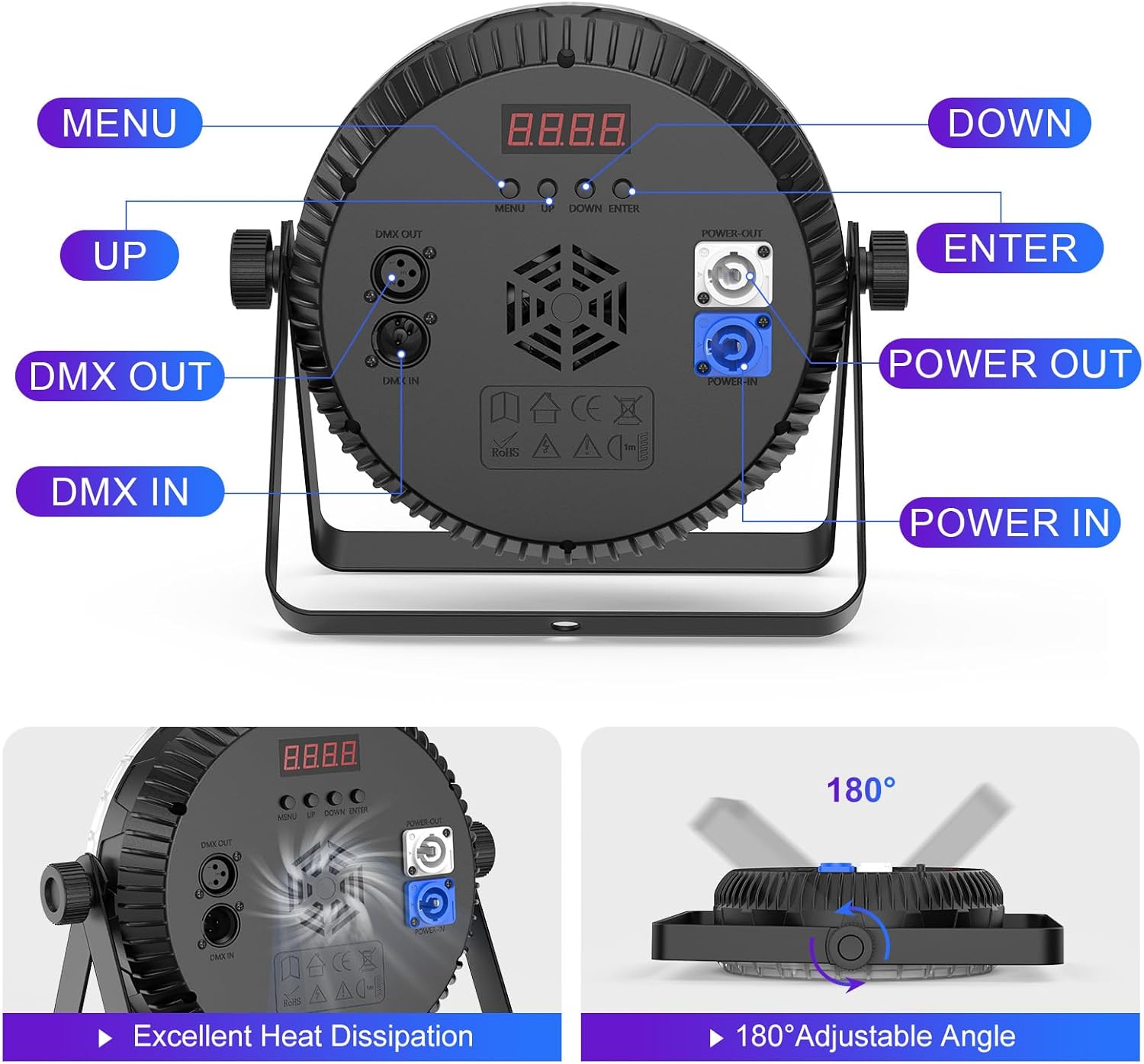
Figure 5.1: Rear panel connections and controls.
6. Operating Instructions
The ZonQoonz ZQ01638 offers several operation modes, selectable via the LED display on the rear panel or the wireless remote control.

Figure 6.1: Multiple control modes and wireless remote.
6.1 Control Panel Operation
Use the 'MENU', 'UP', 'DOWN', and 'ENTER' buttons on the rear panel to navigate through the settings and select modes.
- MENU: Cycles through the main menu options.
- UP/DOWN: Navigates through sub-menus or adjusts parameter values.
- ENTER: Confirms selection or saves changes.
6.2 Operation Modes
- LED Display Mode: Allows direct control and configuration of settings via the onboard display and buttons. This includes scene editing functions.
- Auto Mode: The light cycles through pre-programmed lighting effects automatically.
- Voice (Sound Activated) Mode: The light reacts to sound and music, changing patterns and colors in sync with the audio.
- 8CH DMX Mode: For professional control using a DMX-512 controller. Refer to the DMX channel chart (usually provided in a separate DMX manual or on the product's website) for specific channel functions.
- Master & Slave Mode: Connect multiple units via DMX cables. Set one unit as 'Master' and others as 'Slave'. The slave units will mimic the master unit's operation.
- Wireless Remote Control: Use the included remote to control the light from a distance of up to 10 meters. Functions typically include color selection, mode changes, strobe, and brightness adjustment.
7. Maintenance
- Cleaning: Regularly clean the lens and housing with a soft, lint-free cloth. Do not use abrasive cleaners or solvents. Ensure the unit is unplugged before cleaning.
- Inspection: Periodically check power cables, DMX cables, and mounting hardware for any signs of wear or damage. Replace damaged components immediately.
- Storage: When not in use, store the light in a dry, dust-free environment, preferably in its original packaging or a protective case.
- Ventilation: Ensure the cooling vents are clear of dust and debris to maintain optimal heat dissipation.
8. Troubleshooting
| Problem | Possible Cause | Solution |
|---|---|---|
| Light does not turn on | No power supply; Faulty power cable; Unit malfunction | Check power connection and outlet; Try a different power cable; Contact support if issue persists. |
| Remote control not working | Battery depleted; Obstruction; Remote out of range | Replace remote battery; Ensure clear line of sight to the light; Operate within 10 meters range. |
| DMX control not responding | Incorrect DMX address; Faulty DMX cable; Incorrect DMX mode selected | Verify DMX address setting; Check DMX cable connections; Ensure DMX mode is active on the light. |
| Light overheats | Poor ventilation; Operating in high ambient temperature | Ensure vents are clear; Operate in an environment below 40℃; Allow for proper airflow around the unit. |
9. Specifications
- Model: ZQ01638
- Working Voltage: AC110-240V
- Power Consumption: 120W
- Light Source: RGBW 4-in-1 LED (60x2W)
- Light Source Wattage: 120 Watts
- Maximum Compatible Light Source Wattage: 180 Watts
- Beam Angle: 25°
- Best Projection Distance: 5-10 meters
- Product Weight: 1.5 KG
- Product Dimensions: 24.13 x 8.38 x 27.48 cm
- Shell Material: High-quality ABS, Aluminum, and Plastic
- Maximum Ambient Temperature: 40℃
- Control Modes: LED Display, Auto, Voice, 8CH DMX, Master & Slave, Wireless Remote
- Mounting Type: Bracket Mount
10. Warranty and Support
ZonQoonz products are manufactured to high-quality standards. For warranty information or technical support, please refer to the contact details provided with your purchase or visit the official ZonQoonz website. Please have your model number (ZQ01638) and purchase date available when contacting support.