
Introduction
This manual provides detailed instructions for the operation and maintenance of your SKMEI Model 2022 Digital Sports Watch. Please read this manual thoroughly to ensure proper use and to maximize the lifespan of your watch. Keep this manual for future reference.
Key Features

Image: Overview of the watch highlighting its main features.
- Digital Display: Clear LED backlight for easy reading of time and calendar.
- Precise Timekeeping: Japanese original digital movement ensures accuracy.
- Durable Construction: High hardness resin glass and stainless steel case back.
- Water Resistance: 5 ATM (50 meters) suitable for daily use, swimming, bathing, and showering.
- Chronograph: 1/100 second stopwatch timer function.
- Alarm Function: Daily alarm for reminders.
- Calendar: Displays day and date.
- Long Battery Life: Approximately 2 years with original Japanese battery.
- Material: Silicone case and strap, Plexiglas mirror surface, stainless steel buckle.
Button Functions

Image: Detailed view of the watch face and button labels.
- MODE Button (Top Left): Cycles through different modes (Time, Chronograph, Alarm, Dual Time).
- RESET Button (Bottom Left): Used to reset values during setting, or to split/reset the chronograph.
- START Button (Bottom Right): Used to start/stop functions (e.g., chronograph) or to adjust values during setting.
- LIGHT Button (Top Right): Activates the LED backlight for illumination.
Setup
Setting Time and Date
- From the Timekeeping Mode, press the MODE button repeatedly until the seconds begin to flash. This indicates you are in setting mode.
- Press the RESET button to cycle through the settings: Seconds → Hour → Minute → Month → Date → Day of Week.
- While the desired value is flashing, press the START button to increase the value. Hold the START button to rapidly advance the value.
- Once all settings are adjusted, press the MODE button to exit the setting mode and return to Timekeeping Mode.
12/24-Hour Format
In Timekeeping Mode, press the START button to toggle between 12-hour and 24-hour time formats.
Operating Instructions
Mode Switching
Press the MODE button to cycle through the following modes:
- Timekeeping Mode (displays current time, date, day)
- Chronograph Mode (stopwatch)
- Alarm Mode
- Dual Time Mode (if applicable)
Using the Chronograph (Stopwatch)
- Press the MODE button until you reach the Chronograph Mode (indicated by "ST" or "STOP" on the display).
- Press the START button to begin timing.
- Press the START button again to stop timing.
- Press the RESET button to clear the stopwatch to zero.
- To record split times, press RESET while the stopwatch is running. The display will show the split time. Press RESET again to return to the running stopwatch.
Setting and Using the Alarm
- Press the MODE button until you reach the Alarm Mode (indicated by "AL" or "ALARM" on the display). The alarm hour digits will flash.
- Press the START button to adjust the alarm hour.
- Press the RESET button to switch to setting the alarm minute digits.
- Press the START button to adjust the alarm minute.
- Press the MODE button to exit alarm setting.
- To turn the alarm ON/OFF, in Alarm Mode, press the START button. An alarm indicator (e.g., a bell icon) will appear or disappear.
- When the alarm sounds, press any button to stop it.
Activating the Backlight
Press the LIGHT button (Top Right) to illuminate the display for a few seconds.
Maintenance
Water Resistance (5 ATM / 50 Meters)

Image: Rear view of the watch displaying water resistance rating.
Your SKMEI Model 2022 watch is water resistant up to 5 ATM (50 meters). This means it is suitable for daily use, showering, bathing, and swimming in shallow water. Do not press any buttons while the watch is submerged in water, as this can compromise the water seal. Avoid exposure to hot water or steam, as this can also affect the water resistance.
Cleaning Your Watch
To clean your watch, wipe it gently with a soft, damp cloth. For stubborn dirt, a mild soap solution can be used, followed by rinsing with clean water and drying thoroughly. Avoid using harsh chemicals or abrasive materials, which can damage the watch's finish or components.
Battery Replacement
The watch is powered by a Japanese original battery with an approximate life of 2 years. When the display becomes dim or the watch stops functioning, the battery may need replacement. It is recommended to have the battery replaced by a qualified watch technician to ensure the water resistance seal is properly maintained.
Troubleshooting
| Problem | Possible Cause | Solution |
|---|---|---|
| Display is blank or dim. | Low or dead battery. | Replace the battery. |
| Time is incorrect. | Time not set correctly or accidental button press. | Refer to the "Setting Time and Date" section to reset the time. |
| Alarm does not sound. | Alarm is turned off or set incorrectly. | Ensure the alarm is activated and set to the correct time in Alarm Mode. |
| Water inside the watch. | Buttons pressed underwater or seal compromised. | Immediately take the watch to a professional for inspection and repair to prevent further damage. Avoid pressing buttons underwater. |
Specifications
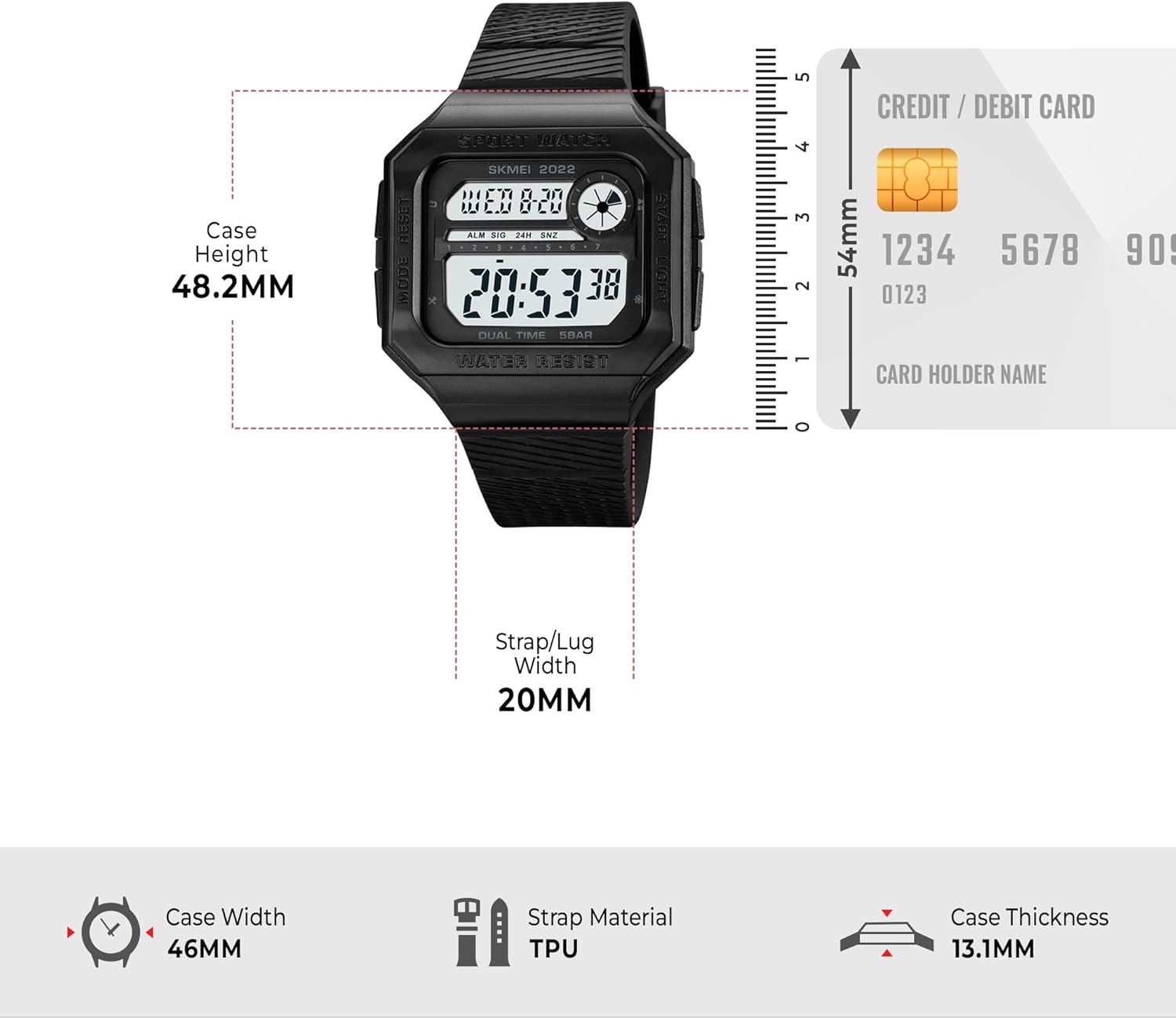
Image: Dimensional drawing of the watch.
- Model Number: 2022
- Display Type: Digital
- Movement Type: Japanese Original Digital Movement
- Water Resistance: 5 ATM (50 meters)
- Case Material: Silicone
- Case Back Material: Stainless Steel
- Strap Material: Silicone
- Mirror Surface: Plexiglas
- Clasp Type: Pin Buckle (Stainless Steel)
- Case Diameter: 4.6 cm
- Case Thickness: 1.31 cm
- Band Width: 2 cm
- Item Weight: 46.4 grams
- Power Source: Battery Powered (Japanese original battery)
- Functions: Time, Date, Day, Chronograph, Alarm, LED Backlight, Dual Time.
Warranty and Support
For warranty information, please refer to the documentation provided with your purchase or contact the retailer. For product support, please visit the official SKMEI website or contact their customer service department. Specific warranty terms and support contact details may vary by region and retailer.