
Jufodrca 4 Core 2G RAM 32G ROM
Jufodrca Car Radio Stereo User Manual
For Honda Accord 7th Generation (2003-2007)
Introduction
This manual provides detailed instructions for the installation, operation, and maintenance of your Jufodrca 10-inch Car Radio Stereo. Designed specifically for the Honda Accord 7th Generation (2003-2007), this unit integrates advanced features such as Wireless CarPlay, Android Auto, Bluetooth 5.0, 5G WiFi, GPS Navigation, and Rear Camera support to enhance your driving experience.
Vehicle Compatibility
This car radio stereo is compatible with Honda Accord 7th Generation models from 2003, 2004, 2005, 2006, and 2007. It is designed for vehicles with a 2+32G configuration and offers seamless integration of advanced features.

Figure 1: Before and After Installation in Honda Accord 7th Gen (2003-2007)

Figure 2: AC Connection Details for Single and Dual AC Systems
Note: This unit is only suitable for manual AC. Ensure correct connection of the 2 connectors into the decoder port (A & B) for AC functionality. For dual AC, use original AC plugs to ports A & B; the green AC wire from the package is not needed.
Setup
The Jufodrca car radio stereo comes with all necessary wiring for installation. Professional installation is recommended. Refer to the included wiring diagram for specific connections. Ensure the vehicle's power is disconnected before beginning installation.
What's in the Box
- Head Unit
- Canbus
- Camera
- Power Cable
- RCA Cable
- Reversing Line
- Radio Antenna
- 2*USB Cable
- Crowbar
- GPS Antenna
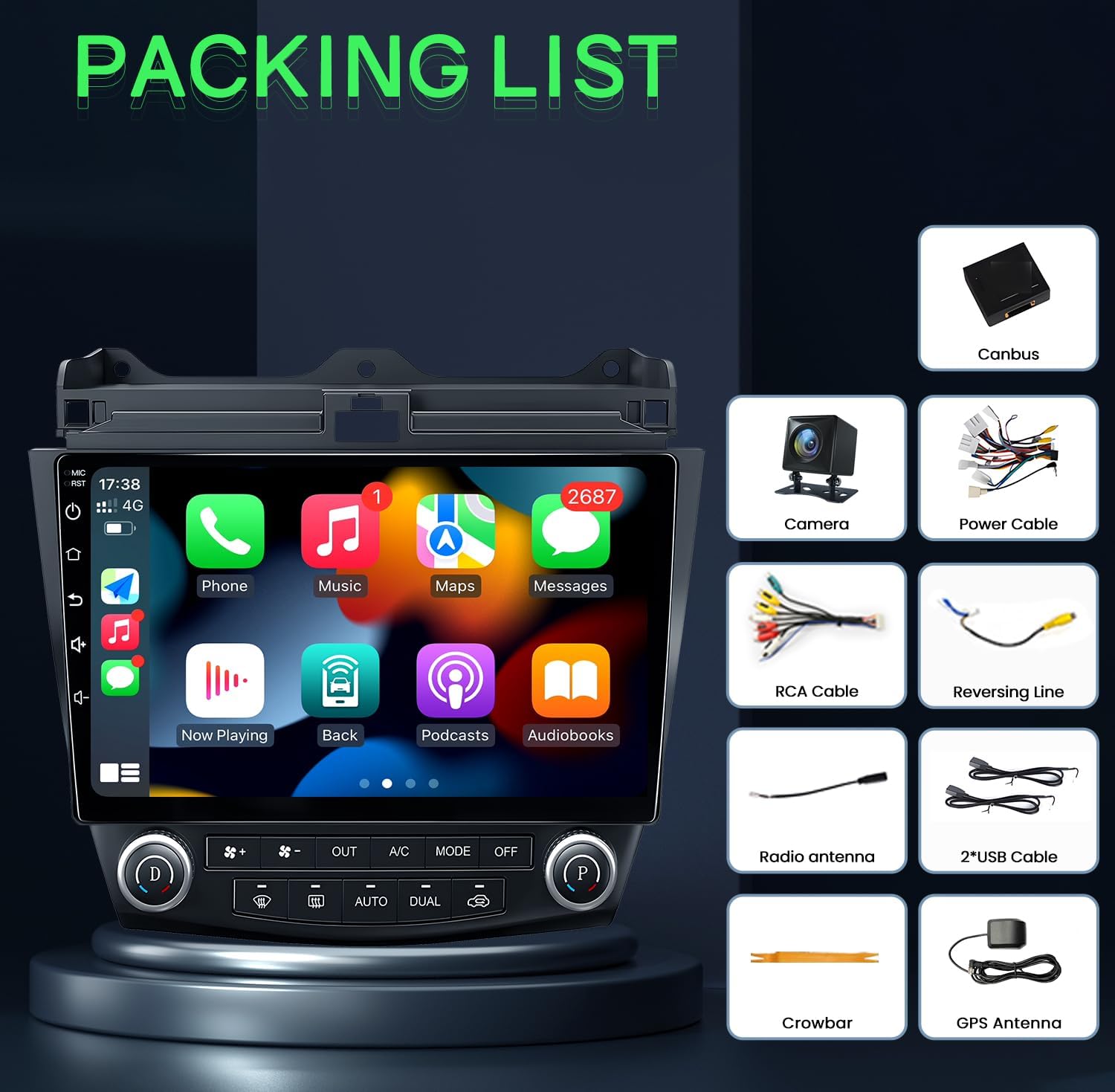
Figure 3: Included Components (Packing List)
Operating Instructions
Wireless CarPlay & Android Auto
Connect your iOS or Android smartphone wirelessly to access navigation, music, messages, and voice control features directly on the car stereo display. This allows for hands-free operation and reduces distractions while driving.
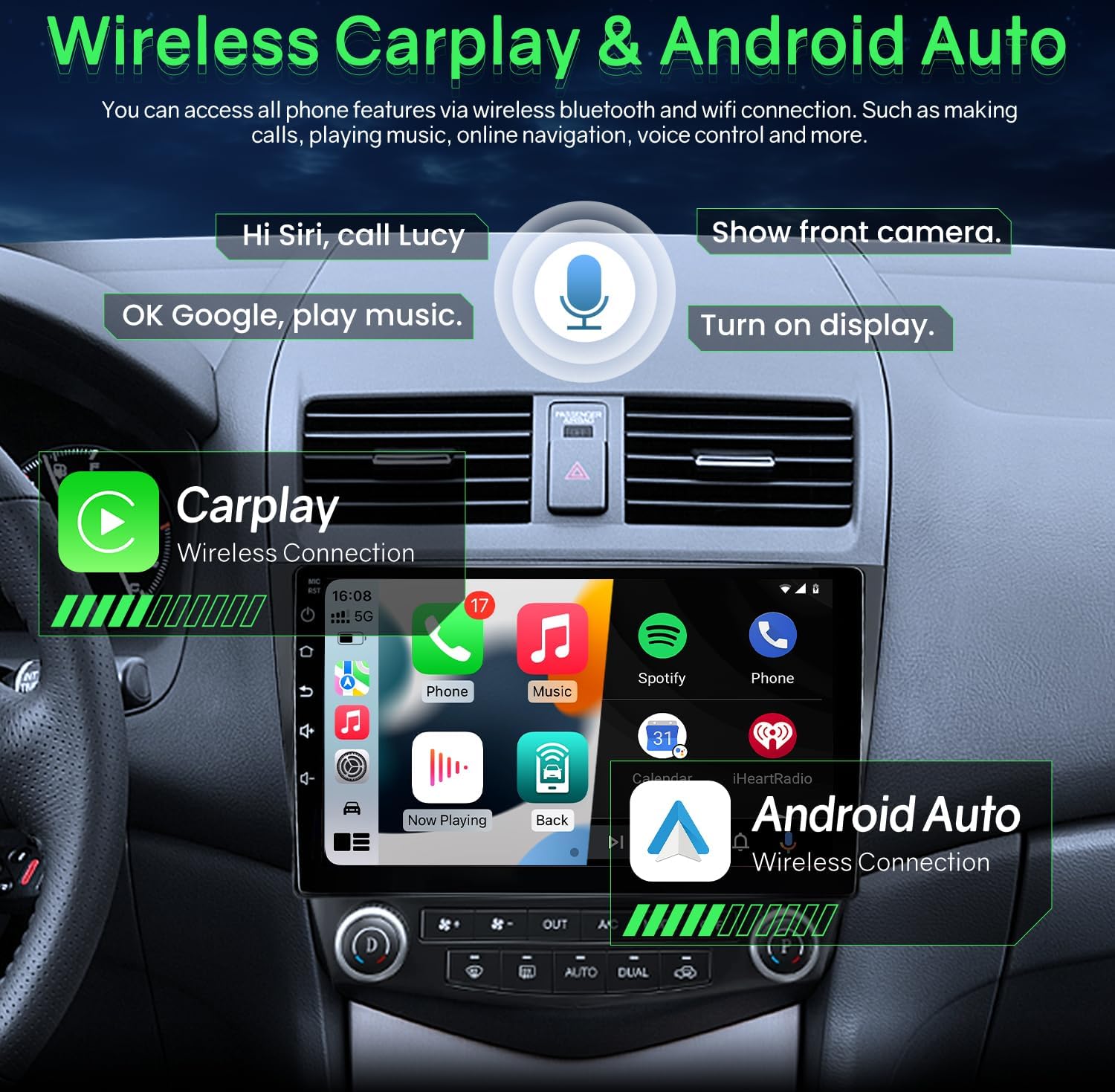
Figure 4: Wireless CarPlay and Android Auto Interface
Bluetooth 5.0 & FM/RDS Audio
The unit features Bluetooth 5.0 for stable and fast connections, enabling hands-free calls and audio streaming. The FM radio includes RDS (Radio Data System) and can store multiple stations. A 15-band EQ option allows for personalized audio tuning.

Figure 5: Bluetooth Music and FM Radio Interface
HD Display & 5G WiFi
Experience clear visuals on the 1280x800 resolution 2.5D tempered glass display. Integrated 5G WiFi supports quick downloads for offline maps and fast online access.

Figure 6: 5G WiFi Connectivity

Figure 7: Full HD 1280x800 IPS Screen Quality

Figure 8: 5G WiFi vs 2.4G WiFi Performance
GPS Navigation
The integrated GPS provides accurate directions and real-time traffic updates. It supports both online and offline navigation applications, ensuring efficient travel to your destination.
Steering Wheel Control (SWC)
Control essential stereo functions such as answering calls, adjusting volume, and changing music or videos directly from your steering wheel buttons. This feature promotes safer driving by keeping your hands on the wheel.
Rear Camera
The system includes a 1080P rear view camera that automatically activates when the vehicle is in reverse gear. It provides a wider, clearer field of view with parking lines, assisting with safe maneuvering and reducing blind spots.

Figure 9: Rear View Camera Display
Built-in DSP Settings
Customize your audio experience with the built-in Digital Sound Processor (DSP). Adjust equalizer settings, surround sound, and subwoofer levels to achieve optimal sound quality.
Split Screen Mode
Utilize the split screen function to run two applications simultaneously, such as GPS navigation and video playback, for enhanced multitasking.
Official Product Videos
Product Overview for Honda Accord 7th Gen
Video 1: This video provides a general overview of the Jufodrca car radio stereo features and compatibility with the Honda Accord 7th Generation (2003-2007).
Operation for Honda Accord Radio
Video 2: This video demonstrates the operational aspects of the Honda Accord radio, including navigating the main interface, using various applications, and accessing settings.
Android System for Accord Radio
Video 3: This video showcases the Android operating system interface and features specific to the Accord radio, including app management and system settings.
Maintenance
- Screen Cleaning: Use a soft, lint-free cloth to gently wipe the screen. For stubborn smudges, slightly dampen the cloth with water or a screen-safe cleaner. Avoid harsh chemicals.
- Software Updates: Periodically check for software updates to ensure optimal performance and access to new features. Refer to the device settings or manufacturer's website for update instructions.
- Cable Connections: Ensure all cables are securely connected to prevent intermittent issues with power, audio, or data transfer.
- Environmental Conditions: Avoid exposing the unit to extreme temperatures or direct sunlight for prolonged periods, as this can affect performance and longevity.
Troubleshooting
- No Power:
- Check all power connections and fuses.
- Ensure the vehicle's ignition is on.
- No Sound:
- Verify volume settings are not muted or too low.
- Check speaker wire connections.
- Ensure the correct audio source is selected.
- GPS Not Working:
- Ensure the GPS antenna is properly installed and has a clear view of the sky.
- Check GPS settings within the unit.
- Verify map data is installed and up to date.
- Bluetooth Connectivity Issues:
- Ensure Bluetooth is enabled on both the stereo and your device.
- Delete previous pairings and re-pair the device.
- Move the device closer to the stereo.
- CarPlay/Android Auto Not Connecting:
- Ensure your phone's operating system is up to date.
- Check the USB cable connection if using wired CarPlay/Android Auto.
- For wireless, ensure Wi-Fi and Bluetooth are enabled on your phone and the stereo.
Specifications
| Feature | Detail |
|---|---|
| Item Weight | 4.4 pounds |
| Package Dimensions | 12.32 x 11.97 x 5.51 inches |
| Display Size | 10 Inches |
| Screen Resolution | 1280x800 |
| Processor | 4 Core |
| RAM | 2GB |
| ROM | 32GB |
| Connectivity Technology | Bluetooth 5.0, 5G WiFi |
| Special Features | Wireless/wired CarPlay & Android Auto & Mirroring, Airplay, Secondary Video Window, 1080P Backup Camera, Support SWC (Steering wheel Control), APK install, FM/RDS Radio |
| Map Type | North America (supports online/offline navigation) |
| Audio Output Mode | Stereo |
| Mounting Type | Dashboard Mount |

Figure 10: Upgraded Smart Chip Details
Warranty & Support
The Jufodrca Car Radio Stereo comes with a 2-year warranty. For technical support, troubleshooting assistance, or warranty claims, please contact Jufodrca customer service through the retailer where the product was purchased. Keep your purchase receipt as proof of purchase for warranty validation.