Introduction
Welcome to the user manual for your JMMO Wireless Noise Reduction Earbuds. These earbuds are designed to provide a high-quality audio experience with advanced noise reduction technology, intuitive touch controls, and a comfortable, secure fit. This manual will guide you through the setup, operation, maintenance, and troubleshooting of your new earbuds.
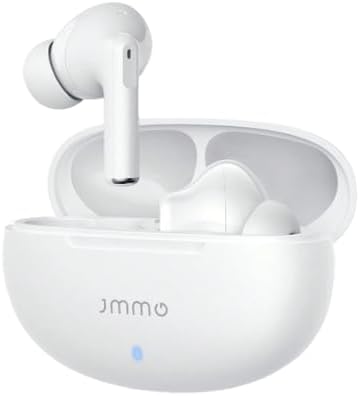
Image: The JMMO Wireless Noise Reduction Earbuds, white in color, resting inside their open charging case. A small blue indicator light is visible on the front of the case.
Setup
1. Unboxing and Initial Charge
Upon opening the package, ensure all components are present: the JMMO Wireless Earbuds, the charging case, and the charging cable. Before first use, it is recommended to fully charge the earbuds and the charging case.
- Place the earbuds into the charging case.
- Connect the charging cable to the charging port on the case and to a USB power source.
- The indicator light on the case will show charging status.
- A full charge provides up to 14 hours of playtime with the case, and 4 hours of playtime for the earbuds alone. Fast charging allows for quick power-ups.

Image: An infographic illustrating the battery life of the JMMO earbuds: 14 hours playtime with case, 4 hours playtime for earbuds, and 1.5 hours for fast charging. The earbuds are shown next to their charging case.
2. Pairing with Your Device
The JMMO earbuds utilize Bluetooth 5.3 for stable and efficient wireless connectivity.
- Ensure the earbuds are charged and placed in the charging case.
- Open the charging case. The earbuds will automatically enter pairing mode.
- On your device (smartphone, tablet, etc.), go to Bluetooth settings and turn Bluetooth on.
- Search for "JMMO Earbuds" (or similar name) in the list of available devices.
- Select the earbuds to connect. Once connected, a voice prompt will confirm successful pairing.

Image: A graphic depicting an "UPGRADED 5.3 CHIPSET" with icons representing "More Stable Connection," "Faster Transmission," "Low Power Consumption," and "Strong Audio Performance."
Operating Instructions
Touch Controls
The JMMO earbuds feature intuitive touch controls on each earbud for easy management of music playback, calls, and voice assistants.
- Single Tap: Play/Pause music, Answer/End call.
- Double Click: Next track, Hang up call.
- Triple Click: Previous track.
- Long Press (2 seconds): Reject call, Activate voice assistant (Siri, Google Assistant).

Image: A close-up of a JMMO earbud with an overlay showing the touch control functions: Click (Play/Pause/Answer), Double Click (Next track/Hang up), Triple Click (Previous track), and Long Press (2 sec) (Reject call/Siri).
Noise Reduction Technology
These earbuds feature advanced noise reduction technology to minimize ambient sounds, providing a clearer listening experience for music and calls. The noise-cancelling microphone ensures your voice is heard clearly during calls, even in noisy environments.

Image: A woman smiling while wearing the JMMO earbuds, with a graphic overlay illustrating how noise is reduced and voice is enhanced for clear calls using NDS technology.
Efficient Switching
The earbuds allow for seamless transition between using both earbuds or just one, providing flexibility for different listening scenarios.
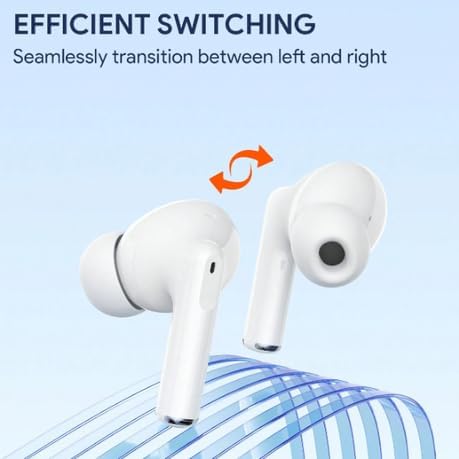
Image: A graphic showing two JMMO earbuds with an arrow indicating seamless transition between left and right, highlighting the efficient switching capability.
Maintenance
Cleaning Your Earbuds
To ensure optimal performance and hygiene, regularly clean your earbuds.
- Use a soft, dry, lint-free cloth to wipe the surface of the earbuds and charging case.
- For earwax or debris in the ear tips or speaker mesh, use a small, soft brush or cotton swab.
- Do not use abrasive cleaners, alcohol, or chemical solvents.
- Avoid getting moisture in any openings.
Storage
When not in use, store the earbuds in their charging case to protect them from dust and damage. Store in a cool, dry place away from direct sunlight and extreme temperatures.
Troubleshooting
If you encounter issues with your JMMO earbuds, please refer to the following common solutions:
| Problem | Solution |
|---|---|
| Earbuds not pairing | Ensure earbuds are charged. Turn off and on Bluetooth on your device. Place earbuds back in case, close, then open to re-enter pairing mode. Forget the device on your phone and try pairing again. |
| No sound from one earbud | Check battery level of both earbuds. Place both earbuds back in the case, close the lid for a few seconds, then open again. Ensure both earbuds are properly connected to your device. |
| Charging case not charging | Check the charging cable and power adapter. Ensure the charging port is clean and free of debris. Try a different USB port or power source. |
| Touch controls not responding | Ensure your fingers are clean and dry. Try restarting the earbuds by placing them in the case and taking them out. |
Specifications
| Feature | Detail |
|---|---|
| Brand | Generic |
| Model Name | JMMO |
| Item Model Number | 0804 |
| Connectivity Technology | Wireless (Bluetooth 5.3) |
| Headphone Form Factor | In Ear |
| Colour | White |
| Special Features | Advanced Noise Reduction Technology, Lightweight, Fast Charging, Touch Control |
| Included Components | Cable, Protective Case, Wireless Charging Case |
Warranty and Support
Your JMMO Wireless Noise Reduction Earbuds come with a manufacturer's warranty.
- Manufacturer's Warranty: 6 Months
- For support or warranty claims, please contact the retailer or the manufacturer directly. Refer to your purchase documentation for specific contact information.


