Introduction
This manual provides comprehensive instructions for the JMMO T202 Wireless HI-FI Stereo Ultra-Low Latency Earbuds. Please read this manual carefully before using the product to ensure proper operation and to maximize your listening experience. Keep this manual for future reference.
Package Contents
- JMMO T202 Wireless Earbuds (Left and Right)
- Charging Case
- USB Charging Cable
- User Manual
Product Overview
The JMMO T202 earbuds feature a compact design with intuitive controls and a portable charging case. Below is an image illustrating the earbuds and their charging case.

Image Description: A pair of green JMMO T202 wireless earbuds resting inside their white charging case. The case is open, revealing the earbuds and an LED battery indicator on the front.
Each earbud is equipped with touch-sensitive areas for control, and the charging case provides power on the go.
Setup
1. Charging the Earbuds and Case
Before first use, fully charge the earbuds and the charging case. Connect the provided USB charging cable to the charging port on the case and to a power source. The LED indicator on the case will show charging status.

Image Description: An illustration showing the battery performance of the JMMO T202 earbuds. It indicates 6 hours of playtime on a single charge, 24 hours total with the charging case, and less than 2 hours for fast charging.
- Earbud Playtime: Approximately 6 hours on a single charge.
- Total Playtime with Case: Up to 24 hours.
- Fast Charging: Less than 2 hours for a full charge.
2. Pairing with Your Device (One-Step Pairing)
The JMMO T202 earbuds feature one-step pairing for quick and easy connection.
- Ensure your device's Bluetooth is turned on.
- Open the charging case. The earbuds will automatically enter pairing mode.
- On your device, search for Bluetooth devices and select "JMMO T202" from the list.
- Once connected, you will hear a confirmation tone, and the device will show "Connected".

Image Description: An illustration demonstrating the one-step pairing process. A smartphone screen shows "JMMO T202" as a connected Bluetooth device, next to the open charging case with earbuds inside, indicating successful pairing.
After the initial pairing, the earbuds will automatically connect to the last paired device when the case is opened, provided Bluetooth is enabled on the device.
Operating Instructions
Wearing the Earbuds
Insert the earbuds into your ears and gently rotate them to find a comfortable and secure fit. A proper fit ensures optimal sound quality and noise isolation.

Image Description: A person wearing a green JMMO T202 earbud in their right ear, demonstrating the in-ear fit and sleek design.
Touch Controls
The JMMO T202 earbuds feature intuitive touch controls on each earbud. Refer to the following table for control functions:

Image Description: An infographic showing the JMMO T202 earbuds and their charging case, with a list of touch control gestures and their corresponding functions, such as answering calls, playing music, and adjusting volume.
| Action | Gesture |
|---|---|
| Answer / End Call | Click either earbud |
| Reject Call | Press left or right earbud for 1.5 seconds |
| Play / Pause | Click either earbud |
| Next Track | Triple click the right earbud |
| Previous Track | Triple click the left earbud |
| Volume Up | Double click the right earbud |
| Volume Down | Double click the left earbud |
| Turn On | Long press for 3 seconds |
| Turn Off | Long press for 5 seconds |
| Voice Assistant | Press left or right until prompt sounds |
Key Features
- HI-FI Stereo Sound: Enjoy crisp highs, rich mids, and deep bass for an immersive listening experience. The earbuds are equipped with a 13mm dynamic driver for enhanced audio quality.
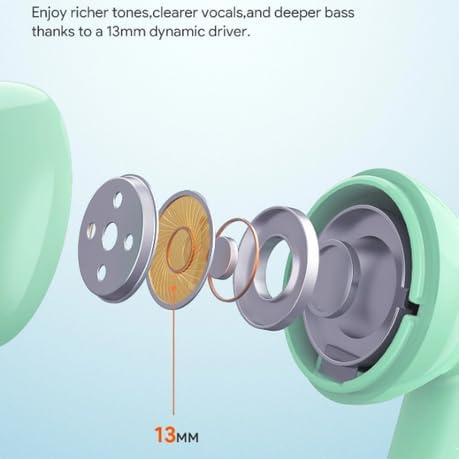
Image Description: A cutaway diagram of the JMMO T202 earbud, highlighting the internal 13mm dynamic driver components responsible for producing rich tones, clear vocals, and deep bass.
- Ultra-Low Latency: Experience minimal audio delay, ensuring seamless synchronization between video and audio content, ideal for gaming and video streaming.
- ENC Call Noise Reduction with 4-Mic: Reduce background noise and enhance voice pickup for clearer calls.

Image Description: A diagram showing the internal structure of a JMMO T202 earbud, illustrating the ENC (Environmental Noise Cancellation) technology with 4 microphones designed to reduce background noise for clearer calls.
- Wireless Connectivity: Connect effortlessly via Bluetooth technology for wireless freedom.
- Comfortable Fit: Ergonomically designed for extended wear without discomfort.
Maintenance
- Cleaning: Regularly clean the earbuds and charging case with a soft, dry, lint-free cloth. Do not use harsh chemicals or abrasive materials.
- Storage: When not in use, store the earbuds in their charging case to protect them and keep them charged.
- Avoid Water: The earbuds are not waterproof. Avoid exposure to water or excessive moisture.
- Temperature: Store and operate the earbuds within recommended temperature ranges to prevent damage to the battery and internal components.
Troubleshooting
| Problem | Solution |
|---|---|
| Earbuds not pairing |
|
| No sound from one earbud |
|
| Charging case not charging |
|
| Poor sound quality |
|
Specifications
| Feature | Detail |
|---|---|
| Model Name | JMMO - T202 |
| Connectivity Technology | Wireless (Bluetooth 5.1, inferred from pairing image) |
| Form Factor | In Ear |
| Colour | Green |
| Special Features | Fast Charging, HiFi Stereo Sound, Lightweight, Ultra-Low Latency, ENC Call Noise Reduction |
| Included Components | Cable, Protective Case, Wireless Charging Case |
| Manufacturer's Warranty | 6 Months |
Warranty & Support
The JMMO T202 Wireless Earbuds come with a 6 Months Manufacturer's Warranty. Please retain your proof of purchase for warranty claims.
For technical support or warranty inquiries, please contact your retailer or the manufacturer's customer service. Contact information may be available on the product packaging or the retailer's website.


