
T202
JMMO T202 Wireless Earbuds User Manual
Model: T202
Introduction
This manual provides comprehensive instructions for the JMMO T202 Wireless HI-FI Stereo Ultra-Low Latency Earbuds. Please read this manual carefully before using the product to ensure proper operation and to maximize your listening experience. Keep this manual for future reference.
Product Overview
Package Contents
- JMMO T202 Wireless Earbuds
- Charging Case
- Charging Cable
- Protective Case
Key Features
- Immersive HI-FI Stereo Sound: High-fidelity audio with crisp highs, deep bass, and balanced mids.
- Ultra-Low Latency Technology: Seamless audio-video synchronization for gaming and streaming.
- Wireless Bluetooth Connectivity: Freedom from tangled cords.
- Long Battery Life: Extended playtime on a single charge.
- Comfortable and Secure Fit: Ergonomic design for extended wear.
- Intuitive Touch Controls: Easy navigation for music and calls.
- Portable and Stylish Design: Compact and lightweight in vibrant blue.
- Built-in Microphone: Clear voice quality for hands-free calling.
- Noise Isolation: Blocks ambient noise for focused listening.
- Fast Charging
- Lightweight
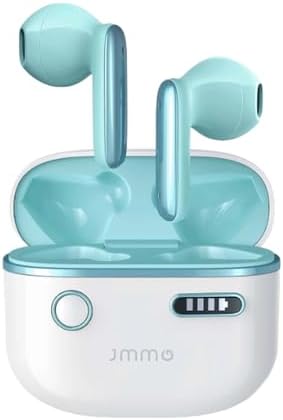
Image: The JMMO T202 Wireless Earbuds, shown in their open charging case. The earbuds are a vibrant blue, matching the interior of the white charging case. This image provides a clear view of the product's design and color.
Setup
Charging the Earbuds and Case
Before first use, fully charge the earbuds and the charging case. Connect the provided charging cable to the case and a power source. The indicator lights on the case will show the charging status.

Image: A graphic illustrating the battery life and charging capabilities of the JMMO T202 earbuds. It indicates 6 hours of playtime on a single charge, 24 hours total with the charging case, and less than 2 hours for fast charging. The image features large "30 hours" text, representing total playtime.
- Single Charge Playtime: Approximately 6 hours.
- Total Playtime with Charging Case: Up to 24 hours.
- Fast Charging: Less than 2 hours for a full charge.
Pairing with Your Device (One-Step Pairing)
The JMMO T202 earbuds feature one-step pairing for convenience.
- Ensure the earbuds are charged.
- Open the charging case. The earbuds will automatically enter pairing mode.
- On your device (smartphone, tablet, etc.), go to Bluetooth settings and enable Bluetooth.
- Select "JMMO T202" from the list of available devices.
- Once connected, you will hear a confirmation tone, and the device will show "Connected".
After the first successful connection, the earbuds will automatically pair with your device when you open the charging case, provided Bluetooth is enabled on your device.
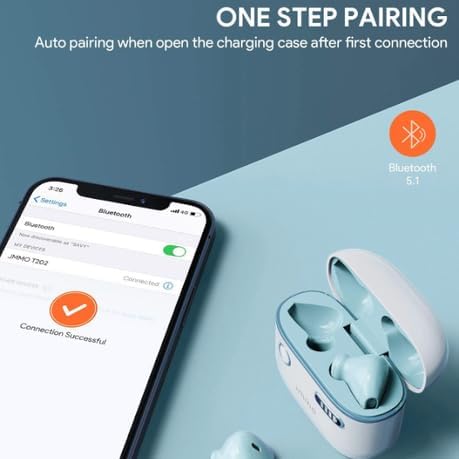
Image: A visual representation of the one-step pairing process for the JMMO T202 earbuds. It shows a smartphone screen with Bluetooth settings open, indicating a successful connection to "JMMO T202". The open charging case with earbuds is also visible, emphasizing the automatic pairing feature when the case is opened.
Operating Instructions
Touch Controls
The JMMO T202 earbuds feature intuitive touch controls for easy management of audio playback and calls. Specific touch gestures and their functions are detailed below:
- Play/Pause Music: Single tap on either earbud.
- Next Track: Double tap on the right earbud.
- Previous Track: Double tap on the left earbud.
- Answer/End Call: Single tap on either earbud.
- Reject Call: Press and hold either earbud for 2 seconds.
- Activate Voice Assistant: Triple tap on either earbud.
Audio Quality and Features
The JMMO T202 earbuds are engineered for a superior audio experience.
- HI-FI Stereo Sound: Enjoy rich tones, clearer vocals, and deeper bass thanks to the 13mm dynamic drivers.
- Ultra-Low Latency: Minimizes audio delay, ideal for gaming and video playback.
- ENC Call Noise Reduction with 4-Mic: Reduces background noise and picks up your voice for clearer calls.
- Noise Isolation: Helps block out ambient noise, allowing you to focus on your audio.
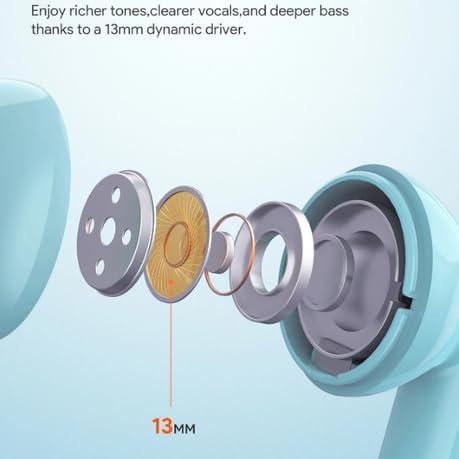
Image: An exploded view diagram illustrating the internal components of an earbud, highlighting a 13mm dynamic driver. Text indicates that this driver contributes to richer tones, clearer vocals, and deeper bass.

Image: A diagram showcasing the ENC (Environmental Noise Cancellation) Call Noise Reduction feature with a 4-microphone system within an earbud. The graphic suggests that this technology reduces background noise and enhances voice pickup for clearer calls.
Maintenance
Proper maintenance ensures the longevity and optimal performance of your JMMO T202 earbuds.
- Cleaning: Regularly clean the earbuds and charging case with a soft, dry, lint-free cloth. Do not use abrasive cleaners or solvents.
- Ear Tips: If removable, clean ear tips with mild soap and water, then dry thoroughly before reattaching.
- Charging Ports: Keep charging contacts and ports free of dust and debris. Use a dry cotton swab if necessary.
- Storage: When not in use, store the earbuds in their charging case to protect them and keep them charged.
- Avoid Moisture: Do not expose the earbuds or case to liquids, high humidity, or extreme temperatures.
Troubleshooting
If you encounter issues with your JMMO T202 earbuds, refer to the following common solutions:
No Sound or Intermittent Sound
- Ensure earbuds are fully charged.
- Check if the earbuds are properly paired with your device.
- Increase the volume on both your device and the earbuds.
- Move closer to your device to avoid signal interference.
- Try re-pairing the earbuds with your device.
Earbuds Not Pairing
- Ensure Bluetooth is enabled on your device.
- Make sure the earbuds are in pairing mode (open the case).
- Forget "JMMO T202" from your device's Bluetooth list and try pairing again.
- Ensure no other devices are connected to the earbuds.
- Restart your device and try pairing again.
Charging Issues
- Verify the charging cable is securely connected to both the case and the power source.
- Try a different charging cable or power adapter.
- Ensure the charging contacts on the earbuds and inside the case are clean and free of debris.
Specifications
| Feature | Detail |
|---|---|
| Brand | Generic |
| Model Name | JMMO - T202 |
| Item Model Number | T202 |
| Colour | Blue |
| Headphone Form Factor | In Ear |
| Connectivity Technology | Wireless (Bluetooth 5.1) |
| Special Features | Fast Charging, Lightweight, Noise Isolation, Ultra-Low Latency |
| Included Components | Cable, Protective Case, Wireless Charging Case |
| Date First Available | 1 June 2024 |
Warranty and Support
Your JMMO T202 Wireless Earbuds come with a manufacturer's warranty.
- Manufacturer's Warranty: 6 Months from the date of purchase.
- For warranty claims or technical support, please contact the retailer or manufacturer directly. Keep your proof of purchase for warranty validation.
Related Documents - T202
 |
August DVB-T202 Installation Manual Step-by-step guide to install the August DVB-T202 USB TV Receiver, including driver setup, software configuration with NextPVR, and system requirements for Windows. |
 |
4MODERNHOME T202 Instruction Manual Instruction manual for the 4MODERNHOME T202 lighting fixture, including parts list, installation steps, and safety warnings. |
 |
Horizon Fitness T101-04 & T202-03 Treadmill Service Manual This comprehensive service manual provides essential information for maintaining, troubleshooting, and repairing Horizon Fitness T101-04 and T202-03 treadmills, ensuring optimal performance and longevity. |
 |
Kelford Cams T202-A Camshaft Specifications and Installation Guide for Toyota Supra 2JZ TURBO Detailed specifications, installation instructions, and warranty policy for the Kelford Cams T202-A performance camshaft, designed for Toyota Supra 2JZ TURBO engines. Includes valve clearance, lift, duration, timing, and product care. |
 |
MODECOM Volcano OC LCD ARGB Air Cooler Installation Manual Comprehensive installation guide for the MODECOM Volcano OC LCD ARGB Air Cooler, detailing setup for Intel and AMD motherboards, component identification, and connection procedures. |
 |
August DVB-T202 USB TV Tuner User Manual Comprehensive guide for the August DVB-T202 USB TV Tuner, covering setup, features, and troubleshooting for digital terrestrial television reception on your PC with NextPVR software. |
Ask a question about this manual
Ask about setup, troubleshooting, compatibility, parts, safety, or missing instructions. Manuals+ will review the question and use this page’s manual context to help answer it.