
1. Introduction
This manual provides essential information for the safe and effective use of the ESXSWYDR MG4010E-i10v3 Dual Encoder Motor. This motor is designed for integration into advanced robotic systems, including mechanical arms and legged robots, offering precise control and feedback through its dual encoder system and RS485 communication interface. Please read this manual thoroughly before installation and operation.
2. Product Features
- Dual Encoder System: Equipped with 18-bit and 14-bit encoders for high-resolution position and velocity feedback.
- RS485 Communication: Standard industrial communication interface for robust and reliable data transmission.
- 24V Operation: Optimized for 24-volt power supplies common in robotic applications.
- Compact Design: Suitable for integration into various robotic platforms.
- Durable Construction: Engineered for demanding environments typical of robotic applications.
3. Safety Information
Adherence to the following safety guidelines is crucial to prevent injury and damage to the product or other equipment:
- Power Supply: Always ensure the power supply voltage matches the motor's specified voltage (24V). Incorrect voltage can cause permanent damage.
- Electrical Connections: Ensure all wiring is correctly connected and insulated to prevent short circuits. Consult wiring diagrams before making connections.
- Moving Parts: Keep hands, tools, and loose clothing away from moving parts during operation to avoid entanglement and injury.
- Mounting: Securely mount the motor to a stable surface using appropriate fasteners to prevent vibration and detachment during operation.
- Environment: Operate the motor within its specified environmental conditions (temperature, humidity) to ensure optimal performance and longevity.
- Professional Installation: Installation and maintenance should be performed by qualified personnel familiar with robotic systems and electrical components.
4. Package Contents
Upon unpacking, verify that all components are present and undamaged:
- 1 x ESXSWYDR MG4010E-i10v3 Dual Encoder Motor
- 1 x Basic connection cable (may vary by package)
If any items are missing or damaged, please contact your supplier immediately.
5. Setup
5.1 Physical Mounting
The motor features multiple mounting points for secure attachment to your robotic structure. Ensure the mounting surface is flat and rigid to minimize vibration.

Figure 5.1: Angled view of the motor's bottom, illustrating the mounting screw holes.
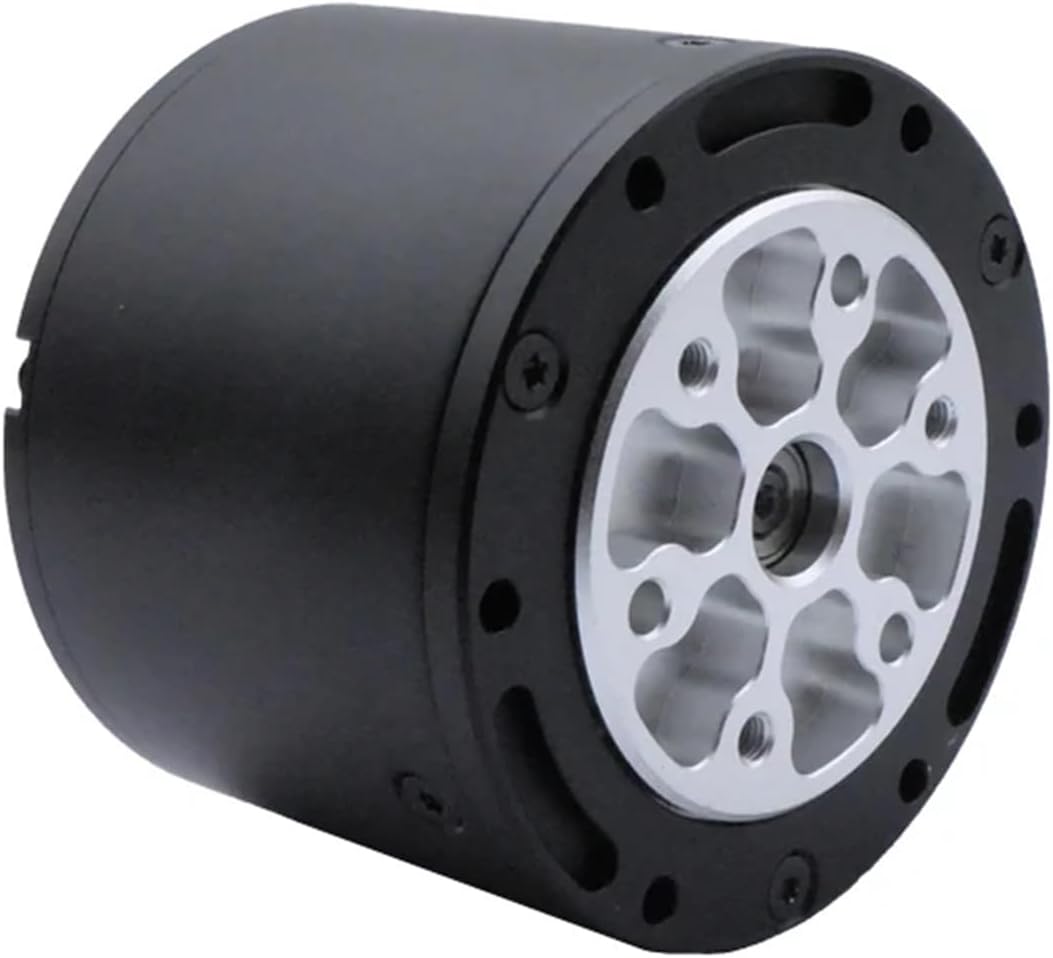
Figure 5.2: Straight view of the motor's bottom, highlighting the mounting points and central shaft.
5.2 Electrical Connections
Connect the motor to a stable 24V DC power supply. Observe correct polarity. The RS485 communication interface requires connection to a compatible controller or master device. Refer to the specific pinout diagram provided with your motor for detailed wiring instructions.

Figure 5.3: Side view of the motor, indicating connection areas and model markings.

Figure 5.4: Top view of the motor, displaying the model number and a connector interface.
5.3 Initial Power-Up
Before applying power, double-check all connections. Power on the motor and observe for any unusual sounds or movements. The motor should remain stationary until commanded by the controller.
6. Operating Instructions
The MG4010E-i10v3 motor is controlled via its RS485 interface. A master controller sends commands to the motor to initiate movement, set target positions, or adjust speed. The dual encoders provide real-time feedback on the motor's position and velocity.
- Communication Protocol: Refer to the detailed RS485 communication protocol document for specific command structures, register addresses, and data formats.
- Position Control: Send target position commands to the motor. The integrated controller will drive the motor to the desired position using feedback from the encoders.
- Velocity Control: Send target velocity commands to achieve continuous rotation at a specified speed.
- Feedback Reading: Periodically read encoder values via RS485 to monitor the motor's actual position and velocity.
- Error Handling: Implement error checking in your control software to handle communication errors or motor faults reported via RS485.
7. Maintenance
Regular maintenance ensures the longevity and reliable operation of your motor.
- Cleaning: Keep the motor free from dust, dirt, and debris. Use a soft, dry cloth for cleaning. Avoid using solvents or abrasive materials.
- Inspection: Periodically inspect all electrical connections for signs of wear, corrosion, or looseness. Check mounting screws for tightness.
- Environmental Conditions: Ensure the operating environment remains within the specified temperature and humidity ranges.
- Lubrication: The motor is typically sealed and does not require user lubrication. Do not attempt to disassemble the motor for lubrication unless specifically instructed by the manufacturer.
8. Troubleshooting
If you encounter issues with your MG4010E-i10v3 motor, consider the following troubleshooting steps:
- Motor Not Responding:
- Verify power supply connection and voltage (24V).
- Check RS485 communication lines for proper connection and continuity.
- Confirm the communication protocol settings (baud rate, parity, stop bits) match between the motor and controller.
- Ensure the motor's address is correctly set if multiple motors are on the bus.
- Incorrect Movement/Positioning:
- Check encoder feedback values to confirm they are being read correctly.
- Verify that the control commands sent are within the motor's operational limits.
- Inspect for any mechanical obstructions or binding that might impede motor movement.
- Overheating:
- Ensure the motor is not overloaded beyond its continuous torque rating.
- Check for adequate ventilation around the motor.
- Reduce the duty cycle or load if possible.
If problems persist after attempting these steps, contact technical support.
9. Specifications
| Attribute | Value |
|---|---|
| Model Number | MG4010E-i10v3 |
| Communication Interface | RS485 |
| Encoder Resolution | 18-bit and 14-bit |
| Operating Voltage | 24V |
| Package Dimensions | 1.18 x 0.79 x 0.39 inches |
| Item Weight | 1.76 ounces |
| Manufacturer | ESXSWYDR |
| ASIN | B0D5V9T431 |
| Assembly Required | No |
| Number of Pieces | 1 |
10. Warranty and Support
This ESXSWYDR MG4010E-i10v3 Dual Encoder Motor comes with a standard manufacturer's warranty. For specific warranty terms and conditions, please refer to the documentation provided at the time of purchase or contact your vendor.
For technical support, troubleshooting assistance, or inquiries regarding replacement parts, please contact ESXSWYDR customer service through the official channels provided by your retailer or on the manufacturer's website. When contacting support, please have your product model number (MG4010E-i10v3) and ASIN (B0D5V9T431) readily available.