1. Introduction
Thank you for choosing the JMMO T201 Wireless Bluetooth Earbuds. These earbuds are designed to provide a high-quality audio experience with the convenience of wireless connectivity and intuitive touch controls. This manual will guide you through the setup, operation, and maintenance of your new earbuds.
Package Contents:
- JMMO T201 Wireless Earbuds
- Wireless Charging Case
- Charging Cable
- Protective Case
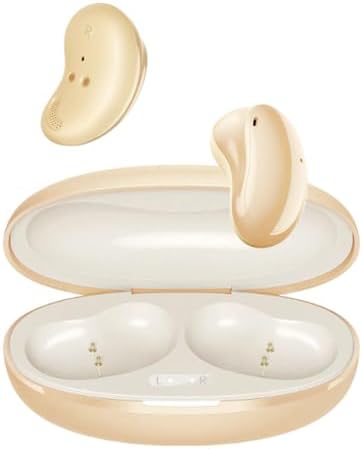
This image displays the JMMO T201 wireless earbuds, one removed from the case and the other resting inside, alongside their open charging case. The earbuds and case are a light yellow color.
2. Setup
2.1 Charging the Earbuds and Case
Before first use, fully charge the earbuds and the charging case. Place the earbuds into the charging case. Connect the charging cable to the case and a USB power source. The indicator lights on the case will show the charging status. A full charge for the earbuds provides approximately 8 hours of playback, with the charging case extending total usage to about 32 hours. Fast charging is supported, allowing for a full charge in less than 2 hours.
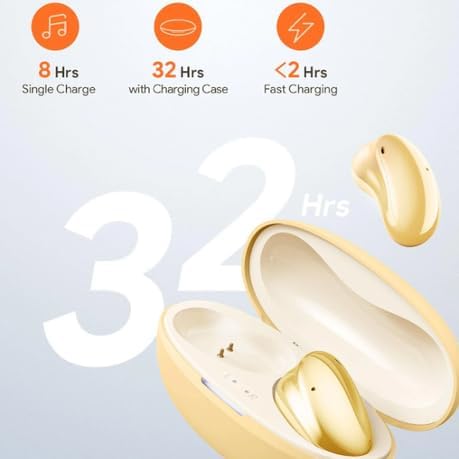
A visual representation of the JMMO T201 earbuds' battery performance, indicating 8 hours of playback on a single charge, up to 32 hours total with the charging case, and fast charging capability under 2 hours.
2.2 Pairing with a Device
- Ensure the earbuds are charged and placed inside the charging case.
- Open the lid of the charging case. The earbuds will automatically enter pairing mode.
- On your device (smartphone, tablet, etc.), go to Bluetooth settings and turn on Bluetooth.
- Search for available devices and select "JMMO T201" from the list.
- Once connected, you will hear a confirmation tone, and the device will show "Connected."

This image depicts the 'One Step Pairing' feature, showing a smartphone screen with a successful Bluetooth connection to 'JMMO T201' and the open earbud charging case in the foreground.
3. Operating the Earbuds
3.1 Touch Controls
The JMMO T201 earbuds feature intuitive touch controls on the outer surface of each earbud. Specific functions may vary slightly by device, but common controls include:
- Play/Pause Music: Single tap on either earbud.
- Answer/End Call: Single tap on either earbud.
- Reject Call: Press and hold either earbud for 2 seconds.
- Next Track: Double tap the right earbud.
- Previous Track: Double tap the left earbud.
- Activate Voice Assistant: Triple tap either earbud.
- Volume Control: Swipe up or down on the earbud surface (specific gesture may vary, refer to device settings if needed).
3.2 Active Noise Cancellation (ANC)
The earbuds feature Active Noise Cancellation technology to reduce ambient sounds. This function can typically be toggled on or off via a specific touch gesture (e.g., a long press or a specific number of taps, refer to product documentation or experiment with touch controls). When activated, ANC helps create a more immersive listening experience.
3.3 Making Calls
The JMMO T201 earbuds include a built-in microphone and utilize an ENC (Environmental Noise Cancellation) noise reduction algorithm. This technology filters out background noise, enhancing your voice for clear conversations during calls.
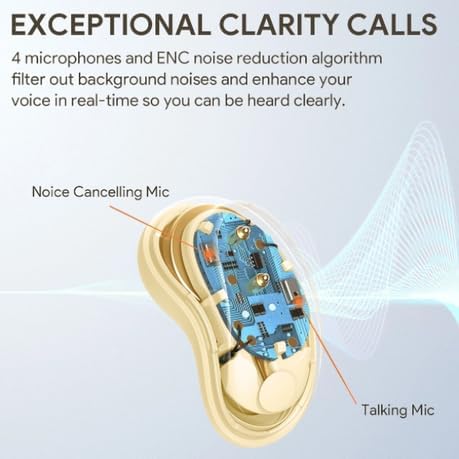
An internal diagram of the JMMO T201 earbud, illustrating the placement of its 'Noise Cancelling Mic' and 'Talking Mic' which work together with an ENC noise reduction algorithm for exceptional call clarity.
4. Maintenance
4.1 Cleaning
To maintain optimal performance and hygiene, regularly clean your earbuds and charging case. Use a soft, dry, lint-free cloth to wipe the surfaces. Avoid using abrasive materials, alcohol, or chemical cleaners, as these can damage the product.
4.2 Storage
When not in use, store the earbuds in their charging case to protect them from dust, dirt, and physical damage. Store the case in a cool, dry place away from direct sunlight and extreme temperatures.
5. Troubleshooting
If you encounter any issues with your JMMO T201 earbuds, please refer to the following common solutions:
- Earbuds not pairing: Ensure both earbuds are charged. Place them back in the case, close the lid, wait a few seconds, then open the lid to re-enter pairing mode. Check your device's Bluetooth settings and try reconnecting.
- No sound from earbuds: Check the volume level on your connected device. Ensure the earbuds are properly paired and selected as the audio output.
- One earbud not working: Try placing both earbuds back into the charging case, closing the lid, and then reopening it. Re-pair the earbuds with your device. Ensure both earbuds are charged.
- Charging issues: Verify that the charging cable is securely connected to both the case and the power source. Try a different USB port or charging cable. Ensure the charging contacts on the earbuds and inside the case are clean and free of debris.
- Poor sound quality: Ensure the earbuds are securely fitted in your ears. Check for any obstructions in the earbud speakers. Move closer to your connected device to avoid interference.
6. Product Specifications
| Feature | Specification |
|---|---|
| Model Name | JMMO T201 |
| Connectivity Technology | Wireless (Bluetooth v5.0) |
| Form Factor | In Ear |
| Color | Yellow |
| Special Features | Active Noise Cancellation, Built-in Microphone, Touch Control, Compact, Lightweight, Portable, Fast Charging |
| Single Charge Playtime | Up to 8 hours |
| Total Playtime (with case) | Up to 32 hours |
| Charging Time | Less than 2 hours (Fast Charging) |

An exploded view diagram illustrating the internal structure of a JMMO T201 earbud. It points out key features such as air vents for spacious audio, 10mm speakers for clear sound, and a bass duct to enhance lower frequencies.
7. Warranty and Support
7.1 Manufacturer's Warranty
The JMMO T201 Wireless Bluetooth Earbuds come with a 6 Months Manufacturer's Warranty from the date of purchase. This warranty covers manufacturing defects. Please retain your proof of purchase for warranty claims.
7.2 Customer Support
For further assistance, technical support, or warranty inquiries, please contact the retailer or manufacturer's customer service. Refer to your purchase documentation for specific contact details.


