
1. Introduction and Overview
This manual provides detailed instructions for the assembly, operation, and maintenance of your VONADO Johnny 5 Robot Building Set. This set allows you to construct a remote and app-controlled robot, designed to enhance STEM skills through hands-on experience. The completed model features adjustable head and arms, grasping hands, an openable torso, and rolling tracks for dynamic movement.
The building set contains 1176 pieces and is suitable for individuals aged 8 years and older. Please ensure all components are accounted for before beginning assembly.
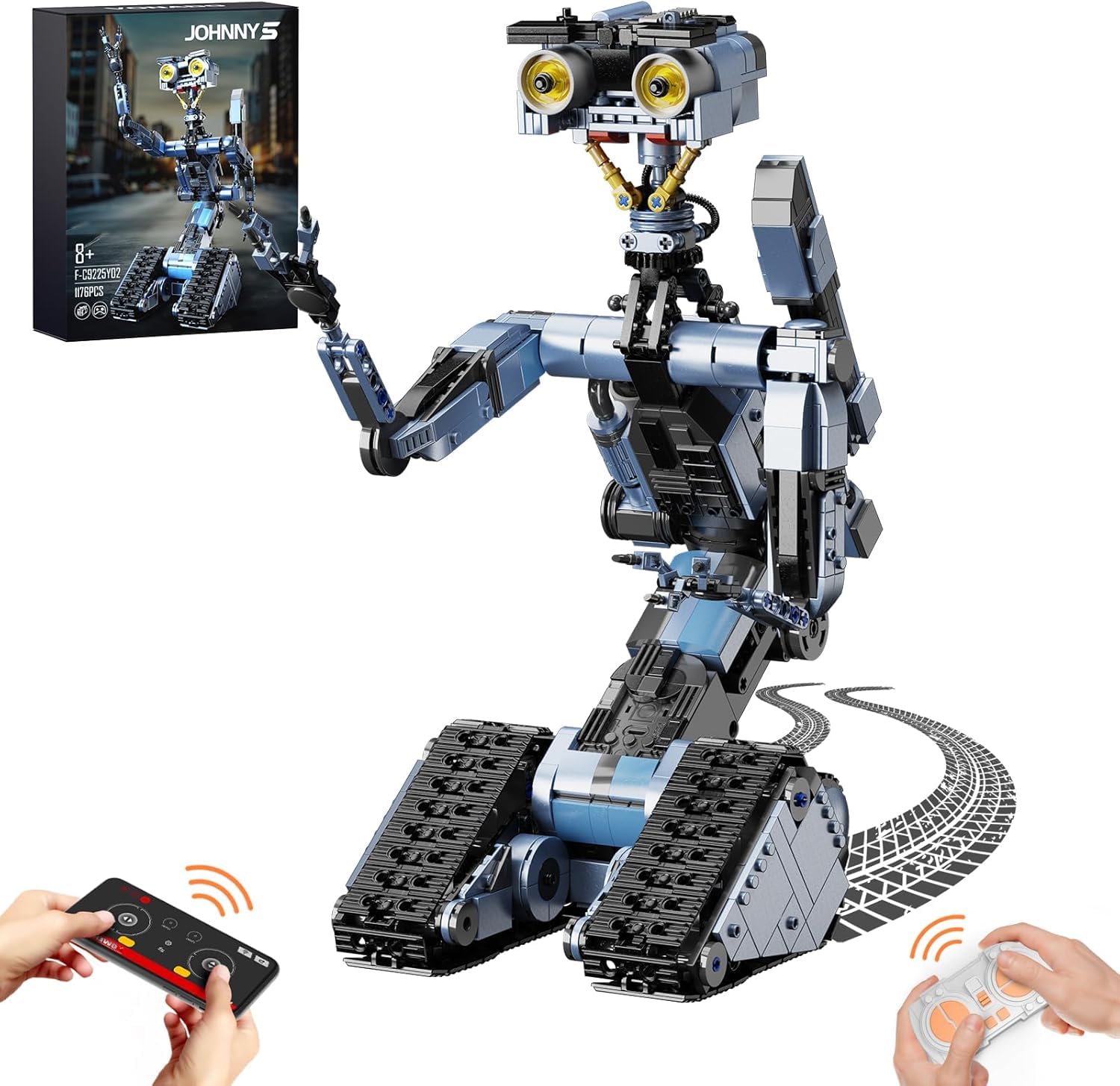
Figure 1: Assembled VONADO Johnny 5 Robot Building Set.

Figure 2: The Johnny 5 Robot model measures approximately 13.3 inches (33.78 cm) long, 6.4 inches (16.25 cm) wide, and 18.5 inches (46.99 cm) high.
Important Safety Information: This product contains small parts and poses a choking hazard. Not suitable for children under 3 years of age.
2. Setup and Assembly
Assembly of the Johnny 5 Robot is required. Follow the included step-by-step building instructions carefully. Ensure all connections are secure to prevent parts from detaching during operation.
2.1 Powering the Robot
The robot is powered by a rechargeable lithium-ion battery, which is included in the set. The battery can be charged via a USB cable.

Figure 3: The robot's battery can be charged using a USB cable connected to a power bank, wall adapter, or computer USB port.
2.2 Remote Control Connection
To operate the robot using the remote control, follow these steps to establish a connection:
- Turn on the power switch on the robot.
- Turn on the power switch on the remote control.
- The robot and remote control will automatically connect.

Figure 4: Steps for linking the robot with its remote control.
3. Operating Instructions
The Johnny 5 Robot can be controlled via the included remote control or a dedicated mobile application.
3.1 Remote Control Operation
Use the remote control to maneuver the robot and activate its features. The remote allows for 360-degree rotation and precise movement.
- Left Track Control: Controls the movement of the left track.
- Right Track Control: Controls the movement of the right track.
- Head Direction Control: Adjusts the direction of the robot's head.
- Power On/Off: Activates or deactivates the robot.
3.2 App Control Operation
Download the official VONADO app to control the robot from your smartphone or tablet. The app supports iOS 10.0 and above, and Android 8.0 and above.
- Forward/Backward Control: Moves the robot forward or backward.
- Head Direction Control: Adjusts the robot's head movement.
- Left/Right Control: Steers the robot left or right.
- Power On/Off: Activates or deactivates the robot.

Figure 5: Overview of remote control and app control functions.
3.3 Robot Features and Movements
The assembled Johnny 5 Robot is designed for interactive play with several movable parts:
- Adjustable Head: The robot's head can be rotated and adjusted to express various 'emotions'.
- Movable Arms and Grasping Hands: The arms can be positioned freely, and the hands are designed to grasp small objects.
- Openable Torso: The central body section can be opened.
- Rolling Tracks: The powerful tracks allow the robot to move forward, backward, and turn left or right on various surfaces.

Figure 6: The robot is capable of 360-degree rotation for dynamic movement.

Figure 7: Key features of the robot including its expressive head, movable arms, and robust tracks.

Figure 8: Detailed view of the robot's adjustable head mechanism.

Figure 9: Detailed view of the robot's robust rolling tracks.
4. Maintenance
To ensure the longevity and proper function of your Johnny 5 Robot, follow these maintenance guidelines:
- Cleaning: Use a soft, dry cloth to gently wipe down the robot. Avoid using water or cleaning solutions directly on electronic components.
- Storage: Store the robot in a cool, dry place away from direct sunlight and extreme temperatures.
- Battery Care: Fully charge the battery before long periods of storage and recharge periodically (e.g., every 3-6 months) to maintain battery health.
- Component Check: Periodically inspect all connections and moving parts for any signs of wear or looseness. Tighten or reassemble as necessary.
5. Troubleshooting
If you encounter issues with your Johnny 5 Robot, refer to the following common problems and solutions:
| Problem | Possible Cause | Solution |
|---|---|---|
| Robot does not respond to remote/app control. | Battery low or depleted; remote/app not connected; robot power off. | Ensure robot and remote control are powered on. Recharge the robot's battery. Re-establish connection as per Section 2.2. |
| Robot parts detach during operation. | Loose connections during assembly. | Carefully re-examine the assembly instructions and re-secure any loose parts. Apply gentle force during play. |
| Robot moves erratically or tracks are stuck. | Obstruction in tracks; track components not properly assembled. | Check tracks for any foreign objects. Ensure all track links and wheels are correctly installed and move freely. |
| Missing building pieces. | Packaging error or lost during assembly. | Double-check all packaging materials. If pieces are genuinely missing, contact VONADO customer support (see Section 7). |
6. Specifications
- Model Number: F-C9225Y02
- Number of Pieces: 1176
- Dimensions (Assembled): 16.26 cm (6.4 in) x 33.78 cm (13.3 in) x 46.99 cm (18.5 in)
- Weight: 1.48 kg
- Material: Acrylonitrile Butadiene Styrene (ABS)
- Battery Type: Rechargeable Lithium-ion Battery (Included)
- Charging: USB Charging
- Control Methods: Remote Control, Mobile App (iOS 10.0+, Android 8.0+)
- Recommended Age: 8 years and up
- Assembly Required: Yes
7. Warranty and Support
7.1 Warranty Information
Specific warranty details for the VONADO Johnny 5 Robot Building Set are typically provided with the product packaging or can be found on the official VONADO website. Please refer to these sources for comprehensive warranty terms and conditions.
7.2 Customer Support
For any questions, missing parts, or technical assistance, please contact VONADO customer support. Contact information can usually be found on the product packaging or the manufacturer's official website.
Manufacturer: VONADO