
1. Introduction
The Green Blue GB360 F mechanical timer is designed to efficiently control energy consumption for various electrical appliances in your home, garage, or workshop. It offers precise control over device operation, contributing to energy savings and convenience. This timer features up to 48 programmable settings within a 24-hour cycle, with a minimum setting interval of 15 minutes. Its robust design supports a maximum load of 3680 W, making it suitable for a wide range of applications. The timer is user-friendly, allowing for quick and effortless program setup.

Image 1.1: Front view of the Green Blue GB360F mechanical timer.
2. Safety Instructions
- Ensure the timer is used indoors only, as it has an IP20 protection rating.
- Do not exceed the maximum load of 3680 W (16 A). Overloading can cause damage or fire.
- Always plug the timer into a properly grounded wall socket.
- Do not immerse the timer in water or expose it to excessive moisture.
- Keep out of reach of children. This device includes child safety features, but supervision is always recommended.
- Do not disassemble or attempt to repair the timer yourself. Contact qualified personnel for service.
- Unplug the timer from the wall socket before cleaning.
3. Product Features
- Efficient Energy Management: Allows effective control of energy consumption for connected devices.
- 48 Programmable Settings: Up to 48 distinct ON/OFF cycles can be set within a 24-hour period.
- 15-Minute Interval: Minimum setting time of 15 minutes for precise scheduling.
- High Performance: Supports a maximum load of 3680 W (16 A) for versatile use with various appliances.
- Easy to Use: Intuitive and user-friendly operation for quick program setup.
- Appliance Automation: Ideal for scheduling lights, fans, aquariums, coffee machines, and other electrical devices.
- Energy Saving: Reduces energy consumption through precise control of operating times.
- Child Safety: Equipped with child protection features.
- Compact Design: Space-saving dimensions for convenient placement.

Image 3.1: Examples of devices that can be automated with the timer.
4. Package Contents
Upon opening the manufacturer's packaging, you should find the following items:
- Green Blue GB360 F Mechanical Timer
- User Manual (this document)

Image 4.1: Green Blue GB360F timer in its packaging.
5. Setup
- Unpack the Timer: Carefully remove the GB360 F mechanical timer from its packaging.
- Plug into Wall Socket: Insert the timer's plug into a standard 220-240V / 50Hz wall socket. The timer is designed for Type F (Schuko) sockets.
- Set Current Time: Rotate the entire 24-hour dial clockwise until the current time aligns with the arrow indicator on the timer's face. The dial is marked with hours (0-23 or 1-24).
- Connect Appliance: Plug the appliance you wish to control into the socket on the front of the timer.

Image 5.1: Timer connected to a wall socket and an appliance.
6. Operating Instructions
6.1. Setting Programs (ON/OFF Times)
The timer dial is divided into 24 hours, with each hour further divided into four 15-minute segments. Each 15-minute segment has a small pin around the outer edge of the dial.
- Identify Pins: Locate the small black pins around the circumference of the dial. Each pin represents a 15-minute interval.
- Set ON Time: To set a period when the appliance should be ON, push the corresponding pins downwards. Each pushed-down pin will keep the appliance ON for 15 minutes.
- Set OFF Time: To set a period when the appliance should be OFF, leave the corresponding pins in the upwards position.
- Example: If you want an appliance to be ON from 8:00 AM to 9:00 AM, push down all four pins between the '8' and '9' marks on the dial.
6.2. Manual Override Switch
The timer is equipped with a manual override switch, typically located on the side of the unit. This switch allows you to bypass the programmed settings.
- Timer Mode (Clock Symbol): When the switch is set to the clock symbol (usually indicated by a small clock icon), the timer will operate according to your programmed ON/OFF settings.
- Always ON Mode (I Symbol): When the switch is set to the 'I' symbol, the appliance connected to the timer will remain continuously ON, regardless of the pin settings.
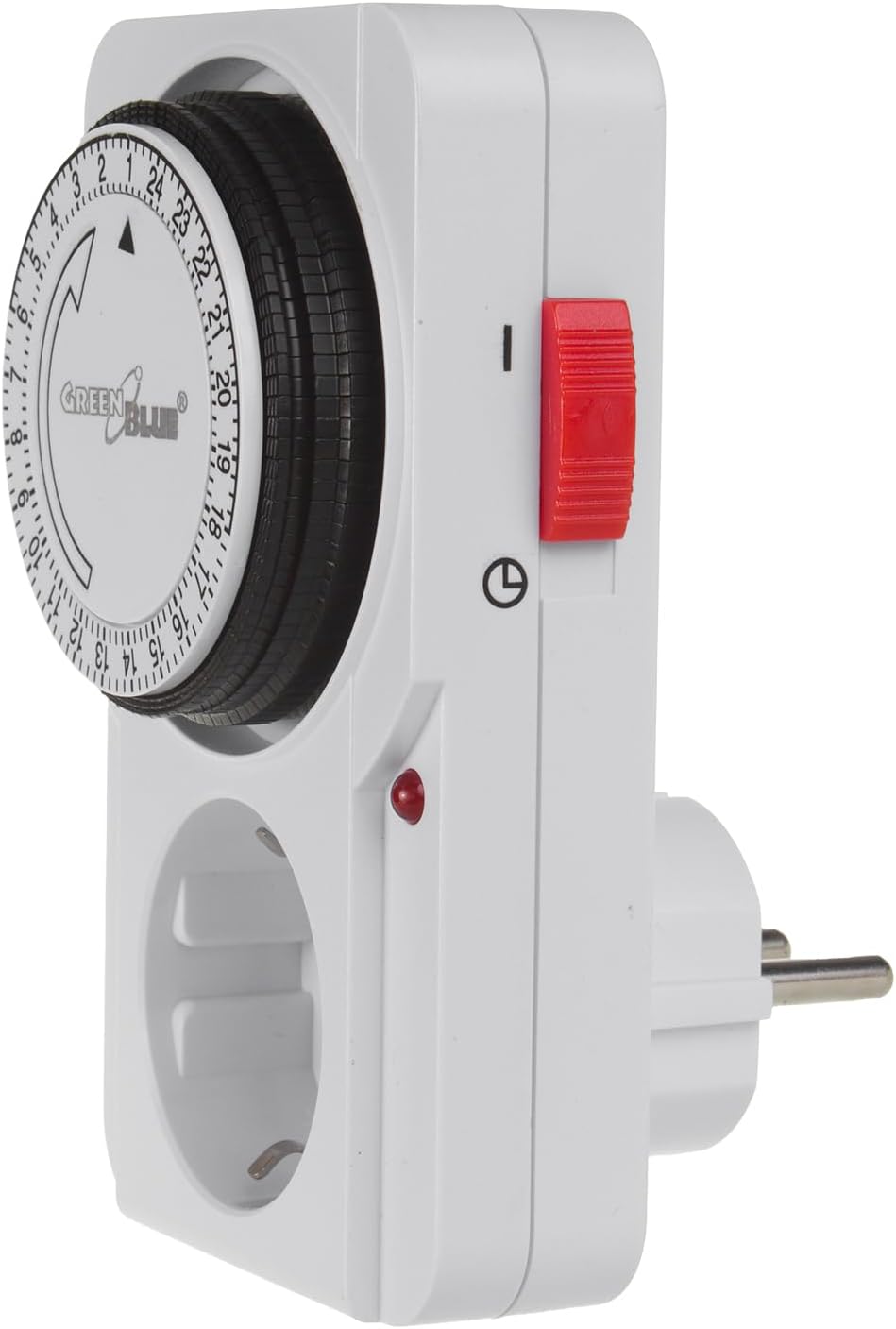
Image 6.1: Manual override switch on the side of the timer.
7. Maintenance
- Cleaning: Disconnect the timer from the power outlet before cleaning. Wipe the exterior with a soft, dry cloth. Do not use liquid cleaners or abrasive materials.
- Storage: Store the timer in a cool, dry place away from direct sunlight and extreme temperatures when not in use.
- Inspection: Periodically inspect the timer and its plug for any signs of damage, such as cracks or frayed wires. If damage is found, discontinue use and replace the unit.
8. Troubleshooting
| Problem | Possible Cause | Solution |
|---|---|---|
| Appliance does not turn ON/OFF as programmed. |
|
|
| Timer dial is not rotating. |
|
|
| Red indicator light is off. |
|
|
9. Specifications
- Model: GB360 F
- Brand: Green Blue
- Plug Type: F (Schuko)
- Minimum Timer Setting: 15 minutes
- Maximum Timer Setting: 24 hours
- Number of Programs: 48
- Max Load: 3680 W (16 A)
- Power Supply: 220-240 V / 50 Hz
- Dimensions (L x W x H): 4.2 x 7 x 12 cm (122 x 76 x 66 mm)
- Weight: 160 g
- Protection Rating: IP20 (Indoor use only)
- Operating Temperature Range: -10°C to +50°C
- Operating Modes: 2 (Timer Mode, Always ON Mode)
- Color: White
- Child Safety: Yes

Image 9.1: Product dimensions.

Image 9.2: Back label with specifications.
10. Warranty and Support
Specific warranty information for the Green Blue GB360 F mechanical timer is not available in the provided product details. For warranty claims or technical support, please refer to the contact information provided by your retailer or the manufacturer's official website.
Information regarding the availability of spare parts is also not provided.


