
1. Safety Information
Please read this manual thoroughly before installation and operation. Failure to follow instructions may result in injury or damage to the product.
- Always wear a helmet and appropriate safety gear when riding an e-bike.
- Ensure all connections are secure and waterproof before riding.
- Do not modify the motor or controller settings beyond recommended parameters.
- Regularly check brakes, tires, and all components for wear and tear.
- Keep the battery and electrical components dry.
- Children should only operate the e-bike under adult supervision.
2. Package Contents
The CUBELLIN 36V 350W Electric Bike Conversion Kit includes the following components:
- 1x 26-inch Front Motor Wheel (36V 350W Hub Motor)
- 1x Controller
- 1x LCD Display
- 1x Thumb Throttle
- 2x Brake Levers with Motor Inhibitors
- 1x Pedal Assist Sensor (PAS)
- 1x Controller Bag
- Cables and Connectors
- Installation Accessories (nuts, bolts, cable ties)
- Instruction Manual
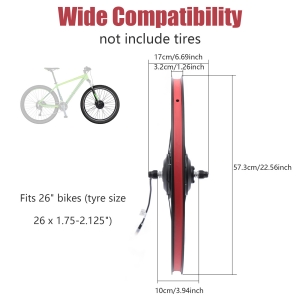
Image: All components included in the CUBELLIN Electric Bike Conversion Kit.
3. Specifications
| Feature | Specification |
|---|---|
| Motor Type | 36V 350W Brushless Geared Hub Motor |
| Wheel Size | 26 Inches (Front Wheel) |
| Max Motor Speed (Unloaded) | 35 km/h |
| Rotational Speed | 300 rpm |
| Torque | 30 N.m |
| Efficiency | ≥82% |
| Wheel Material | Aluminum Alloy |
| Brake Style Compatibility | Disc Brake |
| LCD Display Functions | Speed, Mileage, Power, Fault Notifications, 5-Speed Adjustable |
| Net Weight | 7kg / 15.43 lbs |
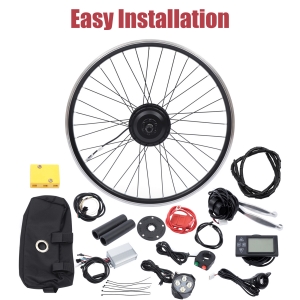
Image: Detailed dimensions and specifications of the 26-inch front wheel hub motor.
4. Setup and Installation
4.1 Pre-Installation Checks
- Ensure your bicycle is compatible with a 26-inch front wheel and disc brakes.
- Verify all kit components are present and undamaged.
- Gather necessary tools: wrenches, screwdrivers, cable cutters, zip ties.
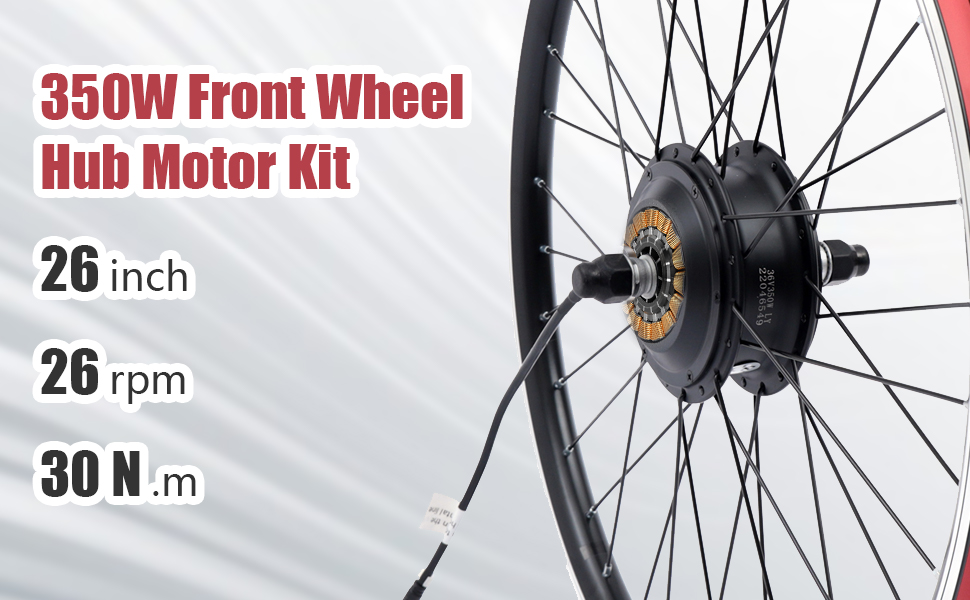
Image: The conversion kit is designed for wide compatibility with 26-inch bikes (tyre size 26 x 1.75-2.125").
4.2 Step-by-Step Installation
- Remove Existing Front Wheel: Carefully remove your bicycle's original front wheel.
- Install Motor Wheel: Mount the new 26-inch front motor wheel into the bicycle's front fork. Ensure it is centered and securely fastened with the provided nuts and washers.
- Mount Controller: Place the controller inside the provided controller bag. Secure the bag to your bike frame in a suitable location, typically on the top tube or down tube, ensuring cables can reach all components.
- Install LCD Display: Attach the LCD display to your handlebar. Position it for easy viewing while riding.
- Install Thumb Throttle: Mount the thumb throttle on the handlebar, usually on the right side, next to the grip.
- Install Brake Levers: Replace your existing brake levers with the new brake levers that include motor inhibitor sensors. Connect the sensor wires.
- Install Pedal Assist Sensor (PAS): Attach the PAS to your bike's bottom bracket area. Ensure the sensor and magnet disc are correctly aligned for proper function.
- Connect Wiring: Carefully connect all cables from the motor, controller, display, throttle, brake levers, and PAS. Refer to the wiring diagram in the included manual for specific connections. Use cable ties to neatly secure all wires along the frame, preventing interference with moving parts.
- Final Checks: Double-check all connections, ensure the motor wheel spins freely, and test the brakes.
Video: Official CUBELLIN Electric Bike Conversion Kit installation guide. This video demonstrates the process of assembling and installing the various components of the conversion kit onto a bicycle frame.
5. Operating Instructions
5.1 LCD Display Functions
The LCD display provides essential riding information and allows you to adjust settings:
- Speed: Displays current riding speed (km/h).
- Mileage: Shows trip distance and total odometer.
- Power: Indicates real-time motor power output.
- Battery Level: Graphic representation of remaining battery charge.
- 5-Speed Adjustable: Allows selection of 5 levels of pedal assist, from low to high.
- Fault Notifications: Displays error codes if any system issues occur.
- Fixed-Speed Cruise Function: Maintain a constant speed without continuous throttle input.
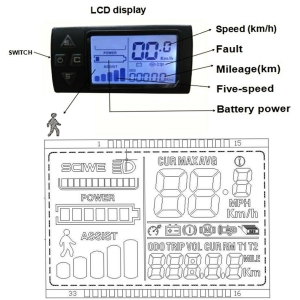
Image: The LCD display shows speed, mileage, power, battery level, and fault notifications, allowing riders to monitor bike status.
5.2 Riding Modes
- Pedal Assist Mode (PAS): The motor provides assistance as you pedal. Adjust the assist level using the display controls. Higher levels provide more power.
- Throttle Mode: Use the thumb throttle to engage the motor without pedaling. This mode is ideal for quick acceleration or maintaining speed.
- Walk Assist Mode: For easier maneuvering while walking beside the bike, activate walk assist mode (typically 6 km/h).
6. Maintenance
- Regular Checks: Periodically inspect all bolts, nuts, and connections for tightness. Check tire pressure and brake function before each ride.
- Cleaning: Clean the motor, controller, and battery with a damp cloth. Avoid high-pressure washing directly on electrical components.
- Battery Care: Charge the battery regularly, even when not in use, to prolong its lifespan. Store the battery in a cool, dry place.
- Lubrication: Keep the chain and other moving parts lubricated as per standard bicycle maintenance.
7. Troubleshooting
If you encounter issues, refer to the LCD display for fault notifications. Common issues and general solutions are listed below:
- No Power: Check battery connection, ensure the battery is charged, and verify all main power cables are securely connected.
- Motor Not Assisting: Check PAS sensor alignment and connection. Ensure brake levers are not engaged (motor inhibitors will cut power).
- Display Not Working: Check display cable connection to the controller.
- Intermittent Power: Inspect all wiring for loose connections or damage.
For specific error codes displayed on the LCD, consult the detailed troubleshooting section in the full instruction manual or contact customer support.
8. Warranty and Support
The CUBELLIN Electric Bike Conversion Kit comes with a 2-year warranty covering manufacturing defects. Please retain your proof of purchase for warranty claims.
For technical assistance, warranty claims, or any questions regarding your product, please contact CUBELLIN customer support through your retailer or the official brand website.