1. Introduction
The GOYERRNES GR-CA-1600 Industrial Infrared Thermometer is a high-precision, non-contact device designed for accurate temperature measurement across a wide range. It features dual-laser targeting, adjustable emissivity, and multiple measurement modes, making it suitable for various industrial and professional applications. This manual provides essential information for safe and effective use of the device.
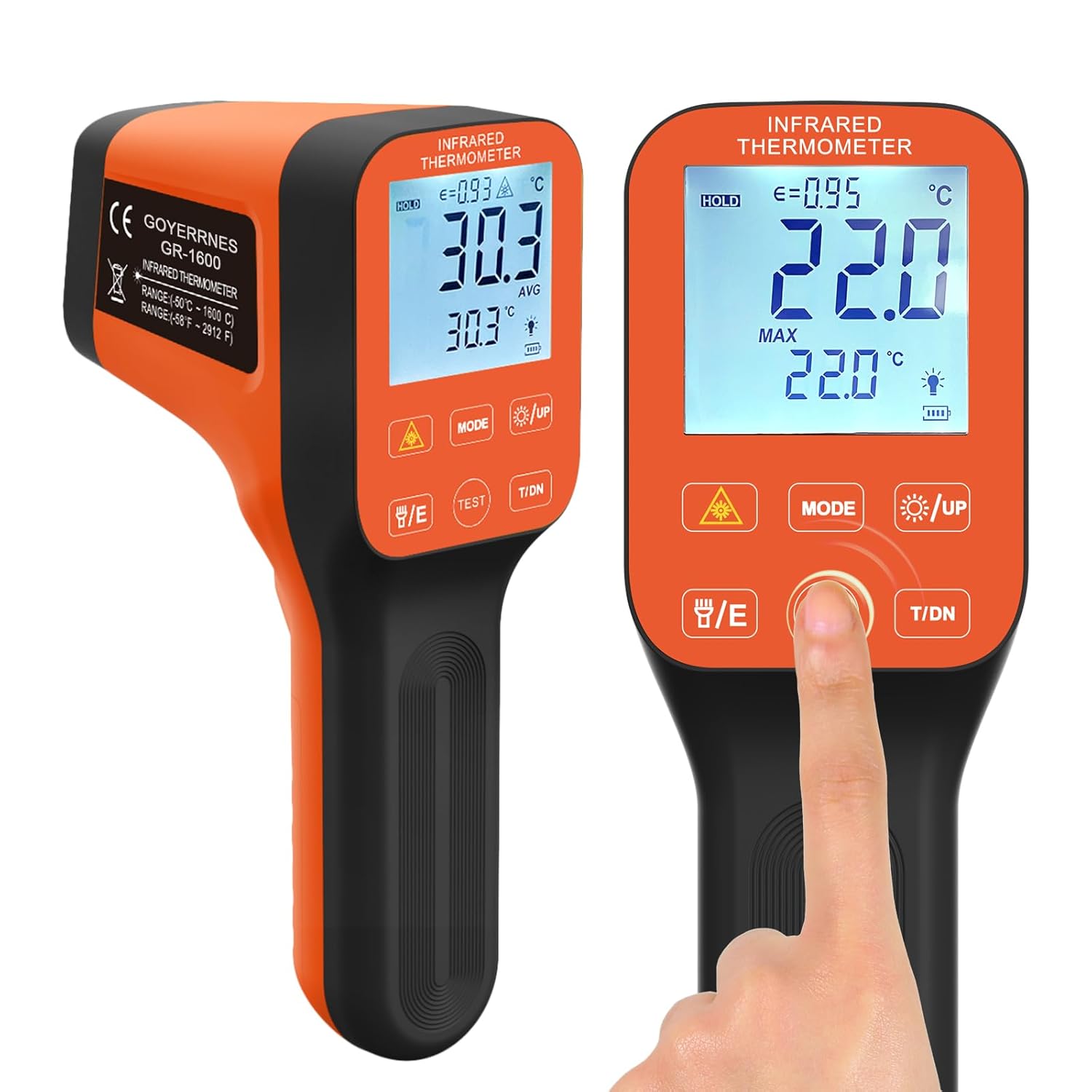
Figure 1: GOYERRNES GR-CA-1600 Industrial Infrared Thermometer.
Video 1: Overview of an Infrared Thermometer, demonstrating its use in various applications like automotive and cooking. Note: The specific model shown in this video may vary from the GR-CA-1600, but the general principles of operation are similar.
2. Package Contents
Verify that all items are present and in good condition upon opening the package.

Figure 2: The package includes the Infrared Thermometer, a carrying bag, a packing box, a user manual, a screwdriver, and a Type-C charging cable.
- GOYERRNES GR-CA-1600 Infrared Thermometer
- Carrying Bag
- User Manual
- Screwdriver
- Type-C Charging Cable
3. Setup
3.1 Battery Installation and Charging
The device is rechargeable for convenient use. Follow these steps to install the battery and charge the unit:
- Remove the battery cover using the provided screwdriver.
- Connect the power cable to the battery.
- Install the battery into the compartment and secure the cover.
- Charge the device using the Type-C cable and a compatible power adapter.

Figure 3: Battery installation and charging process for the thermometer.
4. Operating Instructions
4.1 Basic Operation
To take a temperature reading, aim the thermometer at the target surface and press the trigger. The temperature will be displayed on the LCD screen. Ensure the lens protective cover is removed during measurement.
4.2 Distance-to-Spot Ratio (D:S)
The GR-CA-1600 features a 30:1 D:S ratio, allowing for accurate measurements from a greater distance. This is particularly useful for high-temperature environments or hard-to-reach areas. For example, you can measure a 10cm (3.9 inch) area from 300cm (118 inches) away.
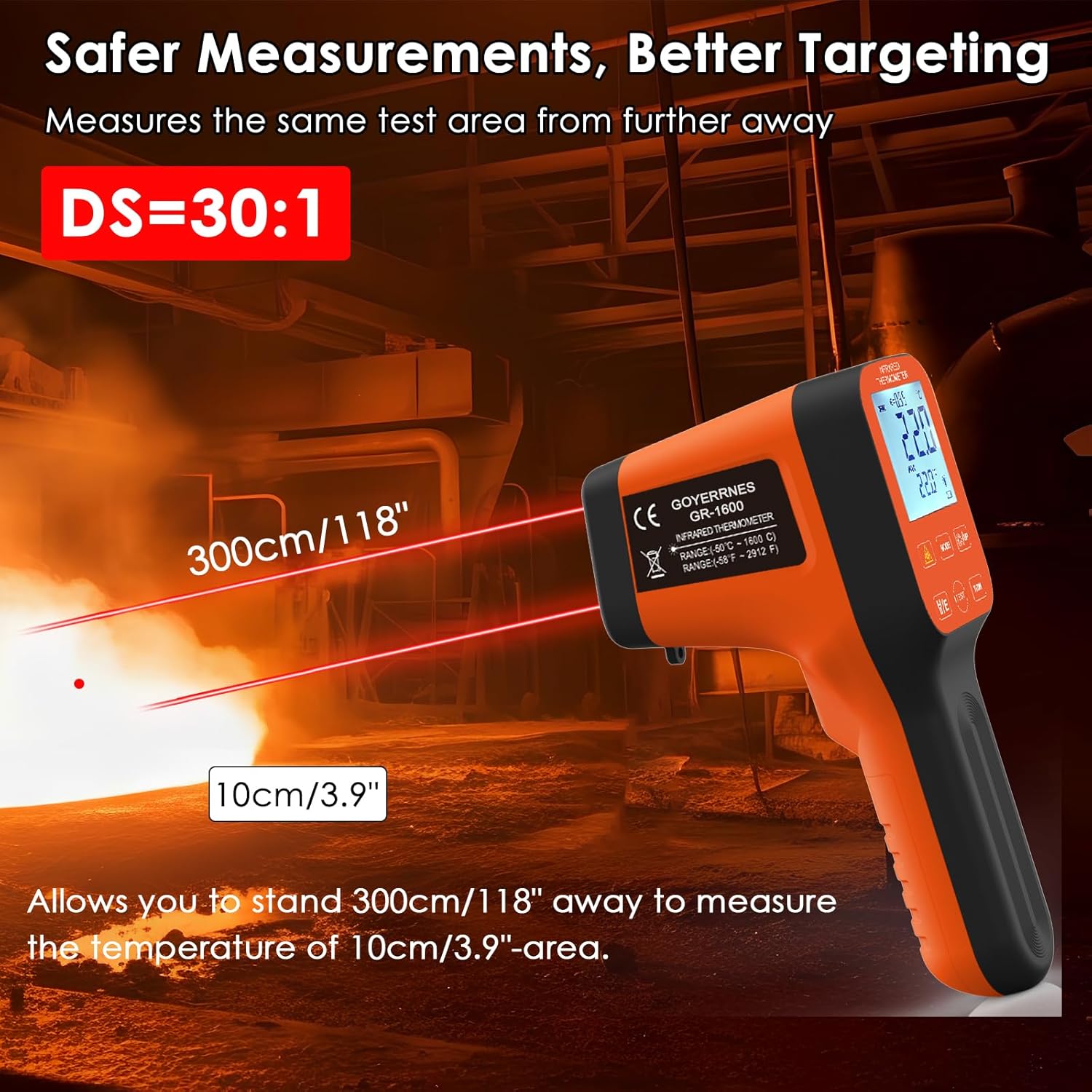
Figure 4: Demonstrating the 30:1 Distance-to-Spot ratio for remote temperature measurement.
4.3 Dual Laser Targeting and Flashlight
The dual-laser technology provides precise targeting for accurate readings. A built-in flashlight assists in low-light conditions, helping to illuminate the target area.

Figure 5: Dual laser targeting and flashlight in action.
4.4 Display Features and Modes
The large LCD backlit screen displays temperature readings, emissivity settings, and various modes. The device supports MIN/MAX/AVG/DIF modes and can store up to 12 sets of data.

Figure 6: Detailed view of the LCD display and available functions.

Figure 7: Data storage and display of MIN/MAX/AVG temperatures.
4.5 Adjustable Emissivity
Emissivity can be adjusted for different surface materials to ensure accurate readings. Refer to the emissivity table in the full manual for common materials.
4.6 Temperature Unit Switching
Easily switch between Celsius (°C) and Fahrenheit (°F) units using the dedicated button on the device.
Video 2: Demonstrates button functions, battery installation, and app connectivity for an infrared thermometer. Note: The specific model shown in this video may vary from the GR-CA-1600, but the general button descriptions and app features are illustrative.
Video 3: Illustrates the use of an infrared thermometer with a K-type probe for dual temperature measurement. This feature may be available on some infrared thermometers for enhanced accuracy on various surfaces. Note: The specific model shown in this video may vary from the GR-CA-1600.
5. Maintenance
5.1 Cleaning
Wipe the device clean with a soft, damp cloth. Do not use abrasive cleaners or immerse the device in water. The device features waterproof touch buttons, enhancing durability.

Figure 8: The thermometer features waterproof touch buttons for enhanced durability.
5.2 Storage
Store the thermometer in its carrying bag in a cool, dry place when not in use. Avoid extreme temperatures and direct sunlight.
6. Troubleshooting
| Problem | Possible Cause | Solution |
|---|---|---|
| Inaccurate readings | Incorrect emissivity setting; distance too far; dirty lens | Adjust emissivity; move closer to target; clean lens |
| Device does not power on | Low battery; battery not installed correctly | Charge battery; re-install battery |
| Laser not visible | Laser function off; bright ambient light | Activate laser; use in lower light conditions |
7. Specifications
| Feature | Detail |
|---|---|
| Temperature Range | -58°F to 2912°F (-50°C to 1600°C) |
| Accuracy | ±1°C / ±1% |
| Response Time | 0.25 seconds |
| Distance-to-Spot Ratio (D:S) | 30:1 |
| Emissivity | Adjustable |
| Display | Large LCD with Backlight |
| Special Features | Dual Laser, Flashlight, MIN/MAX/AVG/DIF Modes, 12 Data Storage, Rechargeable, Waterproof Touch Buttons, Tripod Screw Hole |
| Power Source | Battery Powered (Rechargeable) |
| Model Number | GR-CA-1600 |
Video 4: Demonstrates the dual temperature measurement capabilities (infrared and probe) and distance-to-spot ratio of an infrared thermometer. Note: The specific model shown in this video may vary from the GR-CA-1600, but the features are relevant to industrial infrared thermometers.
8. Safety Information
- CAUTION: This device uses a Class 2 laser product. Do not stare into the laser beam.
- Do not point the laser at people or animals.
- Do not use this device for measuring human body temperature. It is designed for industrial applications.
- Keep out of reach of children.
- Always remove the lens protective cover before taking measurements.
9. Warranty Information
GOYERRNES products are manufactured with high-quality materials and craftsmanship. This product is covered by a limited warranty against defects in material and workmanship for a period of one year from the original purchase date. This warranty does not cover damage caused by misuse, abuse, accident, or unauthorized modifications.
10. Support
For technical support, warranty claims, or general inquiries, please contact GOYERRNES customer service. Refer to the contact information provided on the product packaging or the official GOYERRNES website.