
1. Product Overview
The ALIBELL Wireless Paging System is designed to enhance service efficiency in various commercial settings such as restaurants, cafes, hospitals, and banks. This system allows customers to easily alert staff, ensuring timely service. It comprises digital display receivers and call buttons (pagers) that communicate wirelessly.

Figure 1.1: ALIBELL Wireless Paging System components, including two digital display receivers and sixteen call buttons.
The system features advanced wireless reception technology, supporting multiple ringtones, dual-language announcements, and a 24-hour LED display. Its user-friendly design and elegant appearance make it a practical solution for improving customer satisfaction.
2. Package Contents
Please verify that all items listed below are included in your package:
- 2 x LED Digital Display Receivers
- 16 x Beeper Pagers (Call Buttons)
- 2 x Screws (for mounting)
- 1 x Sticker (for mounting)
3. Key Features
- Advanced Wireless Reception: Ensures reliable and stable communication between pagers and receivers.
- Multiple Ringtones: Choose from up to 31 distinct ringtones for notification.
- Dual Language Support: Number call announcements available in English and Japanese.
- 24-Hour LED Display: Clear digital display for time and call numbers.
- Adjustable Volume: 5 levels of volume control (0-100 dB), including a mute mode.
- Expandable System: Supports connection with up to 99 call buttons.
- Memory Function: Retains programmed settings (accessories, time, ringtones) even after power loss.
- Long Operating Distance: Effective range of 130-200 feet indoors and 1600-2600 feet in open outdoor areas.
- Durable Design: Call buttons feature an IP55 waterproof and dustproof design for longevity.

Figure 3.1: Key features of the ALIBELL Digital Display Receiver, highlighting ringtones, volume, language support, time display, and waterproof rating.
4. Setup
4.1 Receiver Placement
Place the digital display receivers in a central location within your service area to ensure optimal signal reception from all call buttons. Ensure the receiver is connected to a power source.
4.2 Call Button Installation
Install the call buttons on tables or walls where customers can easily access them. Use the provided screws or adhesive sticker for secure mounting. Ensure each button is clearly visible.
4.3 Pager Registration (Pairing)
The receiver can register up to 99 call buttons. Follow these general steps to register a pager:
- Access the receiver's pairing mode (refer to specific instructions in the full manual for button sequences, if available).
- Press the call button you wish to register.
- The receiver will confirm successful registration, often by displaying the pager's assigned number or a confirmation tone.
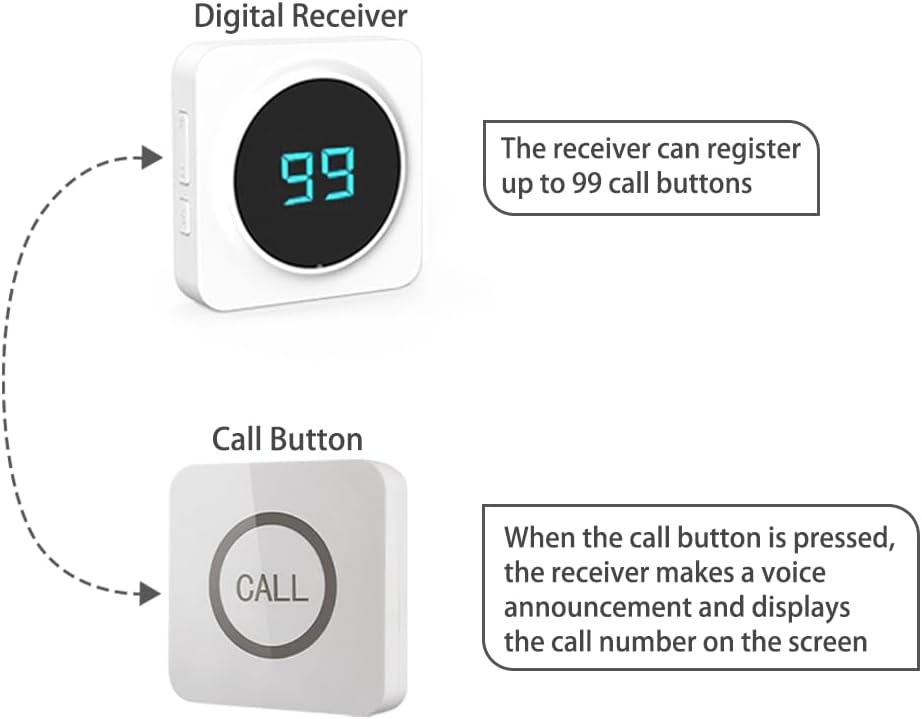
Figure 4.1: Illustration of the interaction between the digital receiver and a call button, demonstrating the registration process and call notification.
5. Operation
5.1 Receiving a Call
When a customer presses a call button, the digital display receiver will emit a selected ringtone and display the corresponding call button number on its LED screen. If enabled, a voice announcement in English or Japanese will also be made.

Figure 5.1: The ALIBELL paging system in a restaurant environment, showing a call button on a table and the receiver alerting staff.
5.2 Adjusting Settings
The receiver features controls for adjusting various settings:
- Volume Control: Use the volume buttons on the side of the receiver to cycle through 5 volume levels, including mute (0 dB to 100 dB).
- Ringtone Selection: Press the music select button to choose from 31 available ringtones.
- Clearing Calls: Specific buttons or sequences are used to clear displayed call numbers.
- Clearing All Numbers: A function to clear all registered pagers from the receiver's memory.
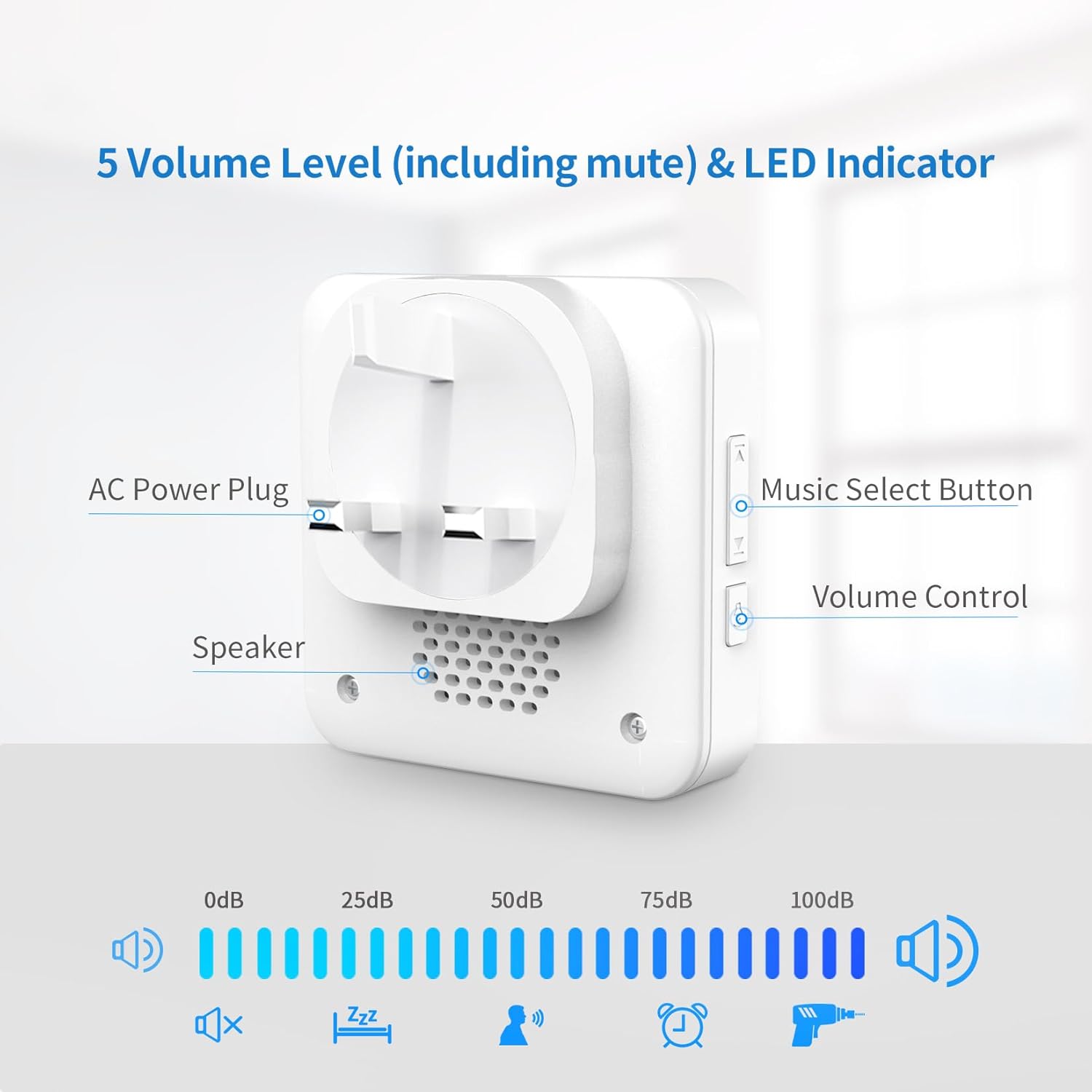
Figure 5.2: Rear view of the digital receiver, detailing the AC power plug, speaker, music selection, and volume controls, along with visual representation of volume levels.
6. Maintenance
6.1 Cleaning
To maintain the system's appearance and functionality, regularly wipe the receivers and call buttons with a soft, dry cloth. For stubborn dirt, a slightly damp cloth can be used, but ensure no moisture enters the devices. Do not use abrasive cleaners or solvents.
6.2 Battery Replacement (Call Buttons)
The call buttons are battery-powered. While designed for long life, if a button becomes unresponsive, the battery may need replacement. The system uses Alkaline batteries. Refer to the specific button design for access to the battery compartment.
6.3 Storage
When not in use for extended periods, store the system components in a cool, dry place, away from direct sunlight and extreme temperatures.
7. Troubleshooting
| Problem | Possible Cause | Solution |
|---|---|---|
| Receiver not responding to call button press. |
|
|
| Receiver display is blank. |
|
|
| Sound is too low or too high. |
|
|
| Limited wireless range. |
|
|

Figure 7.1: Illustration of the wireless operating range in an open environment.
8. Specifications
| Brand | ALIBELL |
| Model Number | SC-R70, APE220 |
| Manufacturer | EASTWAY INTERNATIONAL (HK) LIMITED |
| Product Dimensions (L x W x H) | 37 x 21 x 8 cm (14.57 x 8.27 x 3.15 inches) |
| Item Weight | 1.9 Kilograms (4.19 lbs) |
| Color | White |
| Power Source | Battery Powered (for pagers), AC Powered (for receivers) |
| Installation Method | DIY |
| Sound Level | Up to 100 dB |
| Included Components | 2 LED Digital Display Receivers, 16 Beeper Pagers, 2 Screws, 1 Sticker |
| Batteries Required | Yes |
| Battery Composition | Alkaline |
| Connectivity Technology | Wireless |
| Alert Type | Audio |
| Control Method | Touch |
| Receiver Dimensions | 7.0 x 7.04 cm (2.75 x 2.77 inches) |
| Pager Dimensions | 86 x 86 x 17.5 mm (3.39 x 3.39 x 0.69 inches) |
| Working Distance (Indoor) | 130-200 feet |
| Working Distance (Outdoor) | 1600-2600 feet |
| Coding/Decoding Mode | Recording Mode |

Figure 8.1: Dimensions of the ALIBELL Digital Display Receiver and Call Button.
9. Warranty and Support
Warranty information for your ALIBELL Wireless Paging System is typically provided with your purchase documentation. Please refer to the terms and conditions outlined by the seller or manufacturer for details regarding warranty coverage and duration.
For technical support, troubleshooting assistance beyond this manual, or inquiries about replacement parts, please contact the ALIBELL customer service department or your point of purchase. Keep your product model number (SC-R70, APE220) and purchase details ready when contacting support.