
Prexiso PWDX-F38
PREXISO 5-In-1 Stud Finder Wall Scanner Instruction Manual
Model: PWDX-F38
Brand: Prexiso
1. Introduction
The PREXISO 5-In-1 Stud Finder Wall Scanner (Model PWDX-F38) is an advanced tool designed for accurate detection of various concealed objects behind walls, ceilings, and floors. It features multiple scanning modes to identify wood studs, metal bars, and live AC wires, ensuring safety and precision for construction, renovation, and hanging projects. This manual provides detailed instructions for the proper use and maintenance of your device.

Image 1: The PREXISO PWDX-F38 Stud Finder with its included 9V battery.

Image 2: Key components of the PREXISO PWDX-F38, including the LCD screen, buttons, and battery compartment.
2. Setup
2.1. Battery Installation
The device requires a 9V Zinc Carbon battery (included). Locate the battery compartment on the back of the unit. Open the compartment cover, insert the 9V battery ensuring correct polarity (+ and - terminals match), and then securely close the compartment cover.
2.2. Auto-Calibration
Proper calibration is essential for accurate readings. Perform calibration before each use and whenever you switch between scanning modes. To calibrate:
- Press the ON/OFF button to power on the device.
- Place the unit flat against the wall surface where you intend to scan. Ensure the area is free from known studs, metal, or wires. For metal detection, you can calibrate in the air.
- Press and hold the Scan button located on the side of the device. The LCD display will show decreasing signal bars.
- Calibration is complete when the decreasing bars disappear, and the device emits a single beep. NOTE: Do not move the tool during calibration.

Image 3: Visual representation of the calibration process, showing the LCD display before and after successful calibration.
3. Operating Instructions
After successful calibration, slowly slide the device horizontally across the wall surface. The LCD screen and audio feedback will provide indications of detected objects.
3.1. Scan Modes
The PREXISO PWDX-F38 offers five distinct scanning modes. Use the Mode button to cycle through them.

Image 4: Overview of the five scanning modes and their maximum detection depths.
3.1.1. Stud Scan Modes (1/2", 1", 1-1/2")
- Purpose: To locate the edges and center of wood studs behind drywall.
- Depths:
- 1/2" (13mm) deep scan
- 1" (25mm) deep scan
- 1-1/2" (38mm) deep scan
- Operation: Select the appropriate stud scan depth using the Mode button. Place the device flat on the wall and calibrate. Slowly slide horizontally.
- Indication: As the device approaches a stud, signal bars will increase. The "CENTER" indicator will illuminate, and an audio alarm will sound when the center of the stud is detected. The V-groove at the top of the device helps mark the exact center.

Image 5: How the LCD display and audio alarm indicate stud detection from calibration to finding the center.
3.1.2. Metal Scan Mode
- Purpose: To detect ferrous and non-ferrous metals, such as metal pipes, rebar, or conduit.
- Depth: Up to 3-5/32" (80mm) deep.
- Operation: Select the Metal Scan mode. Calibrate the device. Slowly slide horizontally across the surface.
- Indication: The LCD will display a metal icon and signal strength bars. An audio alert will confirm detection.

Image 6: The device indicating the presence of metal with visual and audio cues.
3.1.3. AC Wire Scan Mode
- Purpose: To identify live unshielded AC wires.
- Depth: Up to 2" (51mm) deep.
- Operation: Select the AC Scan mode. Calibrate the device. Slowly slide horizontally across the surface.
- Indication: An AC wire icon will appear on the display, accompanied by an audio warning. Note: The device indicates live AC wires in all modes as a critical safety feature. Always exercise caution.
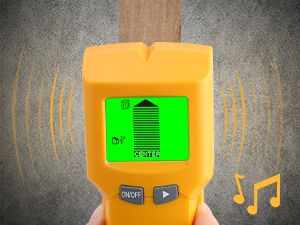
Image 7: The device indicating the presence of an AC wire for safety.
3.2. Interpreting Results
- LCD Display: The backlit LCD provides clear visual cues, including icons for the detected material (stud, metal, AC wire), signal strength bars indicating proximity, and a "CENTER" indicator for precise stud location. The battery status is also displayed.
- Audio Alarm: An audible beep will sound upon detection of an object, providing an additional confirmation.
- V-Groove: The V-groove at the top of the device helps users accurately mark the exact center of a detected stud or object.

Image 8: The multi-functionality of the detector for various household and construction tasks.
Video 1: This video demonstrates the key features and operation of the PREXISO PWDX-F38 wall scanner, including its ability to detect wood, metal, and AC wires, and how to use its LCD display and audio feedback.
4. Maintenance
- Cleaning: Wipe the device with a soft, dry cloth. Do not use abrasive cleaners, solvents, or harsh chemicals, as these can damage the casing or electronic components.
- Storage: Store the stud finder in a dry place, away from direct sunlight and extreme temperatures. If the device will not be used for an extended period, remove the battery to prevent potential leakage and damage.
- Contact Pads: Ensure the contact pads on the back of the unit are clean and free from dust or debris. Clean pads are crucial for accurate readings.
5. Troubleshooting
| Problem | Possible Cause | Solution |
|---|---|---|
| Inconsistent or inaccurate readings | Improper calibration; low battery; wall surface conditions. | Ensure proper calibration before each scan and do not move the device during calibration. Check battery level and replace if low. Wallpaper or freshly painted walls may need several weeks to dry completely for accurate readings. |
| No detection or weak signal | Incorrect mode selected; device not flat against surface; object too deep. | Verify the correct scanning mode is selected for the target material. Ensure the device is held flat and firmly against the wall. The object might be beyond the maximum detection depth for the selected mode. |
| False positives for AC wires | The device is designed to detect live AC wires in all modes for safety. | This is a safety feature. Always exercise extreme caution when drilling near any detected AC signals. Confirm the presence of wires using other methods if possible before proceeding. |
6. Specifications
| Feature | Detail |
|---|---|
| Model Number | PWDX-F38 |
| Manufacturer | Hang Zhou Great Star Industrial Co.,LTD |
| Item Weight | 8.8 ounces |
| Package Dimensions | 8.66 x 4.06 x 1.69 inches |
| Country of Origin | China |
| Power Source | Battery Powered |
| Included Components | Stud Finder |
| Batteries Included | Yes |
| Batteries Required | Yes |
| Battery Cell Type | Zinc Carbon (9V) |
| Stud Scan Depth | 1/2" (13mm), 1" (25mm), 1-1/2" (38mm) |
| Metal Scan Depth | Up to 3-5/32" (80mm) |
| AC Scan Depth | Up to 2" (51mm) |
7. Warranty and Support
For detailed warranty information, product registration, or technical support, please refer to the documentation included with your product packaging or visit the official PREXISO website. You may also contact PREXISO customer service directly through the contact information provided on their website.
Related documentsPWDX-F38


Ask a question about this manual
Ask about setup, troubleshooting, compatibility, parts, safety, or missing instructions. Manuals+ will review the question and use this page’s manual context to help answer it.