
Introduction
This manual provides essential information for the proper setup, operation, and maintenance of your Monsiatog Voice Remote Control. This remote is designed as a direct replacement and is compatible with Xiaomi Mi TV Stick and Xiaomi Mi Box 4S 4K media players. It offers voice control functionality and requires no complex programming for initial use.
The package includes one (1) remote control unit. Please note that AAA batteries are not included and must be purchased separately.
Setup
1. Battery Installation
To begin using your remote control, you must first install two AAA batteries.
- Locate the battery compartment cover on the back of the remote control.
- Slide the cover downwards or press the latch (if present) to open the compartment.
- Insert two 1.5V AAA batteries, ensuring the positive (+) and negative (-) terminals align correctly with the markings inside the compartment.
- Replace the battery compartment cover by sliding it back into place until it clicks securely.
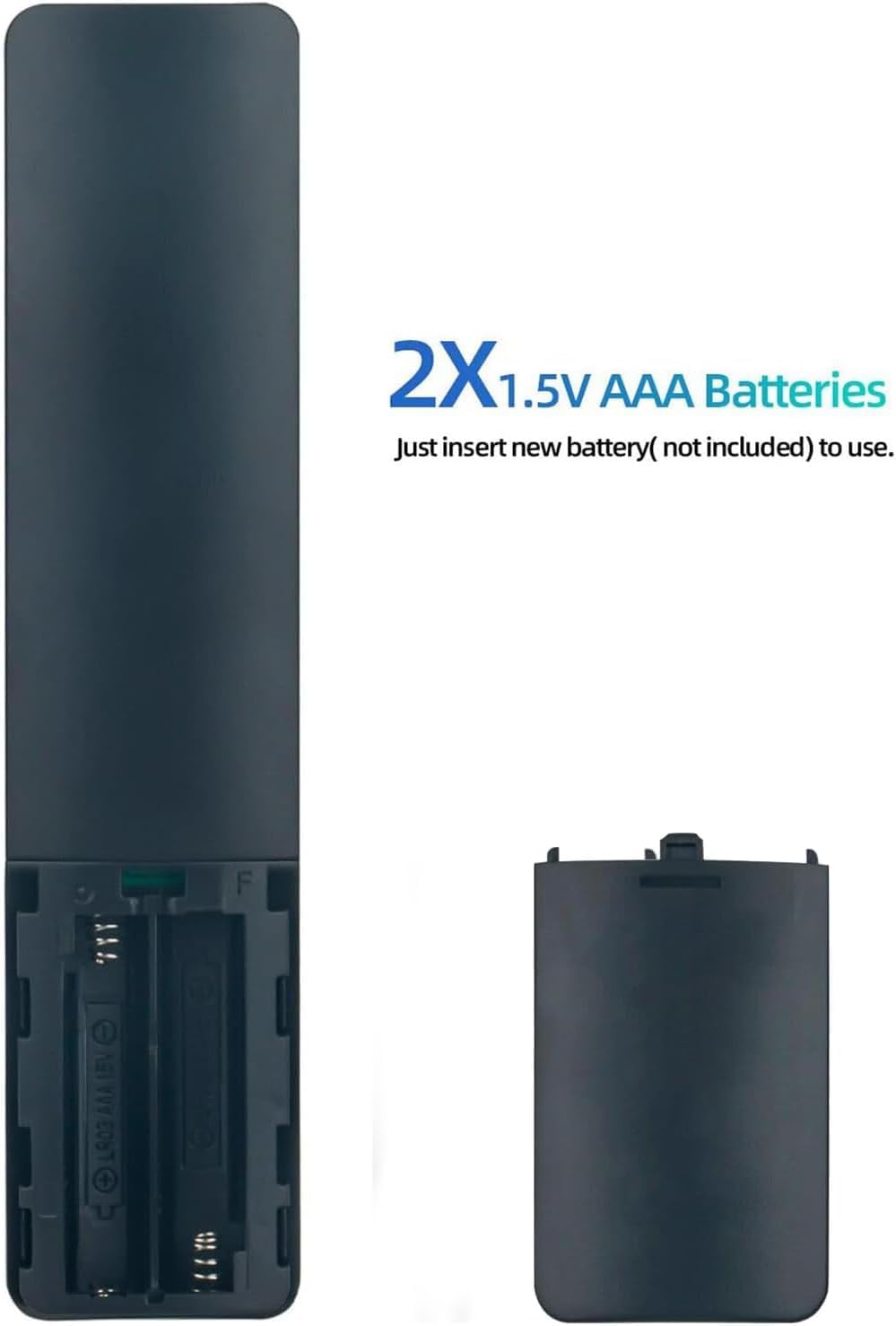
Figure 1: Battery compartment for two AAA batteries.
2. Initial Use
This remote control is designed for immediate use with compatible Xiaomi Mi TV Stick and Mi Box 4S 4K devices without requiring any programming. Once batteries are installed, point the remote towards your device and begin operation.
Operating Instructions
The Monsiatog Voice Remote Control features a user-friendly layout for intuitive navigation and control of your media player.
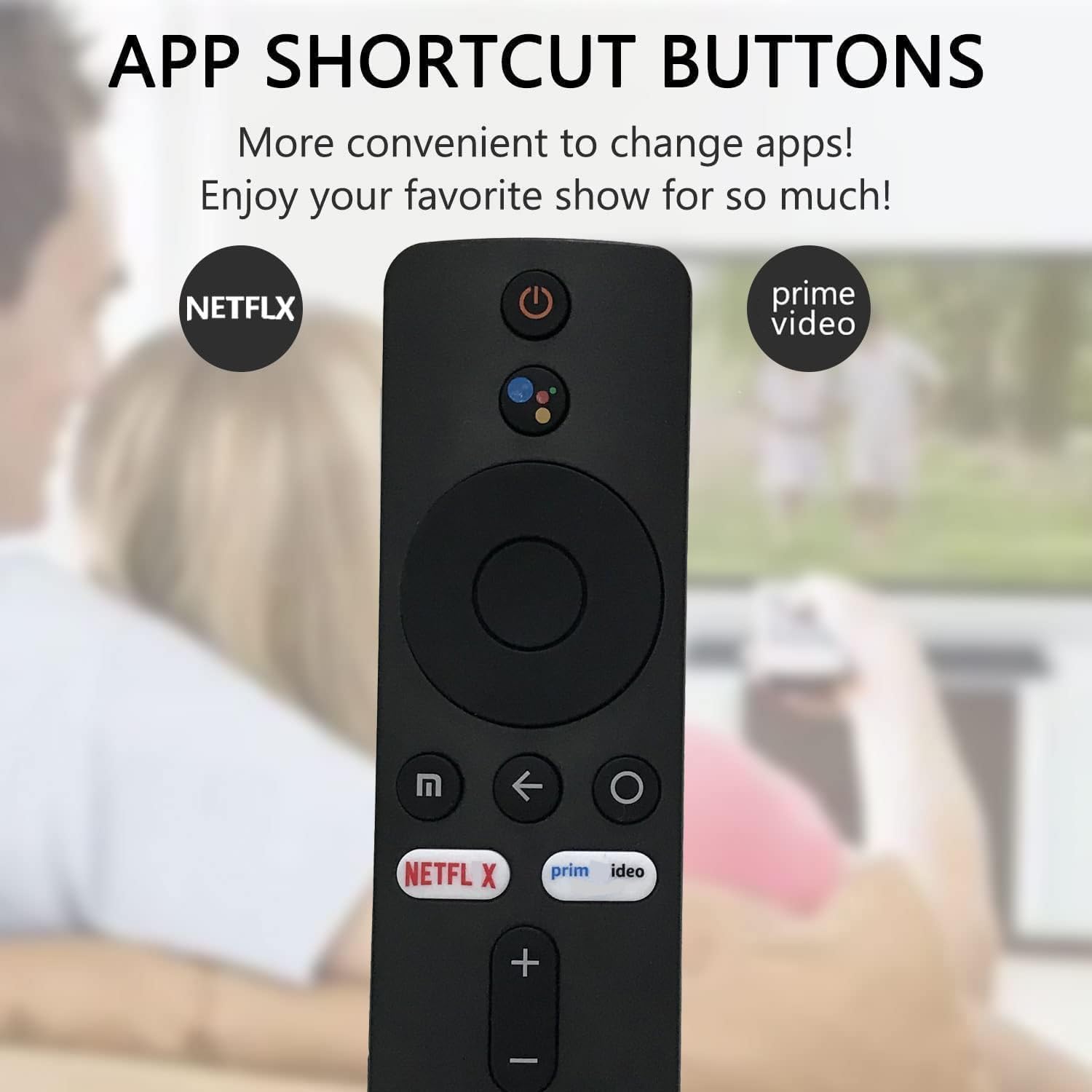
Figure 2: Overview of remote control buttons, including app shortcuts.
Button Functions:
- Power Button (⏻): Turns your device on or off.
- Voice Assistant Button: Activates the voice assistant for commands and searches.
- Navigation Ring: Use the directional arrows (Up, Down, Left, Right) to navigate menus and content. The center button acts as "OK" or "Select".
- Back Button (←): Returns to the previous screen or menu.
- Home Button (⌂): Returns to the main home screen of your media player.
- Netflix Shortcut: Direct access to the Netflix application.
- Prime Video Shortcut: Direct access to the Prime Video application.
- Volume Buttons (+/-): Adjusts the volume level.
Voice Control:
Press and hold the Voice Assistant button, then speak your command clearly into the remote. Release the button when you are finished speaking. This feature allows for hands-free searching, app launching, and device control.

Figure 3: The remote control features an upgraded chip for reliable signal transmission up to 10 meters (over 40 ft).
Maintenance
Battery Replacement:
When the remote control's performance degrades or it stops responding, it is likely time to replace the batteries. Follow the battery installation steps in the "Setup" section to replace the two AAA batteries. Always use new, high-quality batteries for optimal performance.
Cleaning:
To clean the remote control, gently wipe its surface with a soft, dry cloth. For stubborn dirt, a slightly damp cloth can be used, but ensure no moisture enters the remote. Avoid using harsh chemicals or abrasive cleaners.
Storage:
If the remote control will not be used for an extended period, it is recommended to remove the batteries to prevent leakage and potential damage to the device.
Troubleshooting
| Problem | Possible Cause | Solution |
|---|---|---|
| Remote not responding. | Dead or incorrectly installed batteries. Obstruction between remote and device. Remote out of range. | Replace batteries with new ones, ensuring correct polarity. Remove any objects blocking the signal path. Ensure you are within 10 meters (33 feet) of the device. |
| Voice control not working. | Voice button not pressed/held correctly. Microphone obstruction. Device settings issue. | Press and hold the voice button while speaking. Ensure the microphone area on the remote is clear. Check your media player's settings for voice assistant configuration. |
| Buttons are sticky or unresponsive. | Dirt or debris under buttons. | Clean the remote control as described in the Maintenance section. |
Specifications
- Brand: Monsiatog
- Model Number: 799473835102
- Compatible Devices: Xiaomi Mi TV Stick, Xiaomi Mi Box 4S 4K (Streaming devices)
- Connectivity Technology: Infrared (IR)
- Control Type: Voice Control
- Maximum Range: 10 meters (approximately 33 feet)
- Power Source: 2 x AAA 1.5V Batteries (not included)
- Color: Black
- Special Feature: No programming required
Warranty and Support
Warranty Information:
This Monsiatog remote control comes with a 90-day warranty from the date of purchase. This warranty covers manufacturing defects under normal use. It does not cover damage caused by misuse, accidents, unauthorized modifications, or battery leakage.
Customer Support:
For any questions, concerns, or issues not covered in this manual, please contact the retailer or seller from whom you purchased the product. Please have your purchase details and model number (799473835102) ready when contacting support.
You may also refer to the official Xiaomi support resources for your Mi TV Stick or Mi Box 4S 4K for device-specific troubleshooting or pairing instructions, if applicable.