
Neocarbon NC-T01-KM
Wireless Knee Massager User Manual
Model: NC-T01-KM | Brand: Neocarbon
Introduction
Thank you for choosing the Neocarbon Wireless Knee Massager. This portable device is designed to provide comprehensive relief for knee discomfort through a combination of heat therapy, compression, and vibration massage. Its wireless design and intuitive controls make it convenient for use anywhere, anytime. Please read this manual thoroughly before operation to ensure safe and effective use.
Important Safety Information
WARNING: This product includes a heating function. Always adjust the temperature to a suitable level for your comfort. Prolonged or unnecessary use at high temperatures may cause mild burns. It is crucial to read and understand this entire manual before using the device.
- Do not use if you have any pre-existing medical conditions without consulting a healthcare professional.
- Keep out of reach of children.
- Do not immerse the device in water or other liquids.
- Use only the provided charging accessories.
- Discontinue use if you experience any pain or discomfort.
What's in the Box

Figure 1: Packaging contents of the Wireless Knee Massager.
- Neocarbon Wireless Knee Massager (Black)
- USB-C Charging Cable
- 10W Power Adapter
- User Guide
Setup
Charging the Device
Before first use, fully charge the knee massager. A full charge provides up to 5 hours of operating time.
- Locate the USB-C charging port on the side of the massager.
- Connect the provided USB-C charging cable to the massager and the 10W power adapter.
- Plug the power adapter into a standard electrical outlet.
- The LED screen will indicate charging status. The device is fully charged when the indicator changes or turns off (refer to LED screen section for details).

Figure 2: Charging port location and adjustable straps.
Wearing the Massager
The massager features adjustable Velcro straps for a secure and comfortable fit on various leg sizes and shapes.
- Position the massager over your knee, ensuring the main unit with the control panel is centered on the kneecap.
- Wrap the three adjustable Velcro straps around your leg, securing them firmly but comfortably. Ensure the fit is snug enough for the massager to stay in place without restricting circulation.
Operating Instructions
Control Panel Overview
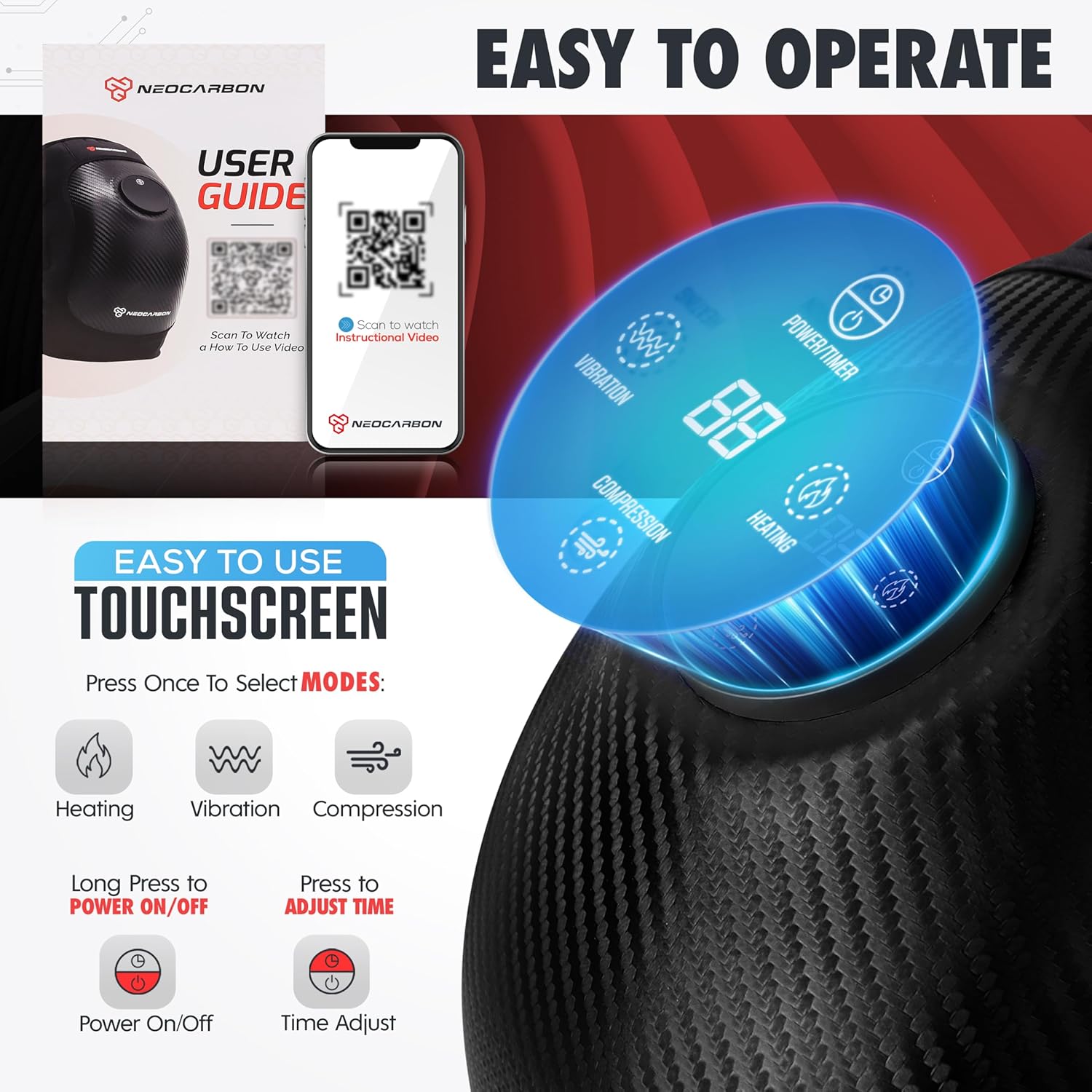
Figure 3: Intuitive LED Touchscreen Control Panel.
The intuitive LED LCD screen allows for easy adjustment of settings.
- Power/Timer Button: Long press to turn the device ON/OFF. Short press to adjust the operating time (default is 15 minutes).
- Heating Button: Press to cycle through 3 heat levels (Low, Medium, High).
- Vibration Button: Press to cycle through 3 vibration levels (Low Relief, Medium Comfort, High Deep Tissue).
- Compression Button: Press to cycle through 3 compression options (1st Gear Depressurize, 2nd Gear Unwind, 3rd Gear Physiotherapy).
Using the Massager
- Ensure the massager is fully charged and securely fastened to your knee.
- Turn On: Long press the Power/Timer button to turn on the device. The default settings will activate.
- Adjust Heat: Press the Heating button to select your desired heat level (1, 2, or 3).

Figure 4: Three adjustable heating levels.
- Adjust Vibration: Press the Vibration button to select your desired vibration intensity (1, 2, or 3).

Figure 5: Three adjustable vibration modes.
- Adjust Compression: Press the Compression button to select your desired compression level (1, 2, or 3).

Figure 6: Three adjustable compression levels.
- Set Timer: Short press the Power/Timer button to cycle through available time settings (e.g., 15, 30 minutes). The device will automatically shut off after the selected time.
- Turn Off: Long press the Power/Timer button to turn off the device at any time.

Figure 7: Enjoying the massager in a relaxed setting.
Maintenance
- Cleaning: Wipe the surface of the massager with a soft, damp cloth. Do not use abrasive cleaners or immerse the device in water.
- Storage: Store the device in a cool, dry place away from direct sunlight and extreme temperatures.
- Battery Care: To prolong battery life, avoid fully discharging the battery frequently. Charge the device regularly, even if not in use for extended periods.
Troubleshooting
| Problem | Possible Cause | Solution |
|---|---|---|
| Device does not turn on. | Battery is low or depleted. | Charge the device fully using the provided charger. |
| No heat/vibration/compression. | Function not activated or set to lowest intensity. | Press the respective function button to cycle through intensity levels. Ensure the device is powered on. |
| Device feels uncomfortable. | Straps are too tight or too loose; intensity level is too high. | Adjust the Velcro straps for a comfortable fit. Reduce heat, vibration, or compression intensity. |
Specifications
- Model: NC-T01-KM
- Brand: Neocarbon
- Product Dimensions: 9.84 x 5.91 x 5.91 inches
- Item Weight: 10.58 ounces (300 Grams)
- Material: Plastic
- Power Source: Battery Powered (Rechargeable)
- Battery Life: Up to 5 hours (per full charge)
- Therapy Modes: Heat, Vibration, Compression
- Intensity Levels: 3 levels for Heat, Vibration, and Compression
Warranty and Support
Neocarbon is committed to providing high-quality products. For any questions, concerns, or support needs regarding your Wireless Knee Massager, please refer to the contact information provided on the product packaging or visit the official Neocarbon website. Please retain your proof of purchase for warranty claims.
Ask a question about this manual
Ask about setup, troubleshooting, compatibility, parts, safety, or missing instructions. Manuals+ will review the question and use this page’s manual context to help answer it.