1. Introduction
Welcome to the user manual for your new Duckdik Arizona Instant Voice Language Translator. This device is designed to facilitate seamless communication across language barriers, offering both offline and online translation capabilities, real-time interpretation, and integrated AI features. Please read this manual carefully to ensure proper use and to maximize the potential of your translator.

Figure 1: Duckdik Arizona Translator Device
This image displays the Duckdik Arizona Instant Voice Language Translator from both front and back perspectives. The front shows the screen interface with various translation modes, while the back highlights its sleek, ergonomic design.
2. Getting Started: Setup
Before using your Duckdik Arizona translator, it is essential to perform the initial setup.
2.1 Initial Wi-Fi Connection
For the first-time setup and to download offline language packs, the device requires an internet connection.
- Power On: Press and hold the power button on the side of the device until the screen illuminates.
- Connect to Wi-Fi: Navigate to the Wi-Fi settings on the device. Select a 2.4 GHz Wi-Fi network and enter the password. Important: The device requires a 2.4 GHz Wi-Fi connection for initial setup and language downloads. It will not be able to download languages if connected to a 5 GHz network.
- Download Languages: Once connected, proceed to the language download section to acquire the necessary offline language packages.
2.2 Charging the Device
The Duckdik Arizona comes with a built-in rechargeable Lithium Polymer battery. Use the included charging cable to charge the device.
- Connect the charging cable to the device's charging port.
- Connect the other end of the cable to a compatible USB power adapter (not included) or a computer's USB port.
- A charging indicator will appear on the screen. A full charge provides approximately 16 hours of continuous use and up to 10 days of standby time.
3. Operating Instructions
The Duckdik Arizona offers various translation modes to suit your needs.
3.1 Offline Translation
The device supports offline translation for 14 languages, allowing you to communicate without an internet connection.
- Supported Offline Languages: Spanish, English, German, French, Italian, Dutch, Portuguese, Arabic, Japanese, Korean, Russian, Thai, Vietnamese, Traditional Chinese, Simplified Chinese, Cantonese.
- Usage: Select "Offline Translate" from the main menu. Choose your source and target languages from the pre-downloaded packs. Press the appropriate button to speak and receive the translation.
- Note: It is not possible to add more offline languages beyond those included. Ensure you have downloaded the desired offline language packs during initial setup.
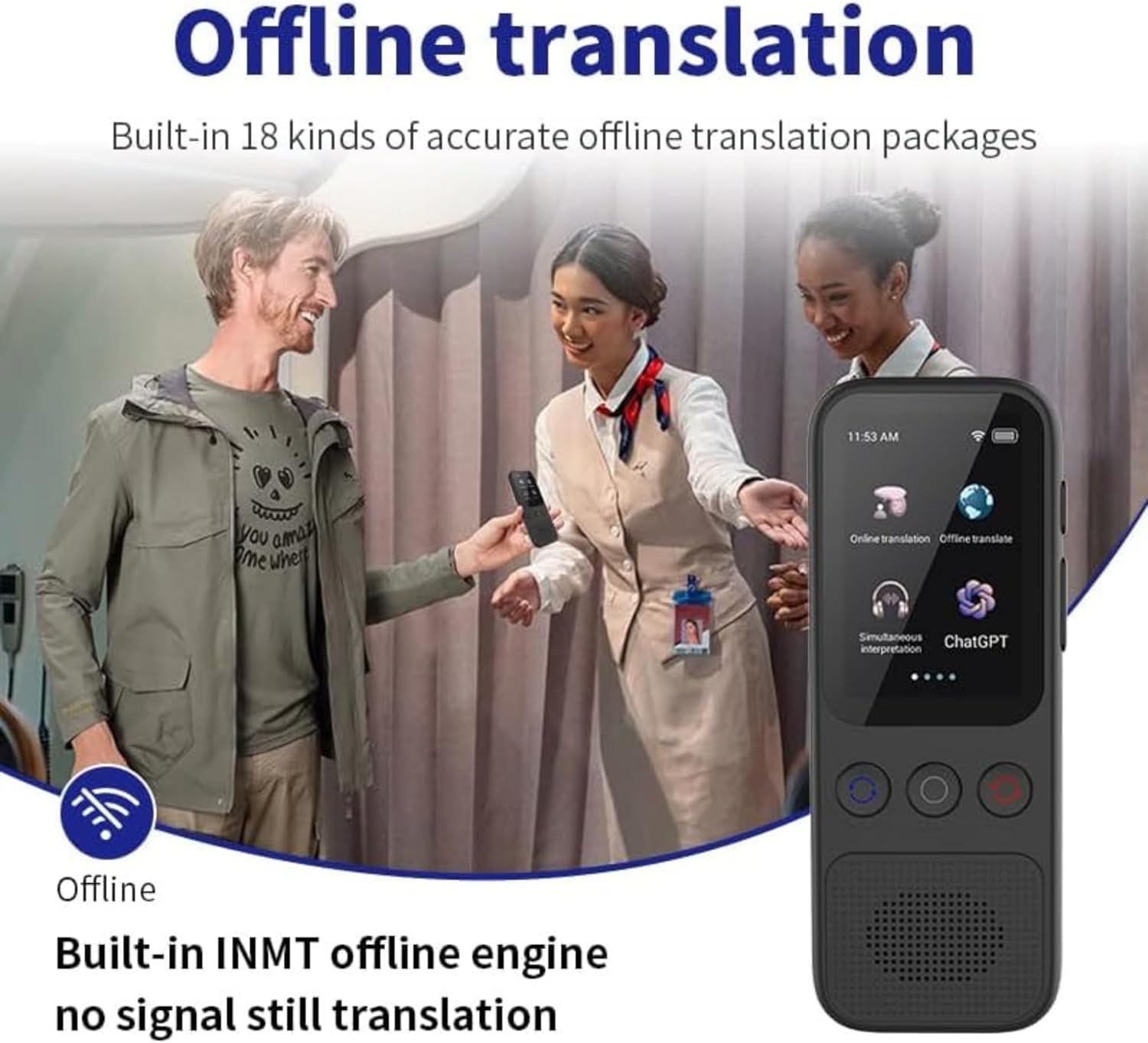
Figure 2: Offline Translation in Use
This image illustrates the offline translation feature of the Duckdik Arizona, showing the device in a real-world scenario where individuals are communicating seamlessly without an internet connection.

Figure 3: Enjoying Offline Translation Anywhere
This image depicts people enjoying outdoor activities, symbolizing the freedom and convenience of the device's offline translation feature, allowing communication in remote areas without internet access.
3.2 Online Translation
When connected to Wi-Fi, the device can translate between 138 languages and dialects in real-time, with high-speed translation in less than 0.5 seconds.
- Usage: Select "Online Translation" from the main menu. Ensure your device is connected to a stable Wi-Fi network. Choose your desired source and target languages. Speak clearly into the microphone.
- The device supports various accents for common languages, such as 7 kinds of English pronunciation, 7 kinds of Arabic accent, 6 kinds of Indian accent, and 9 kinds of Spanish accent.

Figure 4: Online Translation Interface
This image displays the online translation interface of the Duckdik Arizona, featuring a world map indicating its coverage across more than 100 countries and highlighting various accent options for English, Arabic, Indian, and Spanish.

Figure 5: Exploring with Online Translation
This image shows a group of people hiking, symbolizing the extensive reach and utility of the device's online translation feature, enabling communication in diverse global settings.
3.3 Simultaneous Interpretation
The device offers simultaneous interpretation with subtitle display and bilingual control, ideal for conversations.
- Usage: Select "Simultaneous Interpretation" from the main menu. The device will display both the spoken phrase and its translation in real-time.
- The integrated high-fidelity loudspeaker ensures clear audio output.

Figure 6: Simultaneous Interpretation Feature
This image illustrates the simultaneous interpretation feature of the Duckdik Arizona, showing the device's screen displaying real-time bilingual subtitles, with a couple in the background benefiting from the seamless communication.

Figure 7: Real-time Translation for Group Interactions
This image captures four friends laughing and interacting, symbolizing the effectiveness of the device's real-time translation feature in facilitating natural and continuous conversations without interruptions.
3.4 ChatGPT Integration
The Duckdik Arizona includes integrated ChatGPT for fluid and natural communication, supporting intelligent voice services and voice commands.
- Usage: Access the ChatGPT function from the main menu. You can ask questions, get information, or engage in conversational interactions.
- This feature leverages intelligent translation machine technology for various application scenarios.
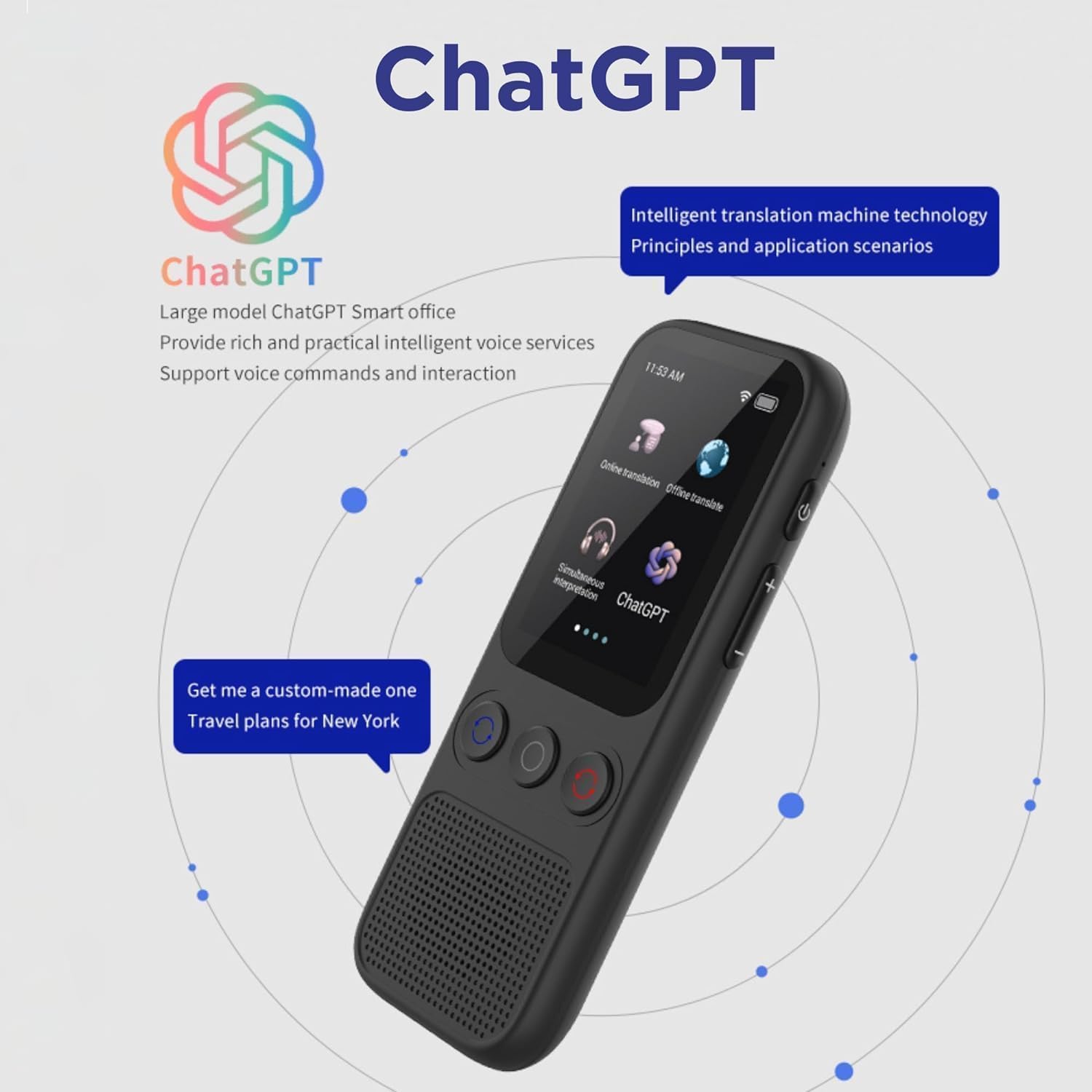
Figure 8: ChatGPT Integration
This image shows the Duckdik Arizona with its ChatGPT interface, illustrating how the device integrates advanced AI for intelligent voice services and natural language interactions, such as generating travel plans.
3.5 Smart Recording Function
The device features a recording function that automatically saves recordings for future reference, working both online and offline. It supports 13 source languages and 138 online language recordings.
- Features: Professional noise reduction, record while translating, real-time translation.
- Usage: Select "Smart Recording" from the menu. Start recording your conversation or speech. The device will translate and save the audio.
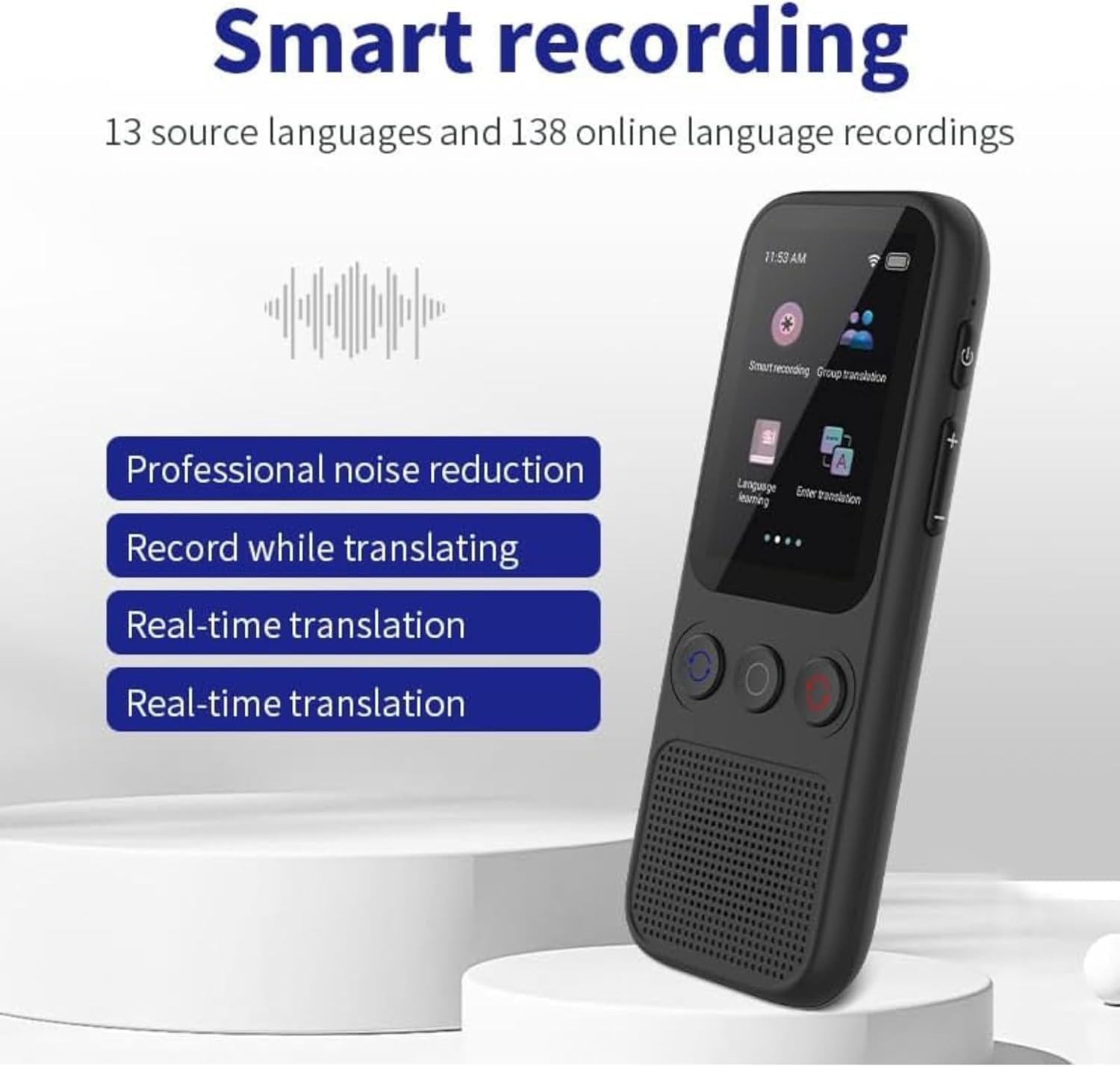
Figure 9: Smart Recording Feature
This image displays the smart recording interface of the Duckdik Arizona, highlighting its capabilities such as professional noise reduction, recording during translation, and real-time translation for 13 source languages and 138 online languages.

Figure 10: Recording Meetings for Later Translation
This image shows people in a meeting setting, illustrating the utility of the device's recording function to capture conversations for later translation and reference, enhancing productivity and understanding.
3.6 Phone Translation
The device supports phone translation, allowing connection between different mobile devices for real-time translation.
- Usage: Select "Phone Translation" from the menu. Follow the on-screen instructions to connect with another mobile device, typically via a scan code.
- This feature simplifies communication in multi-device scenarios.

Figure 11: Phone Translation Feature
This image displays the phone translation interface of the Duckdik Arizona, showing its ability to connect with mobile phones via a scan code for easier communication and real-time translation across devices.
3.7 Language Learning
The Duckdik Arizona can assist with language learning by allowing you to follow translations to learn pronunciation.
- Usage: Access the "Language Learning" mode. The device will provide feedback on your pronunciation, helping you improve.

Figure 12: Language Learning Mode
This image shows the language learning interface of the Duckdik Arizona, demonstrating how users can practice pronunciation and receive scores to improve their language skills.
4. Maintenance
Proper maintenance ensures the longevity and optimal performance of your Duckdik Arizona translator.
- Cleaning: Use a soft, dry cloth to clean the device's exterior. Avoid using liquid cleaners or abrasive materials.
- Storage: Store the device in a cool, dry place away from direct sunlight and extreme temperatures.
- Battery Care: To preserve battery life, avoid fully discharging the battery frequently. Charge the device regularly, especially if it will be stored for an extended period.
- Software Updates: Periodically check for software updates to ensure your device has the latest features and performance improvements. Connect to Wi-Fi and navigate to the system settings for updates.
5. Troubleshooting
If you encounter issues with your Duckdik Arizona translator, refer to the following common problems and solutions.
| Problem | Possible Cause / Solution |
|---|---|
| Cannot download offline languages. | Ensure your device is connected to a 2.4 GHz Wi-Fi network. The device cannot download languages on a 5 GHz network. Check your router settings if unsure. |
| Offline translation not working for a specific language. | Verify that the desired offline language pack has been successfully downloaded. Go to settings and check installed language packs. Remember, it is not possible to add more offline languages than those pre-included. |
| Online translation is slow or not working. | Check your Wi-Fi connection strength and stability. Ensure the device is within range of your router. Try restarting the device and your Wi-Fi router. |
| Translation is incomplete or inaccurate (e.g., only a part or single word translated). |
|
| Device not turning on or charging. | Ensure the charging cable is securely connected to both the device and the power source. Try a different USB port or power adapter. If the battery is completely drained, it may take a few minutes for the charging indicator to appear. |
6. Specifications
Detailed technical specifications for the Duckdik Arizona Instant Voice Language Translator.
| Feature | Detail |
|---|---|
| Brand | Duckdik |
| Model Name | Arizona |
| Manufacturer Reference | UR-5AC0-D90X |
| Package Dimensions | 16.5 x 8.6 x 4.4 cm |
| Product Weight | 180 g |
| Battery Type | Lithium Polymer (1 included) |
| Battery Capacity | 1000mAh |
| Continuous Use Time | 16 hours |
| Standby Time | 10 days |
| Processor | Quad-core ARM Cortex-A7 at 1.6GHz SC8830 |
| Storage | 1GB RAM + 8GB Internal Storage (expandable with TF card) |
| Offline Translation Languages | 14 (Spanish, English, German, French, Italian, Dutch, Portuguese, Arabic, Japanese, Korean, Russian, Thai, Vietnamese, Chinese Traditional/Simplified, Cantonese) |
| Online Translation Languages/Dialects | 138 |
| Included Components | Translator, Charging cable |
| ASIN | B0D5DT4FYY |

Figure 13: AI Processor (CPU+GPU)
This image illustrates the internal AI processor, comprising a Quad-core CPU for fast translation and a built-in GPU, ensuring smooth and efficient operation of the Duckdik Arizona translator.
7. Warranty and Support
For any questions, technical assistance, or warranty inquiries, please contact Duckdik customer support.
- Online Support: Visit the official Duckdik brand store on Amazon for more information and support resources: Duckdik Amazon Store.
- Tutorials: Helpful tutorials may be available on video platforms like YouTube. Search for "Duckdik Arizona translator tutorials" for visual guides.
- Software Updates: While specific software update guarantees are not provided, it is recommended to regularly check for updates via the device's settings to ensure optimal performance and access to new features.