Introduction
This manual provides instructions for the safe and effective use of the NJTY T600 Infrared Thermometer. This device is designed for non-contact surface temperature measurement of inanimate objects in industrial, kitchen, and automotive applications. It is not intended for measuring human or animal body temperature.

Figure 1: NJTY T600 Infrared Thermometer in use, demonstrating non-contact measurement of food on a grill.
The NJTY T600 offers a wide temperature range, high accuracy, and user-friendly features such as a backlit LCD display, data hold function, and automatic shutdown.
Safety Information
- Do Not Use for Human Body Temperature: This device is an industrial thermometer and will provide inaccurate readings for human or animal body temperature.
- Laser Safety: Do not look directly into the laser beam or point it at people or animals. The laser is for aiming purposes only.
- Operating Environment: Use the thermometer within its specified operating temperature and humidity ranges.
- Cleaning: Refer to the Maintenance section for proper cleaning procedures.
Product Features

Figure 2: Key features of the NJTY T600 Infrared Thermometer.
- Non-Contact Measurement: Safely measure surface temperatures from a distance.
- Wide Temperature Range: Measures from -50°C to 600°C (-58°F to 1112°F).
- High Accuracy: Features a 12:1 distance-to-spot ratio for precise readings.
- User-Friendly Display: Large backlit LCD screen for clear readings in various lighting conditions.
- Data Hold Function: Freezes the current temperature reading on the display.
- Unit Switching: Easily switch between Celsius (°C) and Fahrenheit (°F).
- Automatic Shutdown: Extends battery life by turning off after 12 seconds of inactivity.
- Laser Pointer: For accurate targeting of the measurement area.
Setup
1. Battery Installation
The NJTY T600 Infrared Thermometer requires batteries for operation (batteries not included). Follow these steps to install or replace batteries:
- Locate the battery compartment cover at the bottom of the handle.
- Open the battery compartment by sliding the cover according to the "OPEN" indicator.
- Insert the required batteries, ensuring correct polarity (+/-).
- Close the battery compartment cover, ensuring it locks securely to prevent the batteries from falling out.
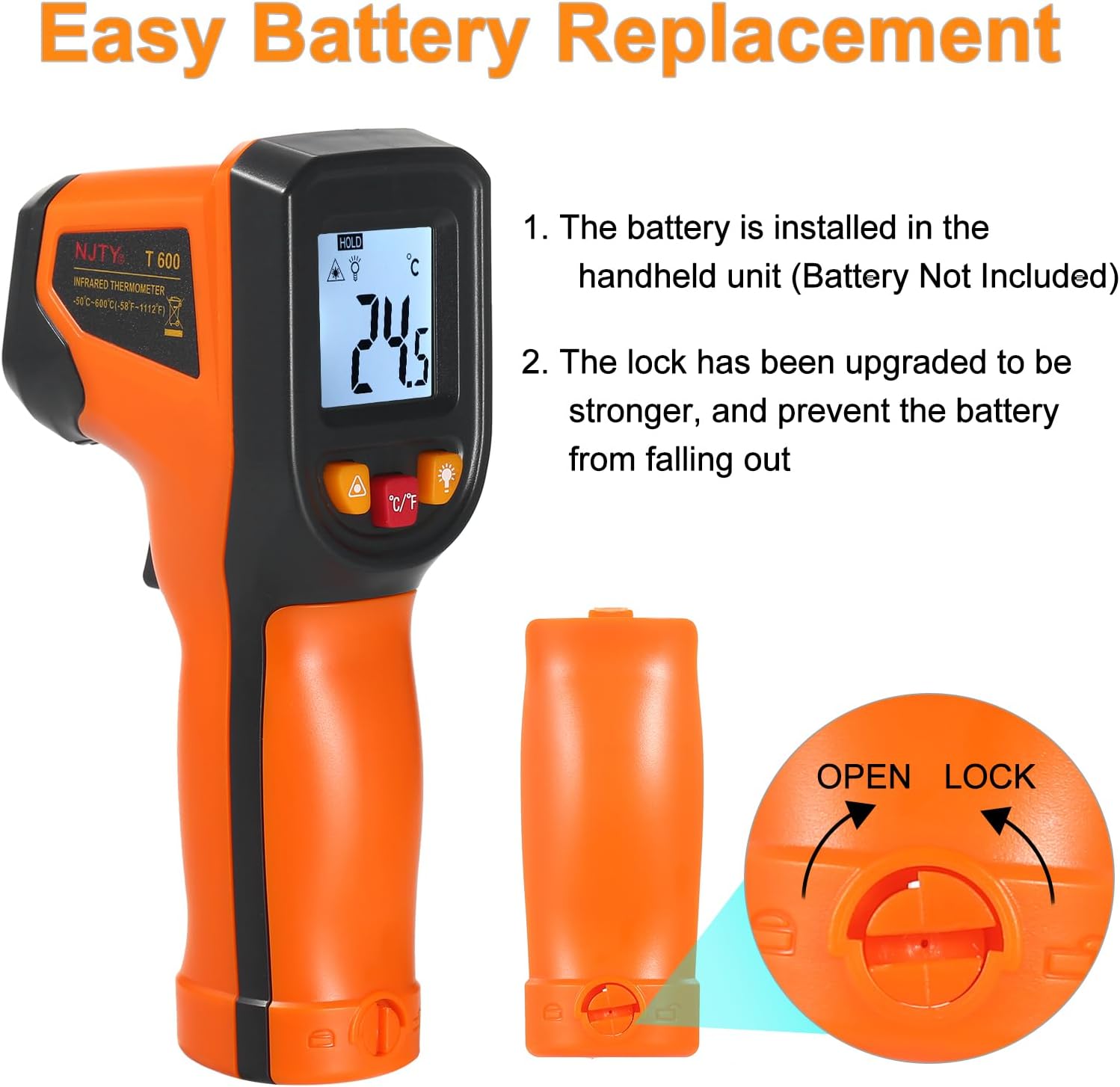
Figure 3: Battery installation process for the NJTY T600.
2. Initial Power On
After installing the batteries, the device is ready for use. Press the trigger to power on the thermometer.
Operating Instructions
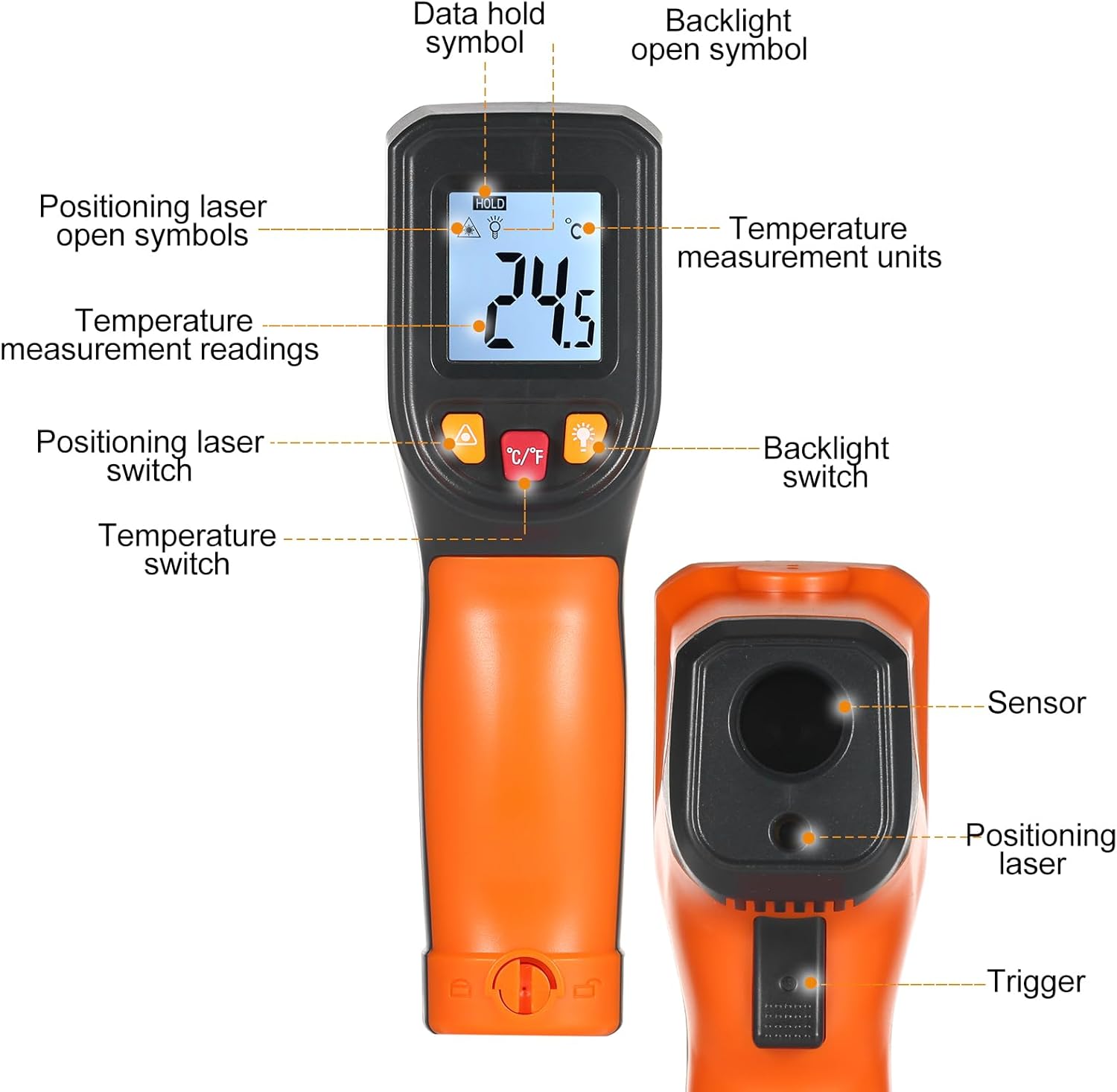
Figure 4: Overview of the NJTY T600 display and controls.
1. Taking a Measurement
- Point the thermometer at the target object.
- Press and hold the trigger. The laser pointer will activate (if enabled) to help aim.
- The current temperature reading will be displayed on the LCD screen.
- Release the trigger to hold the reading on the display (Data Hold function). The "HOLD" symbol will appear.
- The device will automatically shut off after approximately 12 seconds of inactivity to conserve battery life.
2. Switching Temperature Units (°C/°F)
To switch between Celsius and Fahrenheit, press the °C/°F button located below the display.

Figure 5: Backlit LCD display showing temperature reading.
3. Backlight Control
To turn the display backlight on or off, press the light bulb symbol button.
4. Laser Pointer Control
To turn the laser pointer on or off, press the triangle with exclamation mark symbol button.
5. Emissivity (T600 Model)
For the T600 model, the emissivity is preset to 0.95 and is not adjustable. This setting is suitable for most organic materials, painted surfaces, and water. For highly reflective surfaces, readings may be less accurate.
Maintenance
1. Cleaning the Device
To ensure accurate readings and prolong the life of your thermometer, keep the lens and sensor clean. Wipe the device with a clean, damp cloth. Do not use abrasive cleaners or immerse the device in water.
2. Battery Replacement
When the low battery indicator appears on the display, replace the batteries as described in the "Setup" section. Always use fresh batteries of the specified type.
3. Storage
Store the thermometer in a dry, cool place away from direct sunlight and extreme temperatures when not in use for extended periods.
Troubleshooting
- No Display/Device Not Turning On:
- Check battery installation and polarity.
- Replace with new batteries.
- Inaccurate Readings:
- Ensure the lens and sensor are clean and free from obstructions.
- Verify the distance-to-spot ratio (12:1) is maintained for accurate targeting. Measure closer for smaller targets.
- Consider the surface emissivity. The device has a fixed emissivity of 0.95, which may not be ideal for highly reflective surfaces.
- Allow the thermometer to stabilize to ambient temperature if moved from a significantly different temperature environment.
- Laser Not Working:
- Ensure the laser is enabled via its dedicated button.
- Check battery level.
Specifications
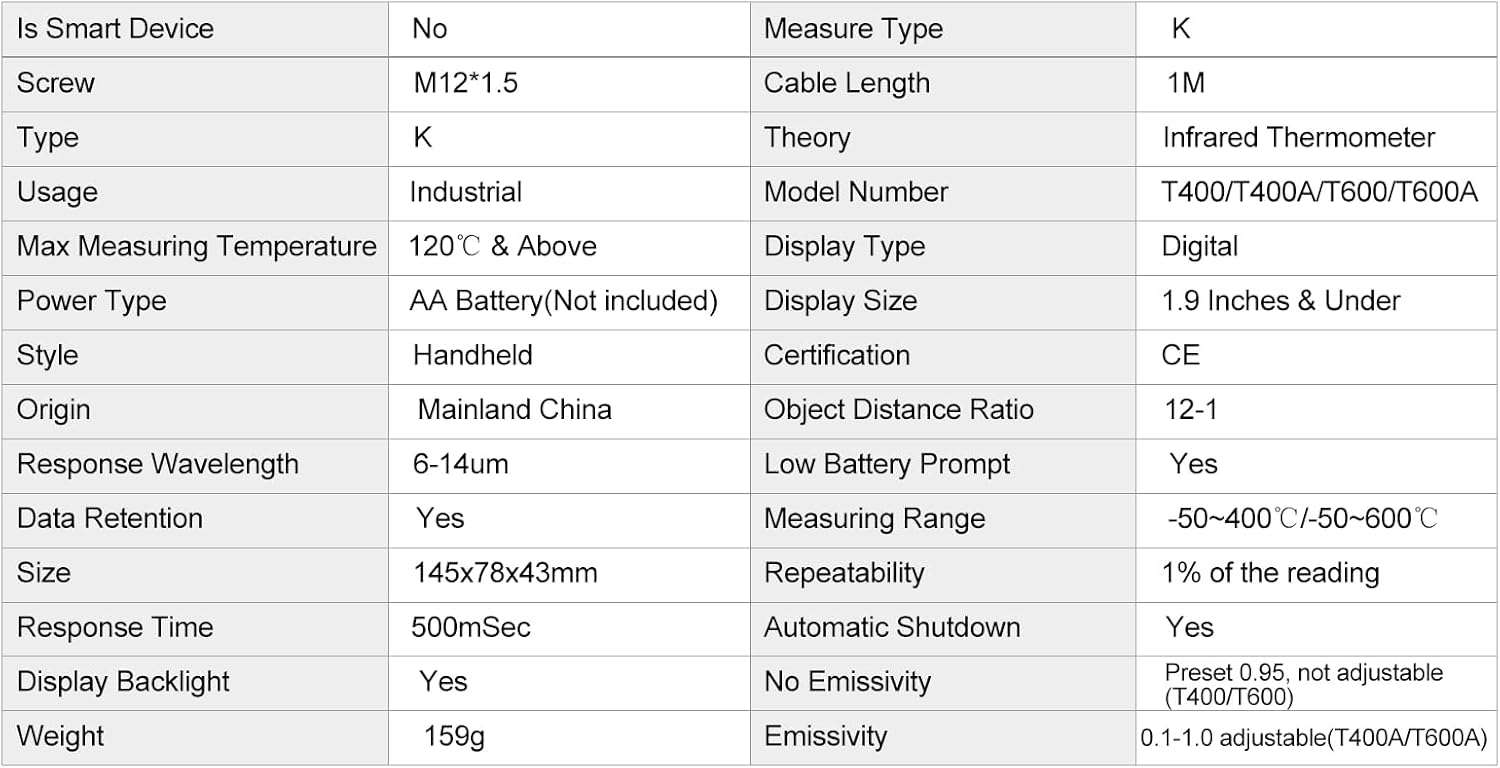
Figure 6: Detailed product specifications.
| Model Number | T600 |
| Measuring Range | -50°C to 600°C (-58°F to 1112°F) |
| Accuracy | ≥0°C (32°F): ±1.5°C (±2.7°F) / ±1.5% ≤0°C (32°F): ±3°C (±5.4°F) / ±3% |
| Distance to Spot Ratio (D:S) | 12:1 |
| Emissivity | Preset 0.95 (Not adjustable for T600) |
| Response Time | 500mSec (95% response) |
| Spectral Response | 8-14um |
| Resolution | 0.1% of reading or 1°C |
| Display Type | Digital, Backlit LCD |
| Automatic Shutdown | Yes (after 12 seconds) |
| Power Type | AA Battery (Not included) |
| Dimensions | 145mm x 78mm x 43mm (5.71in x 3.07in x 1.69in) |
| Item Weight | 5.6 ounces (159g) |
| Usage | Industrial |
Warranty and Support
Information regarding product warranty and customer support was not provided in the available product data. Please refer to the retailer or manufacturer's website for details on warranty coverage and support options.


