
Phonetone P50PH-NA20-PL
Phonetone Cell Phone Booster User Manual
Model: P50PH-NA20-PL
1. Product Overview
The Phonetone Cell Phone Booster is designed to enhance 5G, 4G LTE, and 3G cellular signals within your home or office, covering areas up to 5,500 square feet. It is compatible with all major US and Canadian carriers, supporting frequency bands 2, 4, 5, 12, 13, and 17. This device aims to reduce dropped calls and improve data transfer speeds for a more reliable mobile experience.

Image: The Phonetone P50 Cell Phone Booster system, including the main booster unit, outdoor antenna, and indoor antenna, ready for installation.
The booster operates by receiving weak outdoor signals, amplifying them, and then rebroadcasting a stronger signal indoors. It features advanced functionalities such as Automatic Gain Control (AGC) and Manual Gain Control (MGC) to optimize signal performance and prevent interference.

Image: A diagram illustrating the signal flow: an outdoor antenna receives a weak signal, the booster amplifies it, and an indoor antenna broadcasts the stronger signal throughout the building.
2. Package Contents
Before beginning installation, please verify that all components are present in your package:
- 1 x Phonetone Cell Phone Booster Unit
- 1 x Outdoor Antenna
- 1 x Indoor Antenna
- 1 x AC/DC Power Supply
- 1 x Flat Window Cable
- 3 x Low Loss Coaxial Cables
- 1 x User Manual (this document)

Image: All components included in the Phonetone Cell Phone Booster package, laid out for inspection.
3. Setup and Installation
Proper installation is crucial for optimal performance. Follow these steps carefully.
3.1 Pre-Installation Checks
Before installing, ensure your phone supports the booster's frequency bands (2, 4, 5, 12, 13, or 17) and that you have at least 2 bars of signal outdoors where the outdoor antenna will be placed. The booster requires an existing outdoor signal to amplify.

Image: Visual representation of the 3G, 4G, and 5G signal bands (2, 4, 5, 12, 13, 17) that the Phonetone booster is designed to amplify.
To check your phone's frequency band:
- For iOS: Dial *3001#12345#* and press call. Navigate to "Serving Cell Info" and then "Band Info".
- For Android: Download a signal monitoring app like "Network Cell Info Lite" to check the frequency band.
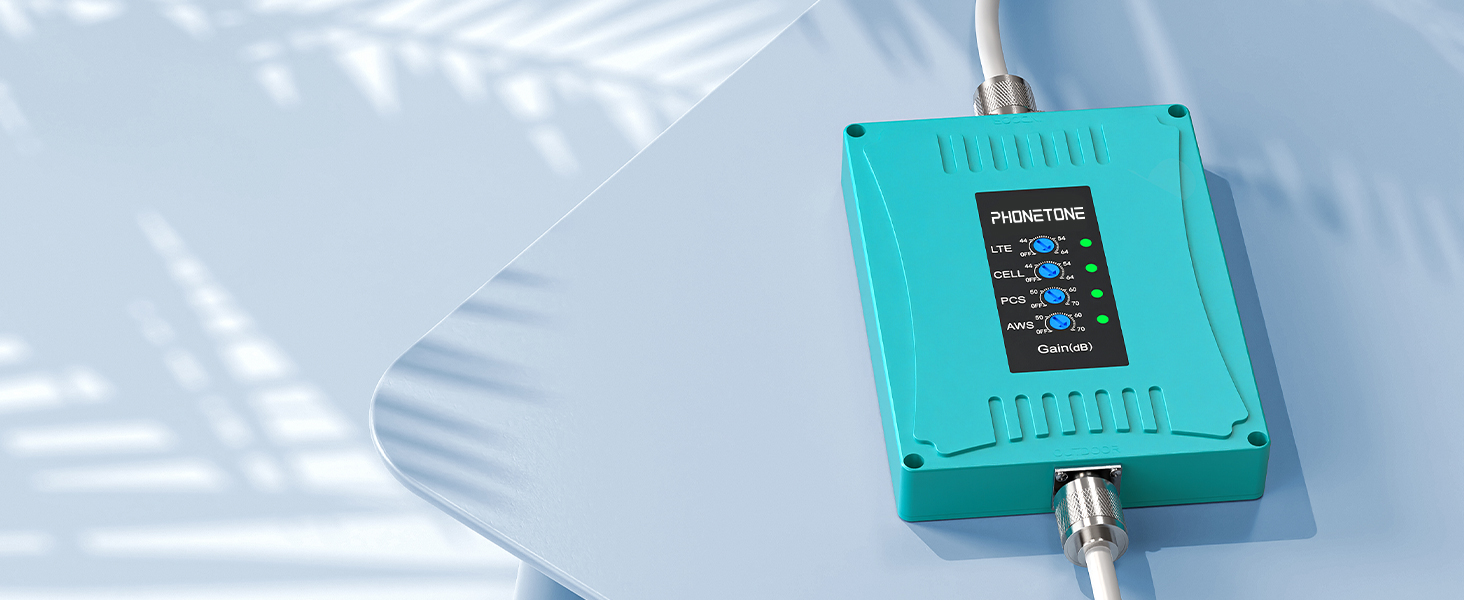
Image: Step-by-step visual guide on how to access and verify your phone's current frequency band using both iOS and Android operating systems.
3.2 Outdoor Antenna Placement
Mount the outdoor antenna at the highest point possible on your structure (e.g., roof, pole) where the signal is strongest. Use the provided U-bolts for pole mounting. Ensure the antenna is pointed towards the nearest cell tower for optimal signal reception. You can use the "Signal Advisor" app to help locate the cell tower direction.

Image: A smartphone screen displaying the "Signal Advisor" application, which helps users find the direction of the nearest cell tower for precise outdoor antenna alignment.
Important: The outdoor antenna must be vertically separated from the indoor antenna by at least 20 feet (6 meters) and horizontally separated by at least 30 feet (9 meters) to prevent feedback and oscillation. Point the two antennas away from each other.

Image: An outdoor antenna securely mounted on a rooftop, with a hand holding a smartphone displaying the Signal Advisor app, demonstrating the process of aiming the antenna.
3.3 Indoor Antenna Placement
Place the indoor antenna in a central location within the area you wish to cover, ensuring it is not too close to the booster unit or the outdoor antenna. Mounting it on a wall roughly perpendicular to the outdoor antenna's direction can be effective. Avoid placing it near large metal objects or electronics that could interfere with the signal.

Image: An indoor antenna discreetly mounted on a wall in a modern living room, illustrating a typical placement for broadcasting amplified signals.
3.4 Cabling and Connection
- Connect the outdoor antenna to the "OUTDOOR" port on the booster unit using one of the low loss coaxial cables.
- Connect the indoor antenna to the "INDOOR" port on the booster unit using another low loss coaxial cable.
- If routing cables through a window, use the provided flat window cable to avoid drilling.
- Ensure all connections are secure. Use the provided weather-proof tape for outdoor connections to protect against moisture.

Image: Detailed views of installation accessories: a flat window cable for drill-free entry, a waterproof connector cover for outdoor use, and a cable organizer for tidy cable management.
3.5 Powering On
Once all antennas and cables are securely connected, plug the AC/DC power supply into the booster unit and then into a power outlet. The booster will power on, and indicator lights will illuminate.

Image: The Phonetone Cell Phone Booster main unit, showing its indicator lights which provide status information during operation.
4. Operating the Booster
The Phonetone P50 booster is designed for automatic operation, optimizing signal gain for your environment. It features intelligent functions to ensure stable performance.
4.1 Automatic Gain Control (AGC)
The booster is equipped with Automatic Gain Control (AGC), which automatically adjusts the signal gain to prevent oscillation and maintain optimal performance. This ensures a stable and strong signal without manual intervention.

Image: A detailed diagram highlighting the Automatic Gain Control (AGC) chip, which is a core component responsible for the booster's intelligent signal optimization.
4.2 Manual Gain Control (MGC)
For specific scenarios, the booster also offers Manual Gain Control. This allows users to fine-tune the gain for individual frequency bands if needed, providing more control over the signal amplification. Refer to the indicator lights on the booster for band-specific status.

Image: A hand demonstrating the adjustment of gain settings directly on the Phonetone booster unit, indicating its Manual Gain Control capability.
4.3 Coverage Area
The coverage area of the booster is directly related to the strength of the outdoor signal. The stronger the outdoor signal, the larger the indoor coverage area will be.
| Outdoor Signal Strength | Coverage Area |
|---|---|
| 5 bars | 5,500 sq ft |
| 3-4 bars | 3,500 sq ft |
| 1-2 bars | 1,000 sq ft |
| 0 bar | Does not work |

Image: A visual representation of how outdoor signal strength directly impacts the indoor coverage area provided by the booster, accompanied by a table detailing expected coverage.
5. Maintenance
The Phonetone Cell Phone Booster is designed for minimal maintenance. Follow these guidelines to ensure longevity and optimal performance:
- Keep Connections Secure: Periodically check all cable connections, especially outdoor ones, to ensure they remain tight and free from corrosion.
- Protect from Elements: Ensure outdoor connections are properly sealed with weather-proof tape to prevent water ingress.
- Clean Gently: If necessary, gently wipe the booster unit and antennas with a dry, soft cloth. Do not use harsh chemicals or abrasive cleaners.
- Ventilation: Ensure the booster unit is placed in a location with adequate airflow to prevent overheating.
Image: Detailed views of installation accessories, including the waterproof connector cover, which is essential for protecting outdoor connections from environmental elements.
6. Troubleshooting
If you experience issues with your Phonetone Cell Phone Booster, refer to the following common problems and solutions:
6.1 No Signal Boost / Weak Signal Indoors
- Check Outdoor Signal: Ensure there are at least 2 bars of signal where the outdoor antenna is located. The booster cannot create a signal where none exists.
- Antenna Alignment: Verify the outdoor antenna is precisely aimed at the nearest cell tower. Use the "Signal Advisor" app for accurate direction.
- Cable Connections: Confirm all cables are securely connected to both antennas and the booster unit. Loose connections can significantly degrade performance.
- Antenna Separation: Ensure sufficient vertical (at least 20 ft / 6m) and horizontal (at least 30 ft / 9m) separation between the outdoor and indoor antennas. Insufficient separation can lead to oscillation or feedback, indicated by a red light on the booster.
- Obstructions: Check for any new obstructions (e.g., trees, buildings) that might be blocking the signal to the outdoor antenna.
- Frequency Band Compatibility: Re-verify that your carrier's frequency bands are supported by the P50 booster (Bands 2, 4, 5, 12, 13, 17).
6.2 Red Light Indicator / Oscillation
A red light on the booster typically indicates oscillation or feedback between the indoor and outdoor antennas. This means the amplified signal from the indoor antenna is being picked up by the outdoor antenna, creating a loop.
- Increase Separation: The most common solution is to increase the physical separation (both vertical and horizontal) between the outdoor and indoor antennas.
- Re-orient Antennas: Ensure the outdoor and indoor antennas are pointed away from each other.
- Reduce Gain: If the issue persists, you may need to manually reduce the gain for specific bands using the Manual Gain Control.
6.3 Power Light Off
- Power Connection: Check that the power adapter is securely plugged into both the booster and a working electrical outlet.
- Power Outlet: Test the power outlet with another device to ensure it is functional.
- Power Adapter: If possible, test with a compatible power adapter to rule out a faulty power supply.
7. Specifications
| Feature | Detail |
|---|---|
| Product Model Number | P50PH-NA20-PL |
| Supported Frequency Bands | Band 2, 4, 5, 12, 13, 17 (Quad-Band) |
| Maximum Signal Gain | 72dB |
| Coverage Area | Up to 5,500 sq ft (dependent on outdoor signal) |
| Special Features | Automatic Gain Control (AGC), Manual Gain Control (MGC), Standby Mode, Multi-User Support, FCC Approved, Smart Optimization |
| Product Dimensions | 15 x 7 x 10 inches |
| Item Weight | 5.96 pounds |
| Connector Type | N type and SMA type |
| FCC ID | 2ALZECPAL70-01 |
| IC | 23915-CPAL7001 |
| Serial Number Example | SN:202300220501 (Refer to your unit for specific S/N) |

Image: The rear view of the Phonetone booster unit, displaying its FCC ID, IC (Industry Canada) number, model number (AN-CPAL70-01), and an example serial number (SN:202300220501), confirming its regulatory compliance.
8. Warranty and Support
Phonetone stands behind the quality of its products. Your P50 Cell Phone Booster comes with comprehensive support:
- 30-Day Return Policy: If you are not satisfied, you may return the product within 30 days of purchase.
- 90-Day Exchange Policy: Products can be exchanged within 90 days for any manufacturing defects.
- Up to 3-Year Warranty: The booster is covered by a warranty for up to 3 years from the date of purchase.
- Technical Support: Timely technical support is available via email. Contact Phonetone for assistance with installation, troubleshooting, or any product-related inquiries.
For further information or to contact support, please visit the official Phonetone Store: Phonetone Store on Amazon.