
1. Introduction
Thank you for choosing the BolyGuard BG636-K Trail Camera. This manual provides detailed instructions for setting up, operating, and maintaining your camera to ensure optimal performance for wildlife monitoring, security surveillance, and outdoor photography. The BG636-K features 48MP image resolution, 1080P video recording, 940nm no-glow night vision, and an IP68 waterproof rating, designed for reliable operation in various outdoor conditions.
2. Package Contents
Please verify that all items are present in your package:
- BolyGuard BG636-K Trail Camera
- Instruction Manual (this document)
- Mounting Tie
- USB Cable
3. Camera Overview
Familiarize yourself with the key components of your BG636-K Trail Camera.
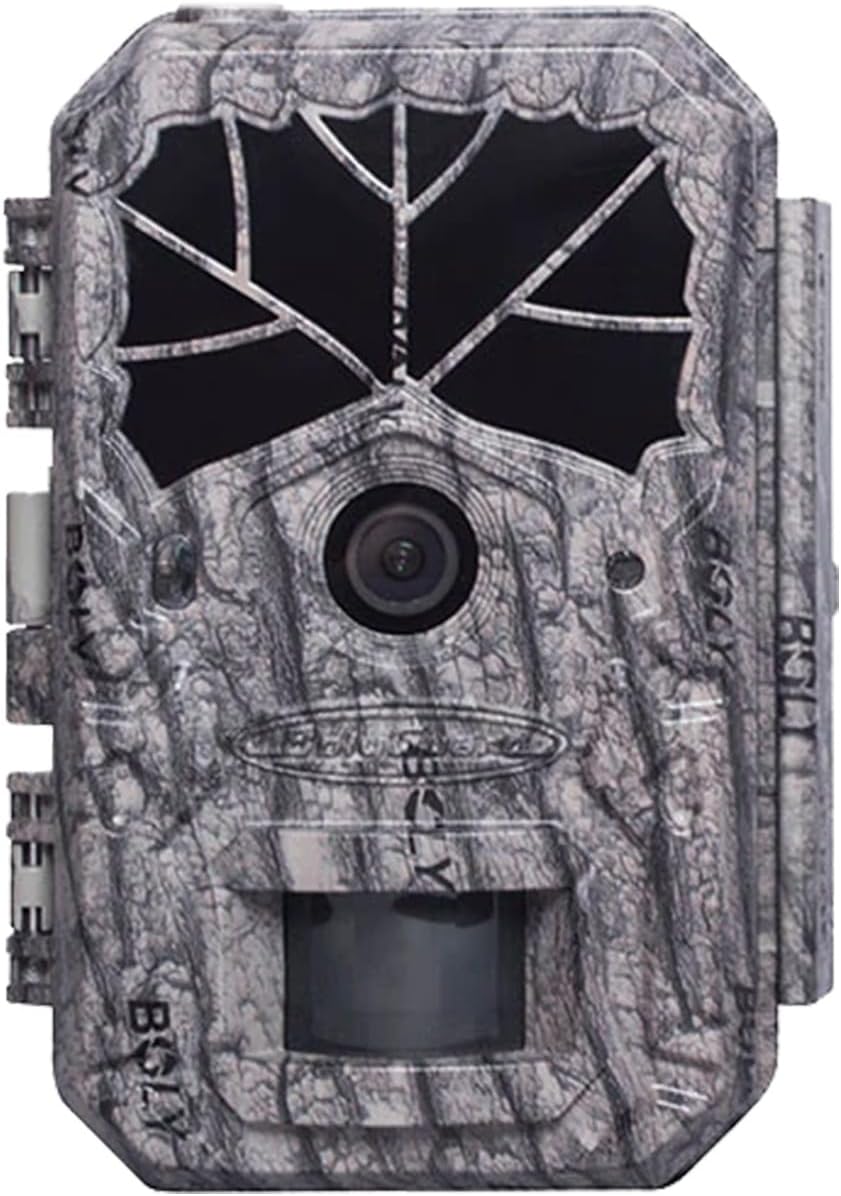
Figure 3.1: Front view of the BolyGuard BG636-K Trail Camera, showcasing the lens, motion sensor, and camouflage casing.

Figure 3.2: Internal view of the camera with the front cover open, showing the LCD display, control buttons, SD card slot, battery tray, and power switch.
Key Components:
- LCD Display: For menu navigation and viewing captured media.
- Control Buttons: Up/Video, Left, OK/Play, Right, Down/Photo, Menu, Shot.
- SD Card Slot: Insert your SD card here for storage.
- Battery Tray: Holds the required batteries.
- Power Switch: To turn the camera ON/OFF.
- Lens: Captures images and videos.
- PIR Motion Sensor: Detects movement to trigger recording.
- Infrared LEDs: Provide illumination for night vision (940nm no-glow).
4. Setup
4.1 Battery Installation
- Open the camera's front cover by unlatching the side clips.
- Locate the battery tray.
- Insert the required number of batteries (not included) into the battery tray, ensuring correct polarity (+/-). The camera supports high-capacity batteries for extended standby time.
- Close the battery tray securely.
4.2 SD Card Installation
- With the camera cover open, locate the SD card slot.
- Insert a formatted SD card (up to 32GB, Class 10 or higher recommended) into the slot until it clicks into place. Ensure the card is inserted in the correct orientation.
- To remove, gently push the SD card in until it clicks, then release, and it will eject.
4.3 Initial Power On & Basic Settings
- After installing batteries and an SD card, move the Power Switch from OFF to ON. The LCD screen will illuminate.
- The camera will enter setup mode. Use the Up/Video, Down/Photo, Left, and Right buttons to navigate the menu.
- Press the OK/Play button to confirm selections.
- Access the Menu to set basic parameters such as date, time, language, and format the SD card. Formatting the SD card is recommended before first use.
4.4 Mounting the Camera
The BG636-K is designed for outdoor use and can be mounted to trees, poles, or other stable surfaces.
- Select a suitable location that provides a clear view of the area you wish to monitor. Consider the detection range (up to 100ft) and the camera's 60-degree viewing angle.
- Use the included mounting tie to secure the camera firmly. Thread the tie through the slots on the back of the camera and around the mounting surface.
- Adjust the camera's angle to ensure optimal coverage.

Figure 4.1: The trail camera securely mounted to a tree using the provided strap, demonstrating typical outdoor placement.
5. Operating the Camera
5.1 Modes of Operation
The camera typically operates in three main modes:
- Setup Mode: Accessed when the camera is powered on and the cover is open. Allows configuration of settings.
- Active Mode: After closing the cover and ensuring the power switch is ON, the camera will enter active mode. The indicator light will flash for a few seconds, then turn off, indicating the camera is actively monitoring.
- Playback Mode: In Setup Mode, press OK/Play to review captured photos and videos.
5.2 Menu Settings
Navigate the menu using the directional buttons and OK/Play to customize camera behavior:
- Mode: Select Photo, Video, or Photo+Video.
- Photo Size: Set resolution (e.g., 48MP, 30MP, 16MP). Higher resolution yields larger file sizes.
- Video Size: Set resolution (e.g., 1080P, 720P).
- PIR Sensitivity: Adjust motion sensor sensitivity (High, Medium, Low) based on environment to avoid false triggers.
- Trigger Interval: Set the delay between consecutive triggers.
- Time Lapse: Configure the camera to take photos at set intervals regardless of motion.
- Date & Time: Set the current date and time for accurate timestamps on media.
- Format SD Card: Erases all data on the SD card. Use with caution.
5.3 Night Vision
The BG636-K utilizes 940nm no-glow black infrared LEDs for undetectable night vision up to 100 feet. These LEDs emit light invisible to humans and animals, ensuring discreet monitoring without disturbing wildlife.

Figure 5.1: An example of a deer captured at night, demonstrating the effectiveness of the 940nm no-glow infrared illumination.
5.4 Dual Power Options
The camera can be powered by internal batteries, providing over 6 months of standby time. For continuous operation, especially in remote or cloudy areas, the camera supports an external solar panel (not included) for extended power supply.
6. Maintenance
6.1 Cleaning
- Regularly clean the camera lens and PIR sensor window with a soft, dry cloth to ensure clear images and accurate motion detection.
- Wipe the camera body with a damp cloth if it becomes dirty. Avoid harsh chemicals or abrasive materials.
6.2 Battery Care
- Replace batteries when the low battery indicator appears on the LCD.
- Remove batteries if the camera will not be used for an extended period to prevent leakage.
- Use high-quality batteries for optimal performance and longevity.
6.3 SD Card Management
- Periodically format the SD card to maintain performance and prevent data corruption. Back up important files before formatting.
- Ensure the SD card is properly inserted and removed to avoid damage.
6.4 Waterproofing
The BG636-K is IP68 rated, providing excellent protection against dust and water immersion. Ensure the camera's latches are securely closed to maintain its waterproof integrity, especially in harsh weather conditions.

Figure 6.1: The camera operating reliably in various weather conditions, highlighting its IP68 waterproof design.
7. Troubleshooting
If you encounter issues with your camera, refer to the following common problems and solutions:
| Problem | Possible Cause | Solution |
|---|---|---|
| Camera does not power on. | Low or dead batteries; incorrect battery polarity; power switch in OFF position. | Replace batteries; ensure correct polarity; move power switch to ON. |
| No photos/videos captured. | SD card full or not formatted; PIR sensitivity too low; camera not in active mode. | Format or replace SD card; increase PIR sensitivity; ensure camera is in active mode (cover closed, switch ON). |
| Poor image/video quality. | Dirty lens; low light conditions; incorrect resolution settings. | Clean the lens; ensure adequate lighting or proper night vision settings; adjust photo/video resolution in menu. |
| False triggers. | PIR sensitivity too high; camera facing moving branches or heat sources. | Decrease PIR sensitivity; reposition camera to avoid obstructions. |
8. Specifications
Detailed technical specifications for the BolyGuard BG636-K Trail Camera:
| Feature | Specification |
|---|---|
| Model Name | BG636-K |
| Effective Still Resolution | 48 MP |
| Video Capture Resolution | 1080p (30 fps) |
| Night Vision Technology | 940nm No Glow IR LED |
| Night Vision Range | 100 Feet |
| Trigger Speed | 0.7 seconds |
| Water Resistance Level | IP68 Waterproof |
| Power Source | Battery / Solar Powered (Solar panel not included) |
| Standby Time | 6+ months (with high-capacity batteries) |
| Flash Memory Type | SD (up to 32GB, Class 10 recommended) |
| Viewing Angle | 60 Degrees |
| Operating Temperature | -22°F to 140°F (-30°C to 60°C) |
| Product Dimensions | 6 x 4 x 3 inches |
| Item Weight | 1.43 pounds |
| Included Components | Camera, Instruction Manual, Tie, Cable |
9. Warranty and Support
BolyGuard products are manufactured to high-quality standards. For specific warranty information, please refer to the warranty card included with your purchase or visit the official BolyGuard website. If you require technical assistance or have questions not covered in this manual, please contact BolyGuard customer support through their official channels.
For further assistance, you may visit the BolyGuard Store on Amazon.