
B221
Dehumidifier User Manual
Brand: Generic | Model: B221
Dehumidifier for Home, 51 OZ Water Tank, Quiet Dehumidifiers for Bathroom, Bedroom, RV and kitchen countertops, with Auto Shut Off and Fast Drying Clothes, 7 Colors LED Light
1. Introduction
This manual provides important information regarding the safe operation, installation, maintenance, and troubleshooting of your new Generic B221 Dehumidifier. Please read this manual thoroughly before using the appliance and retain it for future reference.
The Generic B221 Dehumidifier is designed to efficiently remove excess moisture from the air in various indoor environments, helping to prevent mold growth, reduce allergens, and create a more comfortable living space. It features dual-core semiconductor condensing technology for quiet and effective operation.

Figure 1.1: Front view of the Generic B221 Dehumidifier, showing the control panel and the transparent water tank filled with water.
2. Safety Instructions
To reduce the risk of fire, electric shock, or injury when using your dehumidifier, follow these basic precautions:
- Read all instructions before using the appliance.
- Do not operate the dehumidifier if the power cord or plug is damaged.
- Ensure the appliance is placed on a stable, level surface to prevent tipping and water spillage. The unit consists of two main pieces (top and water tank) that are not secured, so exercise caution.
- Do not block the air inlets or outlets. Maintain at least 20 cm (8 inches) clearance from walls or furniture.
- Do not immerse the appliance, cord, or plug in water or other liquids.
- Unplug the dehumidifier before cleaning, moving, or performing any maintenance.
- Keep out of reach of children and pets. This appliance is not intended for use by persons with reduced physical, sensory, or mental capabilities unless supervised.
- Do not use the appliance in areas where flammable liquids or gases are stored.
- The dehumidifier is designed for indoor use only.
3. Product Features
The Generic B221 Dehumidifier is equipped with several features designed for convenience and efficiency:
- Quiet & Efficient Operation: Utilizes dual-core semiconductor condensing technology for effective moisture removal with minimal noise (below 30dB in sleep mode).
- Auto Shut-Off: Automatically stops operation when the 1.5-liter (51 OZ) water tank is full or incorrectly positioned, preventing overflow.
- Compact & Portable Design: Lightweight and small footprint, suitable for various small spaces like kitchen countertops, bathrooms, bedrooms, RVs, and offices. Features a portable handle for easy movement.
- 7-Color LED Night Light: Integrated LED light with 7 color options, which can also function as a night light.
- Multiple Working Modes: Includes Sleep Mode (low speed, quiet), Normal Mode (standard speed), and High Speed Mode (stronger wind for fast clothes drying).
- Timer Function: Set automatic shutdown times for 6, 8, or 12 hours.

Figure 3.1: Key features of the dehumidifier, including low noise operation, colorful LED lighting, timed shutdown, and sleep function.

Figure 3.2: Detailed view of the dehumidifier's design, showing the LED screen display, 1.5L visible water tank, portable handle, and ultra-wide air grille.
4. Setup
- Unpack the Dehumidifier: Carefully remove the dehumidifier and all packaging materials from the box.
- Choose a Location: Place the dehumidifier on a firm, level surface in the desired area. Ensure there is at least 20 cm (8 inches) of space around the unit for proper airflow. Avoid placing it directly against walls or furniture.
- Ensure Water Tank is Correctly Placed: Verify that the water tank is securely seated in the base of the unit.
- Connect Power: Plug the power cord into a standard electrical outlet.
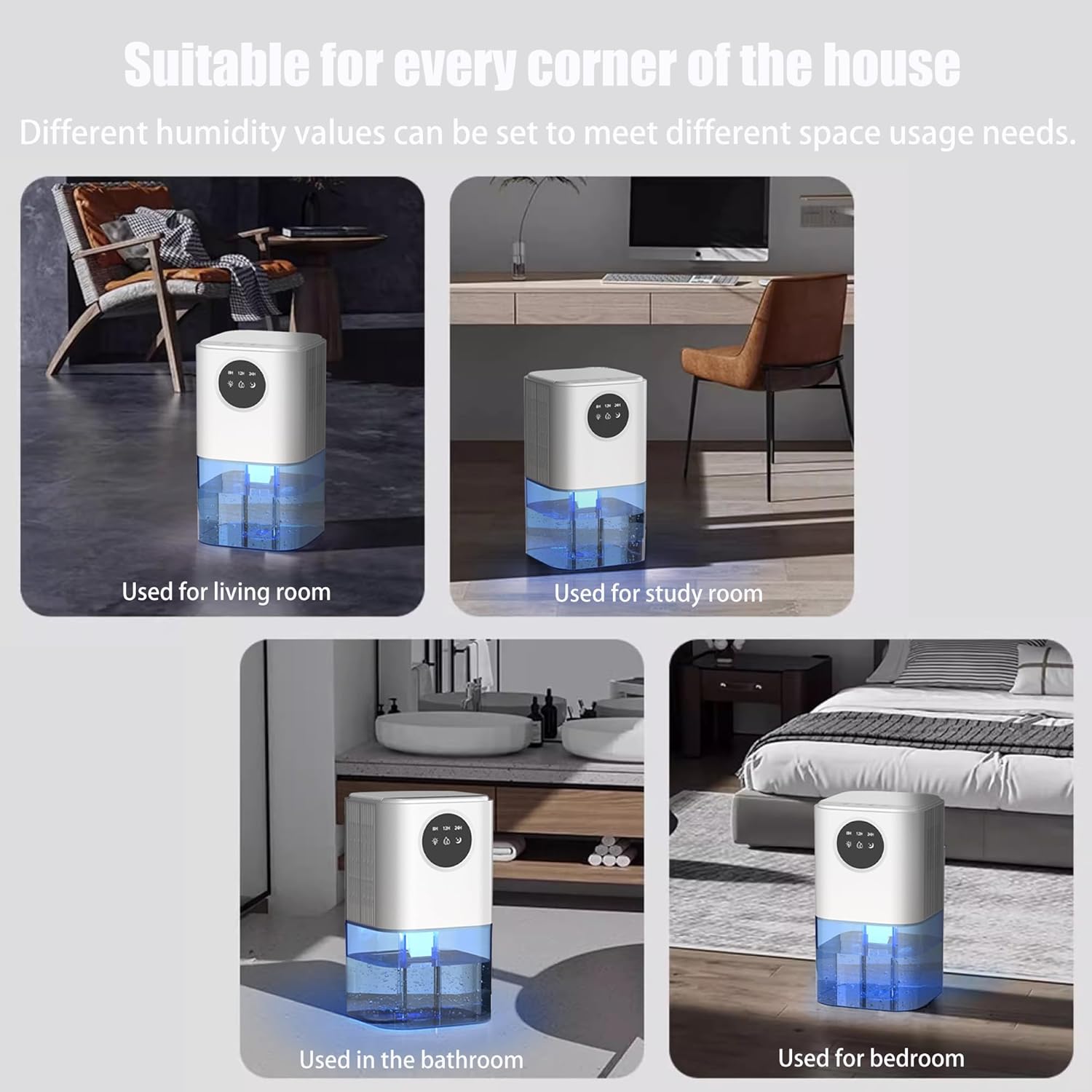
Figure 4.1: Examples of suitable locations for the dehumidifier, including living rooms, study areas, bathrooms, and bedrooms.
5. Operating Instructions
5.1. Control Panel Overview
The control panel is located on the top of the unit and features touch-sensitive buttons and an LED display.
- Power Button: Turns the unit On/Off.
- Light Button (Sun icon): Controls the LED night light.
- Mode Button (Water droplet icon): Cycles through operating modes.
- Timer Button (Moon icon): Sets the automatic shutdown timer.
5.2. Basic Operation
- Power On: Press the Power button to turn on the dehumidifier. The unit will start operating in its default mode.
- Power Off: Press the Power button again to turn off the dehumidifier.
5.3. Mode Selection
Press the Mode Button (water droplet icon) repeatedly to cycle through the available operating modes:
- Sleep Mode: Low speed operation, quiet (below 30dB). Ideal for nighttime use.
- Normal Mode: Standard speed for daily dehumidification.
- High Speed Mode: Stronger fan force for faster dehumidification or drying clothes.
5.4. LED Night Light Operation
The dehumidifier features a 7-color LED night light:
- Turn On/Cycle Colors: Press the Light Button (sun icon) once to turn on the light and cycle through the 7 colors automatically.
- Fix a Color: Press the Light Button again while a desired color is displayed to fix it.
- Turn Off Light: Press the Light Button a third time to turn off the LED light.
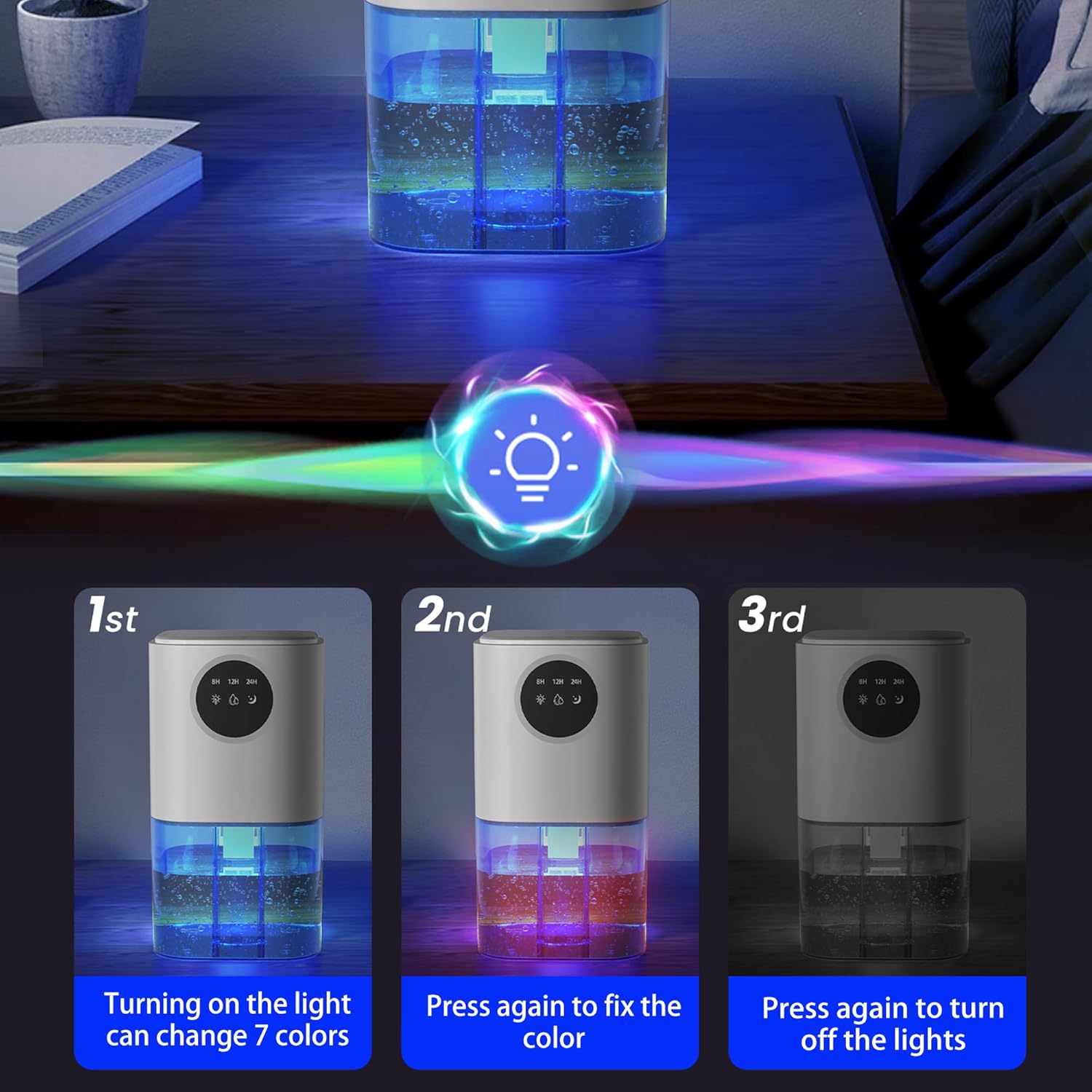
Figure 5.1: Instructions for controlling the 7-color LED light, showing how to turn it on, fix a color, and turn it off.
5.5. Timer Function
The timer function allows you to set the dehumidifier to automatically shut off after a specified period:
- Press the Timer Button (moon icon) repeatedly to select the desired shutdown time: 6 hours, 8 hours, or 12 hours.
- The selected time will be displayed on the LED screen. The unit will automatically turn off once the set time has elapsed.

Figure 5.2: The dehumidifier's control panel displaying timer options (8H, 12H, 24H) and illustrating its quiet operation with a sound level comparison chart.
6. Maintenance
6.1. Emptying the Water Tank
The dehumidifier will automatically shut off when the water tank is full. The LED indicator on the control panel may illuminate to signal that the tank needs to be emptied.
- Turn off the dehumidifier and unplug it from the power outlet.
- Carefully slide out the water tank from the bottom of the unit.
- Pour out the collected water.
- Rinse the water tank with clean water if necessary. Do not use harsh detergents or abrasive cleaners.
- Slide the empty water tank back into the dehumidifier until it clicks securely into place. Ensure it is correctly positioned to resume operation.
6.2. Cleaning the Dehumidifier
Regular cleaning helps maintain the efficiency and lifespan of your dehumidifier.
- Exterior Cleaning: Wipe the exterior of the unit with a soft, damp cloth. Do not use abrasive cleaners or solvents.
- Air Inlet/Outlet: Periodically check the air inlets and outlets for dust accumulation. Use a soft brush or vacuum cleaner attachment to gently remove any dust or debris.
Note: Do not attempt to disassemble the unit for internal cleaning. Refer to qualified service personnel for any internal maintenance.
7. Troubleshooting
| Problem | Possible Cause | Solution |
|---|---|---|
| Dehumidifier does not turn on. |
|
|
| No water collected or low dehumidification. |
|
|
| Unit is noisy. |
|
|
| Water leaks from the unit. |
|
|
8. Specifications
| Attribute | Detail |
|---|---|
| Brand | Generic |
| Model Number | B221 |
| Colour | White |
| Product Dimensions | 14 x 14 x 25.7 cm (5.5 x 5.5 x 10.1 inches) |
| Water Tank Capacity | 1.5 liters (51 OZ) |
| Power/Wattage | 25 watts |
| Material | Plastic |
| Auto Shut-off | Yes |
| Item Weight | 1.41 kg (3.1 lbs) |
| Recommended Floor Area | Up to 250 Square Feet |

Figure 8.1: Dimensions of the dehumidifier, showing height, width, and depth measurements.
9. Warranty and Support
Your satisfaction is our top priority. If you encounter any issues or have comments regarding your Generic B221 Dehumidifier, please do not hesitate to reach out to the manufacturer, YeeCopon.
Contact Information: Please refer to the product packaging or the seller's information on the purchase platform for the most current contact details. The manufacturer aims to respond to inquiries within 24 hours to ensure a positive and hassle-free experience.
This product is designed for reliability and performance. For any technical support or warranty claims, please contact the customer service team.
Related Documents - B221
 |
Docreate B221 Smart Home Dehumidifier Product Safety Warnings Comprehensive safety warnings and usage guidelines for the Docreate B221 Smart Home Dehumidifier, covering electrical safety, mechanical injury, storage, and emergency response. |
 |
NINA-B22x-02B with u-connectXpress 3.0 Production Information Note Information note from u-blox regarding the initial production of NINA-B22x-02B modules with u-connectXpress 3.0 software, including details on hardware updates, security fixes, and recommended customer actions. |
 |
SmartCam View Wireless NVR System Quick Start Guide A quick start guide for the SmartCam View Wireless NVR System (N1/B221/B220), covering setup, installation, and pairing of cameras. |
 |
u-blox NORA-B2 Series Bluetooth Low Energy Modules System Integration Manual This system integration manual for u-blox NORA-B2 series Bluetooth Low Energy modules provides comprehensive guidance on hardware design-in, software integration, component handling, regulatory compliance, and testing for engineers. |
 |
u-connectXpress AT Commands Manual - u-blox Wireless Modules Comprehensive reference manual detailing AT commands for u-blox u-connectXpress short-range wireless modules, including Bluetooth, BLE, and Wi-Fi series. |
 |
u-blox Short Range Wireless Modules: Datasheet and Comparison Explore the comprehensive range of u-blox stand-alone and host-based short-range wireless modules, including Bluetooth and Wi-Fi. This document provides detailed specifications, features, and model comparisons for developers. |