
EnHomee Dresser TV Stand with 7 Drawers& LED
EnHomee Black TV Stand Dresser
User Manual
Model: Dresser TV Stand with 7 Drawers& LED
Product Overview
The EnHomee Black TV Stand Dresser is a versatile furniture piece designed to accommodate up to a 55-inch television while providing extensive storage solutions. It features a sturdy metal frame, a durable wood top, and seven deep fabric drawers, including one large and six small drawers. This unit also integrates modern conveniences such as customizable LED lighting and built-in power outlets with AC and USB ports.
Its compact design maximizes storage in various rooms, including bedrooms, living rooms, and closets, helping to maintain a tidy and organized space. The integrated LED lights offer ambient lighting with multiple colors and flashing modes, controllable via remote, enhancing your entertainment experience. The built-in power outlets provide convenient charging for electronic devices directly from the dresser.

Figure 1: Fully assembled EnHomee Black TV Stand Dresser with LED lights and power outlets.
Safety Information
For your safety and to prevent potential hazards, please adhere to the following guidelines:
- Always secure the dresser to the wall using the anti-tip kits provided. This is crucial to prevent tipping, especially in households with children or pets.
- Do not place items exceeding the specified weight limit (110 lbs) on the top shelf to avoid overloading and potential structural damage or tipping.
- Follow the assembly instructions carefully and completely to ensure the dresser is stable and safe for use. Incorrect assembly can compromise stability.
- Ensure all power cords are routed safely to prevent tripping hazards and are not pinched or damaged.

Figure 2: Illustration of the anti-tip kit for wall mounting.
Package Contents
Before beginning assembly, please verify that all components listed below are present and undamaged:
- TV Stand Frame Components (Metal)
- Wooden Top Panel
- 7 Fabric Drawers (1 large, 6 small)
- LED Light Strip with Remote Control
- Built-in Power Outlet Unit (2 AC outlets, 2 USB ports)
- Anti-tip Kits
- Adjustable Feet
- Installation Tools
- Assembly Instructions Manual (this document)
Setup and Assembly
The EnHomee TV Stand Dresser is designed for straightforward assembly. Please follow the detailed steps provided in the included assembly guide. It is recommended to assemble the unit on a soft, clean surface to prevent scratches.
- Unpack and Identify Parts: Carefully remove all components from the packaging. Lay them out and compare them against the parts list in the separate assembly guide to ensure nothing is missing.
- Assemble the Frame: Begin by connecting the metal frame components according to the diagrams. Ensure all screws are tightened securely but do not overtighten.
- Attach the Wood Top: Secure the wooden top panel to the assembled frame.
- Install Power Outlet: Integrate the power outlet unit into its designated slot on the top panel.
- Install LED Light Strip: Adhere the LED light strip to the underside of the top shelf as indicated in the assembly guide. Ensure the strip is clean and dry before application.
- Insert Fabric Drawers: Once the frame is complete, unfold and insert the fabric drawers into their respective compartments.
- Attach Anti-tip Kit: For safety, attach the anti-tip kit to the back of the dresser and secure it to a wall stud.
- Adjust Feet: Use the adjustable feet at the bottom of the dresser to level the unit on uneven floors and protect your flooring from scratches.

Figure 3: Product dimensions and drawer sizes for assembly planning.

Figure 4: Adjustable feet for leveling and floor protection.
Operating Instructions
Using the LED Lights
The integrated LED light strip offers customizable ambient lighting for your room. Use the provided remote control to manage its functions:
- Power On/Off: Press the power button on the remote to turn the lights on or off.
- Color Selection: Choose from 20 different colors to match your mood or decor.
- Flashing Modes: Select from 41 flashing modes for dynamic lighting effects.
- Brightness Adjustment: Adjust the brightness level to your preference.
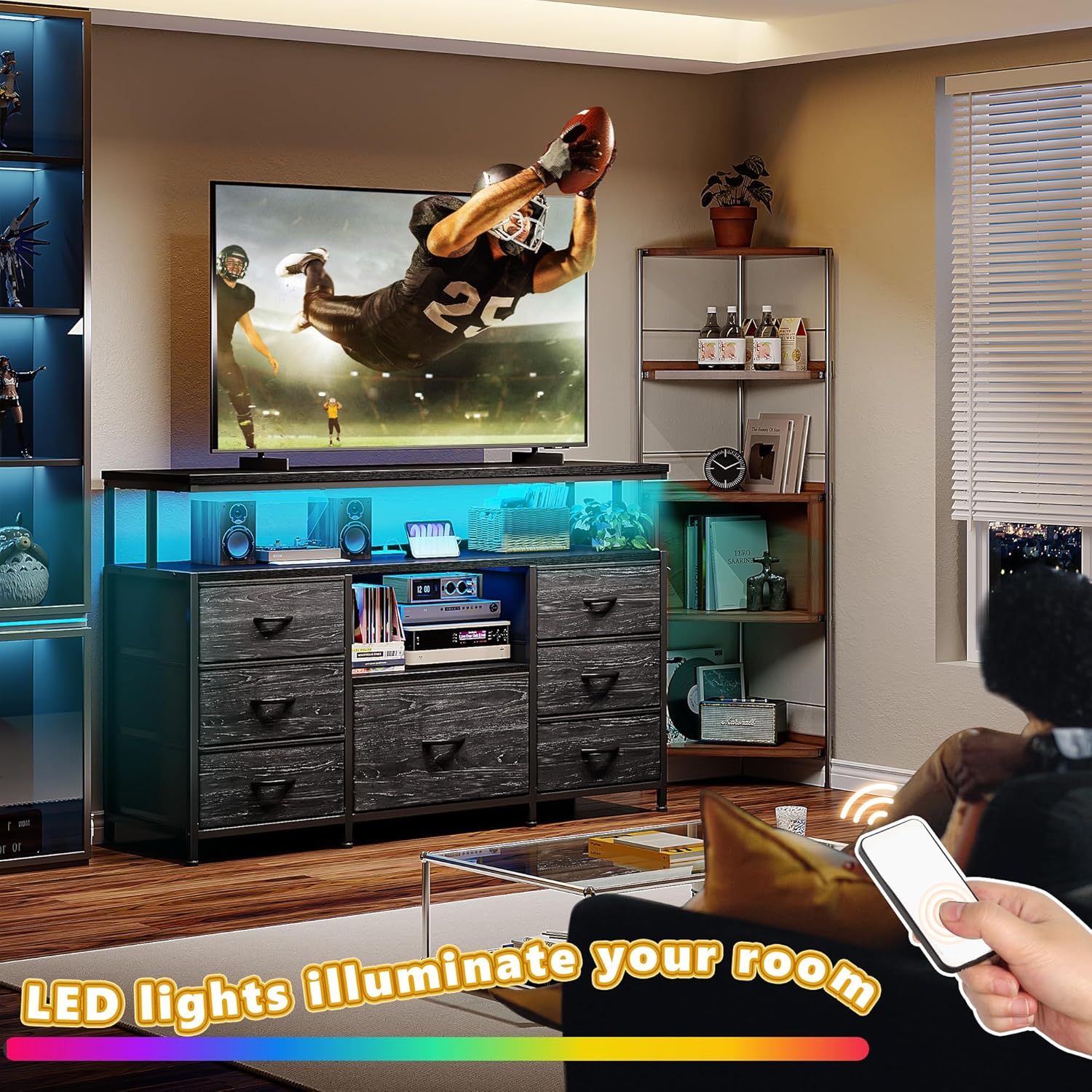
Figure 5: Controlling the LED lights with the remote control.
Utilizing the Built-in Power Outlets
The dresser includes a convenient charging station with 2 AC outlets and 2 USB ports, eliminating the need for extension cords.
- AC Outlets (125V/12A): Plug in your TV, sound system, lamps, or other small appliances.
- USB Ports (5V/2A): Charge your smartphones, tablets, and other USB-powered devices.
- Power Cord: The unit comes with a 4.9-foot power cord for easy connection to a wall outlet.

Figure 6: Integrated power outlets for convenient device charging.
Drawer Usage and Storage
The seven fabric drawers provide ample storage space. Each drawer can hold up to 22 lbs.
- Organization: Use the drawers for clothing, accessories, books, media, or other personal items.
- Privacy: The fabric drawers help keep your belongings neatly out of sight.
- Open Shelves: The three open storage shelves are ideal for electronics, decorative items, or frequently accessed belongings.

Figure 7: Demonstrating the large capacity of the storage drawers and open shelves.
Maintenance and Care
- Cleaning the Frame and Wood Top: Wipe down the metal frame and wooden top with a soft, damp cloth. Avoid abrasive cleaners or harsh chemicals that could damage the finish.
- Fabric Drawers: The fabric drawers can be spot cleaned with a mild detergent and water. Allow them to air dry completely before reinserting. Do not machine wash or tumble dry.
- Dusting: Regularly dust all surfaces to prevent buildup.
- Inspecting Connections: Periodically check all screws and connections to ensure they remain tight. Retighten if necessary to maintain stability.
Troubleshooting
| Problem | Possible Cause | Solution |
|---|---|---|
| Dresser feels wobbly or unstable. | Uneven floor; loose assembly screws; adjustable feet not properly set. | Ensure all assembly screws are tightened. Adjust the leveling feet at the bottom of the dresser to stabilize it on uneven surfaces. Confirm the anti-tip kit is securely installed. |
| LED lights are not turning on or responding to remote. | Power cord not plugged in; remote battery dead; LED strip connection loose. | Check if the dresser's power cord is securely plugged into a working wall outlet. Ensure the LED light strip is properly connected to its power source. Replace the remote control battery if necessary. |
| Power outlets (AC/USB) are not working. | Dresser's main power cord unplugged; device not properly inserted; device fault. | Verify the dresser's main power cord is fully plugged into a live electrical outlet. Ensure devices are correctly inserted into the outlets/ports. Test with a different device to rule out device fault. |
| Drawers are difficult to open/close or sag. | Overloaded drawer; fabric not properly seated in frame; damaged drawer. | Reduce the weight in the drawer, ensuring it does not exceed 22 lbs. Check that the fabric drawer is fully unfolded and properly seated within its metal frame support. Inspect for any damage to the drawer or frame. |
Specifications
| Brand | EnHomee |
| Model Name | TV Stand Dresser |
| Product Dimensions | 43.3"W x 11.8"D x 31.5"H |
| Color | Black |
| Material | Metal Frame, Wood Top, Fabric Drawers |
| Weight Limit (Top) | 110 Pounds |
| Drawer Weight Limit | 22 Pounds per drawer |
| Number of Drawers | 7 |
| Number of Open Shelves | 3 |
| Power Outlets | 2 AC Outlets (125V/12A), 2 USB Ports (5V/2A) |
| Special Features | Adjustable Feet, Anti-tip Kits, Customizable LED Light, Space Saving, Suitable for 55" TV |
| Assembly Required | Yes |
Warranty and Support
EnHomee stands behind the quality of its products. For specific warranty details regarding your TV Stand Dresser, please refer to the warranty card included in your package or visit the official EnHomee brand store.
If you encounter any issues, require replacement parts, or have questions not covered in this manual, please contact EnHomee customer support. You can find contact information on the brand's official website or through the retailer where you purchased the product.
For more information and to explore other EnHomee products, please visit the EnHomee Store on Amazon.
Ask a question about this manual
Ask about setup, troubleshooting, compatibility, parts, safety, or missing instructions. Manuals+ will review the question and use this page’s manual context to help answer it.