
Introduction
This manual provides detailed instructions for the installation, operation, and maintenance of your DAKASON 4FT LED Linear Light Fixture. Please read this manual thoroughly before installation and retain it for future reference. This fixture is designed for commercial and industrial lighting applications, offering adjustable power output and color temperature to suit various environments.
Safety Information
- WARNING: Risk of electric shock. Disconnect power at the fuse or circuit breaker before installation or servicing.
- Installation must be performed by a qualified electrician in accordance with all national and local electrical codes.
- Do not install in wet locations. This fixture is rated for indoor use only.
- Ensure the supply voltage is compatible with the fixture's requirements (110-277V).
- Do not handle the fixture with wet hands.
- Avoid looking directly into the LED light source when illuminated.
Package Contents
Verify that all components are present before beginning installation:
- DAKASON 4FT LED Linear Light Fixture(s)
- LED Lens (pre-installed)
- Mounting Hardware (screws, wall anchors, wire nuts)
- Junction Box Cover
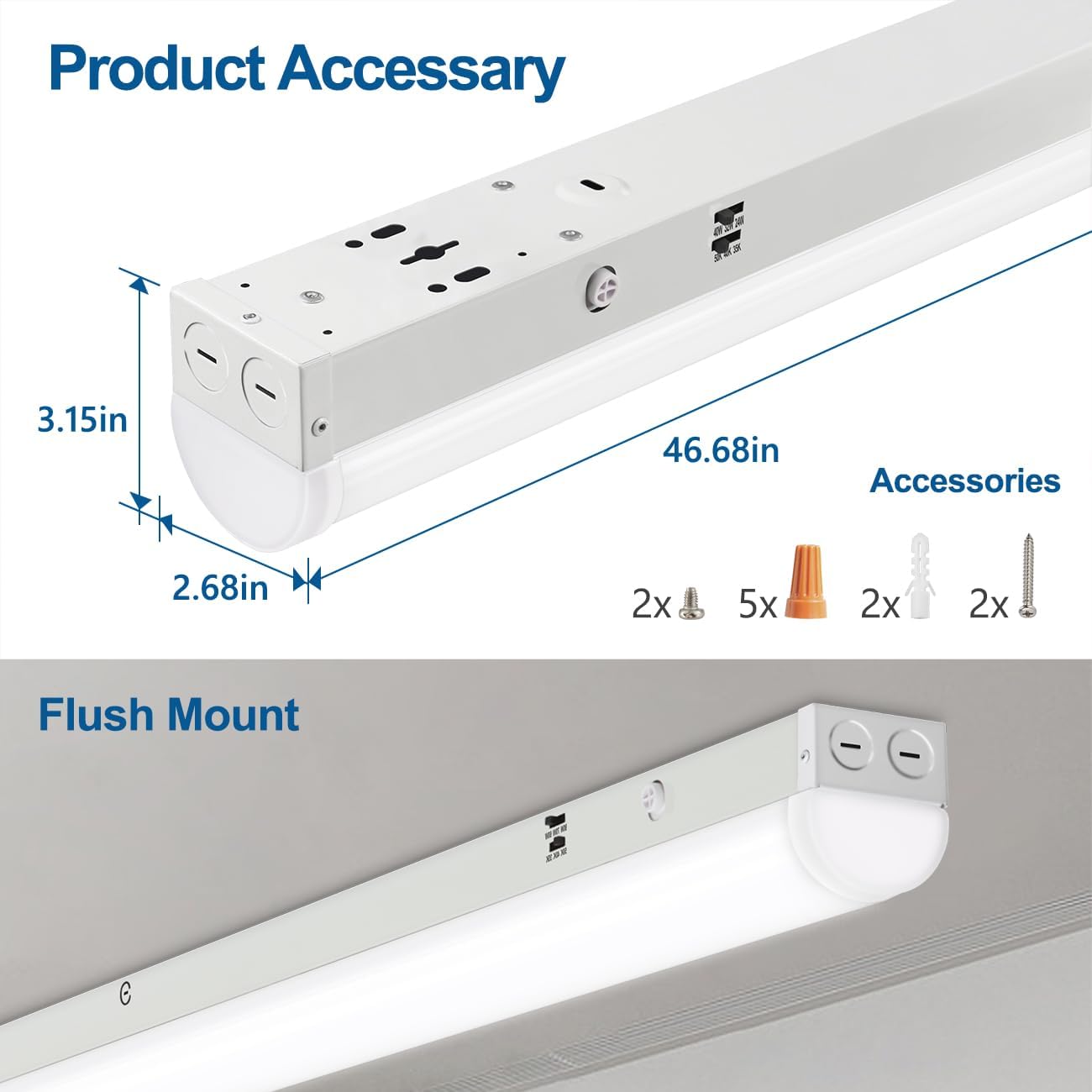
Figure 1: Product dimensions and included accessories.
Product Features
- Adjustable Power Output: Select between 40W, 32W, or 24W to control brightness and energy consumption.
- Selectable Color Temperature: Choose from 3500K (Warm White), 4000K (Cool White), or 5000K (Daylight) to match your lighting preference.
- 0-10V Dimmable: Compatible with standard 0-10V dimming systems for smooth brightness adjustment (dimmer not included).
- Linkable Design: Pre-drilled knockouts allow end-to-end connection of up to 10 fixtures for continuous lighting runs.
- Flexible Installation: Supports flush ceiling/wall mounting (hardwired) and suspended installation (hanging kit sold separately).
- Durable Construction: Features a sturdy metal housing for efficient heat dissipation and a frosted PC diffuser for soft, glare-free illumination.

Figure 2: Key features of the DAKASON LED Linear Light Fixture.
Specifications
| Feature | Specification |
|---|---|
| Brand | DAKASON |
| Model Number | DAKASON-LSC-4FT40/32/24W-H-TCP |
| Dimensions (L x W x H) | 46.68" x 2.68" x 3.15" |
| Wattage | Selectable: 40W / 32W / 24W |
| Brightness (Max) | 5200 lumens (at 40W) |
| Color Temperature | Selectable: 3500K / 4000K / 5000K |
| Voltage | 110-277V |
| Dimmable | 0-10V (dimmer not included) |
| Material | Alloy Steel (housing), Acrylic (shade) |
| Indoor/Outdoor Usage | Indoor |
| Lifespan | Up to 50,000 hours |
| Certifications | UL Listed |
Setup (Installation)
1. Preparation
- Turn off power at the circuit breaker before starting installation.
- Ensure the mounting surface is structurally sound to support the fixture's weight.
- Gather necessary tools (screwdriver, wire strippers, drill, etc.).
2. Mounting Options
The DAKASON LED Linear Light Fixture supports two primary installation methods:
Flush Mount Installation
- Remove the LED lens cover by gently squeezing both sides and pressing down until it detaches.
- Position the fixture on the ceiling or wall where it will be mounted. Mark the drilling locations for the mounting screws.
- Drill pilot holes and insert wall anchors if necessary.
- Secure the fixture to the mounting surface using the provided screws.
- Connect the electrical wiring (see 'Electrical Connections' below).
- Reattach the LED lens cover (see 'Reattaching the Lens Cover' below).

Figure 3: Junction box cover for flush mounting.
Suspended Installation (Hanging Kit Not Included)
For suspended installation, a separate hanging kit is required. Follow the instructions provided with your hanging kit to suspend the fixture from the ceiling. Ensure the fixture is securely supported before proceeding with electrical connections.
3. Electrical Connections
- Route the electrical wires through the knockout holes on the fixture.
- Connect the live (black) wire from the supply to the black wire of the fixture using a wire nut.
- Connect the neutral (white) wire from the supply to the white wire of the fixture using a wire nut.
- Connect the ground (green or bare copper) wire from the supply to the green wire of the fixture using a wire nut.
- If using 0-10V dimming, connect the purple (DIM+) and gray (DIM-) wires from your 0-10V dimmer to the corresponding wires on the fixture.
- Ensure all connections are secure and properly insulated.
- Install the provided junction box cover over the wiring compartment.

Figure 4: Safety wire for securing the fixture components.
4. Reattaching the Lens Cover
After wiring and mounting, carefully reattach the LED lens cover. Align the cover with the fixture, squeeze both sides slightly, and press it firmly into place until you hear a "click" sound, indicating it is securely fastened.
Video 1: Demonstrates how to reattach the lens cover to the DAKASON LED Linear Light Fixture by squeezing and pressing until it clicks into place.

Figure 5: Visual guide for reattaching the lens cover.
Operating Instructions
Your DAKASON LED Linear Light Fixture offers adjustable settings for both power output and color temperature.
1. Selecting Power Output (Wattage)
Locate the wattage selection switch on the side of the fixture. This switch allows you to choose between three power levels:
- 40W: Maximum brightness (up to 5200 lumens).
- 32W: Medium brightness (approx. 4160 lumens).
- 24W: Lower brightness (approx. 3120 lumens).
Adjust the switch to your desired wattage setting before turning on the power.
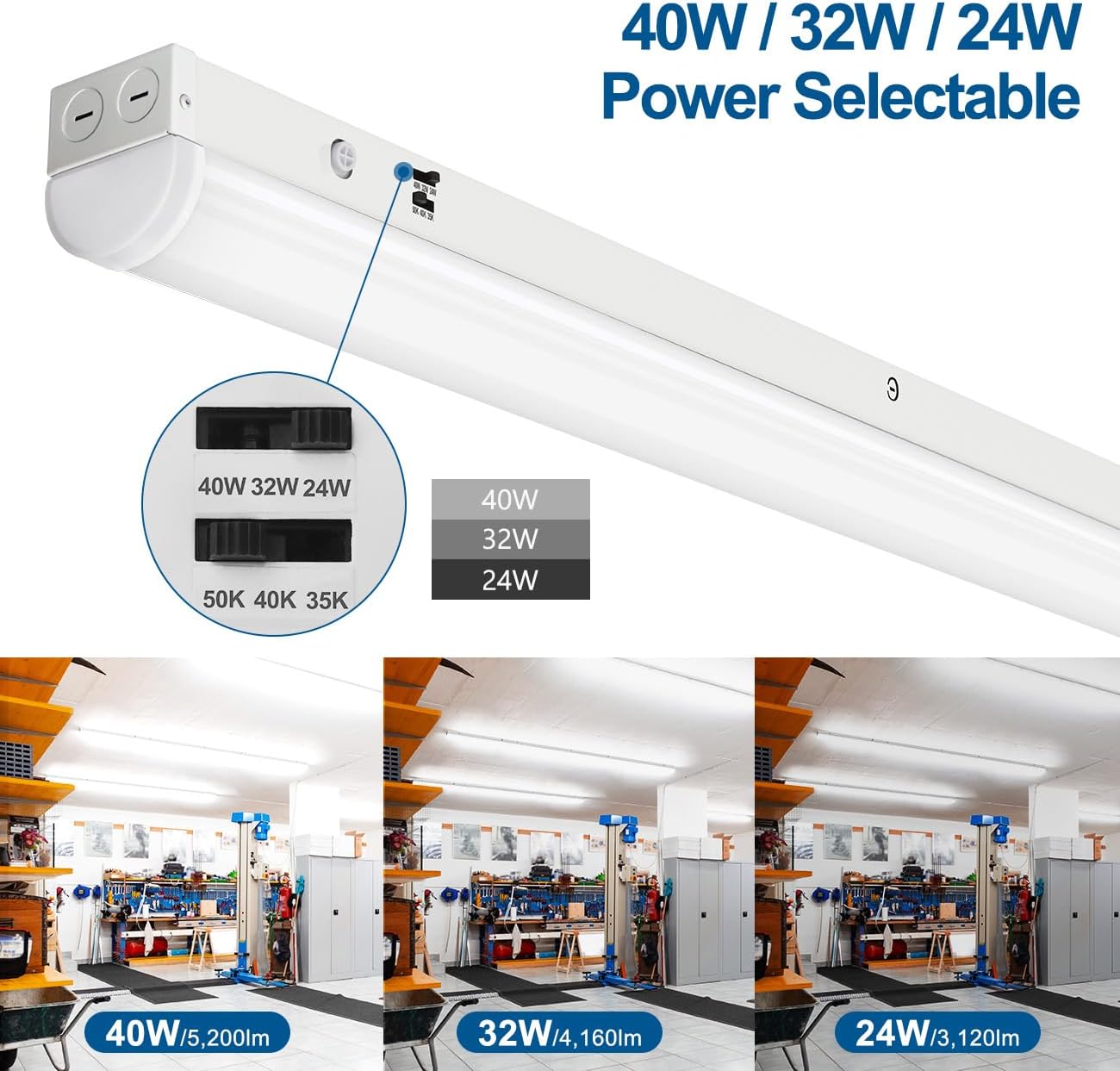
Figure 6: Power selectable switch and corresponding brightness levels.
2. Selecting Color Temperature
Adjacent to the wattage switch, you will find the color temperature selection switch. This allows you to choose from three distinct color temperatures:
- 3500K (Warm White): A softer, warmer light suitable for areas where a more inviting ambiance is desired.
- 4000K (Cool White): A neutral white light, often used in offices and workshops for general task lighting.
- 5000K (Daylight): A bright, crisp white light that mimics natural daylight, ideal for detailed work areas and commercial spaces.
Adjust the switch to your preferred color temperature before turning on the power.
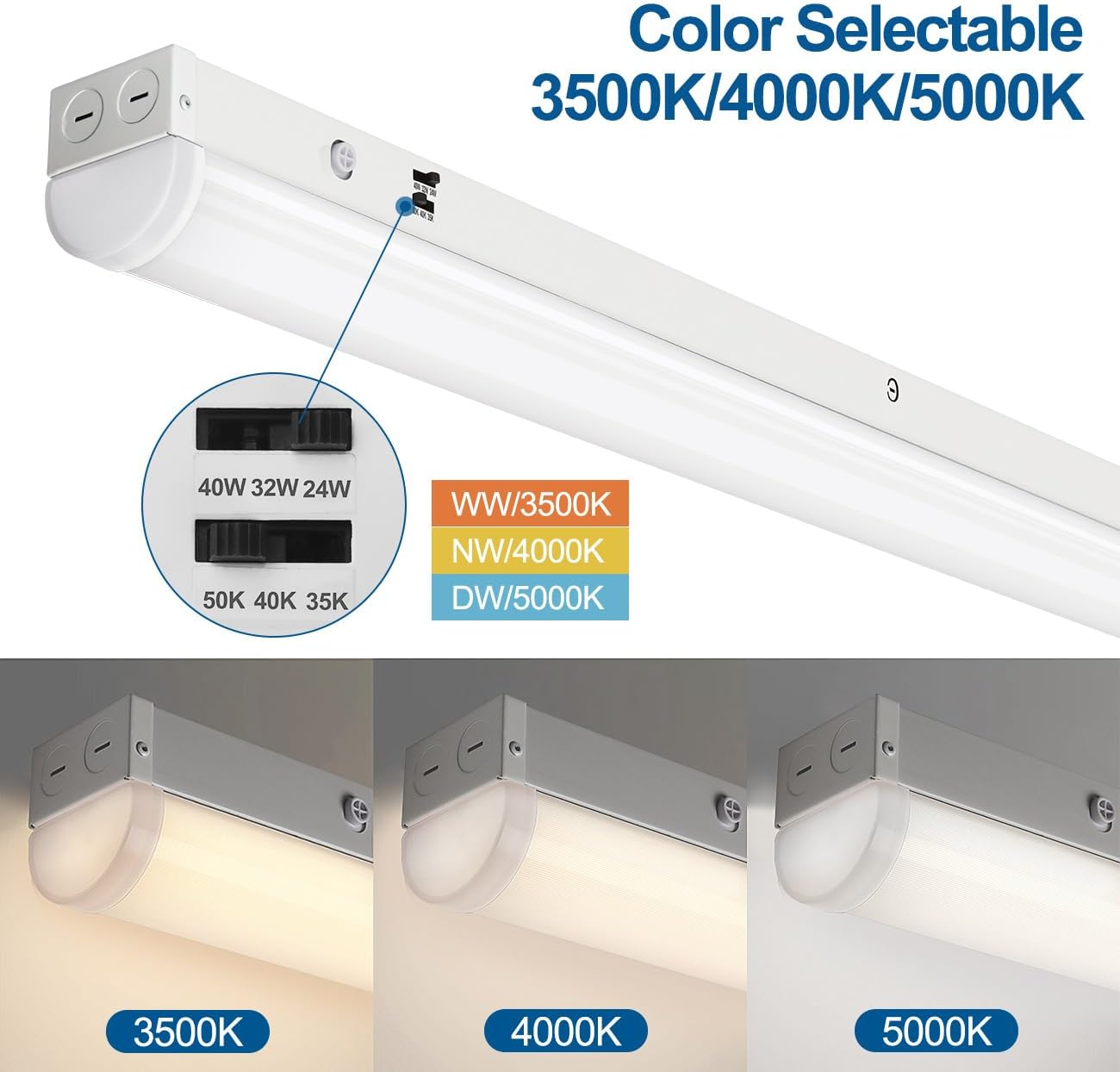
Figure 7: Color temperature selectable switch and visual examples.
3. 0-10V Dimming
This fixture is compatible with external 0-10V dimmers (not included). If you have connected a 0-10V dimmer during installation, you can adjust the light output from 5% to 100% using the dimmer control. Ensure the dimmer is compatible with 0-10V LED fixtures.
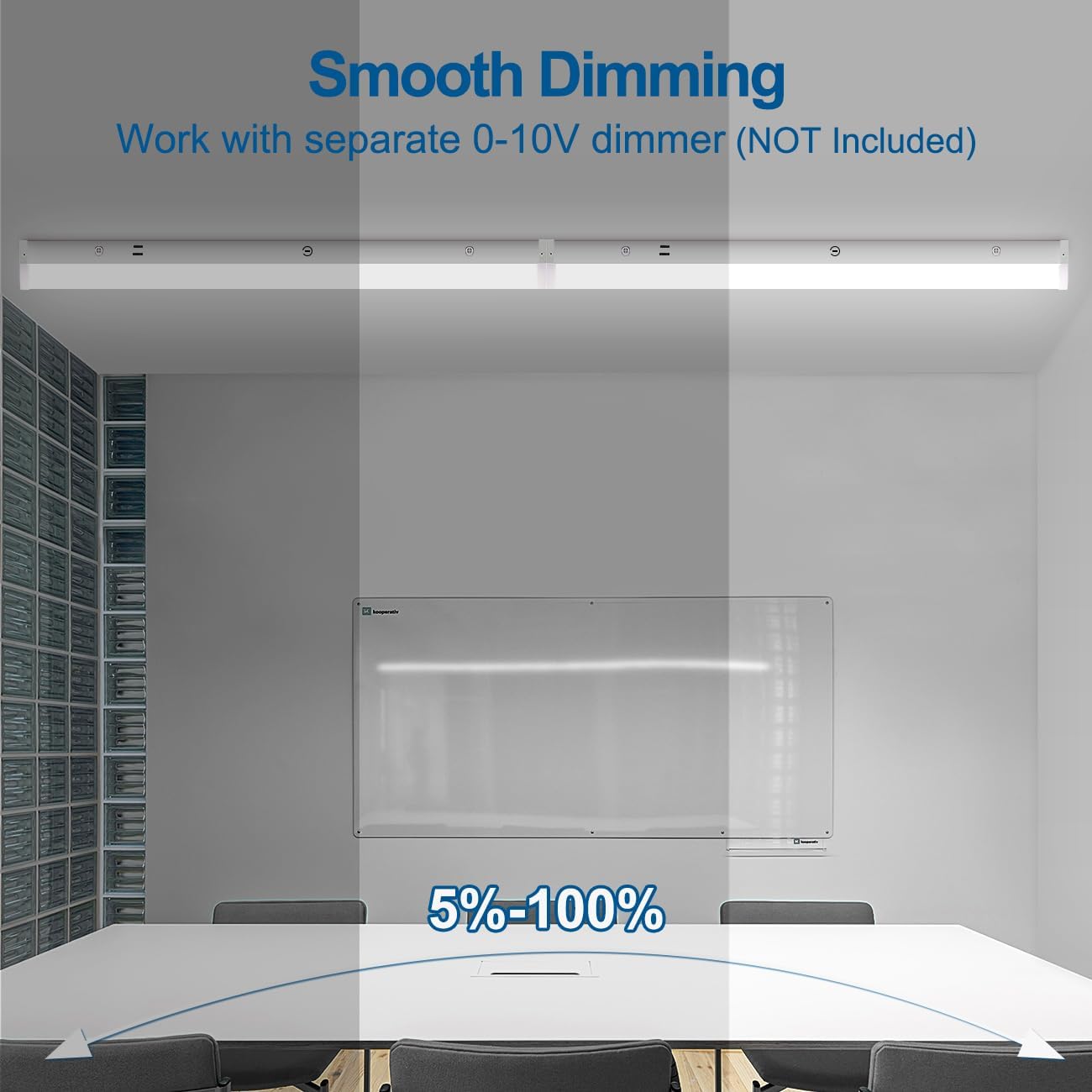
Figure 8: Smooth 0-10V dimming capability.
Maintenance
The DAKASON LED Linear Light Fixture is designed for long-term, maintenance-free operation with a lifespan of up to 50,000 hours.
- Cleaning: Ensure power is off before cleaning. Wipe the fixture and lens with a soft, dry, or slightly damp cloth. Do not use abrasive cleaners or solvents.
- Inspection: Periodically check for any loose wiring or physical damage. If any issues are found, disconnect power and consult a qualified electrician.
- LED Replacement: The integrated LED components are not user-replaceable. If the LEDs fail, the entire fixture should be replaced.
Troubleshooting
| Problem | Possible Cause | Solution |
|---|---|---|
| Light does not turn on. | No power supply. Loose wiring connection. Faulty fixture. | Check circuit breaker and wall switch. Verify all wire connections are secure (ensure power is off). Contact customer support if power and connections are confirmed. |
| Light flickers or dims unexpectedly. | Incorrect dimmer type. Loose dimmer wiring. Power fluctuations. | Ensure a 0-10V dimmer is used. Check dimmer wiring connections. Consult an electrician to check power supply stability. |
| Incorrect color temperature or brightness. | Switches set incorrectly. | Adjust the wattage and color temperature selection switches to desired settings. |
Warranty
DAKASON provides a 5-year limited warranty on this LED Linear Light Fixture from the date of purchase. This warranty covers defects in materials and workmanship under normal use. It does not cover damage resulting from improper installation, misuse, abuse, or acts of nature. Please retain your proof of purchase for warranty claims.
Customer Support
If you have any questions, require technical assistance, or need to make a warranty claim, please contact DAKASON customer support through the retailer where the product was purchased or visit the official DAKASON website for contact information.
For more products and information, visit the DAKASON Store.
