
1. Introduction
Thank you for choosing the CLXEAST 24 Inch Illuminated In/Outdoor Atomic Analog Wall Clock. This clock is designed to provide accurate timekeeping, temperature, and humidity readings, both indoors and outdoors. It features atomic time synchronization, an intelligent light sensor for automatic illumination, and a durable, weather-resistant construction.

Image 1.1: Front view of the CLXEAST 24 Inch Illuminated Atomic Analog Wall Clock.
2. Safety Information
- Use only the specified battery type and quantity (4 D batteries).
- Do not mix old and new batteries, or different types of batteries.
- Insert batteries with correct polarity (+/-).
- Remove exhausted batteries promptly to prevent leakage.
- Keep the clock away from direct heat sources, extreme sunlight, and constant heavy rain to ensure lasting performance.
- This product is not a toy. Keep out of reach of children.
3. Package Contents
- CLXEAST 24 Inch Illuminated Atomic Analog Wall Clock (1 unit)
- Instruction Manual (1 unit)
Note: 4 D batteries are required and not included.
4. Product Features
- Illuminated Dial: Features an integrated light sensor that automatically activates a warm backlight in dark conditions and turns off in daylight. Two backlight modes: Always On, Always Off.
- Atomic Time Synchronization: Automatically syncs with the WWVB radio transmission from Fort Collins, CO, for precise timekeeping.
- Automatic Daylight Saving Time (DST): Option to automatically adjust for Daylight Saving Time.
- Time Zone Selection: Supports 4 USA time zones: Pacific (PST), Mountain (MST), Central (CST), and Eastern (EST).
- Weatherproof & UV Resistant: IP65 rated, sealed with front and back rubberized gaskets for protection against water and outdoor elements.
- Integrated Thermometer: Measures temperatures from -40°F to 140°F (-40°C to 60°C).
- Integrated Hygrometer: Measures humidity from 1% to 99% relative humidity.
- Accurate Quartz Movement: Ensures reliable time display.
- Premium Construction: Features a glass lens and metal frame.
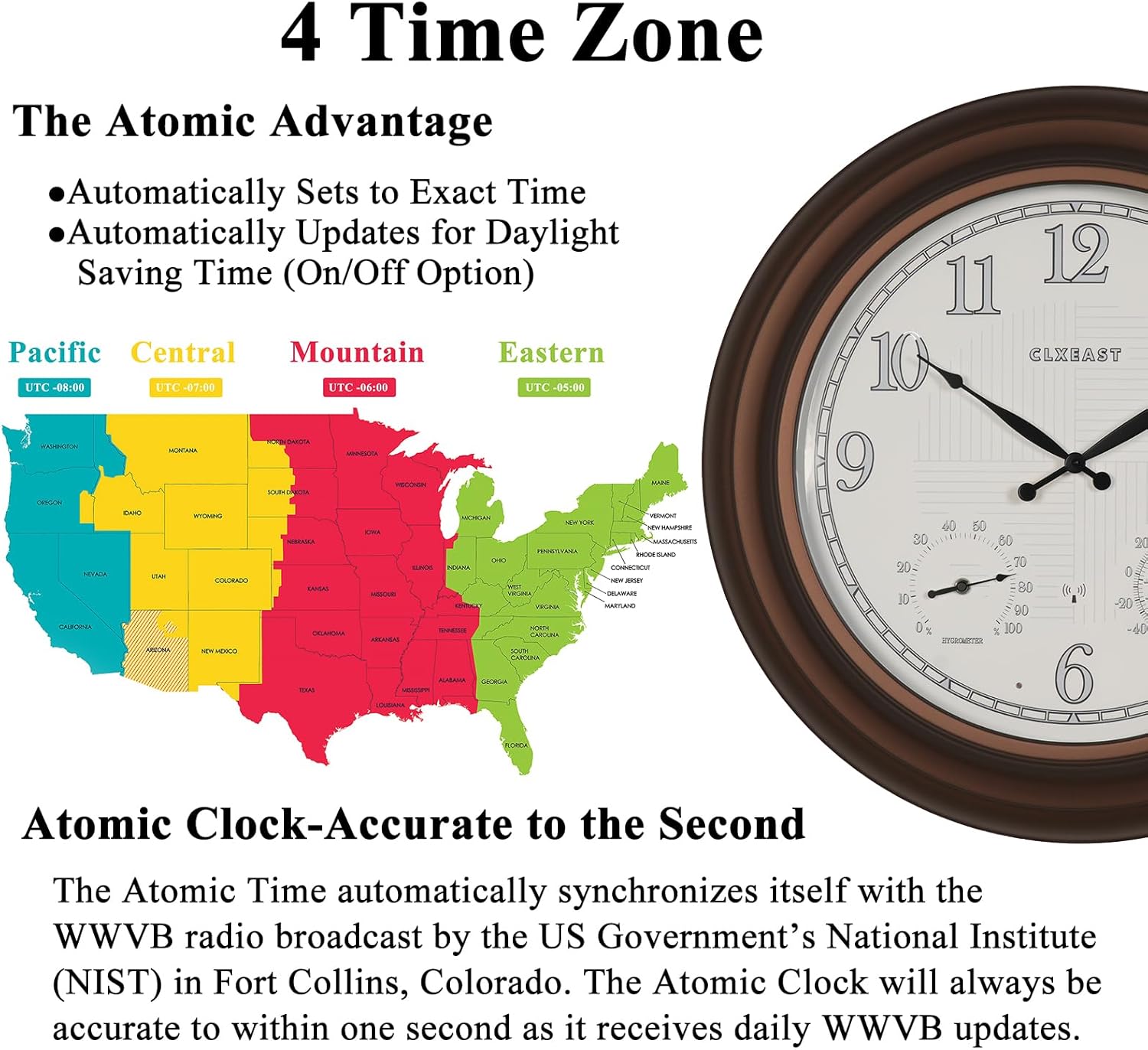
Image 4.1: Day and Night Illumination Feature.

Image 4.2: Key structural features of the clock.
5. Setup Instructions
5.1 Battery Installation
- Locate the battery compartment on the back of the clock.
- Insert 4 new D batteries, ensuring correct polarity (+/-).
- Securely close the battery compartment cover.
5.2 Setting Time Zone
After battery installation, the clock will attempt to synchronize with the atomic time signal. Before it does, set your desired time zone:
- Locate the time zone switch on the back of the clock.
- Select one of the following options:
- P for Pacific Standard Time (PST)
- M for Mountain Standard Time (MST)
- C for Central Standard Time (CST)
- E for Eastern Standard Time (EST)

Image 5.1: USA Time Zone Map and Atomic Time Synchronization.
5.3 Atomic Time Synchronization
Once batteries are installed and the time zone is set, the clock will automatically attempt to receive the WWVB atomic time signal from Fort Collins, Colorado. This process may take several minutes or up to 24 hours depending on signal strength and environmental conditions. For optimal reception, place the clock near a window and away from electronic devices that may cause interference.
5.4 Thermometer & Hygrometer Calibration
The integrated thermometer and hygrometer require approximately 3 hours to fully calibrate and display accurate ambient temperature and humidity readings. Allow this period after initial setup or significant changes in environment.
6. Operating Instructions
6.1 Backlight Operation
The clock features an AI Smart LED Light Sensor. In normal operation, the backlight will automatically activate in low-light conditions and turn off in sufficient light.
- Always On Mode: If available, a switch on the back of the clock can be set to keep the backlight continuously on, regardless of ambient light.
- Always Off Mode: If available, a switch on the back of the clock can be set to keep the backlight continuously off.

Image 6.1: Illuminated clock face at night.
6.2 Daylight Saving Time (DST)
The clock has an option to automatically adjust for Daylight Saving Time. Locate the DST switch on the back of the clock and set it to 'ON' for automatic adjustment or 'OFF' to disable this feature.
7. Maintenance
7.1 Cleaning
To clean the clock, use a soft, dry cloth. For stubborn marks, a slightly damp cloth can be used, followed by a dry cloth. Avoid abrasive cleaners or solvents, as these may damage the finish or display.
7.2 Battery Replacement
When the clock hands stop moving or the backlight dims significantly, it is time to replace the batteries. Follow the battery installation steps in Section 5.1. Always replace all 4 D batteries simultaneously with new ones.
7.3 Placement Considerations
While designed for outdoor use, prolonged exposure to extreme weather conditions (e.g., direct, intense sunlight, heavy rain, or freezing temperatures) can affect the clock's lifespan and accuracy. For optimal performance and longevity, consider placing the clock in a sheltered outdoor area.
8. Troubleshooting
- Clock not displaying correct time:
- Ensure batteries are new and correctly installed.
- Verify the correct time zone is selected.
- Check the DST setting.
- Relocate the clock to an area with better atomic signal reception (e.g., near a window, away from electronics). Allow up to 24 hours for synchronization.
- Backlight not working:
- Check if the batteries need replacement.
- Ensure the backlight mode is not set to 'Always Off' if you desire automatic illumination.
- Verify the light sensor is not obstructed.
- Thermometer/Hygrometer readings seem inaccurate:
- Allow at least 3 hours for the sensors to fully calibrate after initial setup or relocation.
- Ensure the clock is not exposed to direct heat sources or extreme cold that might skew readings.
9. Specifications
| Brand | CLXEAST |
| Model Number | TM2227R14-N-RC |
| Dimensions | 24.4"W x 24.4"H |
| Item Weight | 8.8 Pounds |
| Power Source | Battery Powered |
| Batteries Required | 4 D batteries (not included) |
| Display Type | Analog |
| Material | Acrylic, Glass, Metal (Frame Material: Metal) |
| Indoor/Outdoor Usage | Indoor, Outdoor |
| Special Features | Atomic Time, Daylight Saving Time by WWVB, Illuminated, Temperature & Humidity Display, Weatherproof & UV Resistant |
| Radio Bands Supported | 60 kHz |

Image 9.1: Product Dimensions.
10. Warranty and Support
This CLXEAST product comes with a limited warranty. For specific warranty details or technical support, please refer to the warranty card included with your purchase or contact CLXEAST customer service through the retailer where the product was purchased.

