1. Introduction
Welcome to the Xech MyCafe Smart Mug Coffee Maker and Milk Frother user manual. This versatile appliance is designed to help you create a variety of café-style beverages, including lattes, cappuccinos, hot chocolate, and more, right in your home. Its automatic functions for frothing and heating milk make preparing your favorite drinks simple and efficient.
2. Safety Instructions
Please read all safety instructions carefully before using the appliance to prevent injury or damage.
- Do not immerse the base unit or power cord in water or any other liquid.
- Ensure the appliance is placed on a stable, flat, heat-resistant surface.
- Keep out of reach of children.
- Do not operate the appliance with a damaged cord or plug.
- Only use the provided attachments.
- The appliance is not dishwasher safe. Clean the interior with a soft cloth and mild detergent.
- Avoid touching hot surfaces. Use handles or knobs.
- Unplug from outlet when not in use and before cleaning.
- This appliance is for household use only.
3. Product Components
The Xech MyCafe Smart Mug includes the following components:
- Main Unit (Mug with integrated handle and control panel)
- Power Base
- Lid
- Whisk Attachment (for frothing)
- Mixer Attachment (for stirring/heating without frothing)
- User Manual
- Warranty Card
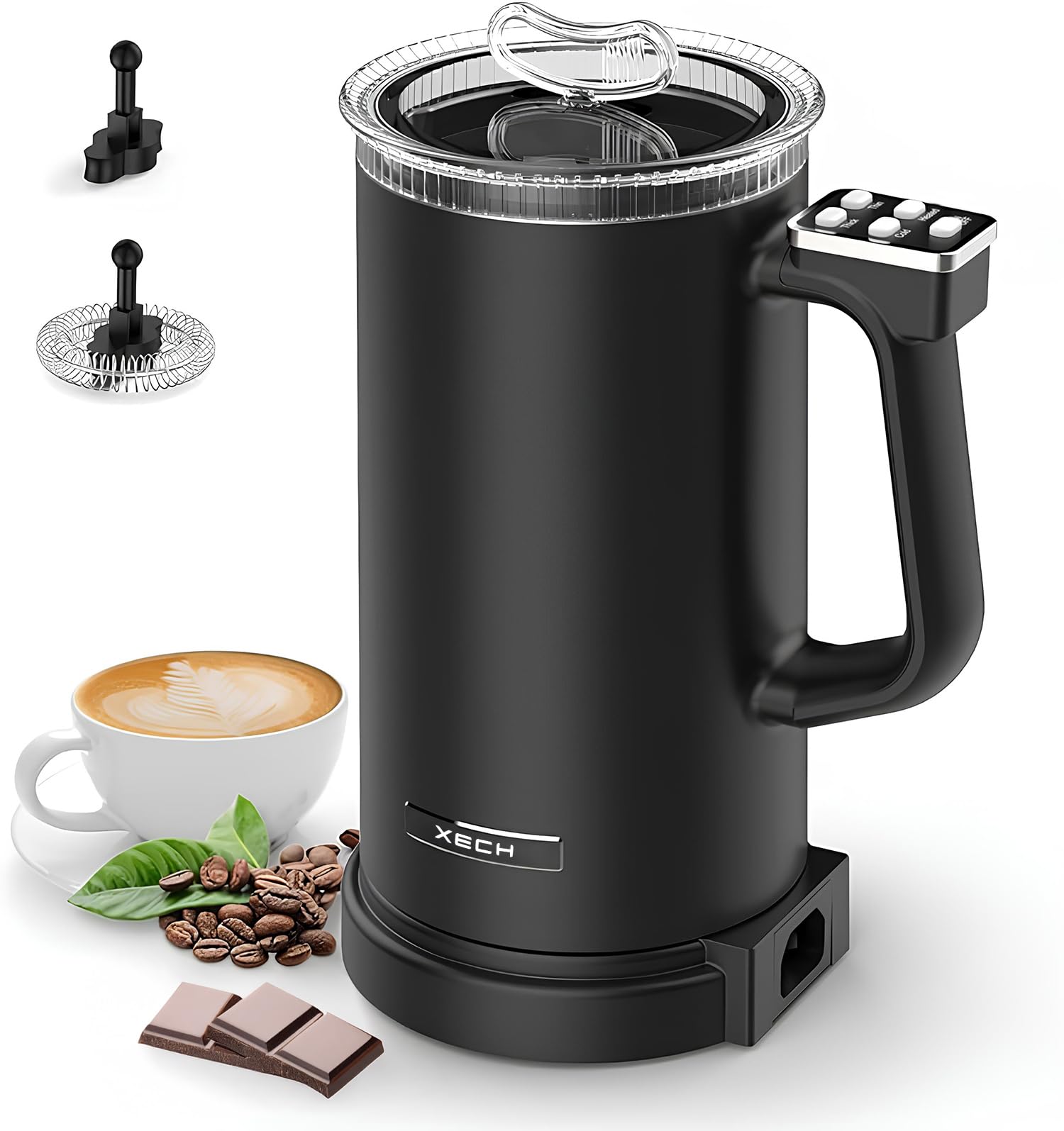
Image: The Xech MyCafe Smart Mug, showcasing its sleek black design and integrated control panel.

Image: Close-up view of the Xech MyCafe showing the 650ml capacity, 160ml frothing capacity, and the two included attachments: whisk and mixer.
4. Setup and First Use
Unpack:
Carefully remove all components from the packaging. Retain packaging for future storage or transport.
Clean:
Before first use, clean the interior of the mug and the attachments with warm, soapy water. Wipe the exterior with a damp cloth. Do not immerse the main unit or power base in water.
Placement:
Place the power base on a dry, stable, and heat-resistant surface near a power outlet.
Connect:
Plug the power cord into a standard 220-240V AC outlet. The appliance is now ready for use.

Image: The interior of the Xech MyCafe, showing the 304 food-grade stainless steel lining and the heavy-duty heating element at the base.
5. Operating Instructions
The Xech MyCafe offers various functions for frothing and heating. Always ensure the correct attachment is in place for your desired beverage.
5.1. Control Panel Overview

Image: The control panel on the handle of the Xech MyCafe, featuring buttons for 'Thick', 'Thin', 'Cold', 'Heated', and 'ON/OFF'.
- Thick: For dense, rich foam.
- Thin: For lighter, airy foam.
- Cold: For cold frothing or mixing.
- Heated: For heating milk or beverages.
- ON/OFF: To start and stop the operation.
5.2. Making Frothed Milk (Hot or Cold)
Insert Whisk:
Place the whisk attachment onto the spindle at the bottom of the mug.
Add Milk:
Pour cold milk into the mug. Do not exceed the 'MAX' frothing level (160ml) indicated inside the mug.
Select Function:
- For Hot Thick Foam: Press 'Thick' then 'Heated'.
- For Hot Thin Foam: Press 'Thin' then 'Heated'.
- For Cold Thick Foam: Press 'Thick' then 'Cold'.
- For Cold Thin Foam: Press 'Thin' then 'Cold'.
Start:
Press the 'ON/OFF' button. The indicator light will illuminate, and the frothing process will begin.
Serve:
Once the cycle is complete (the appliance will automatically shut off), carefully pour the frothed milk into your beverage.

Image: The Xech MyCafe in operation, demonstrating milk frothing and warming functions for various beverages.

Image: Examples of beverages made with the Xech MyCafe, illustrating thin cold foam, thick cold foam, thin hot foam, and thick hot foam.
5.3. Heating Milk or Beverages (without frothing)
Insert Mixer:
Place the mixer attachment onto the spindle at the bottom of the mug.
Add Liquid:
Pour milk or your desired beverage into the mug. Do not exceed the 'MAX' heating level (650ml) indicated inside the mug.
Select Function:
Press 'Heated'.
Start:
Press the 'ON/OFF' button. The indicator light will illuminate, and the heating process will begin.
Serve:
Once the cycle is complete, carefully pour the heated liquid.
5.4. Examples of Beverages
The Xech MyCafe can create a wide range of drinks:
- Hot Beverages: Turmeric Milk (Hot Thin Froth), Milk Tea (Hot Thick Froth), Hot Chocolate (Hot Thick Froth), Cappuccino (Hot Thick Froth).
- Cold Beverages: Kids Health Drinks (Cold Thick Froth), Frappuccino (Cold Thick Froth), Iced Coffee, Spanish Latte.

Image: A collage of various beverages, including turmeric milk, milk tea, hot chocolate, cappuccino, kids' health drinks, and frappuccino, all prepared using the Xech MyCafe.
5.5. Instructional Videos
Video: Xech MyCafe - Cafe Style Beverages in Minutes
Description: This video demonstrates the quick and easy process of making various cafe-style beverages using the Xech MyCafe, including frothing milk and pouring lattes.
Video: Xech MyCafe - Creamy Delicious Hot Chocolate
Description: Watch how to prepare a creamy and delicious hot chocolate using the Xech MyCafe, from adding ingredients to the final garnish.
Video: Xech MyCafe - One Hot Summer Day (Iced Coffee)
Description: This video demonstrates how to make a refreshing iced coffee with the Xech MyCafe, perfect for a hot summer day.
6. Maintenance and Cleaning
Proper maintenance ensures the longevity and optimal performance of your Xech MyCafe.
- Daily Cleaning: After each use, immediately rinse the interior of the mug and the attachments with warm water.
- Hand Wash Only: The Xech MyCafe is not dishwasher safe. Hand wash the interior of the mug and attachments using a soft sponge and mild dish soap.
- Exterior Cleaning: Wipe the exterior of the mug and the power base with a damp cloth. Do not use abrasive cleaners or scourers.
- Drying: Ensure all parts are thoroughly dry before reassembling or storing the appliance.
- Storage: Store the appliance in a clean, dry place.
7. Troubleshooting
If you encounter any issues with your Xech MyCafe, please refer to the following common troubleshooting tips:
- Appliance does not turn on:
- Ensure the power cord is securely plugged into a working electrical outlet.
- Check if the power base and mug are correctly assembled.
- Milk not frothing or heating properly:
- Ensure the correct attachment (whisk for frothing, mixer for heating) is properly installed.
- Check that the milk level is within the MIN/MAX markings for the selected function.
- Use cold milk for frothing for best results.
- Ensure the milk is fresh and not expired.
- Excessive noise during operation:
- Verify that the attachment is securely placed on the spindle.
- Ensure there is enough liquid in the mug.
If the problem persists, please contact customer support.
8. Specifications
| Brand | Xech |
| Model Name | MyCafe |
| Wattage | 500W |
| Capacity | 650ml (Total) |
| Frothing Capacity | 160ml |
| Voltage | 220-240V – 10A |
| Rated Frequency | 50-60Hz |
| Material | 304 Food Grade Stainless Steel (Interior), Acrylonitrile Butadiene Styrene (Exterior) |
| Product Dimensions | 11D x 14W x 22.5H Centimeters |
| Special Features | Auto Shut-Off, Includes Hot Plate, Jug, Lightweight, Milk Frother |
| Operation Mode | Fully Automatic |
| Human Interface Input | Buttons |
| Is Dishwasher Safe | No |
| Country of Origin | China |
9. Warranty and Support
Your Xech MyCafe Smart Mug comes with a warranty. Please refer to the included Warranty Card for detailed terms and conditions.
For technical support, service, or any inquiries, please contact XECH Technologies Pvt Ltd customer care:
Customer Care: +91 88288 44466
Manufacturer: XECH Technologies Pvt Ltd


