
AMTIFO YM519
AMTIFO OBD2 Scanner with Battery Tester
Model: YM519
Introduction
The AMTIFO OBD2 Scanner with Battery Tester (Model YM519) is a versatile diagnostic tool designed for comprehensive vehicle analysis. It combines the functions of an OBD2 code reader with a battery health tester, providing a complete solution for monitoring your vehicle's performance and health. This device supports all OBD II compliant vehicles, offering features such as reading and clearing diagnostic trouble codes (DTCs), real-time data streaming, I/M readiness checks, and detailed battery analysis.
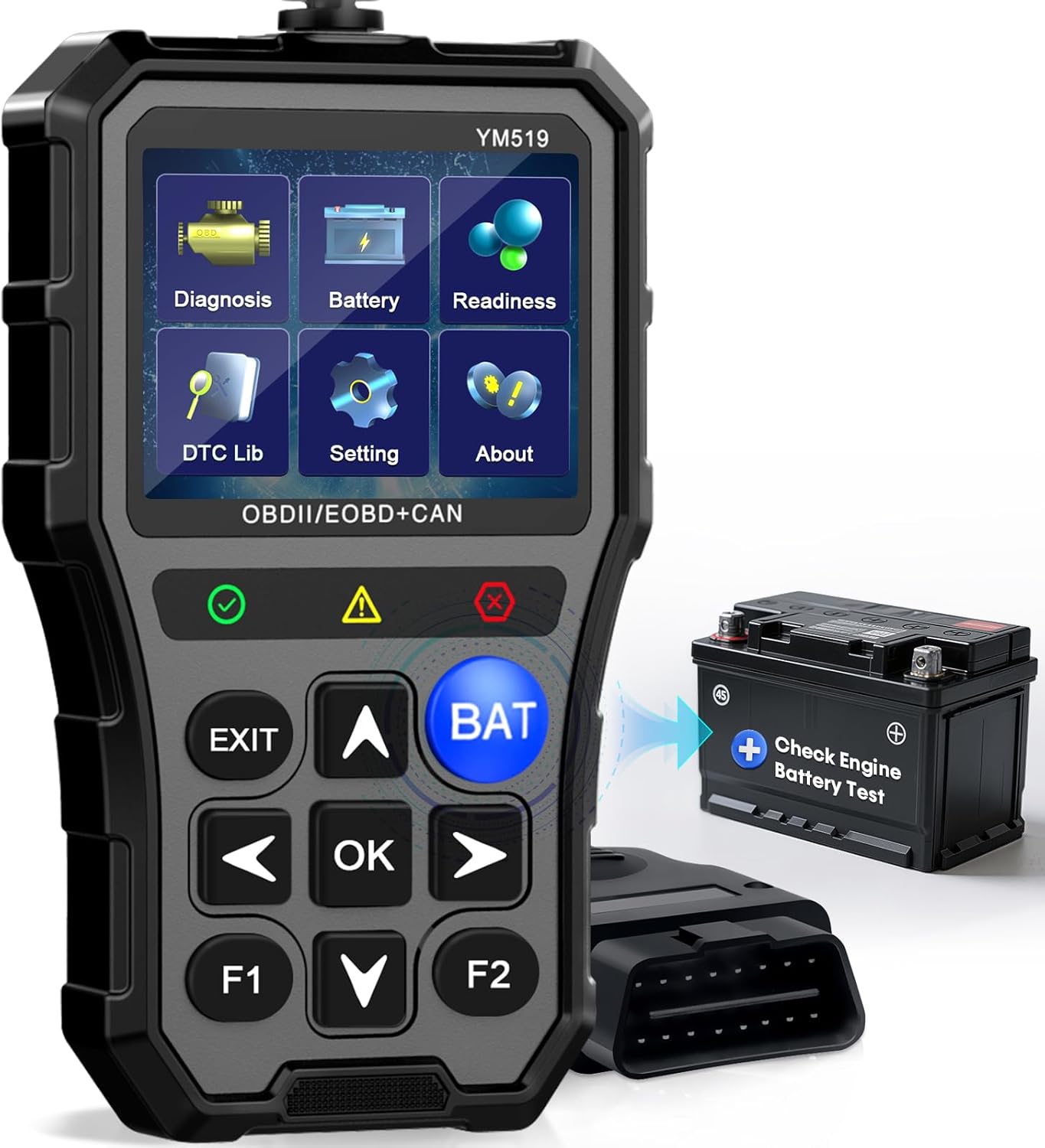
The AMTIFO OBD2 Scanner YM519, a comprehensive diagnostic tool.
What's in the Box
Upon opening the package, ensure all the following items are present:
- 1 x AMTIFO OBD2 Scanner (YM519)
- 1 x User Manual
Setup and Installation
The AMTIFO OBD2 Scanner is designed for simple plug-and-play operation. Follow these steps to set up your device:
- Locate your vehicle's OBD II port. This is typically found under the dashboard on the driver's side.
- Ensure your vehicle's ignition is in the 'OFF' position before connecting the scanner.
- Firmly insert the scanner's OBD II connector into the vehicle's OBD II port.
- Turn the vehicle's ignition to the 'ON' position (do not start the engine unless prompted by a specific test). The scanner will automatically power on and link to the vehicle.

The scanner is easy to set up by plugging into the vehicle's OBD2 port.
For a visual guide on setup and initial operation, please refer to the official product video below:
Official product video demonstrating the setup and various diagnostic functions of the AMTIFO OBD2 Scanner YM519.
Operating Instructions
The AMTIFO OBD2 Scanner offers a range of diagnostic functions accessible through its intuitive menu. Use the navigation buttons (up, down, left, right, OK, Exit) to navigate the interface.
1. Battery Test
The scanner features a dedicated 'BAT' button for quick access to battery testing functions. This allows you to check battery voltage, monitor its condition, and assess battery life.
- Press the BAT button on the scanner.
- Select 'Battery Measurement' to view the current battery voltage.
- Select 'Battery Monitoring' to see a real-time graph of battery voltage.
- Select 'Battery Life' to perform a comprehensive battery health check. Follow on-screen prompts, which may include turning the engine off and on.

Perform a quick and smart battery test with the dedicated BAT button.
2. Reading and Clearing Codes
This function allows you to retrieve and erase Diagnostic Trouble Codes (DTCs) that trigger the Check Engine Light.
- From the main menu, select 'Diagnosis'.
- Choose 'Read Codes' to view stored, pending, and permanent codes.
- Choose 'Erase Codes' to clear all DTCs. Note: This function is performed with the key on, engine off (KOEO). Do not start the engine during this process.
3. I/M Readiness
Check the readiness status of the emission-related monitor systems to ensure your vehicle is ready for a smog check.
- From the main menu, select 'Readiness'.
- The scanner will display the status of various monitors (e.g., Misfire Monitor, Fuel System Monitor, Catalyst Monitor). 'OK' indicates the monitor has completed its diagnostic cycle.
4. Viewing Vehicle Information
Access important vehicle information such as Vehicle Identification Number (VIN), Calibration ID (CALID), and Calibration Verification Number (CVN).
- From the main menu, select 'Diagnosis'.
- Choose 'Vehicle Information'.
5. Live PCM Data
View real-time operational parameters of the vehicle's engine control module (PCM) in numerical or graphical format.
- From the main menu, select 'Diagnosis'.
- Choose 'Live PCM Data'.
- Scroll through the various data points such as RPM, vehicle speed, fuel system status, and sensor readings.

Monitor key live datastream capabilities for real-time vehicle performance.
6. Realtime Curve
Visualize real-time sensor data in a curved graph for easier analysis of trends and fluctuations.
- From the main menu, select 'Diagnosis'.
- Choose 'Realtime Curve'.
7. O2 Sensor Test
Retrieve O2 sensor monitor test results for the most recently completed tests from the vehicle's on-board computer.
- From the main menu, select 'Diagnosis'.
- Choose 'O2 Sensor Test'.
8. On-Board Monitor Test
Access the results of on-board diagnostic monitoring tests for specific components/systems.
- From the main menu, select 'Diagnosis'.
- Choose 'On-Board Mon. Test'.
9. Component Test
This function allows for testing specific components or systems of the vehicle. Availability may vary by vehicle model.
- From the main menu, select 'Diagnosis'.
- Choose 'Component Test'.
10. DTC Lookup
Quickly look up definitions of Diagnostic Trouble Codes (DTCs) directly on the device, eliminating the need for external resources.
- From the main menu, select 'DTC Lib'.
- Enter the DTC code using the navigation buttons and press 'OK' to view its definition.
11. Settings
Customize various settings of the scanner to suit your preferences.
- From the main menu, select 'Setting'.
- Options include:
- Language: Select from 13 supported languages.
- Unit of Measure: Switch between English and Metric units.
- Key Beep: Adjust the volume of button presses.
- F1/F2 Key Function: Customize the shortcuts for F1 and F2 buttons.
- Backlight: Adjust screen brightness.
Maintenance
To ensure the longevity and optimal performance of your AMTIFO OBD2 Scanner, follow these maintenance guidelines:
- Keep the device clean and free from dust and debris. Use a soft, dry cloth for cleaning.
- Avoid exposing the scanner to extreme temperatures, direct sunlight, or excessive moisture.
- Store the device in a cool, dry place when not in use.
- Do not attempt to disassemble or repair the device yourself. Refer to qualified service personnel for any repairs.
- Handle the cable and connector with care to prevent damage.
Troubleshooting
If you encounter issues with your AMTIFO OBD2 Scanner, refer to the following common troubleshooting tips:
Device Does Not Power On
- Ensure the OBD II connector is securely plugged into the vehicle's port.
- Verify the vehicle's ignition is in the 'ON' position.
- Check the vehicle's battery for sufficient charge.
Communication Error with Vehicle
- Confirm the vehicle is OBD II compliant (generally 1996 and newer for US vehicles).
- Check for any loose connections at the OBD II port or scanner cable.
- Turn the ignition off, disconnect the scanner, wait a few seconds, and reconnect.
- Ensure the vehicle's battery is not critically low.
Check Engine Light Remains On After Clearing Codes
- Clearing codes only turns off the light; it does not fix the underlying issue. The light will reappear if the fault persists.
- Address the root cause of the diagnostic trouble code (DTC) before attempting to clear it again.
- Ensure the engine was off when clearing codes, as per instructions.

Understand different DTC statuses to accurately identify car problems and avoid blind maintenance.
Specifications
| Feature | Detail |
|---|---|
| Brand | AMTIFO |
| Model | YM519 |
| Product Dimensions | 9.9"L x 5.2"W x 1.4"H |
| Item Weight | 7.8 ounces |
| Operating System | Android 4.0 |
| Display Resolution | 720x1440 |
| Automotive Fit Type | Universal Fit |
| Supported Protocols | OBDII/EOBD protocols |
| Supported Languages | 13 languages |
| Vehicle Compatibility | Most vehicles (1996 and newer) |

The scanner offers global vehicle coverage for models from 1996 and newer.
Warranty and Support
AMTIFO is committed to providing excellent customer service and product support.
- 24-Hour Support: We offer 24-hour phone and email support for any inquiries or assistance you may need.
- 24-Month Replacement: Your AMTIFO OBD2 Scanner is covered by a 24-month replacement policy, ensuring peace of mind.
For further assistance, please contact AMTIFO customer support through the details provided on our official website or your purchase platform.

Dedicated customer support is available to assist you.