
Weasch CN101A DC/AC 12V
Weasch CN101A Digital Timer Switch User Manual
Model: CN101A DC/AC 12V | Brand: Weasch
1. Introduction and Overview
The Weasch CN101A Digital Timer Switch is a highly versatile and programmable time relay designed for precise control of various electrical appliances. This device allows users to set up to 28 daily or weekly ON/OFF schedules, providing automated control for lighting, motors, irrigation systems, and more. Its digital LCD display ensures clear readability, and the built-in rechargeable battery maintains program settings during power outages.

Figure 1: Front view of the CN101A Digital Timer Switch, showing the LCD display and control buttons.
2. Product Features
- Rated Control Voltage: Input 12V DC/AC, Output 200-250V AC 50/60HZ.
- Contact Capacity: 16A, 250V AC, suitable for a wide range of applications.
- Time Range: Programmable from 1 minute up to 168 hours (7 days).
- Maximum Programmes: Supports up to 28 ON/OFF scheduled times daily or weekly.
- Power-off Memory: Equipped with a built-in 1.2V 40mA rechargeable battery, retaining program settings for ≥60 days during power interruptions.
- Digital LCD Display: Provides clear and easy-to-read time and program information.
- Silicone Buttons: Designed for comfortable and responsive operation.
- Pluggable Jack: Features 6.3mm terminal cables for firm and reliable connections.
- Durable Shell: Constructed from excellent materials for anti-aging and corrosion resistance.
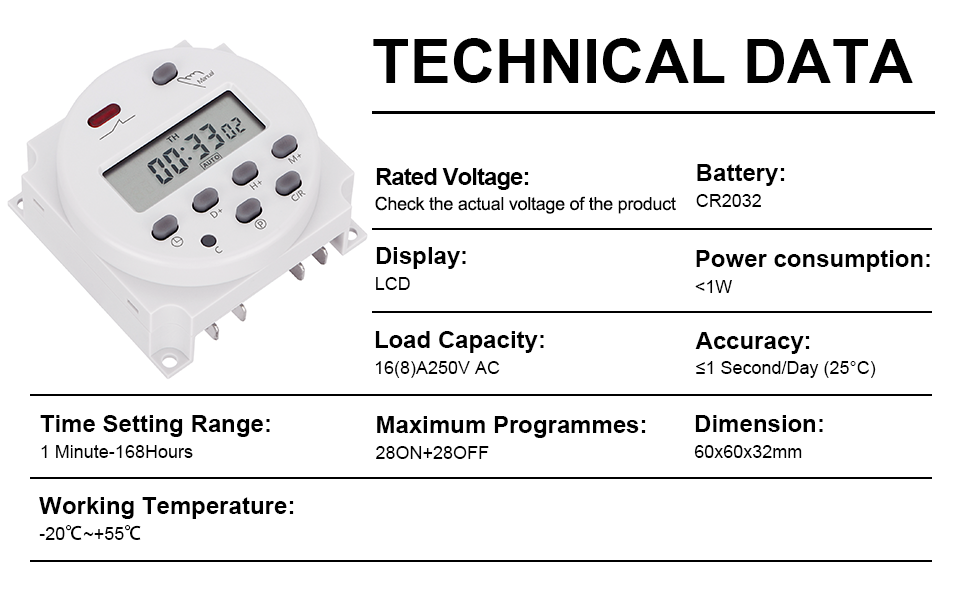
Figure 2: Technical data highlighting key specifications like voltage, capacity, and time range.
3. Safety Information
Please read all instructions carefully before installation and operation. Improper installation or use can lead to electrical shock, fire, or damage to the device and connected equipment. Always ensure power is disconnected before wiring. Installation should be performed by a qualified electrician if you are unsure about electrical wiring procedures. Do not expose the device to excessive moisture or extreme temperatures.
4. Package Contents
- 1 x Weasch CN101A Digital Timer Switch
5. Setup and Installation
The CN101A timer switch is designed for easy integration into your electrical system. Follow the connection diagram carefully to ensure correct wiring.
- Power Disconnection: Before any wiring, ensure the main power supply to the circuit is completely turned off at the breaker.
- Identify Terminals: The timer switch has clearly labeled terminals for input power (12V DC/AC) and output (200-250V AC, 16A).
- Input Wiring: Connect the 12V DC/AC power supply to the input terminals (labeled 1 and 2). Ensure correct polarity if using DC.
- Output Wiring: Connect the electrical appliance or load to the output terminals (labeled 4 and 5). Terminal 3 is typically a common or neutral connection depending on the specific wiring configuration.
- Secure Connections: Ensure all wire connections are tight and secure to prevent loose contacts and potential hazards.
- Mounting: The timer can be mounted using the screw holes provided on its casing.
- Power Restoration: Once all wiring is complete and verified, restore power to the circuit.

Figure 3: Connection diagram illustrating how to wire the timer switch to power and an electrical appliance.
Video 1: An overview of the Weasch CN101A Digital Timer Switch, demonstrating its physical appearance and basic handling.
6. Operating Instructions
The CN101A timer switch features an intuitive button layout for easy programming and operation.

Figure 4: Labelled diagram of the timer switch's buttons and display elements.
6.1. Setting Current Time and Day
- Press the Clock button (often labeled with a clock icon) and hold it.
- While holding the Clock button, press the D+ button to set the current day of the week.
- While holding the Clock button, press the H+ button to set the current hour.
- While holding the Clock button, press the M+ button to set the current minute.
- Release the Clock button to save the settings.
6.2. Manual Override
Press the Manual button (or C/R button, depending on model) to cycle through different modes: ON, AUTO, OFF. In AUTO mode, the timer operates according to programmed schedules. In ON or OFF mode, the output is continuously ON or OFF, overriding any programs.
7. Programming the Timer
The timer supports up to 28 ON/OFF programs. Each program consists of an ON time and an OFF time.
- Press the P button (Program button) once. The display will show "1 ON".
- Use the D+ button to select the day(s) of the week for this program. You can choose individual days, weekdays, weekends, or all days.
- Use the H+ and M+ buttons to set the desired ON hour and minute.
- Press the P button again. The display will show "1 OFF".
- Use the D+, H+, and M+ buttons to set the desired OFF day(s), hour, and minute for this program.
- Repeat steps 1-5 for additional ON/OFF programs (up to 28).
- To exit programming mode, press the Clock button. Ensure the timer is in "AUTO" mode for programs to execute.
- To cancel a program, press the C/R button while viewing the specific program.
8. Maintenance
The Weasch CN101A Digital Timer Switch requires minimal maintenance. Keep the device clean and free from dust. Use a soft, dry cloth for cleaning. Do not use abrasive cleaners or solvents. The built-in rechargeable battery is designed for long-term use and does not require user replacement under normal conditions. If the timer loses time or programs frequently, ensure it is receiving consistent power.
9. Troubleshooting
| Problem | Possible Cause | Solution |
|---|---|---|
| Display is blank or dim. | No power supply; internal battery depleted. | Check power connections. Allow time for the internal battery to charge when power is connected. |
| Programs are not executing. | Timer is not in AUTO mode; incorrect program settings. | Press the Manual button until "AUTO" is displayed. Review and correct program settings. |
| Time is inaccurate or resets. | Power interruptions; internal battery issue. | Ensure stable power supply. If the issue persists after charging, the internal battery may need service (contact support). |
| Cannot set programs. | Buttons unresponsive; device locked. | Press the C (Reset) button with a pointed object to reset the device. Re-enter time and programs. |
10. Specifications
- Product Dimensions: 1.18 x 2.36 x 2.36 inches (30 x 60 x 60 mm)
- Item Model Number: CN101A DC/AC 12V
- Batteries: 1 CR2032 rechargeable battery (included, built-in)
- Manufacturer: Weasch
- ASIN: B0D59B1DD1
- Country of Origin: China
- Color: Gray
- Material: Plastic
- Number of Settings: 28 (ON/OFF programs)
- Power Consumption: <1W
- Accuracy: ≤1 Second/Day (at 25°C)
- Working Temperature: -20°C to +55°C

Figure 5: Physical dimensions of the Weasch CN101A Digital Timer Switch.
11. Warranty and Support
For warranty information and technical support, please refer to the product packaging or contact Weasch customer service directly. Keep your purchase receipt as proof of purchase for any warranty claims.
Ask a question about this manual
Ask about setup, troubleshooting, compatibility, parts, safety, or missing instructions. Manuals+ will review the question and use this page’s manual context to help answer it.