
333Designs SS351
Replacement Motor for Ninja Foodi Blender - Model SS200 SS201 1200 Watt Power Base User Manual
Model: SS351
1. Introduction
Thank you for choosing the 333Designs Replacement Motor Base for your Ninja Foodi Power Blender. This manual provides essential information for the safe and effective installation, operation, and maintenance of your new motor base. Please read this manual thoroughly before use and retain it for future reference.
2. Compatibility
This replacement motor base is specifically designed to be compatible with the following Ninja Foodi Power Blender models:
- Ninja Foodi Power Blender Model SS200
- Ninja Foodi Power Blender Model SS201
Important: Please verify your existing blender's model number before attempting installation to ensure compatibility.
3. Safety Information
Always observe basic safety precautions when using electrical appliances to reduce the risk of fire, electric shock, injury, or damage.
- Ensure the motor base is unplugged from the power outlet before cleaning, assembling, or disassembling parts.
- Do not immerse the motor base in water or any other liquid.
- Keep hands and utensils out of the container while blending to prevent severe injury.
- Do not operate the appliance with a damaged cord or plug.
- This motor base is for household use only.
4. Setup and Installation
Follow these steps to replace your existing motor base with the new 333Designs replacement unit.
- Unplug the Blender: Ensure your original Ninja Foodi Power Blender is completely unplugged from the wall outlet before beginning any replacement procedures.
- Remove Old Motor Base: Carefully detach any containers or accessories from the old motor base. Dispose of the old motor base responsibly according to local regulations.
- Position New Motor Base: Place the new 333Designs replacement motor base on a clean, dry, and stable surface.
- Attach Container: Align your Ninja Foodi Power Blender container (e.g., pitcher, bowl) with the coupling on the top of the new motor base. Twist the container clockwise until it locks securely into place. You should hear a click.

Image: Top view of the replacement motor base, highlighting the central coupling where blender containers attach. Note the lock/unlock indicators.

Image: An angled view of the 333Designs replacement motor base, showcasing its overall design and control panel.
- Plug In: Once the container is securely attached, plug the motor base into a standard electrical outlet. The control panel should illuminate, indicating it is ready for use.
5. Operating Instructions
The 1200-watt motor base provides powerful performance for various blending tasks. Familiarize yourself with the control panel:
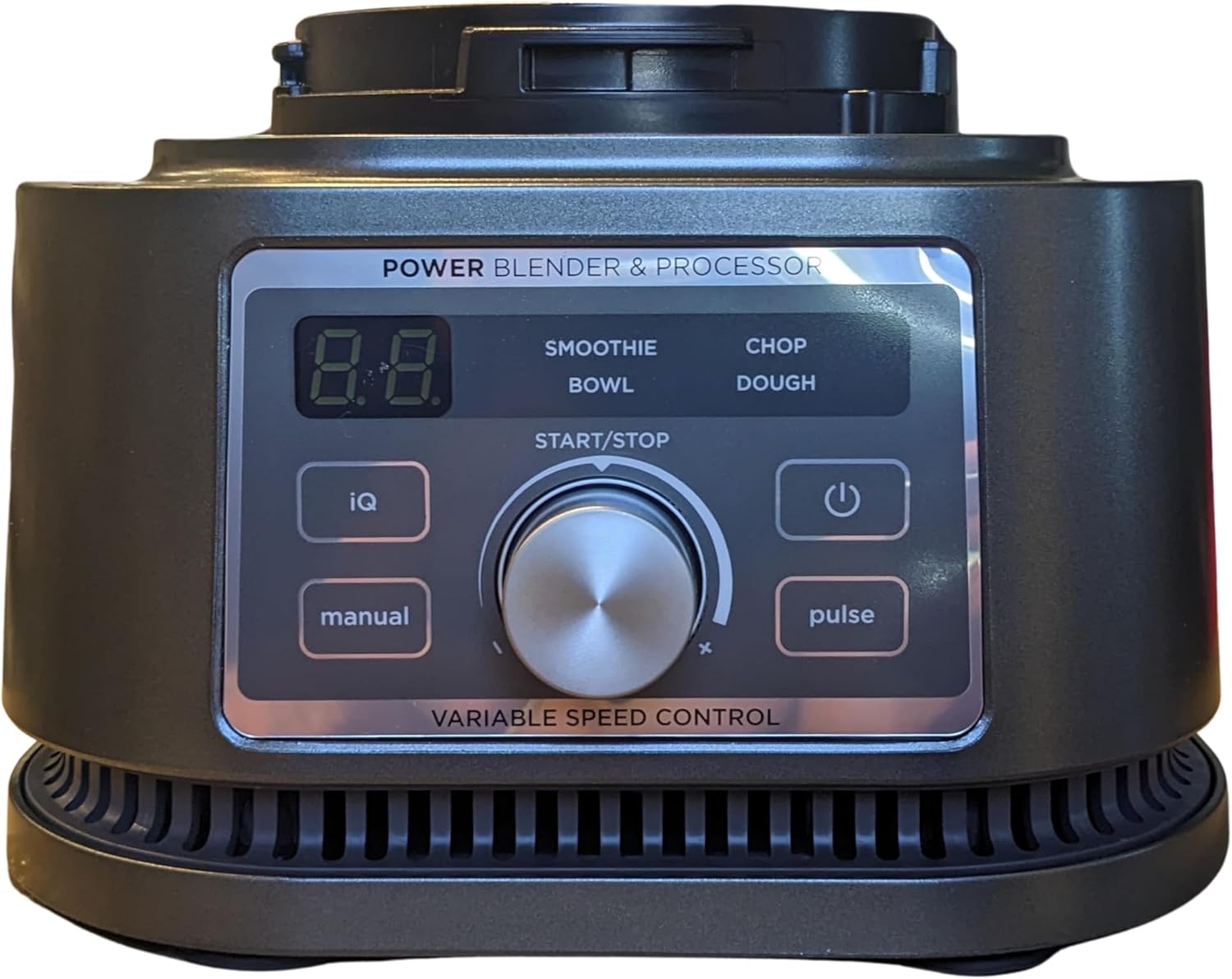
Image: A close-up view of the motor base's control panel, showing the digital display, variable speed control dial, and function buttons (IQ, manual, start/stop, pulse, power).
- Power Button: Press to turn the unit on or off.
- Variable Speed Control Dial: Rotate to adjust blending speed from low to high.
- Start/Stop Button: Initiates or pauses the blending cycle.
- Pulse Button: Provides short bursts of power for chopping or quick blending.
- IQ Programs: (If applicable to your container) These are pre-set programs for specific tasks like Smoothie, Bowl, Chop, or Dough. Refer to your original Ninja Foodi Blender manual for details on using these with compatible containers.
- Manual Button: Allows for manual speed control without pre-set programs.
Always ensure the container lid is securely fastened before operating the blender.
6. Maintenance and Care
Proper care will extend the life of your replacement motor base.
- Cleaning the Motor Base: Unplug the motor base before cleaning. Wipe the motor base with a clean, damp cloth. Do not immerse the motor base in water or spray it with water.
- Cleaning the Coupling: Use a small brush or cloth to clean any food debris from the coupling mechanism on top of the motor base.
- Storage: Store the motor base in a clean, dry place when not in use.
7. Troubleshooting
If you encounter issues with your replacement motor base, refer to the following table:
| Problem | Possible Cause | Solution |
|---|---|---|
| Motor base does not power on. | Not plugged in; power outlet issue; container not properly seated. | Ensure unit is securely plugged in. Test outlet with another appliance. Make sure container is twisted and locked into place. |
| Blades do not spin. | Container not properly seated; overload; incorrect program/speed. | Ensure container is securely locked. Reduce ingredients if overloaded. Select appropriate speed or program. |
| Unit smells burnt or overheats. | Overload; continuous operation. | Unplug immediately. Allow unit to cool down for at least 15 minutes. Reduce load and blend in shorter intervals. |
If the problem persists after trying these solutions, please contact customer support.
8. Specifications
| Feature | Detail |
|---|---|
| Model Number | SS351 |
| Power Output | 1200 Watts |
| Product Dimensions | 7.5 x 7.5 x 5.5 inches |
| Item Weight | 7 pounds |
| Manufacturer | 333Designs |
| Compatible Models | Ninja Foodi Power Blender SS200, SS201 |
9. Warranty Information
This 333Designs replacement motor base comes with a limited warranty against defects in materials and workmanship. Please retain your proof of purchase. For specific warranty terms and conditions, refer to the documentation included with your purchase or contact 333Designs customer support.
10. Customer Support
For assistance with your 333Designs Replacement Motor Base, including troubleshooting, parts, or warranty inquiries, please visit the 333Designs store on Amazon or contact their customer service directly through the Amazon platform.
Online Support: Visit the 333Designs Store on Amazon
Ask a question about this manual
Ask about setup, troubleshooting, compatibility, parts, safety, or missing instructions. Manuals+ will review the question and use this page’s manual context to help answer it.