
100A Solar Charge Controller Aicd AGMGel
100A Solar Charge Controller User Manual
Model: 100A Solar Charge Controller Aicd AGMGel
1. Introduction
This manual provides detailed instructions for the installation, operation, and maintenance of your Generic 100A Solar Charge Controller. Designed to efficiently manage power from solar panels to charge 12V or 24V lead-acid, AGM, or Gel batteries, this controller utilizes PWM technology for optimal performance and battery longevity. It features dual USB ports for convenient device charging and comprehensive protection mechanisms to ensure safe and reliable operation of your solar system.

Image 1.1: The 100A Solar Charge Controller and its accompanying USB extension cable.
2. Safety Instructions
Please read and understand all safety instructions before installing or operating the solar charge controller. Failure to follow these instructions may result in electric shock, fire, or severe injury.
- Always connect the battery to the charge controller first. This allows the controller to recognize the system voltage.
- Connect the solar panel to the charge controller next.
- Connect the DC load to the charge controller last.
- To disconnect, follow the reverse order: disconnect load, then solar panel, then battery.
- Ensure proper ventilation around the controller to prevent overheating.
- Use appropriate wire gauges for all connections to handle the expected current.
- Avoid short circuits at all times.
- Keep the controller away from water, moisture, and flammable materials.
- This device is not waterproof; install it in a dry, protected environment.
3. Product Features
The 100A Solar Charge Controller offers a range of features designed for efficient and safe solar power management:
- Auto-Rated Current: Supports various capacities from 10A up to 100A.
- Max. PV Input Power: Handles up to 1200W for 12V battery systems (with 18V-23V solar panels) and up to 2400W for 24V battery systems (with 24V-42V solar panels).
- Dual Voltage Support: Automatically detects and adapts to 12V or 24V battery systems.
- Battery Compatibility: Designed for optimal charging and discharging of Lead-Acid, Gel, Flooded, and AGM batteries.
- PWM Technology: Utilizes Pulse Width Modulation for efficient charging, maximizing battery life and performance.
- Enhanced Protection: Features dual MOSFET reverse current protection and low heat production.
- 3-Stage Charging Management: Provides complete and optimized charging for your battery.
- Built-in Protections: Includes overcurrent, short circuit, open circuit, and reverse connection protection. All protections are self-recovery, preventing damage to the controller.
- Dual USB Output: Two USB ports with a maximum current of 2.5A, supporting charging for various devices, including Apple phones. A USB Male to Female Extension Cable is included.

Image 3.1: Visual representation of the comprehensive security protection features of the solar charge controller.
4. Components Overview
Familiarize yourself with the main components of your solar charge controller:
- LCD Display: Shows real-time data such as battery voltage, charging current, discharge current, and various settings.
- Control Buttons: Three buttons (MENU, UP, DOWN/ON/OFF) for navigating the display and adjusting parameters.
- Dual USB Ports: Located on the front panel for charging external USB devices.
- Terminal Blocks: Six screw terminals at the bottom for connecting the battery, solar panel, and DC load. These are clearly marked with symbols.

Image 4.1: Product dimensions of the solar charge controller.
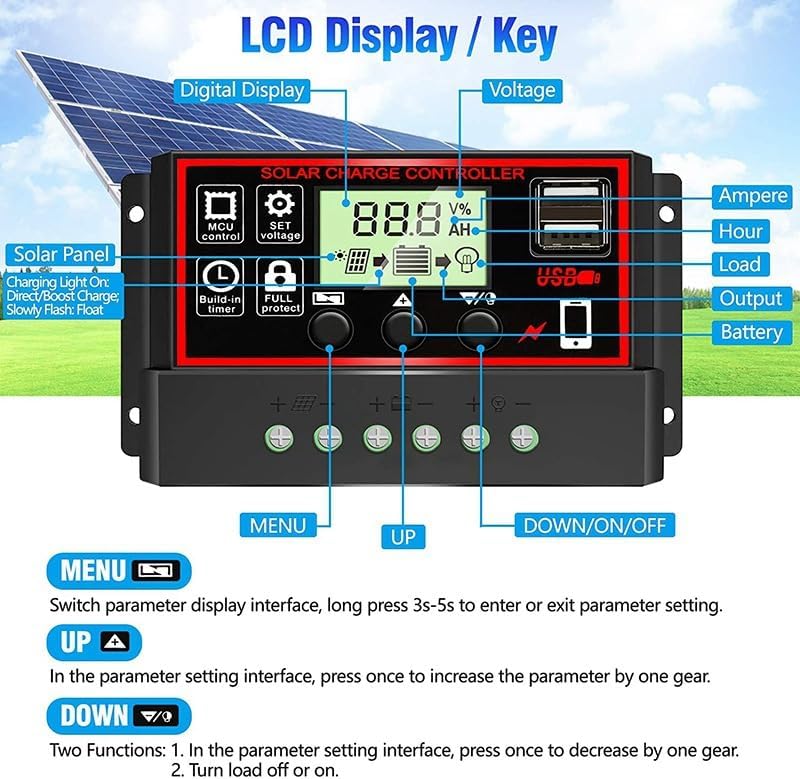
Image 4.2: Detailed view of the LCD display and control buttons.
5. Setup and Installation
Follow these steps carefully to install your solar charge controller. Incorrect wiring can damage the device or your system components.
- Prepare Wires: Ensure you have appropriate wire gauges for your system's current. Strip about 8-10mm of insulation from the ends of all wires.
- Connect Battery: Connect the battery to the controller's battery terminals (marked with a battery symbol). Connect the positive (+) wire to the positive terminal and the negative (-) wire to the negative terminal. The LCD display should light up, indicating the controller has power.
- Connect Solar Panel: Connect the solar panel to the controller's solar panel terminals (marked with a sun symbol). Connect the positive (+) wire to the positive terminal and the negative (-) wire to the negative terminal.
- Connect DC Load: Connect your DC load (e.g., lights, fan) to the controller's load terminals (marked with a light bulb symbol). Connect the positive (+) wire to the positive terminal and the negative (-) wire to the negative terminal.
- Secure Connections: Ensure all terminal screws are tightened securely to prevent loose connections and potential arcing.

Image 5.1: Wiring diagram for the solar charge controller.
Installation Video Guide
Video 5.1: A step-by-step guide demonstrating how to properly wire the solar charge controller to your solar panel and battery system.
6. Operating Instructions
The LCD display provides real-time information and allows you to adjust various parameters.
Display Navigation
Press the MENU button to cycle through the different display interfaces:
- Main Display: Shows the current battery voltage.
- Float Voltage: The voltage at which the battery is maintained after charging.
- Discharge Reconnect: The voltage at which the load will reconnect after being disconnected due to low battery.
- Type of Battery: Displays the selected battery type (B01 for Lead-Acid, B02 for AGM, B03 for Gel).
- Work Mode: Controls the load output (e.g., 24H for continuous output, 01-23H for timed output, 00H for dusk-to-dawn).
- Discharge Stop: The voltage at which the load will be disconnected to protect the battery from over-discharge.
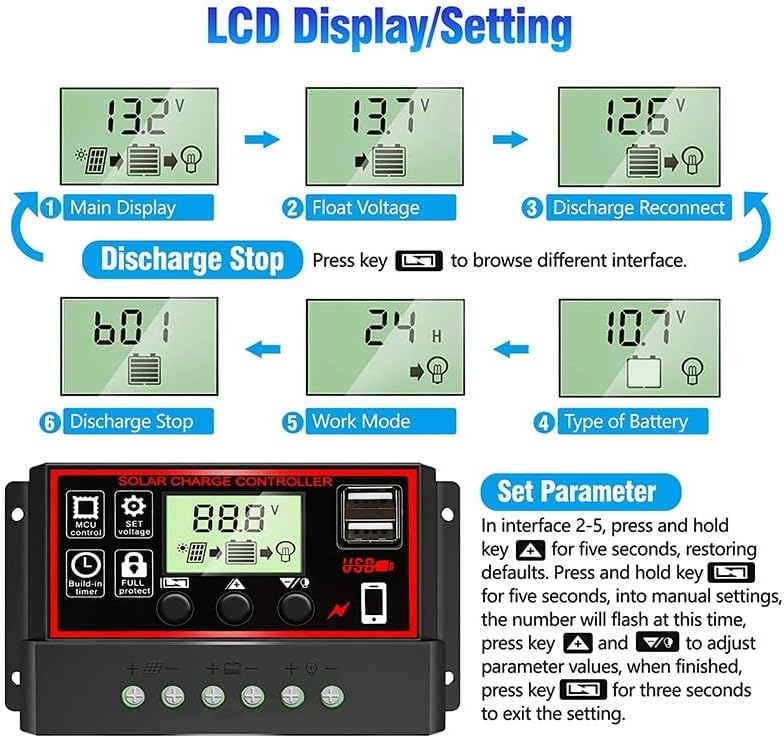
Image 6.1: Examples of LCD display screens and settings.
Parameter Settings
To enter manual settings for parameters (interfaces 2-5):
- Press and hold the MENU button for 5 seconds. The number on the display will flash.
- Use the UP and DOWN buttons to adjust the parameter values.
- Once finished, press and hold the MENU button for 3 seconds to exit the setting mode.
To restore default settings, press and hold the UP button for 5 seconds while on interfaces 2-5.
7. Maintenance
Regular maintenance ensures the longevity and optimal performance of your solar charge controller:
- Cleanliness: Keep the controller clean and free from dust and debris. Use a dry cloth for cleaning.
- Connection Check: Periodically inspect all wiring connections to ensure they are tight and free from corrosion. Loose connections can lead to power loss or overheating.
- Ventilation: Ensure that the controller's ventilation openings are not blocked to allow for proper heat dissipation.
- Environmental Conditions: Verify that the controller is installed in a dry, well-ventilated area, protected from direct sunlight, rain, and extreme temperatures.
8. Troubleshooting
If you encounter issues with your solar charge controller, refer to the following common problems and solutions:
- No Display on LCD:
- Check the battery connection. Ensure the positive and negative terminals are correctly connected and secure.
- Verify that the battery has sufficient charge (above 8V for 12V systems, 16V for 24V systems) to power the controller's display.
- No Charging from Solar Panel:
- Check the solar panel connections to the controller.
- Ensure there is sufficient sunlight reaching the solar panel.
- Verify the solar panel's open-circuit voltage (Voc) is within the controller's acceptable range (e.g., 18V-23V for 12V systems, 24V-42V for 24V systems).
- Load Not Working:
- Check the load connections to the controller.
- Ensure the battery has enough charge; the load will disconnect if the battery voltage drops below the discharge stop voltage.
- Check the 'Work Mode' setting on the controller to ensure the load output is enabled (e.g., 24H for continuous output).
- Verify the load current does not exceed the controller's rated load current.
- Controller Overheating:
- Ensure adequate ventilation around the controller.
- Check if the load or charging current exceeds the controller's maximum rating.
9. Specifications
| Specification | Value |
|---|---|
| Item Weight | 0.19 Kilograms (6.7 ounces) |
| Display Type | LCD |
| Operating Temperature | 60 Degrees Celsius (Max) |
| Manufacturer | SHENZHEN HUAXINQIANG Co,.Ltd |
| Charging Port Type | USB |
| Product Dimensions | 6 x 2 x 3 inches (6"L x 2"W x 3"H) |
| Country of Origin | China |
| Item Model Number | 100A Solar Charge Controller Aicd AGMGel |
| Batteries Required | No |
| Included Components | Solar charge controller, a USB Male Busbar |
| Color | Black |
| Voltage | 12V/24V Auto |
| Material | Plastic |
10. Warranty and Support
For warranty information and technical support, please refer to the seller's contact details on your purchase platform or the product packaging. Keep your proof of purchase for any warranty claims.
Ask a question about this manual
Ask about setup, troubleshooting, compatibility, parts, safety, or missing instructions. Manuals+ will review the question and use this page’s manual context to help answer it.