
1. Introduction
This manual provides essential instructions for the safe and efficient use of your YYFNGU 5V Type C Power Adapter. This adapter is designed to provide reliable power to compatible security cameras and other devices requiring a 5V Type C input. Please read this manual thoroughly before use and retain it for future reference.
2. Safety Information
To ensure safe operation and prevent damage, observe the following safety precautions:
- Use only with devices requiring a 5V Type C input. Verify your device's power requirements before connecting.
- Do not expose the adapter to water, moisture, or extreme temperatures.
- Avoid dropping or subjecting the adapter to severe impact.
- Do not attempt to disassemble or modify the adapter. This will void the warranty and may cause electrical hazards.
- Ensure the power outlet is easily accessible and properly grounded.
- Disconnect the adapter from the power outlet during lightning storms or when unused for extended periods.
- This product is UL / CE / FCC / RoHS certified and features overcurrent protection, overvoltage protection, short circuit protection, and over-temperature protection.
3. Package Contents
Verify that all items are present in your package:
- 1 x YYFNGU 5V Type C Power Adapter (US Type Plug)
- 1 x Integrated 5-foot Type C Power Cord

Image 3.1: The YYFNGU 5V Type C Power Adapter with its integrated 5-foot power cord. The adapter features a standard US plug.
4. Specifications
| Input Voltage | 100-240V AC, 50-60Hz |
| Output Voltage | 5V DC |
| Output Current | 2 Amps |
| Connector Type | USB Type C |
| Cable Length | 5 feet (approximately 1.5 meters) |
| Product Dimensions (Adapter) | Approximately 2 x 1 x 3 inches (5.08 x 2.54 x 7.62 cm) |
| Item Weight | 2.39 ounces (approximately 67.7 grams) |
| Safety Certifications | UL, CE, FCC, RoHS |

Image 4.1: Visual representation of the adapter's dimensions and cable length.
5. Compatibility
This 5V Type C Power Adapter is designed for a range of security cameras and other devices that utilize a Type C USB port for power. Please ensure your device requires a 5V input and has a Type C port.
Known Compatible Models:
- Cloarks CA42
- GALAYOU G2, G7
- litokam LF-P1t
- Hugolog HU-PWR6P-W
- AOSU AOSU-C2E2BH11
- AMTIFO CG9
Important Note: This adapter is NOT compatible with litokam LF-C1t or any devices using Micro USB ports. Please verify your device's port type before purchase and use.

Image 5.1: Visual guide to compatible security camera models.
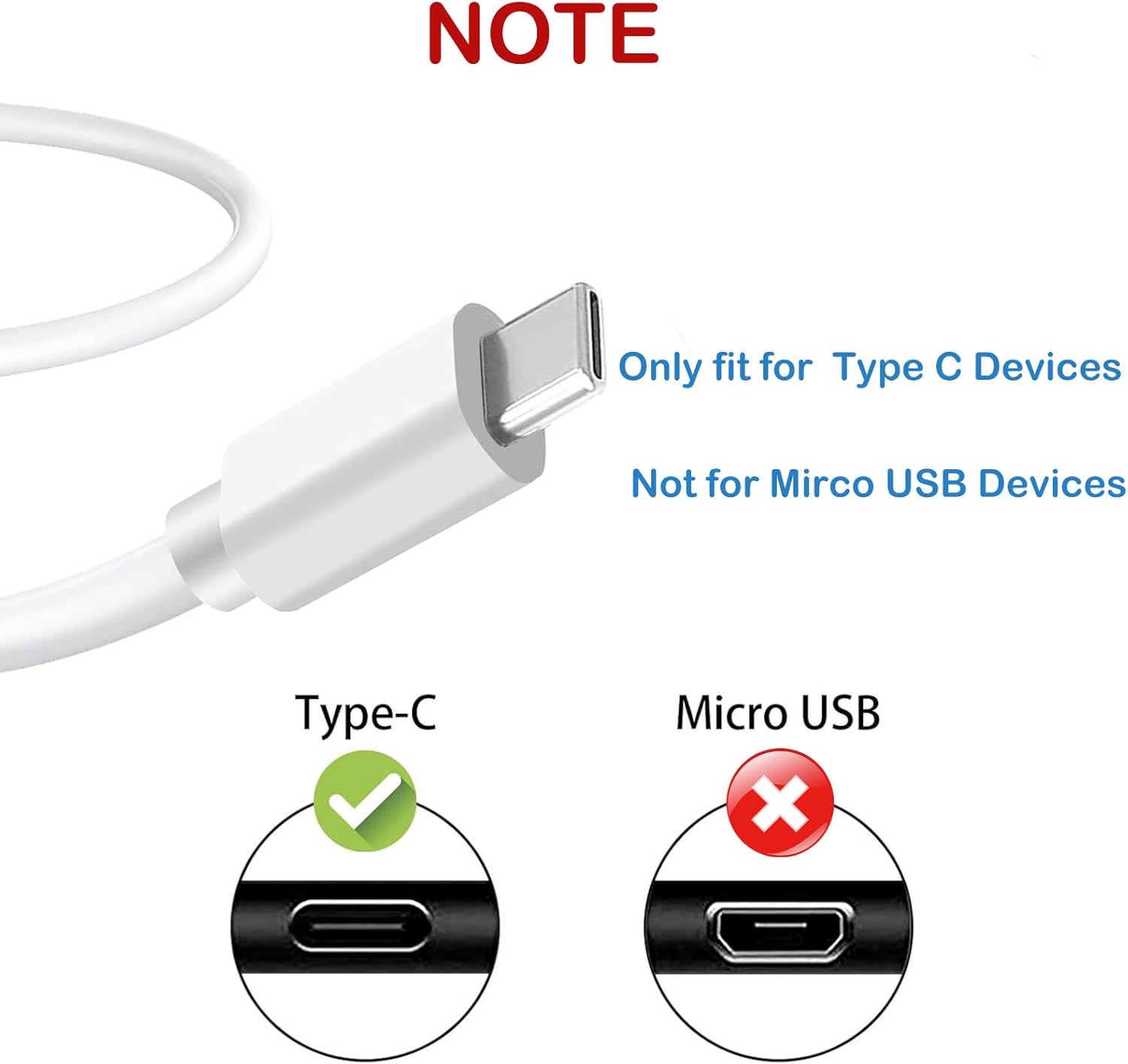
Image 5.2: Illustration distinguishing between a Type C port (compatible) and a Micro USB port (not compatible).
6. Setup and Operating Instructions
- Verify Compatibility: Before connecting, confirm that your device requires a 5V power input and has a Type C charging port. Refer to your device's manual for power specifications.
- Connect to Device: Insert the Type C connector of the power cord firmly into the charging port of your security camera or compatible device.
- Connect to Power Outlet: Plug the AC adapter into a standard 100-240V wall outlet. Ensure the connection is secure.
- Power On Device: Once connected, your device should begin charging or power on, depending on its design. Observe any charging indicators on your device.
- Disconnecting: To disconnect, first unplug the adapter from the wall outlet, then gently remove the Type C connector from your device.

Image 6.1: The power adapter connected to a security camera and plugged into a wall outlet, illustrating typical usage.
7. Maintenance
Proper maintenance ensures the longevity and performance of your power adapter:
- Cleaning: Disconnect the adapter from power before cleaning. Use a soft, dry cloth to wipe the surface. Do not use liquid cleaners or solvents.
- Storage: Store the adapter in a cool, dry place away from direct sunlight and moisture when not in use. Avoid tightly coiling the cable to prevent damage.
- Cable Care: The integrated cable is designed for bending resistance. However, avoid sharp bends, kinks, or excessive pulling on the cable to prevent internal wire damage.

Image 7.1: The power adapter with its cable neatly stored, demonstrating good cable management practices.
8. Troubleshooting
| Problem | Possible Cause / Solution |
|---|---|
| Device not charging/powering on. |
|
| Adapter feels warm during use. |
|
| Loose connection. |
|
9. Warranty and Customer Support
YYFNGU products are designed for reliability. For any issues or questions regarding your 5V Type C Power Adapter, please contact our customer support team.
Contact Information: Please refer to the packaging or the seller's information on the purchase platform for the most current customer support contact details.
Warranty: Specific warranty terms may vary. Please retain your proof of purchase for warranty claims. The warranty typically covers manufacturing defects but does not cover damage caused by misuse, accidents, or unauthorized modifications.