
1. Introduction
This manual provides detailed instructions for the operation and maintenance of your Generic Z93 Pro Smart Watch. Please read this manual thoroughly before using the device to ensure proper functionality and longevity.

Figure 1: Front view of the Generic Z93 Pro Smart Watch, showcasing its round 1.5-inch HD display and blue strap.
2. Package Contents
Upon unpacking, verify that all items listed below are present:
- Generic Z93 Pro Smart Watch
- Watch Band
- Wireless Charger
- Instruction Manual
3. Setup
3.1 Charging the Smart Watch
Before initial use, fully charge your Z93 Pro Smart Watch. The device features wireless charging.
- Place the watch onto the wireless charging pad.
- Ensure the charging pad is connected to a power source.
- A full charge typically takes approximately 2 hours.

Figure 2: The Z93 Pro Smart Watch being charged wirelessly, illustrating its efficient power management and 250 mAh battery.
3.2 Pairing with Your Smartphone
To access all smart features, pair your watch with your smartphone via Bluetooth.
- Ensure your smartphone's Bluetooth is enabled.
- Turn on the Z93 Pro Smart Watch.
- Open the companion app on your smartphone (refer to the watch display or packaging for app name).
- Follow the in-app instructions to search for and connect to your Z93 Pro Smart Watch.
- Confirm the pairing request on both your phone and the watch.
The Z93 Pro Smart Watch is compatible with iOS 9.0 and above, and Android 5.0 and above.
4. Operating Instructions
4.1 Basic Navigation
The Z93 Pro features a 1.5-inch full touch color screen for intuitive navigation.
- Swipe Up/Down/Left/Right: Navigate through menus and notifications.
- Tap: Select an item or open an application.
- Press Side Button: Return to the home screen or access the app menu.
4.2 Customizing Watch Dials
Personalize your watch face from over 100 exquisite dials or use your own photos.
- Long-press the watch face to enter the dial selection interface.
- Swipe left or right to browse available dials.
- Tap to select a dial.
- For custom photos, use the companion app on your smartphone.

Figure 3: Examples of various customizable watch dials available for the Z93 Pro Smart Watch.
4.3 Bluetooth Call & Smart Notifications
The smartwatch supports making and answering calls directly from your wrist when connected to your phone.
- Making Calls: Access the dialer or contacts list on the watch.
- Answering Calls: Tap the green icon on the watch screen when a call comes in.
- Notifications: The watch will display notifications for text messages and various social media apps (e.g., WhatsApp, Facebook, Twitter).
4.4 AI Voice Assistant
Utilize the integrated AI voice assistant for quick tasks.
- Activate the voice assistant (specific gesture or button press may vary, refer to on-screen prompts).
- Speak commands for weather updates, music playback, sending messages, and more.
4.5 Sports Tracking & Health Monitoring
The Z93 Pro tracks various fitness metrics and offers multiple sports modes.
- Activity Tracking: Monitors steps, distance, and calories in real-time.
- Sports Modes: Over 100 daily exercise modes, including indoor and outdoor activities.
- Health Monitoring: Equipped with motion sensors to record fitness status. (Note: This device is not a medical device and should not be used for medical diagnosis or treatment.)

Figure 4: The Z93 Pro Smart Watch tracking various sports activities, showing real-time data like steps, calories, and heart rate.
4.6 Other Features
The Z93 Pro Smart Watch includes additional functionalities:
- Camera Control
- Music Control
- Weather Display
- Alarm Clock
- Timer
- Stopwatch
- Drinking Water Reminder
- Sedentary Reminder
- Find Phone function
- Calculator
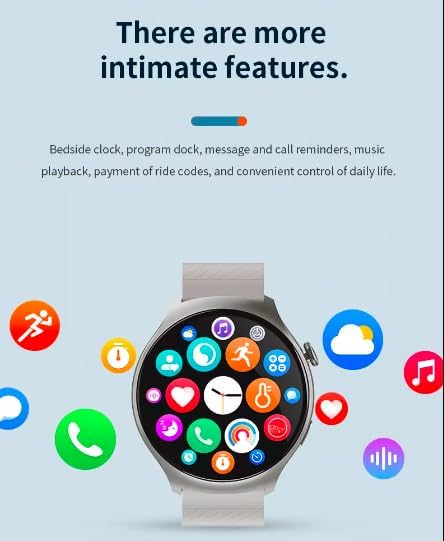
Figure 5: The Z93 Pro Smart Watch displaying a grid of application icons, representing its diverse range of features.
4.7 Gesture Control
The watch supports gesture controls for certain functions.
- Click each other twice with two fingers to listen to a call or turn off an alarm clock.

Figure 6: A hand demonstrating the two-finger gesture control feature on the Z93 Pro Smart Watch for call management.
5. Maintenance
5.1 Waterproof Guidelines
The Z93 Pro Smart Watch is IP67 waterproof.
- You can wear it while washing your hands or in the rain.
- Important Note: To prevent damage to the microphone and speaker functions, avoid prolonged submersion in water. It is not suitable for swimming or showering with hot water.
5.2 Cleaning and Care
- Wipe the watch screen and body with a soft, dry cloth.
- For the watch band, use a slightly damp cloth if necessary, then dry thoroughly.
- Avoid using harsh chemicals or abrasive materials.
5.3 Battery Care
- Charge the watch regularly to maintain battery health.
- Avoid completely draining the battery frequently.
- If storing the watch for an extended period, charge it to approximately 50% to prevent deep discharge.
6. Troubleshooting
6.1 Watch Not Turning On
- Ensure the watch is fully charged. Connect it to the charger for at least 30 minutes.
- Press and hold the side button for several seconds.
6.2 Unable to Pair with Phone
- Check if Bluetooth is enabled on your phone and the watch.
- Ensure the watch is within the Bluetooth range of your phone.
- Restart both your phone and the watch.
- Clear the Bluetooth cache on your phone and try pairing again.
6.3 Notifications Not Appearing
- Verify that the watch is successfully paired with your phone.
- Check notification settings in the companion app and on your phone to ensure permissions are granted for the app to send notifications.
- Ensure 'Do Not Disturb' mode is not active on either device.
7. Specifications
| Feature | Specification |
|---|---|
| Model Number | Z93pro |
| Screen Size | 1.5 inches HD |
| Waterproof Rating | IP67 |
| Battery Capacity | 200-250 mAh Lithium Polymer |
| Charging Method | Wireless Charging |
| Charging Time | Approx. 2 hours |
| Continuous Use Time | Approx. 2 days |
| Standby Time | Approx. 15 days |
| Compatibility | iOS 9.0+, Android 5.0+ |
| Connectivity | Bluetooth |
| Item Weight | 5.8 ounces |
| Package Dimensions | 11 x 9 x 1 inches |

Figure 7: An overview of the Z93 Pro Smart Watch's core advantages, including its 1.52-inch HD display, battery life, Bluetooth call function, multiple styles, sports modes, health monitoring, and IP67 waterproof rating.

Figure 8: Rear view of the Z93 Pro Smart Watch, highlighting the health monitoring sensors and the titanium & ceramic case with sapphire crystal.
8. Warranty and Support
The Generic Z93 Pro Smart Watch comes with a 12-month warranty from the date of purchase. This warranty covers manufacturing defects under normal use. It does not cover damage caused by misuse, accidents, unauthorized modifications, or failure to follow the instructions in this manual.
For warranty claims or technical support, please refer to the contact information provided with your purchase or visit the manufacturer's official support website.