
1. Introduction
This manual provides detailed instructions for the proper use and maintenance of your Haino Teko Air-1 mini Wireless Earbud Headphones. Please read this manual thoroughly before using the product to ensure optimal performance and longevity.
2. Package Contents
Verify that all items listed below are included in your package:
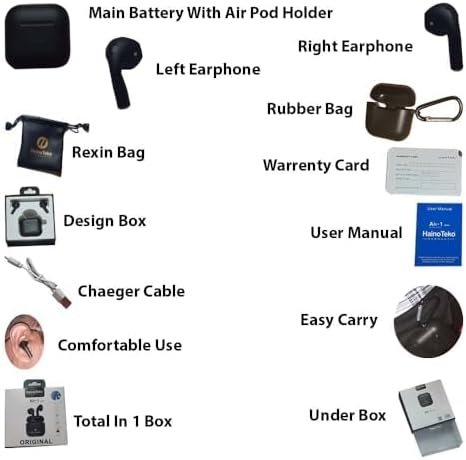
Image: Contents of the Haino Teko Air-1 mini package, showing the earbuds, charging case, charging cable, user manual, warranty card, and a carrying pouch.
- Haino Teko Air-1 mini Earbuds (Left and Right)
- Charging Case
- USB Charging Cable
- User Manual
- Warranty Card
- Carrying Pouch
3. Product Overview
The Haino Teko Air-1 mini earbuds are designed for wireless audio playback and hands-free communication. The charging case provides portable power for your earbuds.

Image: The Haino Teko Air-1 mini wireless earbuds securely placed within their black charging case, which features a 'Super Clear Mic' indicator.
4. Setup
4.1 Charging the Charging Box
- Connect the provided USB charging cable to the charging port on the charging box.
- Connect the other end of the USB cable to a suitable USB power source (e.g., wall adapter, computer USB port).
- The red indicator light on the charging box will flash during charging.
- The red indicator light will turn off when the charging box is fully charged.
4.2 Charging the Earphones
- Place both earphones securely inside the charging box.
- Ensure the charging box has sufficient power.
- The earphones will automatically begin charging when placed in the box.
4.3 Powering On/Off
- Automatic Power On: Open the charging box lid to automatically power on the earphones.
- Automatic Power Off: Close the charging box lid to automatically power off the earphones.
- Manual Power On: Long touch either earbud for 5 seconds.
4.4 Bluetooth Pairing
- Ensure the earphones are charged and powered on (open the charging box lid).
- On your smartphone or audio device, enable Bluetooth.
- Search for available Bluetooth devices. You should see 'Haino Teko Air-1 mini' in the list.
- Select 'Haino Teko Air-1 mini' to connect. A voice prompt will confirm successful pairing.
5. Operating Instructions
5.1 Earphone Control Operations
The touch controls on the earbuds allow you to manage music playback and calls. (Note: Functionality may vary slightly between Android and iOS devices).
| Function | Action |
|---|---|
| Play/Stop Music | Touch either earbud 1 time |
| Previous Song | Touch the left earbud 3 times |
| Next Song | Touch the right earbud 3 times |
| Volume Up | Not available via earbud controls |
| Volume Down | Not available via earbud controls |
| Answer Call | Touch either earbud 1 time |
| Refuse Call | Touch either earbud 2 times |
| Activate Voice Assistant (Siri) | Touch either earbud 2 times |
6. Maintenance
- Clean the earbuds and charging case regularly with a soft, dry, lint-free cloth.
- Avoid exposing the product to extreme temperatures, moisture, or corrosive substances.
- Store the earbuds in their charging case when not in use to protect them and keep them charged.
- Do not attempt to disassemble or modify the product, as this will void the warranty.
7. Troubleshooting
7.1 Earphones Not Connecting Together or Pairing Correctly
- Place both earphones inside the charging box.
- Close the charging box lid completely.
- Open the charging box lid again. The earphones will automatically reset and attempt to reconnect to each other and your device.
- If the issue persists, try unpairing the device from your phone's Bluetooth settings and repeat the pairing process from Section 4.4.
8. Specifications
| Feature | Detail |
|---|---|
| Model Name | Haino Teko Air-1 mini |
| Wireless Version | V5.0+EDR |
| Connectivity Technology | Wireless, Bluetooth |
| Earphone Battery Capacity | 35 mAh |
| Charging Box Battery Capacity | 200 mAh |
| Product Dimensions | 10 x 10 x 3.5 cm |
| Product Weight | 120 g |
| Colour | Black |
| Ear Placement | In Ear |
| Form Factor | In Ear |
| Noise Control | None |
| Headphone Jack | No |
9. Warranty and Support
This product includes a warranty card. Please refer to the warranty card included in your package for details on warranty coverage and support terms and conditions. For further assistance or inquiries, please contact your retailer or the point of purchase.