
BENNTOP 3600EU24
User Manual for BENNTOP 3600W 24V Hybrid Solar Inverter
Model: 3600EU24 | Brand: BENNTOP
1. Introduction
This manual provides detailed instructions for the installation, operation, and maintenance of your BENNTOP 3600W 24V Hybrid Solar Inverter. This advanced device integrates the functions of a pure sine wave inverter, a 120A MPPT solar charger, and a battery charger into a single unit, offering a comprehensive solution for off-grid solar power systems. It is designed to convert 24V DC power to 230V AC power, supporting both lead-acid and lithium batteries. Please read this manual thoroughly before installation and use to ensure safe and efficient operation.

Figure 1: BENNTOP 3600W 24V Hybrid Solar Inverter with its detachable LCD control panel.
2. Safety Information
Always observe the following safety precautions to prevent injury and damage to the inverter or connected equipment.
- Ensure proper grounding of the inverter.
- Do not disassemble the unit. Refer all servicing to qualified personnel.
- Keep the inverter away from water, high humidity, and flammable materials.
- Ensure adequate ventilation around the inverter to prevent overheating.
- Verify all connections are secure and correct before powering on the system.
- The inverter features built-in protections against overload, over-temperature, short-circuit, over-current, and over-voltage. However, proper system design and installation are crucial.
- For inductive loads, select an inverter with a rated power 3 to 5 times higher than the load's nominal power due to higher starting current requirements.
3. Product Features and Overview
The BENNTOP 3600W Hybrid Solar Inverter is designed for robust performance and versatility.
- Pure Sine Wave Output: Provides stable and clean power suitable for sensitive electronics.
- High Power Capacity: 3600W continuous AC output.
- Integrated MPPT Solar Controller: 120A MPPT charge controller with a maximum PV input voltage of 500Vdc and maximum PV power of 6200W. Optimal MPPT working voltage range: 60V-500VDC.
- Multiple Operating Modes:
- 4 Selectable Charging Modes: Solar Priority, Utility Priority, Solar and Utility Hybrid, Solar Only.
- 3 Selectable Output Modes: Solar Priority (SUB), Utility Priority (USB), and Solar-Battery-Utility Sequential Priority (SBU).
- Detachable LCD Display: Real-time system data and operating status display. Allows user configuration of system parameters.
- Battery Compatibility: Supports both 24V lead-acid and lithium batteries.
- Advanced Protections: Overload, over-temperature, short-circuit, over-current, and over-voltage protection.
- Automatic Restart: Features automatic restart function when AC power is restored.
- Cold Start Function: Allows the inverter to start without AC input.
- Optional WIFI Monitoring: Supports remote monitoring via an optional WIFI module (purchased separately).
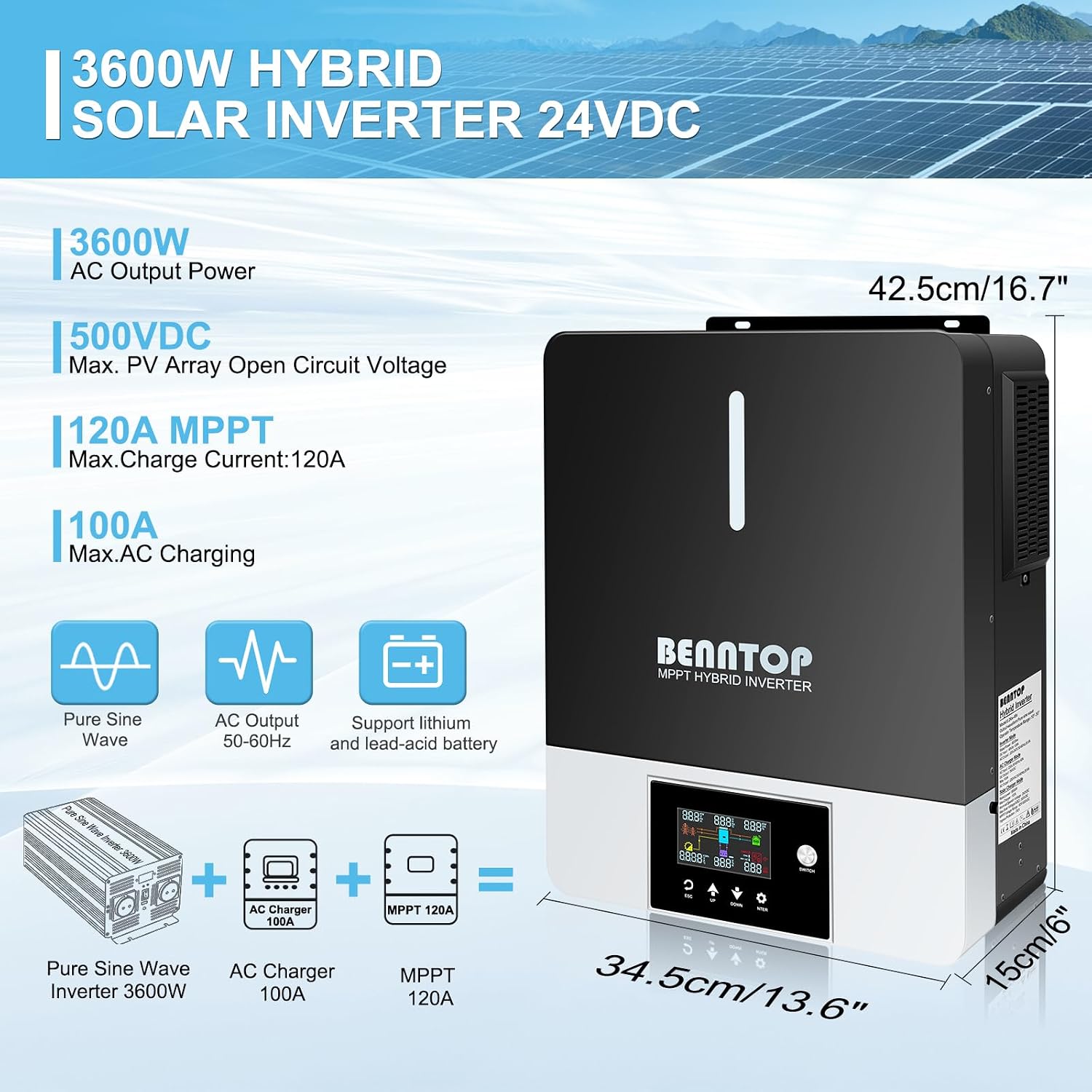
Figure 2: Key specifications and dimensions of the BENNTOP 3600W Hybrid Solar Inverter.

Figure 3: Detailed view of the inverter's connection ports and integrated protection features.
4. Setup and Installation
4.1. Site Selection and Mounting
Choose a dry, well-ventilated area away from direct sunlight, heat sources, and corrosive gases. Ensure sufficient clearance around the inverter for proper airflow and cooling. Mount the inverter vertically on a sturdy surface.
4.2. Wiring Connections
All wiring must be performed by a qualified electrician in accordance with local electrical codes. Ensure all power sources are disconnected before making any connections.
- Battery Connection: Connect the 24V battery bank to the inverter's battery terminals. Ensure correct polarity (+ to + and - to -).
- Solar Input (PV) Connection: Connect your solar panel array to the PV input terminals. Observe the maximum PV input voltage of 500Vdc and ensure the array's open circuit voltage (Voc) does not exceed this limit.
- Utility Power Input: Connect the AC utility grid power to the inverter's utility input terminals.
- Load Output Connection: Connect your AC loads (appliances, lights, etc.) to the inverter's AC output terminals. The inverter provides a main output and a second output (1/3 of max power).
- Grounding: Connect the inverter's ground terminal to a reliable earth ground.

Figure 4: Comprehensive wiring diagram for the BENNTOP Hybrid Solar Inverter, illustrating connections for solar panels, battery, utility grid, and home applications.
4.3. Initial Power-Up
After all connections are secure, follow these steps to power up the inverter:
- Turn on the battery breaker.
- Turn on the solar PV breaker.
- Turn on the AC utility input breaker (if connected).
- Press the power button on the inverter to turn it on. The LCD display will illuminate.
5. Operating Modes
The inverter offers various configurable modes to optimize energy usage based on your preferences and available power sources.
5.1. Charging Modes
- Solar Priority Charging: Solar power is the primary source for charging batteries. Utility power is used only if solar power is insufficient.
- Utility Priority Charging: Utility power is the primary source for charging batteries. Solar power is used only if utility power is unavailable.
- Solar and Utility Hybrid Charging: Both solar and utility power are used to charge the batteries simultaneously, prioritizing solar when available.
- Solar Only Charging: Only solar power is used to charge the batteries. Utility power is not used for charging.
5.2. Output Modes
- Solar Priority (SUB): Solar power is the primary source for powering loads. If solar power is insufficient, battery power is used. Utility power is used as a last resort.
- Utility Priority (USB): Utility power is the primary source for powering loads. If utility power is unavailable, battery power is used. Solar power is used to charge batteries.
- Solar-Battery-Utility Sequential Priority (SBU): Solar power is the primary source. If solar power is insufficient, battery power is used. If both solar and battery power are insufficient, utility power is used.

Figure 5: Visual representation of the selectable charging and load output modes.
6. LCD Display and Controls
The detachable LCD display provides real-time system information and allows for configuration of various parameters.

Figure 6: Overview of the LCD display and its indicators.
6.1. LCD Indicators
- Red: Indicates Battery Mode.
- Blue: Indicates Utility Mode.
- Purple: Indicates PV (Solar) Mode.
- Flashing Code: Warning code.
- Lighting Code: Fault code.
6.2. Navigation and Settings
Use the buttons (ESC, UP, DOWN, ENTER, SWITCH) on the LCD panel to navigate through menus and adjust settings such as output voltage, charging current, and operating modes. Refer to the on-screen prompts for specific parameter adjustments.
7. Specifications
Detailed technical specifications for the BENNTOP 3600W 24V Hybrid Solar Inverter.
| Parameter | Value |
|---|---|
| Brand | BENNTOP |
| Model Number | 3600EU24 |
| AC Output Power | 3600 Watts |
| Input Voltage (DC) | 24 Volts (DC) |
| Max PV Input Voltage | 500 VDC |
| Max PV Power | 6200 Watts |
| MPPT Charge Current | 120A |
| Max AC Charging Current | 100A |
| Optimal MPPT Voltage Range | 60V-500VDC |
| Dimensions (L x W x H) | 43L x 35W x 15H cm |
| Item Weight | 9 Kilograms |
| Efficiency | 93% |
| Output Waveform | Pure Sine Wave |
8. Maintenance
Regular maintenance ensures the longevity and optimal performance of your inverter.
- Cleaning: Periodically clean the inverter's exterior and ventilation openings to prevent dust buildup, which can impede cooling. Use a dry, soft cloth.
- Connection Checks: Annually inspect all electrical connections (battery, solar, AC input/output) for tightness and corrosion. Tighten any loose connections.
- Ventilation: Ensure that the area around the inverter remains clear and that the cooling fans are not obstructed.
- Battery Maintenance: Follow the manufacturer's guidelines for your specific battery type (lead-acid or lithium) regarding charging, discharging, and periodic checks.
9. Troubleshooting
This section provides solutions to common issues you might encounter. For problems not listed here, contact customer support.
| Problem | Possible Cause | Solution |
|---|---|---|
| Inverter does not power on. | No battery connection, low battery voltage, power button not pressed. | Check battery connections and voltage. Ensure battery breaker is on. Press and hold the power button. |
| No AC output. | Overload, short circuit, high/low battery voltage, inverter fault. | Reduce load. Check for short circuits in wiring. Check battery voltage. Refer to LCD fault codes. |
| Batteries not charging from solar. | Insufficient solar input, PV connection issue, incorrect charging mode. | Check solar panel connections and sunlight. Verify PV input voltage on LCD. Ensure "Solar Priority" or "Solar Only" charging mode is selected. |
| Overload warning/shutdown. | Connected load exceeds inverter's capacity. | Disconnect some loads. Ensure total load does not exceed 3600W. Remember inductive loads require higher starting power. |
| Over-temperature warning. | Poor ventilation, high ambient temperature, blocked cooling fans. | Ensure adequate clearance around the inverter. Clean ventilation openings. Reduce ambient temperature if possible. |
9.1. LCD Error Codes
The LCD display will show specific codes for warnings (flashing) and faults (lighting). Consult the full product manual (if provided separately by manufacturer) for a complete list of error codes and their meanings.
10. Warranty and Support
Your BENNTOP 3600W 24V Hybrid Solar Inverter comes with a manufacturer's warranty.
- Manufacturer Warranty: This product is covered by a 2-year manufacturer's warranty. Please retain your proof of purchase for warranty claims.
- Customer Support: For technical assistance, troubleshooting beyond this manual, or warranty inquiries, please contact BENNTOP customer support through the retailer or the official BENNTOP website.
Note: Information regarding software updates and spare parts availability is not provided at this time.
11. Official Product Videos
No official product videos from the seller were found for this model. Please refer to the detailed instructions and diagrams provided in this manual.
Ask a question about this manual
Ask about setup, troubleshooting, compatibility, parts, safety, or missing instructions. Manuals+ will review the question and use this page’s manual context to help answer it.