
Introduction
This manual provides comprehensive instructions for the installation, operation, maintenance, and troubleshooting of the Imaje 9450 White Pigment Ink Pump Assy, part number ENM49427. This assembly is designed for use with Imaje 9410 and 9450 series inkjet coding printers, ensuring optimal performance and longevity of your printing system.
Product Overview
The ENM49427 Ink Pump Assembly is a critical component responsible for the precise delivery of white pigment ink within compatible Imaje inkjet coding printers. It consists of a pump mechanism, motor, and associated electrical connections, all housed within a durable enclosure.
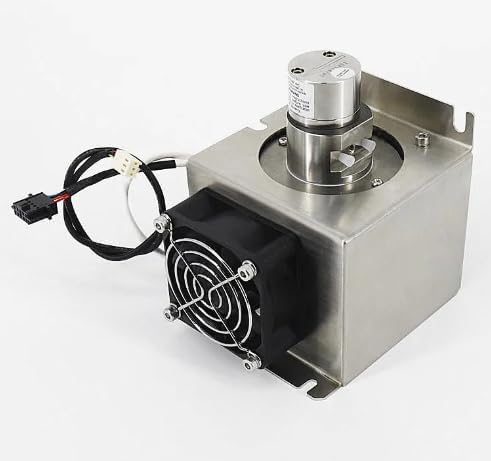
Figure 1: Imaje 9450 White Pigment Ink Pump Assembly (ENM49427). This image displays the complete pump assembly, including the main pump unit, cooling fan, and electrical connectors, housed within a metallic casing.
Setup and Installation
Before beginning installation, ensure the printer is powered off and disconnected from the main power supply. Refer to your printer's specific service manual for detailed instructions on accessing the pump assembly compartment.
Installation Steps:
- Preparation: Ensure the work area is clean and free of debris. Wear appropriate personal protective equipment (PPE), including gloves and eye protection.
- Remove Old Assembly: Carefully disconnect all electrical connectors and ink lines from the existing pump assembly. Unfasten any mounting screws or clips securing the old unit and remove it from the printer chassis.
- Inspect New Assembly: Before installation, visually inspect the new ENM49427 pump assembly for any signs of damage during transit.
- Position New Assembly: Place the new pump assembly into its designated location within the printer. Ensure it aligns correctly with mounting points.
- Secure Assembly: Fasten the new pump assembly using the appropriate screws or clips. Do not overtighten.
- Connect Electricals: Reconnect all electrical cables to their corresponding ports on the new pump assembly. Ensure connections are secure and properly seated.
- Connect Ink Lines: Reattach the ink supply and return lines to the pump assembly. Verify that all connections are tight to prevent leaks.
- System Check: Once installed, close the printer access panels. Reconnect the printer to power and perform a system startup as per your printer's operational manual.
Operation
The Imaje 9450 White Pigment Ink Pump Assembly operates automatically as part of the printer's ink delivery system. Its function is controlled by the printer's internal software and hardware. No direct user interaction is required for its operation once installed correctly.
- Automatic Function: The pump activates and deactivates as needed to maintain optimal ink pressure and flow for continuous inkjet printing.
- Ink Circulation: It ensures proper circulation of white pigment ink, preventing settling and maintaining ink homogeneity.
- Pressure Regulation: The pump assembly contributes to regulating the ink pressure within the system, which is crucial for consistent print quality.
Maintenance
Regular maintenance of the printer system, including components related to the ink delivery, is essential for the longevity and reliable operation of the ENM49427 pump assembly. While the pump itself is a sealed unit, general cleanliness and adherence to printer maintenance schedules are important.
- Regular Cleaning: Keep the area around the pump assembly clean and free of ink spills or dust accumulation. Use a lint-free cloth and appropriate cleaning solutions recommended by the printer manufacturer.
- Ink Quality: Always use genuine Imaje white pigment ink or approved equivalents. Substandard ink can lead to pump blockages or premature wear.
- Filter Replacement: Ensure that all ink filters within the printer system are replaced according to the manufacturer's recommended schedule. Clogged filters can put undue strain on the pump.
- Environmental Conditions: Operate the printer within the specified environmental conditions (temperature, humidity) to prevent adverse effects on the pump and ink.
- Professional Inspection: Schedule periodic professional inspections and servicing of your printer to identify and address potential issues before they lead to component failure.
Troubleshooting
If you experience issues related to ink delivery or printer performance, consider the following troubleshooting steps. For complex issues, consult a qualified service technician.
| Symptom | Possible Cause | Solution |
|---|---|---|
| No ink flow or inconsistent ink delivery | Clogged ink filter, air in ink lines, faulty pump, low ink level. | Check ink levels. Replace ink filters. Bleed air from ink lines (refer to printer manual). If issues persist, the pump may require professional inspection or replacement. |
| Printer displays ink pressure error | Ink line blockage, pump malfunction, pressure sensor issue. | Inspect ink lines for kinks or blockages. Verify ink supply. If the pump is suspected, professional diagnosis is recommended. |
| Unusual noise from pump area | Loose mounting, internal pump wear, foreign object. | Ensure pump assembly is securely mounted. If noise persists, it may indicate internal wear requiring professional service. |
Specifications
- Part Number: ENM49427
- Product Type: Ink Pump Assembly
- Compatibility: Imaje 9410, Imaje 9450 Inkjet Coding Printers
- Ink Type: White Pigment Ink
- Product Dimensions: 16 x 16 x 16 inches
- Item Weight: 8 pounds
- Manufacturer: Cijprinter
- Date First Available: April 3, 2024
Warranty Information
This product is covered by a standard manufacturer's warranty against defects in materials and workmanship. For specific warranty terms and conditions, please refer to the documentation provided with your purchase or contact the manufacturer directly. The warranty typically covers issues arising from normal use and does not cover damage caused by misuse, accident, unauthorized modification, or improper installation.
Customer Support
For technical assistance, spare parts, or service inquiries regarding the Imaje 9450 White Pigment Ink Pump Assy ENM49427, please contact your authorized Cijprinter distributor or service center. When contacting support, please have your product model number (ENM49427) and printer serial number readily available.
Manufacturer: Cijprinter
Model Number: ENM49427