
1. Introduction
This manual provides essential information for the safe and efficient use of your Ktaxon 88 Key Semi-Weighted Electric Piano. Please read it thoroughly before operating the instrument and retain it for future reference. This digital piano features 88 semi-weighted keys, multiple connectivity options including Bluetooth and MIDI, a 3-pedal unit, and various built-in tones and rhythms, designed for musicians of all skill levels.
2. Safety Information
- Power Supply: Use only the specified power adapter. Ensure the voltage matches your local power supply.
- Placement: Place the piano on a stable, level surface. Avoid direct sunlight, heat sources, and excessive humidity.
- Ventilation: Do not block ventilation openings.
- Water and Moisture: Keep the instrument away from water or any liquids. Do not operate with wet hands.
- Cleaning: Disconnect power before cleaning. Use a soft, dry cloth.
- Children: Supervise children when they are near the instrument.
3. Package Contents
Verify that all items listed below are included in your package:
- Ktaxon 88 Key Digital Piano x 1
- Stable Piano Stand x 1
- Professional 3 Pedal Unit x 1
- Headphone x 1
- Power Adapter x 1
- Piano Sticker x 1
- Dustproof Cloth x 1
- Music Stand x 1
- Cable x 1

Image: Ktaxon 88 Key Semi-Weighted Electric Piano with its complete set of accessories, including the piano, stand, pedals, headphones, power adapter, stickers, dust cloth, music stand, and cable.
4. Setup
4.1 Piano Stand Assembly
The piano itself requires no complex assembly. Begin by assembling the stable piano stand according to the instructions provided with the stand. Once the stand is securely assembled, carefully place the Ktaxon 88 Key Digital Piano onto it.
4.2 Power Connection
Connect the provided power adapter to the DC 5V input port on the rear panel of the piano. Plug the other end into a suitable power outlet.
4.3 Pedal Unit Connection
Connect the 3-pedal unit cable to the dedicated pedal interface port on the rear panel of the piano.
4.4 Headphone Connection
For private practice, connect headphones to either of the two 3.5mm headphone jacks located on the rear panel. This allows two users to listen simultaneously without disturbing others.
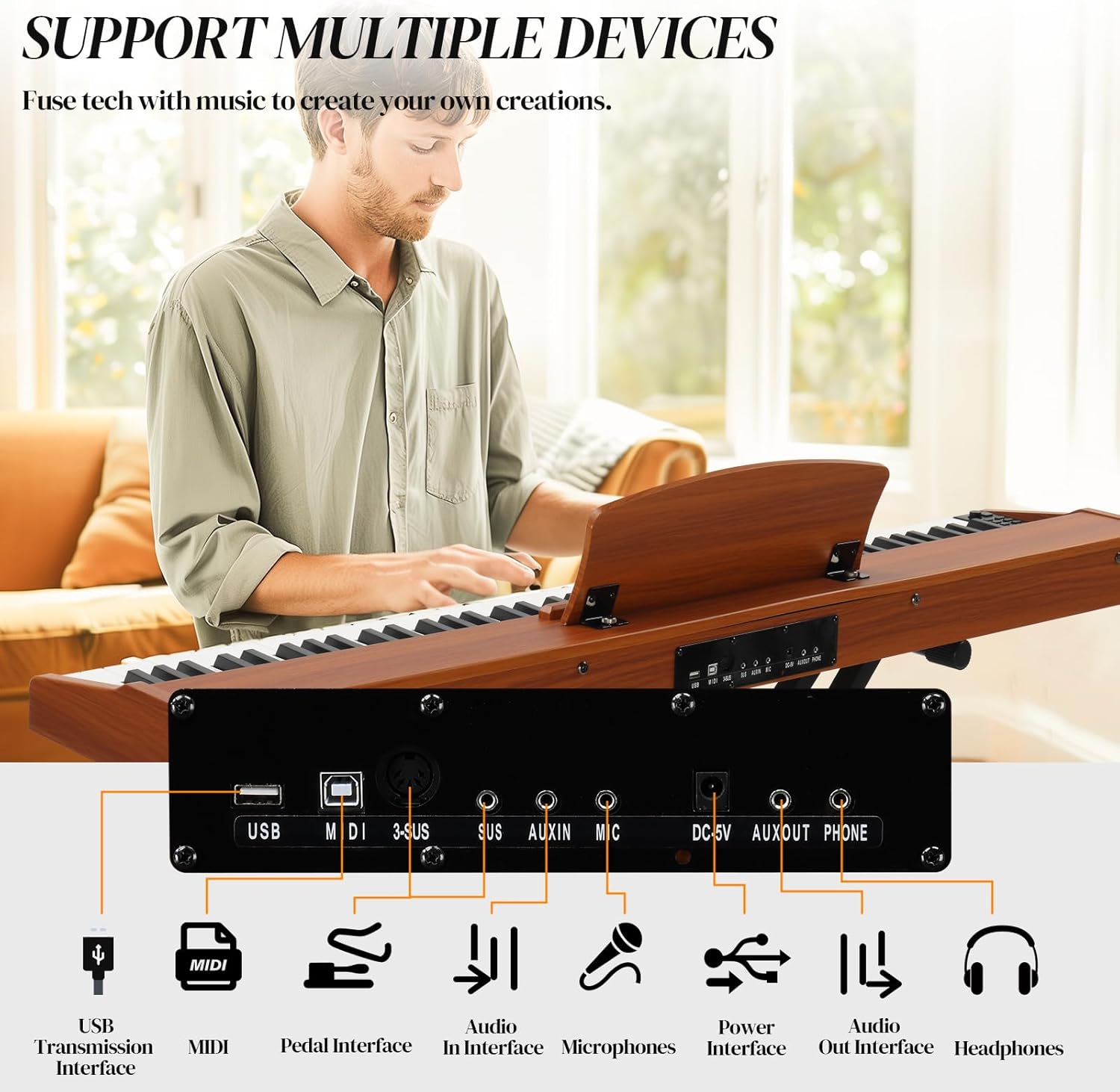
Image: Rear panel connections of the Ktaxon 88 Key Electric Piano, illustrating ports for USB, MIDI, 3-SUS (pedal), AUX IN, MIC, DC 5V power, AUX OUT, and PHONE (headphones).
5. Operating Instructions
5.1 Power On/Off and Volume
Locate the power button on the control panel. Press it to turn the piano on or off. Use the dedicated volume controls to adjust the output level of the speakers or headphones.
5.2 Semi-Weighted Keys
The Ktaxon 88 Key Electric Piano features semi-weighted keys designed to offer a responsive touch and realistic playing experience. The keys provide a balance between the lightness of a synthesizer and the resistance of an acoustic piano, allowing for expressive dynamics from the softest touch to a strong crescendo.

Image: A musician playing the Ktaxon 88 Key Semi-Weighted Electric Piano, illustrating the natural feel and response of the keys.
5.3 Tone and Rhythm Selection
The piano includes 128 different tones and 128 rhythms. Use the dedicated buttons on the control panel to browse and select your desired tone or rhythm. The display will show the current selection.
5.4 Pedal Functions
The included 3-pedal unit enhances musical expression:
- Sustain Pedal: (Rightmost pedal) Enhances the sound and increases resonance, allowing notes to ring out longer.
- Soft Pedal: (Leftmost pedal) Softens the sound played on the keyboard.
- Damper Pedal: (Middle pedal) Decreases the damper effect by pressing the pedal halfway, offering nuanced control over sustain.

Image: Detailed view of the Ktaxon 3-pedal unit, clearly indicating the functions of the Soft, Damper, and Sustain pedals.
5.5 Connectivity Options
The Ktaxon digital piano offers versatile connectivity:
- Bluetooth: Activate Bluetooth on the piano and your external device (e.g., smartphone, tablet). Pair the devices to practice with compatible music apps or software wirelessly.
- MIDI Bluetooth: For experienced players, MIDI Bluetooth allows connection to MIDI-compatible software for composing and creating original music.
- Headphone Jacks: Two 3.5mm headphone jacks allow for simultaneous private practice for two individuals.
- USB: Connect to a computer for MIDI data transfer.

Image: An adult and a child simultaneously using headphones while playing the Ktaxon 88 Key Electric Piano, demonstrating the dual headphone jack functionality.
5.6 Advanced Functions
The control panel provides access to various advanced features:
- Recording: Use the record function to capture your performances.
- Playback: Listen to your recorded tracks.
- Double Keyboard Split: Divides the keyboard into two sections, allowing two different tones to be played simultaneously or for two people to play different parts.
- Transpose: Adjust the pitch of the entire keyboard up or down in semitone steps.

Image: A musician using the Ktaxon 88 Key Electric Piano, with visual cues highlighting its multiple practical features such as Bluetooth, MIDI, Dual Keyboard mode, built-in speakers, recording capability, and transpose function.
6. Maintenance
6.1 Cleaning
Regularly wipe the piano's surface with the provided dustproof cloth or a soft, dry cloth. Avoid using abrasive cleaners, solvents, or waxes, as these can damage the finish. For stubborn marks, a slightly damp cloth can be used, followed by a dry cloth.
6.2 Storage
When not in use, cover the piano with the dustproof cloth to protect it from dust and debris. If storing for an extended period, ensure it is in a cool, dry place, away from extreme temperatures and humidity.
7. Troubleshooting
- No Sound:
- Ensure the power adapter is securely connected and the piano is turned on.
- Check the volume level.
- If headphones are connected, ensure they are fully plugged in and functioning.
- Keys Not Responding:
- Gently clean around the affected keys to ensure no debris is obstructing movement.
- If the issue persists, contact customer support.
- Bluetooth Connectivity Issues:
- Ensure Bluetooth is enabled on both the piano and your external device.
- Make sure the devices are within range.
- Try unpairing and re-pairing the devices.
- Pedal Not Functioning:
- Verify that the pedal unit cable is securely connected to the correct port.
For issues not covered here, please refer to the contact information in the Warranty and Support section.
8. Specifications
| Feature | Specification |
|---|---|
| Brand | Ktaxon |
| Model Name | Ktaxon 88 Key Piano Keyboard |
| Number of Keys | 88 |
| Key Type | Semi-Weighted |
| Connectivity Technology | Bluetooth, USB |
| Connector Type | 3.5mm Jack, Bluetooth, MIDI USB, USB |
| Power Source | Corded Electric |
| Product Dimensions | 50.79 x 3.15 x 10.63 inches |
| Material Type | Wood |
| Special Features | Elegant Appearance, Full Equipment, Portable, Professional Three Pedal, Weighted Keys |

Image: A visual representation of the Ktaxon 88 Key Electric Piano with its key dimensions labeled: 50.79 inches (length), 10.63 inches (width), and 3.15 inches (height).
9. Warranty and Support
For warranty information, technical support, or service inquiries, please contact Ktaxon customer service through their official website or the retailer where the product was purchased. Please have your model number and purchase date available when contacting support.