
1. Introduction
This manual provides essential information for the safe and effective use of your Kirby Avalir Vacuum Cleaner. Please read all instructions carefully before operating the appliance. The Kirby Avalir is a powerful upright vacuum cleaner designed for deep cleaning carpets and various surfaces with its versatile attachments.

Figure 1: Front view of the Kirby Avalir Vacuum Cleaner.
2. Safety Information
Always follow basic safety precautions when using electrical appliances to reduce the risk of fire, electric shock, or injury. This includes:
- Do not leave the appliance unattended when plugged in. Unplug from outlet when not in use and before servicing.
- Do not use outdoors or on wet surfaces.
- Do not allow to be used as a toy. Close attention is necessary when used by or near children.
- Use only as described in this manual. Use only manufacturer’s recommended attachments.
- Do not use with damaged cord or plug. If appliance is not working as it should, has been dropped, damaged, left outdoors, or dropped into water, return it to a service center.
- Do not pull or carry by cord, use cord as a handle, close a door on cord, or pull cord around sharp edges or corners. Do not run appliance over cord. Keep cord away from heated surfaces.
- Do not unplug by pulling on cord. To unplug, grasp the plug, not the cord.
- Do not handle plug or appliance with wet hands.
- Do not put any object into openings. Do not use with any opening blocked; keep free of dust, lint, hair, and anything that may reduce air flow.
- Keep hair, loose clothing, fingers, and all parts of body away from openings and moving parts.
- Do not pick up anything that is burning or smoking, such as cigarettes, matches, or hot ashes.
- Do not use to pick up flammable or combustible liquids, such as gasoline, or use in areas where they may be present.
3. Setup
Before first use, ensure all components are correctly assembled and the vacuum bag is properly installed.
3.1 Installing the Vacuum Bag
The Kirby Avalir uses disposable vacuum bags for filtration. Follow these steps to install a new bag:
- Unzip the outer bag cover.
- Remove the old disposable bag by twisting it counter-clockwise and pulling it off the fill tube.
- Align the opening of the new bag with the fill tube and twist clockwise until secure.
- Ensure the bag is fully seated and zip up the outer bag cover.
Video: Overview of the Kirby Avalir Vacuum, including bag installation and general use.
3.2 Attaching Accessories
Your Kirby Avalir comes with various attachments for different cleaning tasks. To attach an accessory:
- Ensure the vacuum is unplugged.
- Remove the power nozzle by disengaging the foot pedal and lifting it off.
- Connect the desired hose or attachment to the suction port.
- Ensure a secure connection before operating.

Figure 2: Kirby Avalir Vacuum Cleaner shown with its full set of attachments.
4. Operating
The Kirby Avalir is designed for efficient cleaning with its powerful suction and self-propelled feature.
4.1 Basic Vacuuming
To operate the vacuum for general cleaning:
- Plug the power cord into a suitable electrical outlet.
- Adjust the height setting for your carpet type using the foot pedal.
- Turn on the vacuum using the power switch.
- Engage the self-propelled feature for easier maneuverability.
4.2 Using Attachments
For detailed cleaning, connect the appropriate attachments as described in Section 3.2. The attachments allow for cleaning upholstery, crevices, and other hard-to-reach areas.
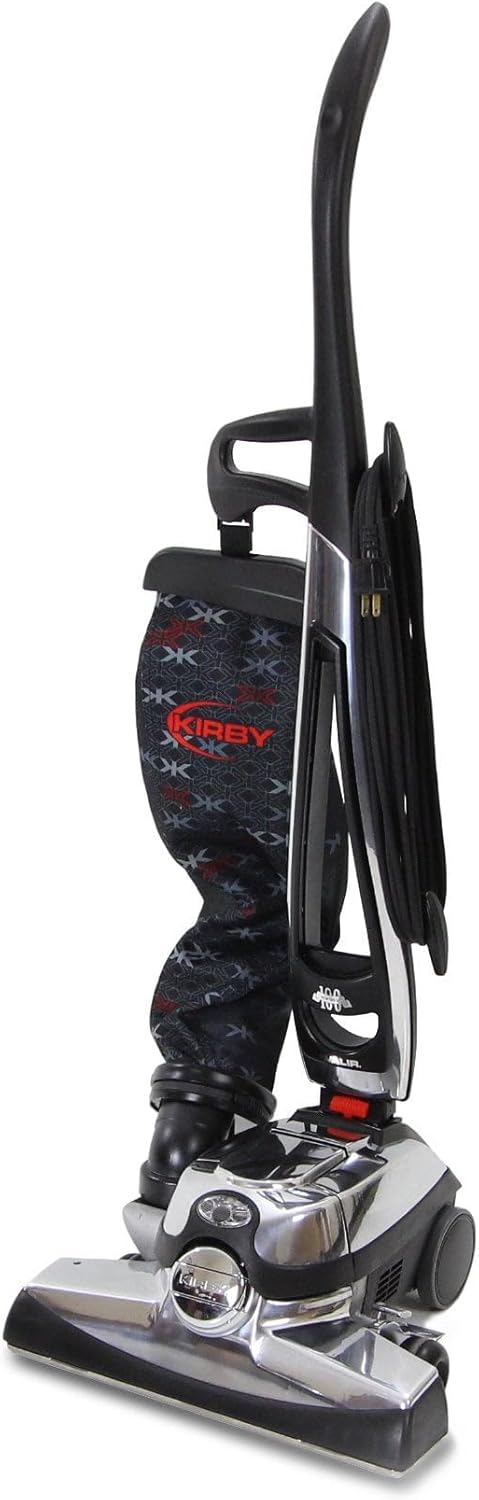
Figure 3: Side view of the Kirby Avalir Vacuum Cleaner in upright position.
5. Maintenance
Regular maintenance ensures optimal performance and longevity of your Kirby Avalir Vacuum Cleaner.
5.1 Changing Vacuum Bags
Change the vacuum bag when it is approximately half full to maintain strong suction and filtration efficiency. Refer to Section 3.1 for detailed bag replacement instructions.
5.2 Cleaning/Replacing the Brush Roll
Periodically inspect the brush roll for tangled hair or debris. To clean or replace the brush roll:
- Unplug the vacuum cleaner.
- Remove the power nozzle cover.
- Carefully remove the brush roll and clear any obstructions.
- If replacing, ensure the new brush roll is correctly aligned with the belt.
- Reassemble the power nozzle.
Video: Demonstration of brush roll inspection and replacement.
5.3 HEPA Filtration
The Kirby Avalir features HEPA filtration, capturing 99.97% of particles down to 0.3 microns. This system is designed to effectively trap allergens and fine dust within the vacuum bag, contributing to cleaner air.
6. Troubleshooting
If you encounter issues with your Kirby Avalir, consult the following common troubleshooting tips:
- Loss of Suction: Check if the vacuum bag is full and needs replacement. Inspect the hose and attachments for blockages. Ensure the power nozzle is properly attached and the belt is intact.
- Brush Roll Not Spinning: Verify the belt is not broken or dislodged. Clear any hair or debris tangled around the brush roll. Ensure the power nozzle is correctly engaged.
- Unusual Noises: Turn off and unplug the vacuum immediately. Inspect the brush roll and fan for any foreign objects. If the noise persists after clearing, contact customer support.
- Vacuum Not Turning On: Check the power cord and plug for damage. Ensure the outlet is functional. Verify the power switch is in the 'ON' position.
7. Specifications
| Feature | Detail |
|---|---|
| Brand | Kirby |
| Model Name | Avalir |
| Special Feature | Bagless (Note: Uses disposable bags within an outer bag system) |
| Filter Type | HEPA Filter |
| Included Components | Attachments |
| Is Cordless? | No |
| Recommended Uses For Product | Carpet |
| Color | Black |
| Product Dimensions | 15"L x 15"W x 45"H |
| Noise Level | 70 Decibels |
| Item Weight | 32.4 pounds |
| Power Source | Corded Electric |
8. Warranty and Support
The Kirby Avalir Vacuum Cleaner is backed by a 5-year warranty, reflecting its durable design and complete rebuild process. Additionally, a 60-day money-back guarantee is offered if you are not satisfied with the product.
For technical support, service, or warranty claims, please refer to the contact information provided with your purchase documentation or visit the official Kirby website.