Introduction
Welcome to the Ultrapods Pro 5.3 Noise Cancelling Wireless Earbuds user manual. These earbuds are engineered to deliver a superior audio experience with the convenience of wireless connectivity and effective noise cancellation. Featuring advanced Bluetooth 5.3 technology and Environmental Noise Cancellation (ENC), the Ultrapods Pro are designed to be compact, lightweight, and ideal for a wide range of activities, from commuting to working out, ensuring clear sound and calls.
Package Contents
Please verify that all items listed below are included in your package:
- Ultrapods Pro 5.3 Wireless Earbuds (Left & Right)
- Charging Case
- USB Charging Cable
- User Manual
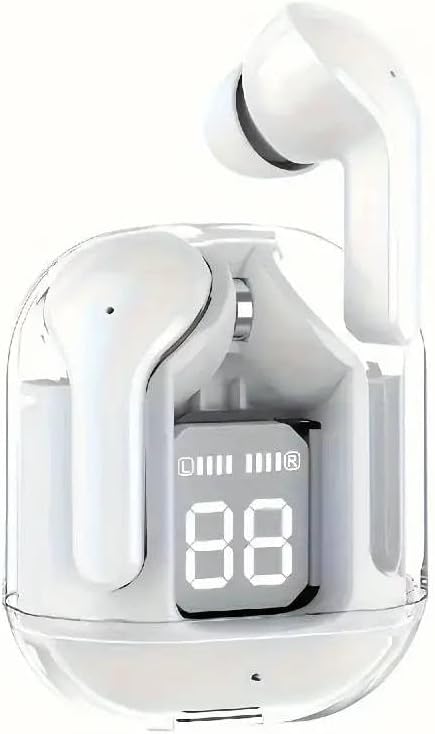
Image: The Ultrapods Pro 5.3 Wireless Earbuds, white in color, are shown resting inside their transparent charging case. The case features a digital display indicating battery levels for both the case and individual earbuds.
Setup
1. Initial Charging
Before first use, fully charge the Ultrapods Pro and their charging case. Connect the provided USB charging cable to the charging port on the case and a compatible USB power source. The digital display on the charging case will show the current battery level. Ensure both earbuds are placed correctly in the charging case during this process. A full charge typically takes approximately 1-2 hours.
2. Pairing with Your Device
- Ensure the earbuds are fully charged.
- Open the charging case lid. The earbuds will automatically power on and enter pairing mode.
- On your device (smartphone, tablet, etc.), navigate to the Bluetooth settings.
- Search for available devices and select "Ultrapods Pro" from the list.
- Once connected, a voice prompt will confirm successful pairing. The earbuds are now ready for use.
- For subsequent uses, the earbuds will automatically connect to the last paired device when removed from the case, provided Bluetooth is enabled on the device.
Operating Instructions
Power On/Off
- Power On: Open the charging case lid, and the earbuds will automatically power on.
- Power Off: Place the earbuds back into the charging case and close the lid. They will automatically power off and begin charging.
Music Playback
- Play/Pause: Tap either earbud once.
- Next Track: Double-tap the right earbud.
- Previous Track: Double-tap the left earbud.
Call Management
- Answer/End Call: Tap either earbud once during an incoming call or active call.
- Reject Call: Press and hold either earbud for 2 seconds during an incoming call.
Noise Cancelling (ENC)
The Ultrapods Pro feature Environmental Noise Cancellation (ENC) for clearer calls. This technology automatically reduces ambient noise during phone conversations. No specific user action is required to activate ENC during calls.
Maintenance
- Cleaning: Use a soft, dry, lint-free cloth to clean the earbuds and charging case. Do not use abrasive cleaners, alcohol, or chemical solvents.
- Storage: When not in use, store the earbuds in their charging case to protect them and keep them charged. Avoid exposing the device to extreme temperatures, humidity, or dust.
- Water Resistance: Please note that these earbuds are Not Water Resistant. Avoid exposure to water, sweat, or moisture to prevent damage.
Troubleshooting
| Problem | Possible Cause | Solution |
|---|---|---|
| Earbuds not pairing/connecting. | Earbuds not in pairing mode; Bluetooth off on device; previously paired device interfering. | Ensure earbuds are in pairing mode (open case). Turn Bluetooth off and on again on your device. Forget "Ultrapods Pro" from your device's Bluetooth list and re-pair. |
| No sound from one or both earbuds. | Low battery; earbud not properly seated in case; volume too low. | Check battery level and charge earbuds/case. Ensure earbuds are firmly seated in the charging case. Increase volume on your device. |
| Charging case display not working. | Case battery depleted; charging cable issue. | Connect the charging case to a power source. Try a different USB cable or power adapter. |
Specifications
- Model Name: Ultrapods Pro
- Connectivity Technology: Bluetooth 5.3
- Form Factor: In Ear
- Control Method: Remote (Touch Controls)
- Noise Cancellation: Environmental Noise Cancellation (ENC)
- Water Resistance Level: Not Water Resistant
- Item Weight (Package): Approximately 2.08 ounces (59 grams)
- Manufacturer: Shenzhen Pipijia Technology Co., Ltd.
Warranty and Support
For information regarding product warranty, returns, or technical support, please refer to the purchase documentation or contact the seller directly. You may also visit the official website of the manufacturer, Shenzhen Pipijia Technology Co., Ltd., for further assistance and updated information.


