
1. Introduction
The Qiang Picosecond Laser Machine is an advanced, non-invasive device designed for effective removal of various skin pigmentations, including tattoos, freckles, moles, and eyebrow pigments. Utilizing picosecond technology, this machine delivers ultra-short pulses of energy to break down pigment particles without causing damage to surrounding normal tissues, minimizing side effects and scarring. This manual provides essential information for the safe and efficient operation, setup, and maintenance of your device.

The Qiang Picosecond Laser Machine, designed for non-invasive tattoo and pigment removal, featuring a sleek design and user-friendly interface.
2. Safety Information
- This device is intended for professional use only. Operation by untrained individuals may result in injury or damage to the device.
- Always wear the provided light protection glasses and ensure the client wears an eye mask during operation to prevent eye damage from laser exposure.
- Ensure the machine is properly filled with water before operation to maintain the cooling system. Refer to the 'Setup' section for detailed instructions.
- Do not operate the machine if any part is damaged or malfunctioning. Contact customer support for assistance.
- Keep the device away from water or other liquids, except for the designated water inlet.
- Store the device in a cool, dry place when not in use.
3. Product Features
- Advanced Picosecond Technology: Delivers ultra-short pulses for efficient pigment breakdown.
- Non-Invasive Treatment: Targets pigmentations without damaging normal skin tissue, reducing the risk of scarring.
- Efficient Cooling System: Ensures stable and continuous operation for extended periods.
- Precise Targeting: Equipped with an infrared aiming light for accurate spot positioning.
- Versatile Probes: Includes six different treatment heads for various applications and pigment types.
- Portable Design: Lightweight and shock-resistant for ease of transport and use.
4. Package Contents
Please verify that all items are present in your package:
- 1 x Qiang Picosecond Laser Machine
- 1 x Eye Mask (for client)
- 1 x Light Protection Glasses (for operator)
- 6 x Treatment Probes/Control Head Accessories
- 1 x Hanging Bracket
- 1 x Funnel
- 1 x Foot Pedal
- 1 x Power Cord
5. Setup
Follow these steps to set up your Qiang Picosecond Laser Machine:
- Unpacking: Carefully remove all components from the packaging.
- Water Filling:
- Locate the water inlet (加水口) and overflow port on the back of the machine.
- Open both the water inlet and the overflow port.
- Using the provided funnel, slowly pour distilled water into the water inlet until water begins to flow out of the overflow port. This indicates the system is full.
- Close both the water inlet and overflow port securely.
- Connect Components:
- Connect the picosecond handle to the 'Handle socket' on the front of the machine.
- Connect the foot pedal to the 'Foot socket' on the back of the machine.
- Attach the desired treatment probe to the picosecond operating head.
- Connect the power cord to the 'power socket' on the back of the machine and then to a suitable power outlet (110V/220V).

Labeled front view of the machine, showing the LCD display, key switch, emergency stop, handle socket, and picosecond handpiece.

Labeled back view of the machine, showing cooling vents, water inlet, overflow, drain, foot pedal socket, and power socket.
6. Operating Instructions
Before operating, ensure the machine is properly set up and all safety precautions are observed.
- Power On: Insert the key into the 'key switch' and turn it to the ON position. The LCD display will illuminate.
- Select Probe: Choose the appropriate treatment probe based on the target pigmentation and attach it securely to the picosecond operating head.
- Adjust Parameters: Use the controls on the LCD display to set the desired wavelength, pulse energy, pulse duration, spot area, and frequency according to the treatment protocol.
- Targeting: The integrated infrared light will assist in precisely targeting the treatment area. Position the handpiece over the target.
- Treatment: Press the foot pedal to activate the laser and begin treatment. Release the pedal to stop.
- Power Off: After treatment, turn the key switch to the OFF position and disconnect the power cord.
Probe Functions:

An overview of the six interchangeable probes included with the machine, each designed for specific treatments such as black pigment removal, color pigment removal, tattoo removal, oil control, and skin rejuvenation.
- 532 nm Probe: Primarily used for removing freckles and color pigments.
- 1064 nm Probe: Ideal for removing eyebrow tattoos, body tattoos, and dark pigments.
- Black Face Doll Head: Used for oil control, skin whitening, skin rejuvenation, and blackhead removal.
- Cellular Picosecond Probe: Specific applications for cellular-level pigment treatment.
- 755 Honeycomb Head: For large area tattoo removal and eyebrow spot removal.
- Non-invasive 1064 heads: Targets black pigment.
- Non-invasive 532 heads: For color pigments.
Technology Overview:
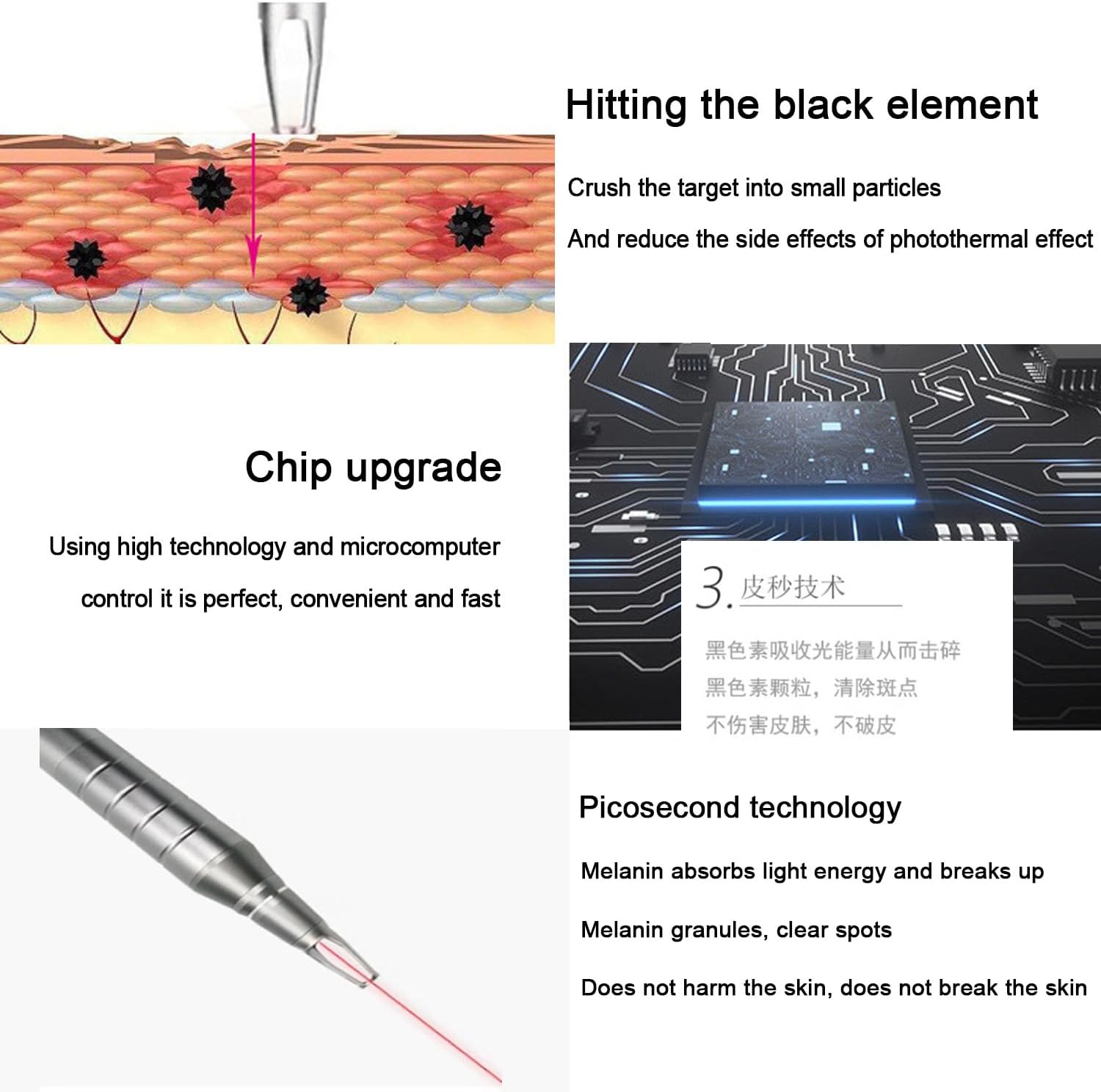
This graphic explains the core technology of the device, showing how picosecond pulses effectively shatter pigment particles without harming surrounding skin, enabled by advanced microcomputer control.

A detailed view of the laser handpiece, highlighting the integrated red infrared light that ensures precise positioning during treatment.
Application Range:

This image demonstrates the wide range of applications for the picosecond laser, targeting various pigmentations and skin concerns.
The machine can be used for various applications including, but not limited to, cleaning eyebrows, eyeliners, lip lines, tattoos, freckles, birthmarks, and moles. It is particularly effective for removing red, blue, brown, and other colored tattoos.

Examples of skin improvements, demonstrating the machine's effectiveness in reducing the appearance of freckles and moles.
7. Maintenance
- Water Level: Regularly check the water level in the cooling system. If the water level is low, refill it following the instructions in the 'Setup' section.
- Cleaning: Clean the exterior of the machine and the handpiece with a soft, dry cloth. Do not use abrasive cleaners or solvents.
- Storage: When not in use for extended periods, ensure the machine is powered off, unplugged, and stored in a clean, dry environment.
- Probe Care: Handle probes with care. Clean them according to professional guidelines after each use.
8. Troubleshooting
If you encounter any issues with your device, refer to the following common problems and solutions:
| Problem | Possible Cause | Solution |
|---|---|---|
| Machine does not power on | Power cord not connected; Key switch off; Power outlet issue | Ensure power cord is securely connected; Turn key switch to ON; Check power outlet with another device. |
| Laser not firing | Foot pedal not pressed; Probe not attached correctly; Parameters not set | Press foot pedal firmly; Re-attach probe securely; Set treatment parameters on LCD display. |
| Overheating warning | Insufficient water in cooling system; Blocked cooling vents | Check water level and refill if necessary; Ensure cooling vents are clear of obstructions. |
For issues not listed here or if troubleshooting steps do not resolve the problem, please contact customer support.
9. Specifications
| Specification | Value |
|---|---|
| Product Type | Picosecond Laser Tattoo and Pigment Removal Machine |
| Model Number | 101864-814187 |
| Manufacturer | Qiang |
| Wavelengths | 1064 nm, 532 nm, 1320 mm |
| Pulse Energy | Single pulse ≥160 mJ, Double pulse ≥270 mJ, Multiple pulse ≥700 mJ |
| Pulse Duration | 6-8 NS |
| Spot Area | 1-5 mm |
| Frequency | 1-10HZ |
| Voltage | 110 V/220 V |
| Output Power | 2500W |
| Package Dimensions | 58 x 44 x 41 cm |
| Package Weight | 15 kg |
| Country of Origin | China |
10. Warranty and Support
Customer satisfaction is our top priority. If you have any questions regarding the product, its operation, or require technical assistance, please do not hesitate to contact us. We are committed to responding to your inquiries as quickly as possible.
Please refer to your purchase documentation for specific warranty terms and contact information.