
Sun World Energy IVEM5048
Sun World Energy Felicity IVEM5048 Off-Grid Inverter User Manual
Model: IVEM5048 | Brand: Sun World Energy
1. Introduction
This user manual provides comprehensive instructions for the installation, operation, and maintenance of your Sun World Energy Felicity IVEM5048 Off-Grid Inverter. This advanced inverter is designed to convert DC power from solar panels or batteries into AC power for your household appliances, ensuring a reliable and efficient off-grid power supply. Please read this manual thoroughly before installation and use to ensure optimal performance and safety.
2. Safety Instructions
Always adhere to the following safety precautions to prevent injury or damage to the inverter and connected equipment.
- Qualified Personnel: Installation and maintenance must be performed by qualified personnel only.
- Ventilation: Ensure adequate ventilation around the inverter to prevent overheating. Do not block ventilation openings.
- Environment: Install the inverter in a dry, cool, and dust-free environment, away from flammable materials and direct sunlight.
- Grounding: The inverter must be properly grounded to prevent electrical shock.
- Disconnect Power: Before performing any wiring or maintenance, ensure all power sources (AC, DC, battery) are disconnected.
- Battery Safety: Work with batteries carefully. Wear eye protection and avoid contact with battery acid.
- No User Serviceable Parts: Do not attempt to open or repair the inverter. Refer all servicing to authorized service personnel.
3. Product Overview
The Felicity IVEM5048 is a multi-functional inverter/charger, combining functions of an inverter, solar charger, and battery charger to offer uninterruptible power support with a portable size. Its comprehensive LCD display provides user-configurable and easy-accessible button operation such as battery charging current, AC/solar charger priority, and acceptable input voltage based on different applications.

Figure 3.1: Front view of the Felicity IVEM5048 Off-Grid Inverter, showing the main display and control buttons.
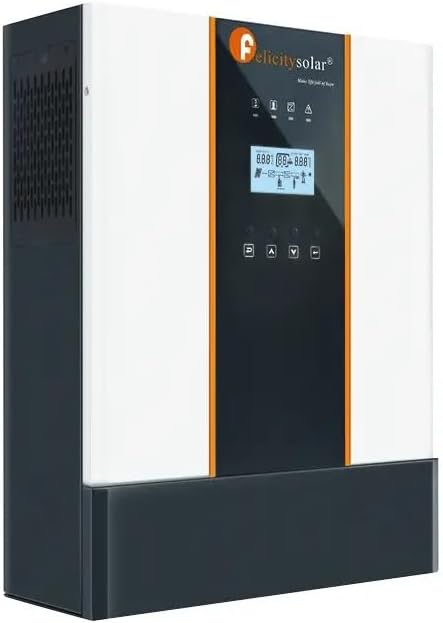
Figure 3.2: Angled view of the Felicity IVEM5048 Off-Grid Inverter, highlighting its compact design.

Figure 3.3: Rear view of the Felicity IVEM5048 Off-Grid Inverter, showing AC input/output, PV input, and communication ports.

Figure 3.4: Close-up of the inverter's LCD display, showing real-time operational data and settings.

Figure 3.5: A Felicity Solar LBPF48350 battery unit, often used in conjunction with the inverter for energy storage.

Figure 3.6: An external energy meter, which can be integrated into the solar power system for monitoring.
4. Setup and Installation
Proper installation is crucial for the safe and efficient operation of your inverter. Follow these steps carefully.
4.1 Site Selection
- Choose a location that is dry, well-ventilated, and protected from direct sunlight, rain, and dust.
- Ensure the ambient temperature is within the operating range specified in the specifications section.
- Allow sufficient clearance around the inverter for air circulation (at least 20 cm on all sides).
4.2 Mounting the Inverter
- Mark the positions for the mounting screws on a sturdy wall.
- Drill holes and insert appropriate wall anchors.
- Securely mount the inverter to the wall using suitable screws.
4.3 Wiring Connections
Warning: Ensure all power sources are disconnected before making any electrical connections.
- Battery Connection: Connect the battery cables to the inverter's battery terminals. Ensure correct polarity (positive to positive, negative to negative).
- PV (Solar Panel) Connection: Connect the solar panel array to the PV input terminals. Verify correct polarity and ensure the open-circuit voltage does not exceed the inverter's maximum PV input voltage.
- AC Input Connection: Connect the AC utility grid power to the AC input terminals.
- AC Output Connection: Connect your household loads to the AC output terminals.
- Grounding: Connect the inverter's ground terminal to a reliable earth ground.
5. Operating Instructions
Once installed, follow these steps to operate your inverter.
5.1 Powering On
- Ensure all wiring connections are secure and correct.
- Turn on the battery breaker.
- Turn on the AC input breaker (if connected to grid).
- Turn on the PV array breaker (if connected to solar panels).
- Press and hold the ON/OFF button on the inverter for a few seconds until the display lights up.
5.2 LCD Display and Settings
The LCD display provides real-time status and allows configuration of various parameters. Use the navigation buttons (UP, DOWN, ENTER, ESC) to browse and modify settings.
| Display Item | Description |
|---|---|
| Input Voltage | Current AC input voltage from grid or generator. |
| Output Voltage | Current AC output voltage supplied to loads. |
| Battery Voltage | Current battery bank voltage. |
| PV Input Voltage | Current voltage from solar panels. |
| Load Percentage | Percentage of total load connected to the inverter. |
Refer to the detailed parameter settings section in the full manual for advanced configurations such as charging current, output priority (Solar/Utility/Battery), and alarm settings.
6. Maintenance
Regular maintenance ensures the longevity and optimal performance of your inverter.
- Cleaning: Periodically clean the inverter's exterior with a dry, soft cloth. Do not use liquid cleaners.
- Ventilation: Ensure ventilation openings are free from dust and debris. Use compressed air to clear vents if necessary.
- Connections: Annually check all electrical connections for tightness and signs of corrosion. Tighten any loose connections.
- Battery Inspection: If using lead-acid batteries, check electrolyte levels and terminal cleanliness regularly.
- Environmental Check: Verify that the installation environment remains within recommended conditions (temperature, humidity).
7. Troubleshooting
This section provides solutions for common issues you might encounter.
| Problem | Possible Cause | Solution |
|---|---|---|
| Inverter not turning on | No battery connection; Battery voltage too low; Power button not pressed long enough. | Check battery connections; Charge battery; Press and hold ON/OFF button for 3 seconds. |
| No AC output | Overload; Over-temperature; Battery low; AC output breaker tripped. | Reduce load; Allow inverter to cool; Charge battery; Reset AC output breaker. |
| Solar panels not charging battery | PV input voltage too low/high; PV polarity reversed; PV breaker off. | Check PV voltage and connections; Correct polarity; Turn on PV breaker. |
| Abnormal noise from inverter | Loose components; Fan malfunction; Overload. | Contact technical support; Check for obstructions in fan; Reduce load. |
If the problem persists after attempting these solutions, please contact Sun World Energy technical support.
8. Specifications
Technical specifications for the Felicity IVEM5048 Off-Grid Inverter.
| Parameter | Value |
|---|---|
| Model | IVEM5048 |
| Rated Power | 5000 VA / 5000 W |
| Output Voltage | 230 VAC (Adjustable range: 220-240 VAC) |
| Efficiency | 95% (Nominal R Load) |
| Battery Voltage | 48 VDC |
| Max. PV Array Power | 5000 W |
| Max. PV Array Open Circuit Voltage | 450 VDC |
| Dimensions (D x W x H) | 514 x 419 x 222 mm |
| Weight | Information not available |
| Operating Temperature | 0°C - 55°C |
9. Warranty and Support
Sun World Energy provides a limited warranty for the Felicity IVEM5048 Off-Grid Inverter against defects in materials and workmanship under normal use and service. The warranty period typically covers 12 months from the date of purchase. Please retain your proof of purchase for warranty claims.
9.1 Warranty Exclusions
The warranty does not cover damages resulting from:
- Improper installation or wiring.
- Unauthorized modification or repair.
- Misuse, abuse, or negligence.
- Natural disasters or acts of God.
- Operating outside specified environmental conditions.
9.2 Technical Support
For technical assistance, troubleshooting, or warranty inquiries, please contact Sun World Energy customer support. Have your product model number (IVEM5048) and purchase date ready when contacting support.
Contact Information:
- Please refer to your product packaging or official website for the most current contact details.
- Online resources and FAQs may also be available on the Sun World Energy website.
Related Documents - IVEM5048
 |
Felicitysolar IVEM Series Solar Inverter User Guide (3KVA-5KVA) Comprehensive user guide for the Felicitysolar IVEM Series solar inverter (3KVA-5KVA). Covers installation, operation, specifications, troubleshooting, and parallel connection for efficient solar energy management. |
 |
Felicitysolar IVEM Series Solar Inverter User Guide (3KVA-5KVA) Comprehensive user guide for Felicitysolar IVEM Series solar inverters (IVEM3024, IVEM5048). Learn about installation, operation, safety, and features of these MPPT solar chargers and hybrid inverters for reliable power solutions. |
 |
Посібник користувача: Сонячний інвертор Felicitysolar IVEM Серії (3KBA-5KBA) Посібник користувача для сонячних інверторів Felicitysolar IVEM Серії (3KBA-5KBA). Охоплює встановлення, експлуатацію, безпеку, усунення несправностей та технічні характеристики. |
 |
Felicitysolar IVEM5048-LV Solar Inverter User Guide This user guide provides comprehensive information for the Felicitysolar IVEM5048-LV solar inverter, covering installation, operation, specifications, safety precautions, troubleshooting, and parallel connection configurations. |
 |
Felicitysolar 3-5KVA IVEM Series Off-grid Solar Inverter Datasheet Detailed technical specifications and features for the Felicitysolar 3-5KVA IVEM Series AC-110/120V off-grid high-frequency solar inverters, including models IVEM3048-LV and IVEM5048-LV. |
 |
Solar Inverter IVEM3024/5048: Features and Specifications Detailed information on the Felicitysolar IVEM3024/5048 solar inverter, including features like configurable input voltage, battery charging, AC/Solar priority, and technical specifications for both models. |
Ask a question about this manual
Ask about setup, troubleshooting, compatibility, parts, safety, or missing instructions. Manuals+ will review the question and use this page’s manual context to help answer it.