
Powdeom EX140
Powdeom 140W 27000mAh 3-Port Portable Laptop Charger EX140C User Manual
Model: EX140C | Brand: Powdeom
Introduction
This manual provides essential instructions for the safe and efficient operation of your Powdeom 140W 27000mAh 3-Port Portable Laptop Charger, model EX140C. Please read this manual thoroughly before use and retain it for future reference.
Package Contents
- Powdeom 140W Power Bank (EX140C)
- USB-C Cable (charging adapter not included)
- User Manual
- Storage Bag
Product Overview
The Powdeom EX140C power bank is designed for high-speed charging with a large capacity and smart features.
- Two 140W Fast Charging Ports: Equipped with PD 3.1 chip and bi-directional charging technology to achieve 140W fast charging.
- 27000mAh Large Capacity: With a massive 99Wh capacity, it provides extended power for multiple electronic devices.
- Smart LCD Digital Display: Accurately shows real-time power, estimated charging time, temperature, battery health, and cycle times.
- Three Output Ports: Features 2x USB-C ports and 1x QC 3.0 USB-A port for simultaneous charging of up to three devices.
- Durable Design: Innovative can shape and all-aluminum heat dissipation structure design for ease of holding and portability.
- Airline Approved: Capacity is less than 100Wh, complying with Federal Transportation Security Rules for safe air travel.
Ports and Indicators
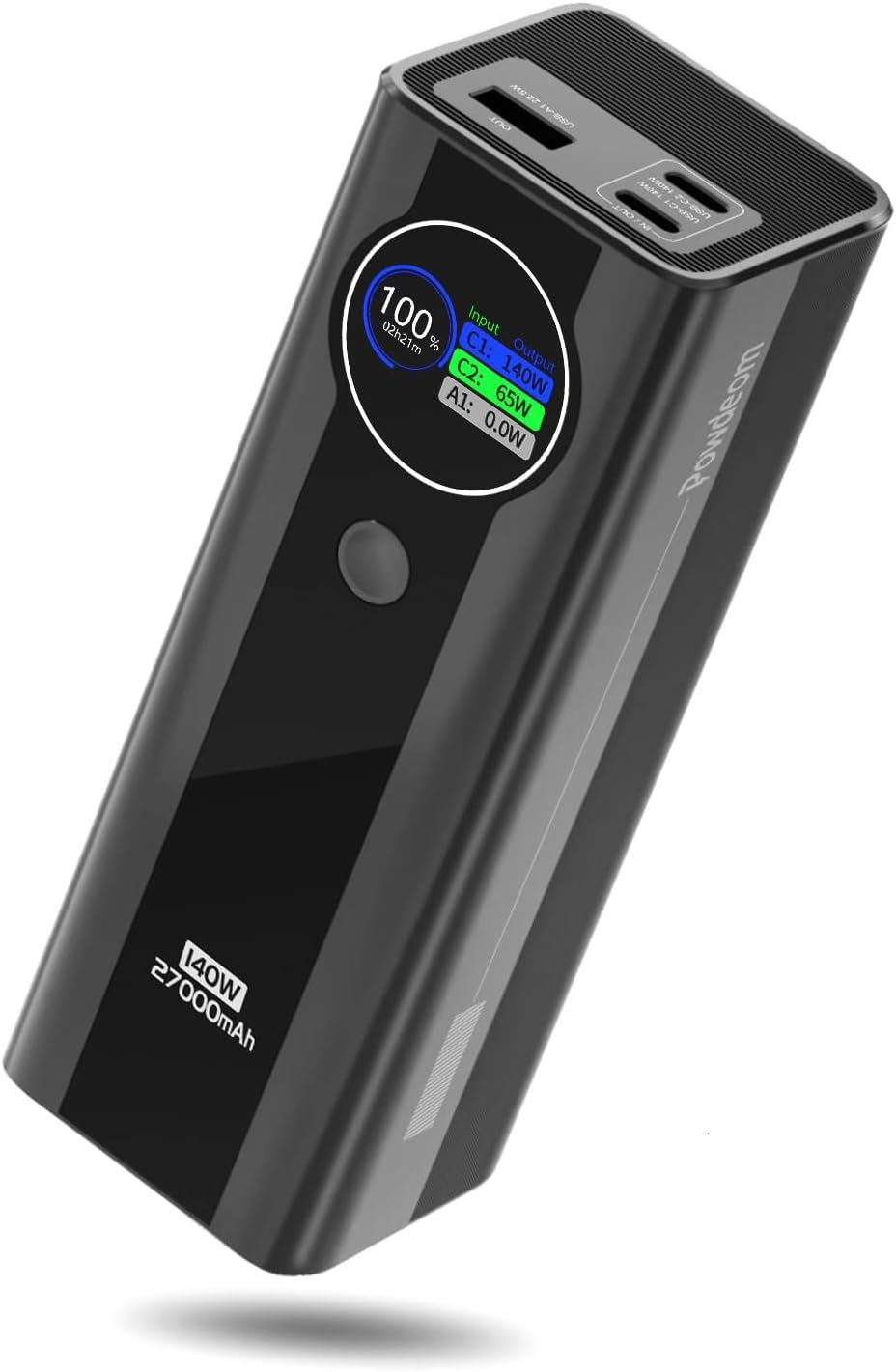
This image displays the Powdeom EX140C power bank, highlighting its sleek design and the smart digital display. The display shows the current battery percentage, input wattage for C1 and C2 ports, and output wattage for A1 port.
The device features two USB-C ports (C1, C2) and one USB-A port (A1) for both input and output. The central button activates the display and cycles through information screens.
Setup
Initial Use
For optimal performance, it is recommended to fully discharge the power bank upon first use, then fully recharge it to 100%.
Charging the Power Bank
Connect a USB-C cable to either the C1 or C2 port of the power bank and to a compatible power adapter (not included). For fastest recharge, use a 140W compatible charger. The digital display will show "Input" with green wattage values indicating the charging speed.

This image illustrates the Powdeom EX140C power bank being recharged. A USB-C cable is connected, and the display indicates "140W MAX" for rapid input charging.
Operating Instructions
Smart Digital Display Functions
The LCD digital display provides comprehensive information. Press the button once to activate the display and cycle through the following screens:
- Page 1: Shows current battery percentage, estimated charging/recharging time, and real-time input/output wattage for each port (green for input, blue for output).
- Page 2: Displays internal temperature (Celsius/Fahrenheit), maximum battery capacity (health), and total battery cycle count.
- Page 3: Allows adjustment of screen display time (30 seconds or Always On).

This image provides a detailed view of the smart digital display on the Powdeom EX140C. It shows three different information screens: current charge and port wattage, temperature and battery health, and screen display time settings.
Charging Your Devices
Connect your device to the power bank using a compatible USB-C or USB-A cable. The power bank will automatically detect the device and begin charging. The display will show "Output" with blue wattage values for the ports actively delivering power.
Single Port Charging
For the fastest charging speeds, especially for high-power devices like laptops, it is recommended to use a single USB-C port (C1 or C2). Each USB-C port can deliver up to 140W. The USB-A port (A1) provides up to 22.5W.

This diagram shows the maximum wattage output for single-port charging: C1 at 140W MAX, C2 at 140W MAX, and A1 at 22.5W MAX.
Multiple Device Charging
The power bank can charge up to three devices simultaneously. When multiple ports are in use, the total power output is distributed.

This image depicts the Powdeom EX140C power bank simultaneously charging a laptop, a smartphone, and a pair of wireless earbuds, demonstrating its multi-device charging capability.
- Two-Port Output:
- C1 + C2: Up to 120W MAX combined.
- C1 + A1: C1 up to 100W MAX, A1 up to 22.5W MAX.
- C2 + A1: C2 up to 100W MAX, A1 up to 22.5W MAX.
- Three-Port Output:
- C1 + C2 + A1: C1 up to 65W MAX, C2 up to 65W MAX, A1 up to 22.5W MAX.

This diagram details the power distribution when charging two or three devices simultaneously through the USB-C and USB-A ports.
Pass-Through Charging
The Powdeom EX140C supports pass-through charging, allowing it to be recharged while simultaneously charging other devices.
Compatibility
The Powdeom EX140C is compatible with a broad range of devices, including:
- Laptops: MacBook Pro, MacBook Air 2022, Dell XPS 15/13, HP Spectre, Lenovo, ThinkBook, Surface Laptop, ROG.
- Tablets: iPad Pro 11'', iPad, Surface Pro, Galaxy Tab, Yaga Tab, Lenovo Pad, Google Pixel Tablet.
- Phones: iPhone 14/14 Pro/14 Pro Max/13/12, Galaxy S23/S22/S21, Samsung, Google, Sony/LG, OnePlus.
- Other Devices: Steam Deck, Switch, DJI Mini 3 Pro, Legion Go, Airpods, GoPro, Headphones, Drones.

This infographic visually lists a wide array of devices compatible with the Powdeom EX140C power bank, categorized into laptops, tablets, phones, and other electronics.
Safety Information
Important Safety Guidelines
- Do not expose the power bank to extreme temperatures, direct sunlight, or water.
- Avoid dropping or subjecting the device to strong impacts.
- Keep out of reach of children.
- Do not disassemble, repair, or modify the device.
- Use only certified cables and adapters.
- The power bank features multiple protection mechanisms including over-current, overload, short circuit, overtemperature, and over-voltage protection.
Airline Travel
With a capacity of 99Wh (27000mAh), the Powdeom EX140C complies with Federal Transportation Security Rules and is safe to carry on an airplane.

This image shows the Powdeom EX140C power bank in an airplane cabin setting, emphasizing its compact size and suitability for air travel.
Temperature Management
The power bank intelligently manages its output wattage to control internal temperature, protecting both the device and connected electronics. For example, 140W charging may drop to 100W after 15 minutes, then further to 65W if temperatures exceed 40°C, and to 30W above 42°C.

This graph visually explains the power bank's temperature-controlled output, showing how wattage decreases as the internal temperature rises to ensure safety and longevity.
Specifications
Technical Specifications
| Feature | Detail |
|---|---|
| Model Number | EX140 |
| Battery Capacity | 27000 Milliamp Hours (99Wh) |
| Product Dimensions | 6.09 x 2.08 x 1.95 inches |
| Item Weight | 1.3 pounds |
| USB-C Output (C1/C2) | Up to 140W MAX (PD3.1) |
| USB-A Output (A1) | Up to 22.5W MAX (QC3.0) |
| Input | USB Type C (C1/C2) |
| Special Features | Digital Display, Fast Charging |
| Color | Black |
| Manufacturer | Shenzhen Everplus Technology Co., Ltd. |
Warranty and Support
Customer Service
Powdeom provides a 12-month warranty from the date of purchase. For any questions or support needs, please contact our customer service.
Visit the Powdeom Store for more information.
Product Video Demonstration
This video provides a visual guide to unboxing, operating the smart digital display, and demonstrating the charging capabilities of the Powdeom 140W Power Bank. It highlights the various ports and how the display shows real-time input and output wattage.
Ask a question about this manual
Ask about setup, troubleshooting, compatibility, parts, safety, or missing instructions. Manuals+ will review the question and use this page’s manual context to help answer it.