
GUXANG AT1016U Tablet 10.1 Inch Case
Instruction Manual for GUXANG Azeyou AT1016U Tablet 10.1 Inch Case
Model: AT1016U Tablet 10.1 Inch Case
Introduction
This manual provides instructions for the proper use and maintenance of your GUXANG Protective Tablet Case, designed exclusively for the Azeyou AT1016U Tablet 10.1 Inch. This case offers comprehensive protection and enhanced functionality for your device.
Product Features
- Full Protection: Constructed from durable silky PU leather to protect against drops and scratches.
- Multiple Perspectives: The front cover functions as a stable stand for various viewing angles.
- Soft Hand Strap: Provides secure handling and convenience during use.
- Magnetic Closure: Ensures the case remains securely closed.
- Precise Cutouts: Allows easy access to all controls, speakers, camera, and ports.
Setup
Installing Your Tablet
- Ensure your Azeyou AT1016U Tablet 10.1 Inch is clean and free of debris.
- Gently align the tablet with the case's frame, ensuring all corners and edges fit snugly into the protective shell.
- Press firmly but carefully around the edges of the tablet until it is fully seated within the case. Verify that all ports, buttons, and the camera are unobstructed by the case's cutouts.

Figure 1: Tablet case with tablet inserted, demonstrating the stand functionality.
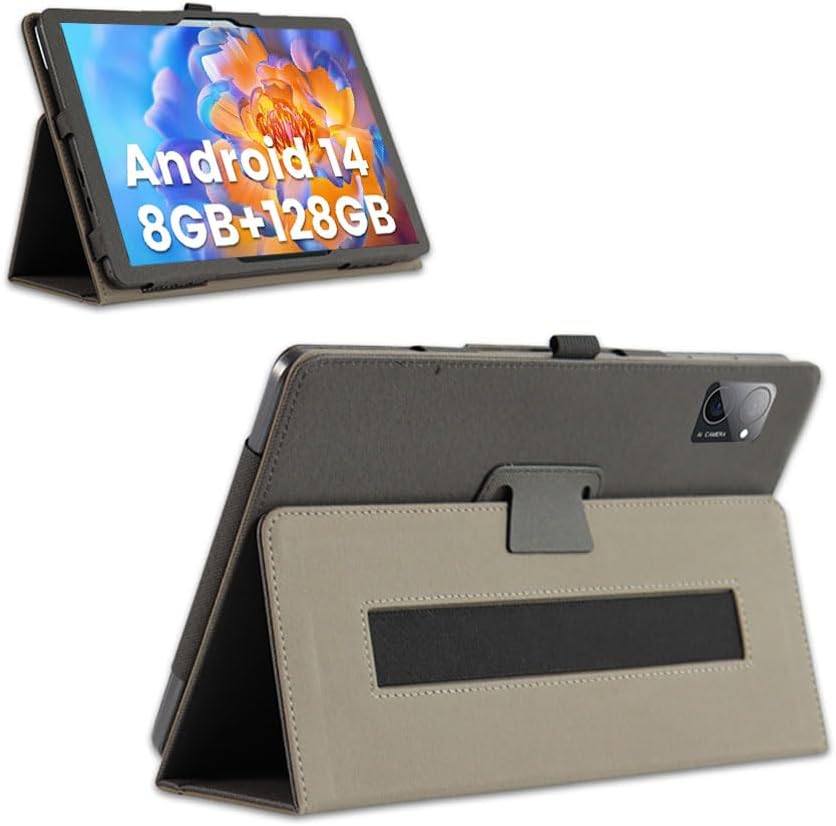
Figure 2: Alternative view of the tablet case with the tablet, showcasing the stable stand.
Operating Instructions
Using the Folding Stand
The front cover of the case is designed to fold into a stable stand, providing multiple viewing angles for your tablet. This is ideal for watching videos, reading, or video calls.
- Open the front cover of the case.
- Fold the cover back along the designated creases to form a triangular support structure.
- Rest the tablet's edge into the groove created by the folded cover to secure it in an upright position.
Utilizing the Hand Strap
The integrated soft hand strap on the back of the case enhances grip and security, especially when holding the tablet for extended periods or on the go.
- Slide your hand through the elastic strap located on the back of the case.
- Adjust your grip for comfort and stability. This feature is particularly useful for one-handed operation or when moving around.

Figure 3: Rear view of the case with tablet, illustrating the hand strap and precise camera cutout.
Maintenance
Cleaning Instructions
To maintain the appearance and longevity of your tablet case:
- Wipe the exterior surface with a soft, damp cloth.
- For stubborn stains, use a mild soap solution on the cloth, then wipe with a clean, damp cloth to remove any residue.
- Avoid using harsh chemicals, abrasive cleaners, or solvents, as these can damage the PU leather.
- Allow the case to air dry completely before reinserting your tablet.
Storage
When not in use, store the case in a cool, dry place away from direct sunlight and extreme temperatures to prevent material degradation.

Figure 4: Front and back views of the case when folded, illustrating its compact form.

Figure 5: Front view of the closed tablet case, highlighting its sleek design.
Troubleshooting
Tablet Does Not Fit Properly
- Issue: Tablet feels loose or too tight in the case.
- Solution: Ensure you have the correct model of tablet (Azeyou AT1016U Tablet 10.1 Inch). This case is designed exclusively for this specific model.
- Solution: Re-align the tablet carefully, ensuring all corners snap into place.
Stand Functionality Issues
- Issue: The stand is unstable or collapses.
- Solution: Ensure the front cover is folded correctly along the creases to form a stable triangular base.
- Solution: Place the tablet on a flat, stable surface when using the stand.
Specifications
| Product Name | GUXANG Protective Tablet Case |
| Compatible Model | Azeyou AT1016U Tablet 10.1 Inch |
| Material | Durable Silky PU Leather |
| Color | Black |
| Dimensions | 10.24 x 6.69 x 0.59 inches (26 x 17 x 1.5 cm) |
| Item Weight | 7 ounces (198 grams) |
| Special Features | Slim Fit, Travel-friendly, Kickstand, Soft Hand Strap, Magnetic Closure |
Warranty and Support
Warranty Information
Please refer to the product packaging or the retailer's website for specific warranty details. GUXANG stands behind the quality of its products.
Customer Support
If you encounter any issues or have questions regarding your GUXANG tablet case, please contact our customer support team. Contact information can typically be found on the product packaging or the official GUXANG website.
"Just simply contact us If you have any problems and we will take care of it."
Ask a question about this manual
Ask about setup, troubleshooting, compatibility, parts, safety, or missing instructions. Manuals+ will review the question and use this page’s manual context to help answer it.