
HOOBRO BB40UDFT01
HOOBRO 20 Gallon Fish Tank Stand Instruction Manual
Model: BB40UDFT01
Important Safety Information
Please read and understand all instructions before assembling and using this product. Failure to follow these instructions may result in injury or damage to the product or property.
- Ensure all parts are present and undamaged before assembly.
- Do not exceed the maximum weight capacity: 300 lbs on the top shelf, 110 lbs on the bottom shelf.
- Place the stand on a flat, level, and stable surface to prevent tipping.
- Keep electrical components (power strip, LED light) away from water.
- Unplug the power strip before performing any maintenance or cleaning.
- This stand is designed for indoor use only.
Product Overview
The HOOBRO 20 Gallon Fish Tank Stand is a versatile and sturdy furniture piece designed to support aquariums, terrariums, or other decorative items. It features integrated power outlets and an LED light strip for enhanced functionality and aesthetics.
- Dimensions: 27.6" L x 15.7" W x 32.3" H
- Material: Quality Particleboard and Metal Frame
- Top Shelf Capacity: Up to 20-gallon fish tank (max 300 lbs)
- Bottom Shelf Capacity: 5-10 gallon small fish tank, turtle tank, or reptile terrarium (max 110 lbs)
- Power Strip: 2 AC outlets, 1 USB port, 1 Type-C port
- LED Light: Multi-color and mode options
- Storage: Middle cabinet with doors for accessories

Image: The HOOBRO fish tank stand in black, supporting a 20-gallon aquarium on its top surface and a smaller tank on the lower shelf, with the integrated LED light strip casting a blue glow.
Assembly and Setup
This section provides step-by-step instructions for assembling your HOOBRO Fish Tank Stand. All necessary tools and a detailed illustrated manual are included in the package. It is recommended to assemble the stand with two people.
- Unpack and Identify Parts: Carefully unpack all components and lay them out. Refer to the included parts list and hardware diagram to identify each piece. Each part is labeled with a serial number.
- Assemble the Metal Frame: Begin by connecting the main metal frame components using the provided screws and Allen wrench. Ensure all connections are secure but do not overtighten until the frame is fully assembled. Note the X-braces for added stability.
- Attach Particleboard Panels: Secure the particleboard panels to the metal frame. This includes the top surface, the cabinet sides, and the bottom shelf. Pay attention to the orientation of the panels as indicated in the manual.
- Install Cabinet Doors: Attach the cabinet doors using the hinges and screws. Adjust the hinges as needed to ensure the doors close properly and are aligned.
- Install Power Strip: Mount the power strip into its designated slot on the side of the stand. Ensure it is firmly secured.
- Attach LED Light Strip: Adhere the LED light strip to the underside of the top shelf or as indicated in the manual. Connect it to the power strip.
- Adjust Feet: Once the stand is fully assembled, place it in its desired location. Adjust the leveling feet at the bottom of the stand to ensure it is stable and level on your floor. This is crucial for the safety of your aquarium.
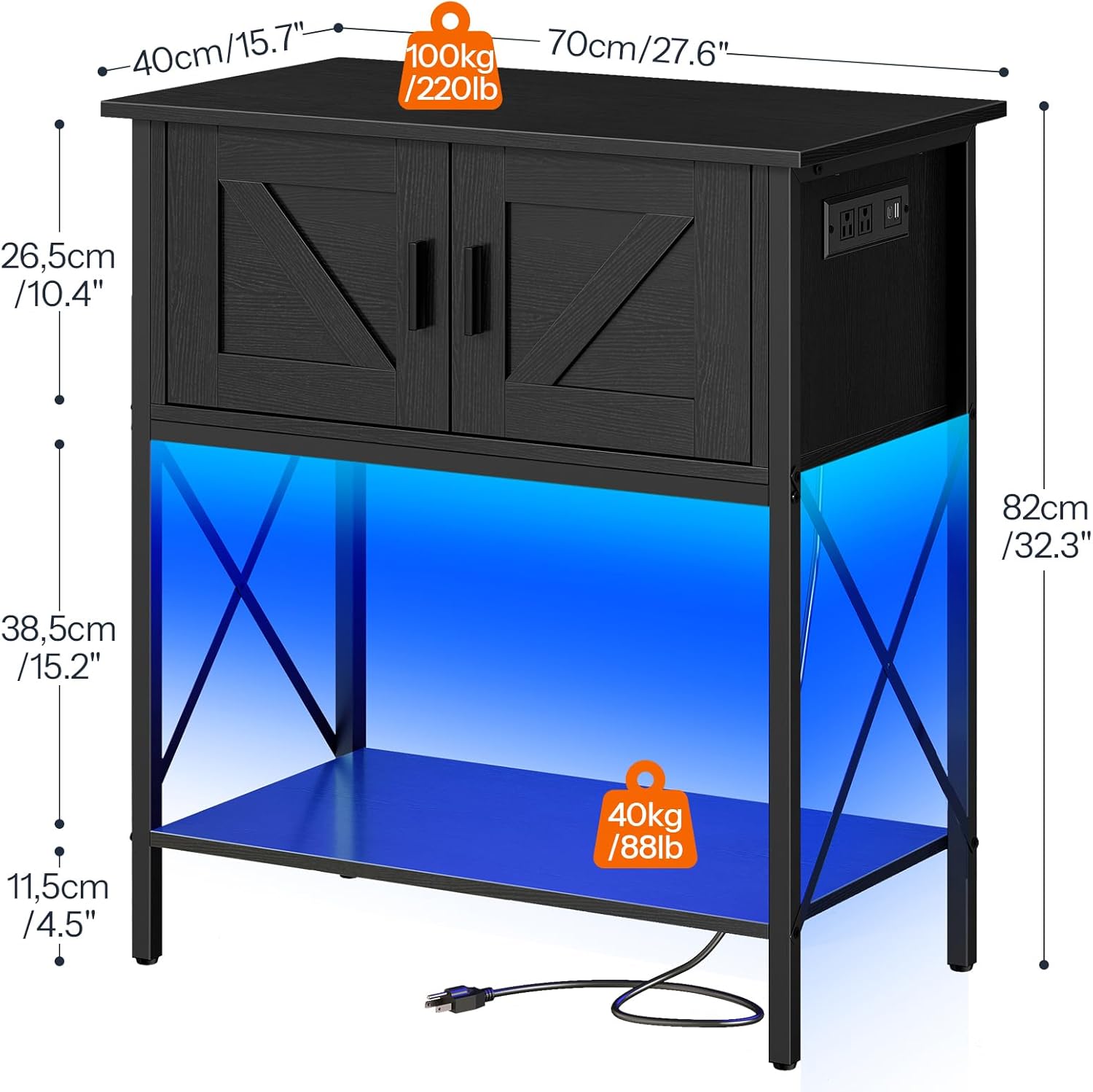
Image: A detailed diagram illustrating the dimensions of the stand (27.6" L x 15.7" W x 32.3" H) and the weight capacities for the top (100kg/220lb) and bottom (40kg/88lb) shelves. Please refer to the product specifications for the most accurate weight capacities (300 lbs top, 110 lbs bottom).

Image: A close-up view of the integrated power strip, highlighting its two AC outlets, one USB port, and one Type-C port, designed for convenient power access for aquarium equipment.
Operating Instructions
Once assembled, the HOOBRO Fish Tank Stand is ready for use. Follow these guidelines for optimal operation.
Using the Power Outlets
- Plug the stand's power cord into a grounded wall outlet.
- Connect your aquarium equipment (e.g., circulator, oxygen pump, heater, filter) to the 2 AC outlets.
- Use the USB and Type-C ports to charge compatible devices or power low-voltage accessories.
- Do not overload the power strip. Refer to the power strip's specifications for maximum wattage.
Controlling the LED Light
The integrated LED light strip offers multiple colors and modes to create a visually appealing ambiance for your aquarium or display items.
- Use the included remote control to adjust the LED light settings.
- Options typically include changing colors, adjusting brightness, and selecting various lighting modes (e.g., static, fade, flash).
- Ensure the LED light strip is securely attached and its connection to the power strip is firm.

Image: A visual representation of the LED light strip in operation, showing a hand holding the remote control used to manage its 16 colors, 6 brightness levels, and 4 lighting modes.
Cabinet Storage
The middle cabinet provides discreet storage for fish food, nets, cleaning supplies, and other aquarium accessories, helping to keep your space tidy.

Image: The cabinet doors of the stand are open, showcasing the internal storage compartment suitable for organizing various aquarium supplies.
Maintenance
Regular maintenance will help preserve the appearance and functionality of your HOOBRO Fish Tank Stand.
- Cleaning: Wipe surfaces with a soft, damp cloth. Avoid harsh chemicals or abrasive cleaners that could damage the finish.
- Spills: Immediately wipe up any water spills from the aquarium to prevent damage to the particleboard.
- Hardware Check: Periodically check all screws and connections to ensure they remain tight. Retighten if necessary.
- Leveling: Re-check the leveling feet occasionally, especially if the stand is moved or if the floor settles.
Troubleshooting
This section addresses common issues you might encounter with your fish tank stand.
| Problem | Possible Cause | Solution |
|---|---|---|
| Stand is wobbly/unstable. | Uneven floor; loose connections. | Adjust the leveling feet until the stand is stable. Check and tighten all assembly screws. |
| LED light not working. | Not plugged in; loose connection; remote battery dead. | Ensure the power strip is plugged into a live outlet. Check the connection between the LED strip and the power strip. Replace remote control batteries. |
| Power outlets not working. | Not plugged in; circuit breaker tripped; overloaded. | Verify the stand's power cord is securely plugged into a working wall outlet. Check your household circuit breaker. Reduce the number of devices plugged into the power strip. |
| Cabinet doors are misaligned. | Hinges not properly adjusted. | Adjust the screws on the hinges to align the doors. Refer to the assembly manual for detailed hinge adjustment instructions. |
Specifications
| Feature | Detail |
|---|---|
| Model Number | BB40UDFT01 |
| Dimensions (L x W x H) | 27.6" x 15.7" x 32.3" (70cm x 40cm x 82cm) |
| Weight | 34.4 lbs (15.6 kg) |
| Material | Particleboard, Metal |
| Top Shelf Capacity | 300 lbs (136 kg) |
| Bottom Shelf Capacity | 110 lbs (50 kg) |
| Power Strip | 2 AC Outlets (120V/12A), 1 USB Port (5V/2A), 1 Type-C Port (5V/2A) |
| Power Cord Length | 4.9 feet |
| LED Light | Multi-color (16 colors), 6 Brightness, 4 Lighting Modes |
Warranty and Support
HOOBRO stands behind the quality of its products. For any questions, concerns, or warranty inquiries, please contact our customer support team.
Contact Information: Please refer to the contact details provided in your product packaging or visit the official HOOBRO website for support.
Warranty Description: "Please contact us if you have any questions"
Product Videos
Watch these official product videos for additional visual guidance and demonstrations.
No official seller videos are available for this product in the provided data.
Ask a question about this manual
Ask about setup, troubleshooting, compatibility, parts, safety, or missing instructions. Manuals+ will review the question and use this page’s manual context to help answer it.