
1. Introduction
Thank you for choosing the Aiwa Neck Fan & 4000mAh Power Bank. This versatile device offers personal cooling, a portable power source, and a convenient phone stand, designed for comfort and utility on the go or at your desk. Please read this manual carefully to ensure proper use and maintenance of your device.
2. Product Features
- Versatile Design: Functions as a wearable neck fan, handheld fan, and desktop fan with a 180° tilt feature.
- Integrated Power Bank: Built-in 4000mAh rechargeable battery also serves as a power bank for charging other USB-powered devices.
- Adjustable Airflow: Three distinct speed settings for customizable cooling.
- Ultra-Quiet Operation: Engineered for minimal noise, suitable for quiet environments like offices or libraries.
- Portable & Lightweight: Compact and easy to carry, includes a lanyard for hands-free use.
- Durable Construction: Made from high-quality materials for long-lasting performance.
3. Package Contents
Please check the box for the following items:
- Aiwa Neck Fan & Power Bank Unit
- Lanyard
- USB-C Charging Cable
- User Manual

Image: Aiwa Neck Fan packaging, illustrating the included items.
4. Setup
- Unfolding the Fan: Gently unfold the fan unit from its compact, folded position until it locks into an upright or angled position.
- Attaching the Lanyard: Locate the small loop on the fan unit and attach the provided lanyard. This allows for hands-free wearing around your neck.
- Initial Charge: Before first use, fully charge the device using the provided USB-C cable. Connect the USB-C end to the fan's charging port and the USB-A end to a compatible power adapter (not included) or computer USB port. The charging indicator light will show charging status.
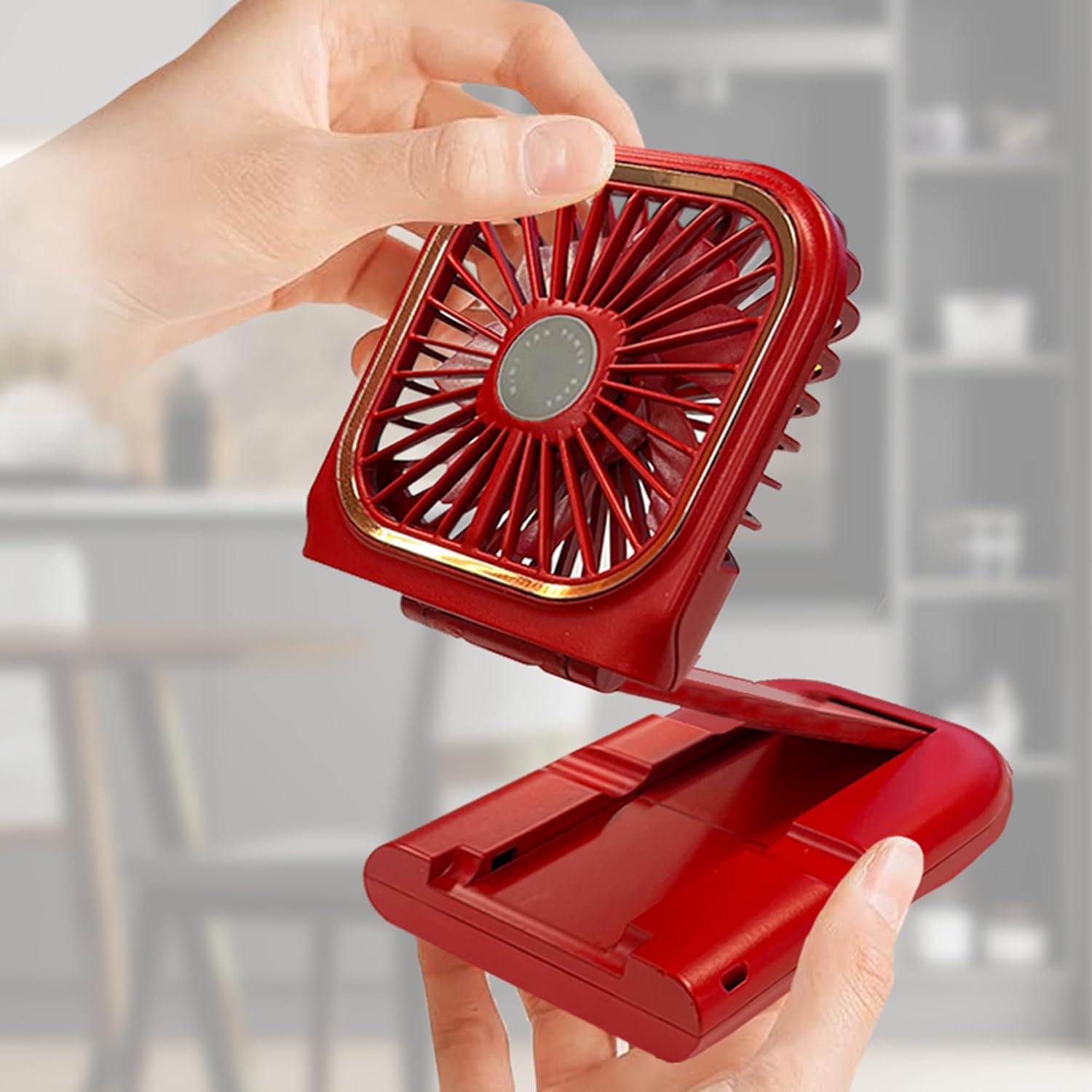
Image: Demonstrating the fan's folding mechanism for compact storage or setup.
5. Operating Instructions
5.1 Fan Operation
- Power On/Off: Press the power button once to turn the fan on at its lowest speed.
- Adjusting Speed: Press the power button repeatedly to cycle through the three speed settings (Low → Medium → High). A fourth press will turn the fan off.
5.2 Usage Modes
- Neck Fan Mode: Attach the lanyard and wear the fan around your neck. Adjust the fan head to direct airflow upwards towards your face.

Image: The fan being worn around the neck, providing hands-free cooling.
- Desktop Fan Mode: Unfold the fan to stand upright on a flat surface. The 180° tilt feature allows you to adjust the angle for optimal airflow.
- Phone Stand Mode: The base of the fan can be used as a phone stand. Place your smartphone in the designated slot on the base for convenient viewing while the fan operates.

Image: The fan in desktop mode, demonstrating its use as a phone stand.
6. Charging Instructions
6.1 Charging the Fan
- Connect the provided USB-C cable to the fan's charging port.
- Connect the other end of the cable to a USB power source (e.g., wall adapter, computer, power bank).
- The charging indicator light will illuminate to show charging status and turn off or change color when fully charged.
6.2 Using as a Power Bank
- To charge an external device, connect your device's charging cable to the USB-A output port on the fan.
- The fan's internal 4000mAh battery will begin charging your connected device.
7. Maintenance
- Cleaning: Use a soft, dry cloth to wipe the exterior of the fan. Do not use liquid cleaners or immerse the fan in water.
- Storage: When not in use for extended periods, store the fan in a cool, dry place, away from direct sunlight and extreme temperatures. Ensure the battery is partially charged before storage to prolong its lifespan.
8. Troubleshooting
| Problem | Possible Cause | Solution |
|---|---|---|
| Fan does not turn on. | Low battery. | Charge the fan fully. |
| Weak airflow. | Low battery; Fan speed setting. | Charge the fan; Increase the fan speed. |
| Device not charging from power bank. | Fan battery is low; Incorrect cable/connection. | Charge the fan; Ensure cable is properly connected and functional. |
9. Specifications
| Feature | Detail |
|---|---|
| Brand | Aiwa |
| Model Name | WPF4-1008-BLK |
| Color | Red |
| Electric Fan Design | Wearable Fan |
| Power Source | Battery Powered |
| Battery Capacity | 4000mAh |
| Speed Settings | 3 RPM |
| Item Weight | 0.25 Pounds (approx. 4 ounces) |
| Product Dimensions | 1.5"D x 3.75"W x 5.79"H |
| Special Feature | Foldable |
| Indoor/Outdoor Usage | Outdoor |
10. Warranty and Support
For warranty information and customer support, please refer to the contact details provided on the product packaging or visit the official Aiwa website. Keep your purchase receipt for warranty claims.