
1. Introduction
This manual provides detailed instructions for the GENERIC M29 PRO Bluetooth 5.1 Wireless Earbuds. Please read this manual carefully before using the product to ensure proper operation and to maximize your user experience. Keep this manual for future reference.
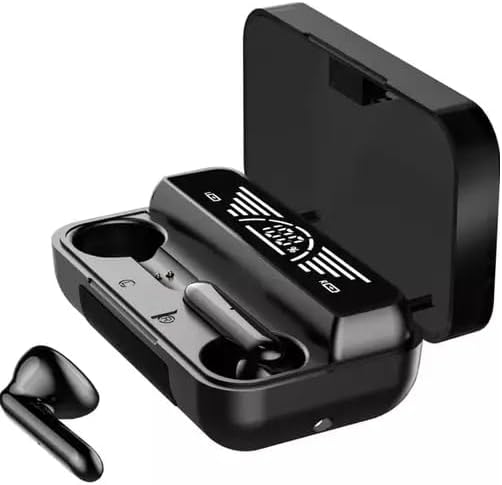
Image 1.1: The GENERIC M29 PRO Bluetooth Earbuds with their charging case. One earbud is shown outside the case, highlighting its design.
2. Package Contents
Verify that all items are present in the package:
- GENERIC M29 PRO Bluetooth Earbuds (Left and Right)
- Charging Case
- USB Charging Cable
- User Manual (this document)

Image 2.1: The complete package contents, including the earbuds, charging case, USB cable, and product box.
3. Setup and Initial Use
3.1. Charging the Earbuds and Case
Before first use, fully charge the earbuds and the charging case.
- Connect the provided USB charging cable to the charging port on the case.
- Connect the other end of the cable to a USB power adapter (not included) or a computer's USB port.
- The LED display on the charging case will indicate the charging status. A full charge is indicated when the display shows 100%.
- The earbuds will charge automatically when placed inside the powered charging case.

Image 3.1: The charging case with earbuds inserted, displaying the battery percentage (100%) on its LED screen.
3.2. Pairing with a Bluetooth Device
Follow these steps to pair your earbuds with your smartphone or other Bluetooth-enabled device:
- Ensure the earbuds are charged.
- Open the charging case. The earbuds will automatically power on and enter pairing mode.
- On your device, go to Bluetooth settings and enable Bluetooth.
- Search for available devices. You should see "M29 PRO" or a similar name in the list.
- Select "M29 PRO" to connect. Once connected, a voice prompt will confirm successful pairing.
- If pairing fails, turn off Bluetooth on your device, place the earbuds back in the case, close the case, then repeat the steps.
4. Operating Instructions
4.1. Power On/Off
- Power On: Open the charging case, and the earbuds will automatically power on. Alternatively, press and hold the touch control area on both earbuds for 3 seconds.
- Power Off: Place the earbuds back into the charging case and close the lid. They will automatically power off and begin charging. Alternatively, disconnect them from Bluetooth, and they will power off after a few minutes of inactivity.
4.2. Touch Controls
The M29 PRO earbuds feature touch-sensitive controls for various functions:
- Play/Pause: Single tap on either earbud.
- Next Track: Double tap the right earbud.
- Previous Track: Double tap the left earbud.
- Volume Up: Triple tap the right earbud.
- Volume Down: Triple tap the left earbud.
- Answer/End Call: Single tap on either earbud during an incoming call.
- Reject Call: Press and hold either earbud for 2 seconds during an incoming call.
- Activate Voice Assistant: Press and hold either earbud for 2 seconds (when not on a call).
- Game/Music Dual-mode: Press and hold the touch area for 3 seconds to switch between modes.
5. Maintenance and Care
To ensure the longevity and optimal performance of your M29 PRO earbuds, follow these maintenance guidelines:
- Cleaning: Use a soft, dry, lint-free cloth to clean the earbuds and charging case. Do not use abrasive cleaners, alcohol, or chemical solvents.
- Water Resistance: The earbuds are waterproof (specific IP rating not provided, but generally means splash-proof). Avoid submerging them in water or exposing them to heavy rain for extended periods. Dry them thoroughly if they get wet.
- Storage: When not in use, store the earbuds in their charging case to protect them and keep them charged. Store in a cool, dry place away from direct sunlight and extreme temperatures.
- Charging: Use only the provided charging cable or a certified equivalent. Avoid overcharging.
6. Troubleshooting
If you encounter issues with your M29 PRO earbuds, refer to the following common solutions:
| Problem | Solution |
|---|---|
| Earbuds not pairing |
|
| Only one earbud working |
|
| No sound or low volume |
|
| Charging case not charging |
|
7. Specifications
Key technical specifications for the GENERIC M29 PRO Bluetooth Earbuds:
| Feature | Detail |
|---|---|
| Model Name | M29 PRO |
| Brand | GENERIC |
| Connectivity Technology | Wireless (Bluetooth 5.1) |
| Form Factor | In Ear |
| Special Features | Fast Charging, Waterproof, Bass Headphone, Game Music Dual-mode, Noise Reduction |
| Included Components | Cable |
| Color | BLACK |
8. Warranty and Support
For warranty information or technical support, please refer to the retailer or the point of purchase. Keep your proof of purchase for any warranty claims.
For further assistance, you may contact the seller directly through the platform where the product was purchased.