
Casaria 109709
Casaria Orlando Coffee Table Instruction Manual
Model: 109709
Introduction
This manual provides instructions for the assembly, operation, maintenance, and care of your Casaria Orlando Coffee Table, Model 109709. Please read these instructions carefully before assembly and use to ensure safe and correct handling of the product. Keep this manual for future reference.

Image: The Casaria Orlando Coffee Table, showcasing its modern design and two-tiered structure in a living room environment.
Safety Information
- Ensure all components are present and undamaged before assembly. Do not use damaged parts.
- Assemble the table on a soft, clean surface to prevent scratches.
- Do not overtighten screws during assembly to avoid damaging the material.
- Keep small parts and packaging materials away from children to prevent choking hazards.
- The maximum load capacity for this coffee table is 50 kg. Do not exceed this weight limit.
- Regularly check all fasteners to ensure they remain tight and secure.
- Do not stand or sit on the table.
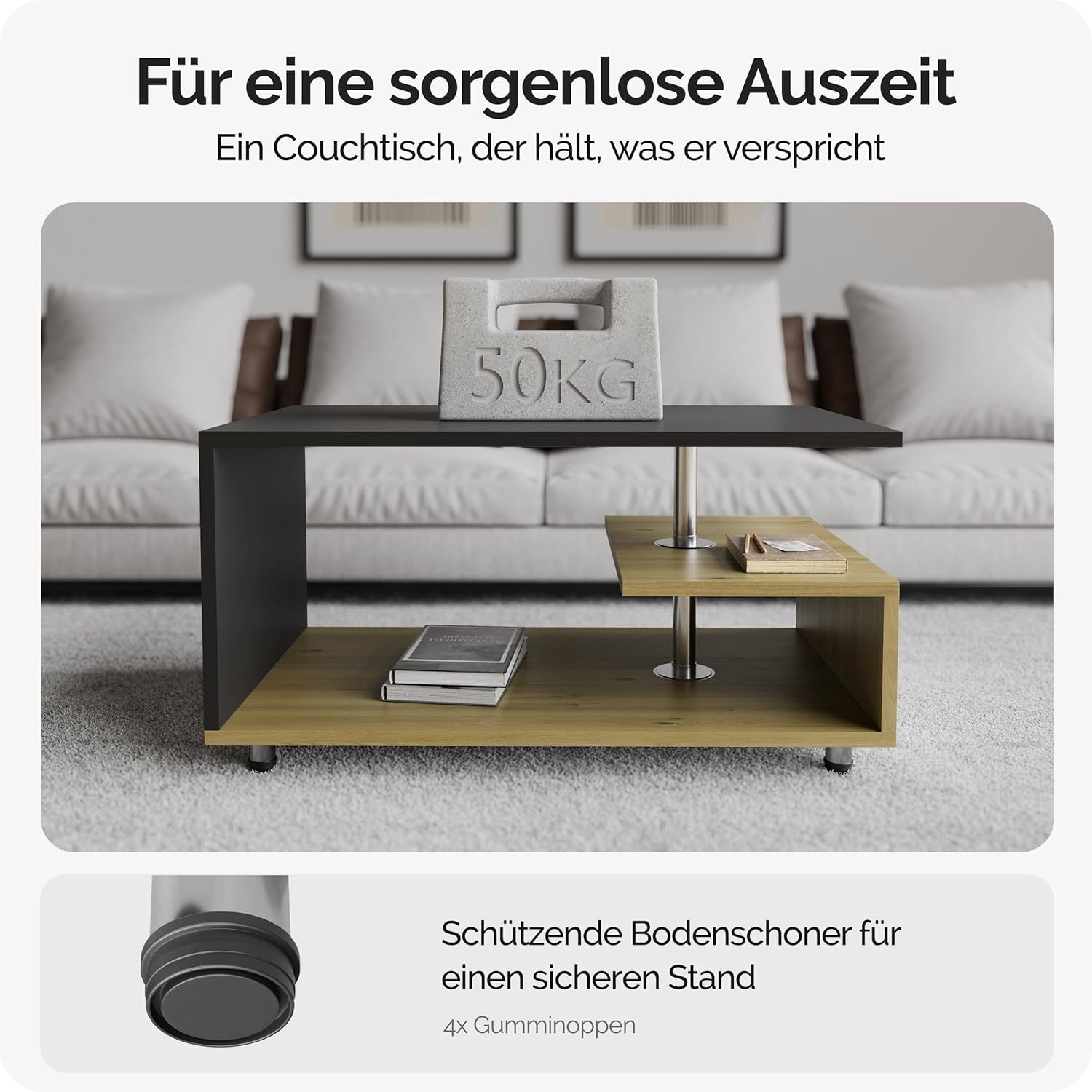
Image: Demonstrates the table's robust construction with a 50kg weight placed on its surface, highlighting its stability and load capacity. A close-up shows the protective, height-adjustable feet.
Package Contents
Before beginning assembly, verify that all parts listed below are present in your package:
- Table components (top panel, side panels, lower shelf, etc.)
- Stainless steel bar(s)
- 4 height-adjustable feet with rubberized floor protectors
- Assembly hardware (screws, dowels, etc.)
- Assembly instructions (this document)
Setup (Assembly)
Assembly of the Casaria Orlando Coffee Table is straightforward. Follow these steps carefully:
- Unpack Components: Carefully remove all parts from the packaging. Lay them out on a clean, soft surface to prevent damage.
- Identify Parts: Refer to the included diagram (if separate) or the image below to identify each component.
- Assemble Base: Attach the height-adjustable feet to the bottom panel of the table. Ensure they are securely fastened but do not overtighten.
- Connect Side Panels: Secure the side panels to the bottom panel using the provided hardware.
- Install Stainless Steel Bar: Insert the stainless steel bar(s) to connect the table tops as shown in the diagram.
- Attach Top Panel and Shelf: Secure the main top panel and the additional shelf to the assembled structure.
- Final Check: Once assembled, gently lift and place the table in its desired location. Check that all connections are firm and the table is stable. Adjust the feet if necessary to level the table on uneven floors.

Image: An exploded view diagram illustrating the individual components of the coffee table and their assembly sequence, including panels, stainless steel supports, and adjustable feet.
Operating (Usage)
The Casaria Orlando Coffee Table is designed for use in living room environments. Its features enhance functionality and adaptability:
- Storage Space: Utilize the main table surface and the additional lower shelf for storing books, magazines, remote controls, or displaying decorative items.
- Adjustable Feet: The four stainless steel feet are height-adjustable. This allows you to fine-tune the table's height and ensure stability on various floor surfaces, preventing wobbling.
- Placement: Position the table next to a sofa or couch, or as a central piece in your living area, ensuring it does not obstruct pathways.

Image: Illustrates the dimensions of the coffee table (95x55x50 cm) and highlights its generous storage capacity across multiple tiers, suitable for various items.
Maintenance and Care
Proper care will extend the lifespan and maintain the appearance of your coffee table:
- Cleaning: The table's surface has a scratch-resistant and water-repellent coating. For general cleaning, wipe the surface with a soft, slightly moistened cotton cloth. Avoid abrasive cleaners or harsh chemicals, as these can damage the finish.
- Spills: Wipe up spills immediately to prevent any potential staining, although the surface is water-repellent.
- Protection: Use coasters under drinks and placemats under hot items to further protect the surface from heat and moisture.
- Fasteners: Periodically check all screws and connections to ensure they are tight. Retighten if necessary.

Image: Illustrates the water-repellent and scratch-resistant surface of the coffee table, showing water droplets beading on the surface, indicating ease of cleaning.
Troubleshooting
| Problem | Possible Cause | Solution |
|---|---|---|
| Table is wobbly. | Uneven floor or loose feet. | Adjust the height of the individual feet until the table is stable. Ensure all feet are firmly attached. |
| Parts do not fit together. | Incorrect orientation of parts or wrong hardware. | Review the assembly instructions and diagrams carefully. Ensure you are using the correct hardware for each step. |
| Scratches on surface. | Sharp objects or abrasive cleaning. | While the surface is scratch-resistant, it is not scratch-proof. Avoid dragging sharp objects across the surface. Use soft cloths for cleaning. |
Specifications
| Model: | 109709 |
| Brand: | Casaria |
| Dimensions (L x W x H): | 95 x 55 x 50 cm (37.4 x 21.65 x 19.69 inches) |
| Material: | 15 mm Chipboard with Melamine Resin Coating, Stainless Steel |
| Maximum Load Capacity: | 50 kg (110 lbs) |
| Features: | Height-adjustable feet, scratch-resistant and water-repellent surface, additional storage shelf |
| Assembly: | Required |

Image: Displays the Casaria Orlando Coffee Table, highlighting its design and the availability of different color variations (wood grey, white-black, white, white oak).
Warranty and Support
For warranty information or technical support, please refer to the retailer's website or contact Casaria customer service directly. Please have your model number (109709) and purchase details available when contacting support.