
GREENER C5-PLUS
GREENER Electric Pressure Washer User Manual
Model: C5-PLUS
1. Product Overview
The GREENER Electric Pressure Washer is a powerful and efficient cleaning tool designed for various outdoor tasks. It delivers a maximum of 4000 PSI water pressure and 2.6 GPM water flow, making it suitable for cleaning cars, siding, driveways, and fencing. Equipped with an upgraded copper core motor, this pressure washer ensures reliable performance for tackling dirt and grime.
Key features include a 23-foot outlet hose, a 16-foot power cord for extended reach, and a variety of quick-connect nozzles for different cleaning needs. For enhanced safety, the unit incorporates a Total Stop System (TSS) and a safety lock on the water hose handle.
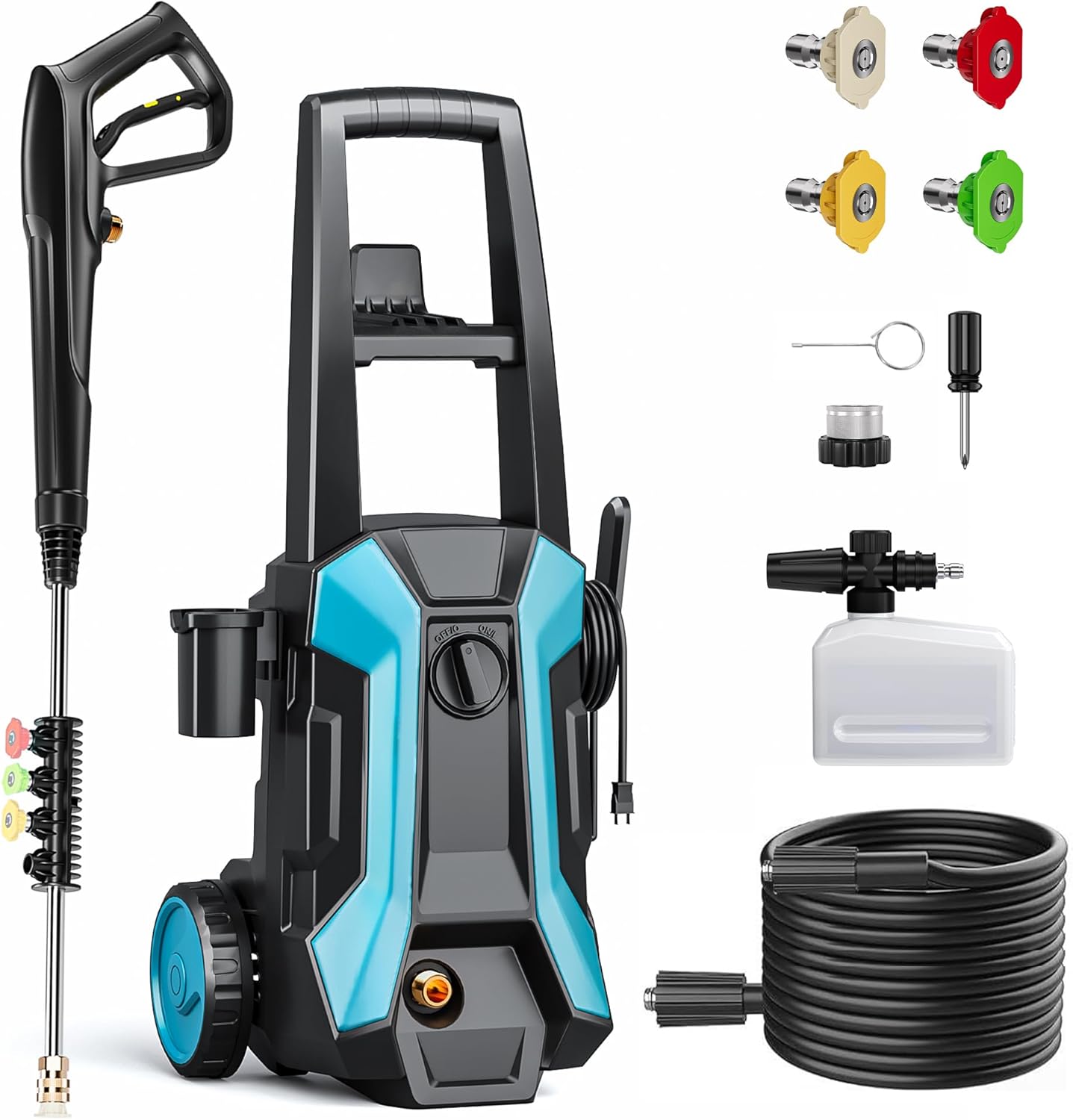
Figure 1.1: GREENER Electric Pressure Washer and included accessories.
2. Safety Instructions
Always read and understand all safety warnings and instructions before operating the pressure washer. Failure to follow these instructions may result in electric shock, fire, and/or serious injury.
- Electrical Safety: Ensure the power outlet is properly grounded. Do not operate the pressure washer in wet conditions or near standing water. Always use a ground fault circuit interrupter (GFCI) protected outlet.
- Total Stop System (TSS): The pressure washer is equipped with an internal TSS that automatically shuts off the pump when the trigger is not engaged. This prolongs the pump's service life and enhances safety.
- Safety Lock: A safety lock is integrated into the water hose handle to prevent accidental activation. Always engage the safety lock when the unit is not in use or during nozzle changes.
- Personal Protective Equipment: Always wear appropriate eye protection (safety goggles), hearing protection, and protective footwear when operating the pressure washer.
- Water Connection: Connect the pressure washer only to a cold water supply. Do not use hot water. Ensure all connections are secure to prevent leaks.
- Nozzle Handling: Never point the spray gun at people, pets, or electrical devices. The high-pressure spray can cause serious injury.

Figure 2.1: Safety lock mechanism on the spray gun handle.
3. Components and Assembly
3.1. Included Components
Your GREENER Electric Pressure Washer package includes the following items:
- Pressure Washer Unit
- High-Pressure Hose (23 ft)
- Spray Gun with Wand
- Quick-Connect Nozzles (0°, 15°, 25°, 40°)
- Foam Cannon
- Power Cord (16 ft)
- Nozzle Cleaning Pin
3.2. Assembly Instructions
- Attach the Wheels: Securely attach the wheels to the base of the pressure washer unit.
- Connect the High-Pressure Hose: Connect one end of the high-pressure hose to the outlet on the pressure washer unit and the other end to the spray gun. Ensure connections are hand-tightened.
- Connect Water Supply: Connect your garden hose (not included) to the water inlet on the pressure washer. Ensure the garden hose is free of kinks and has a steady water supply.
- Insert Nozzle: Choose the desired quick-connect nozzle and insert it into the end of the spray wand until it clicks into place.
- Connect Foam Cannon (Optional): If using the foam cannon, fill it with appropriate pressure washer detergent and attach it to the spray gun in place of a nozzle.

Figure 3.1: The pressure washer supports two water intake methods: direct faucet connection or self-priming from a bucket.
4. Operating Instructions
4.1. Starting the Pressure Washer
- Ensure all connections are secure and the water supply is turned on.
- Plug the power cord into a grounded electrical outlet.
- Hold the spray gun firmly and disengage the safety lock.
- Squeeze the trigger for a few seconds to purge air from the pump and hose until a steady stream of water emerges.
- Turn the power switch to the "ON" position. The motor will start when the trigger is squeezed and stop when released (TSS function).
4.2. Using Quick-Connect Nozzles
The pressure washer comes with four quick-connect nozzles, each designed for specific cleaning tasks:
- 0° Red Nozzle (Powerful Blasting): Provides a concentrated, high-pressure stream for tough, caked-on stains and cracks. Use with extreme caution.
- 15° Yellow Nozzle (Heavy-duty Power): Ideal for heavy-duty cleaning of concrete, driveways, and siding.
- 25° Green Nozzle (General Cleaning): Suitable for general cleaning of decks, cars, and fences.
- 40° White Nozzle (Gentle Spraying): Provides a wide, gentle spray for delicate surfaces like windows and outdoor furniture.

Figure 4.1: Quick-connect nozzles and their spray patterns.

Figure 4.2: 0° Red Nozzle for powerful blasting on tough stains.

Figure 4.3: 15° Yellow Nozzle for focused wash on driveways and concrete.

Figure 4.4: 25° Green Nozzle for general cleaning of decks and cars.

Figure 4.5: 40° White Nozzle for uniform spraying on delicate surfaces.
4.3. Using the Foam Cannon
- Fill the foam cannon reservoir with a suitable pressure washer detergent.
- Attach the foam cannon to the spray gun.
- Spray the detergent onto the surface to be cleaned. Allow the detergent to soak for a few minutes, but do not let it dry.
- Remove the foam cannon and attach the appropriate cleaning nozzle to rinse the surface.

Figure 4.6: Pressure washing a car, demonstrating extended reach.

Figure 4.7: Versatile cleaning applications of the pressure washer.
5. Maintenance and Storage
5.1. After Each Use
- Shut Down: Turn off the power switch, turn off the water supply, and squeeze the spray gun trigger to release any remaining pressure.
- Disconnect: Disconnect the garden hose and high-pressure hose from the unit and spray gun.
- Clean Nozzles: Use the included nozzle cleaning pin to clear any debris from the nozzle openings.
- Drain Water: Drain all water from the pump, hoses, and accessories to prevent freezing damage in cold weather.
- Wipe Down: Wipe the unit and accessories with a clean, damp cloth.
5.2. Storage
Store the pressure washer in a dry, frost-free area. The unit is designed for convenient storage of its components:
- Power Cord Hook: Wrap the power cord around the designated hook.
- Hose Hanger: Coil the high-pressure hose and hang it on the integrated hanger.
- Spray Gun Holder: Place the spray gun securely in its holder.
- Accessory Storage: Utilize the built-in storage for nozzles and other small accessories.

Figure 5.1: All-in-one storage features for organized keeping.
6. Troubleshooting
If you encounter issues with your GREENER Electric Pressure Washer, refer to the following common troubleshooting steps:
| Problem | Possible Cause | Solution |
|---|---|---|
| Unit does not start | No power; GFCI tripped; Power switch off; Safety lock engaged. | Check power connection; Reset GFCI; Turn power switch ON; Disengage safety lock. |
| Low pressure | Insufficient water supply; Kinked hose; Clogged nozzle; Air in pump. | Ensure full water flow; Straighten hose; Clean nozzle with pin; Squeeze trigger to purge air. |
| Motor runs continuously | Air in pump; Leak in system; Inlet filter clogged. | Purge air by squeezing trigger; Check all connections for leaks; Clean inlet filter. |
| Water leaks | Loose connections; Damaged O-rings. | Tighten all connections; Inspect and replace O-rings if damaged. |
If the problem persists after attempting these solutions, please contact customer support.
7. Specifications
| Feature | Detail |
|---|---|
| Brand | GREENER |
| Model Number | C5-PLUS |
| Maximum Pressure | 4000 PSI |
| Water Flow Rate | 2.6 GPM |
| Power Source | Corded Electric |
| Hose Length | 23 ft (7 Meters) |
| Power Cord Length | 16 ft |
| Product Dimensions | 12.6 x 12.6 x 15.7 cm; 6.6 kg |
| Color | Blue and Black |
| Manufacturer | GREENER |

Figure 7.1: Internal view of the powerful 1600W motor.

Figure 7.2: Detailed view of the pump, capable of drawing water from a bucket or tap.
8. Warranty and Support
GREENER is committed to providing excellent customer service and product support.
- Extended Warranty: Enjoy 12+ months of free extended warranty.
- Money Back Guarantee: A 30-day money back guarantee is offered.
- Customer Support: 24/7 customer support is available for any inquiries or assistance.
- VIP Service: Benefit from VIP service which includes free replacement for eligible issues.
For support, please contact greener-serviceteam@outlook.com.

Figure 8.1: Overview of GREENER's privilege service benefits.
Ask a question about this manual
Ask about setup, troubleshooting, compatibility, parts, safety, or missing instructions. Manuals+ will review the question and use this page’s manual context to help answer it.